How to sort folder names in a library?

Nick Sergeant

New member
Local time
11:48 AM
Messages
30
Location
Australia
Hello,

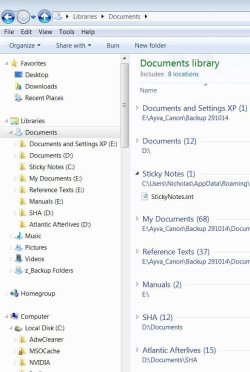
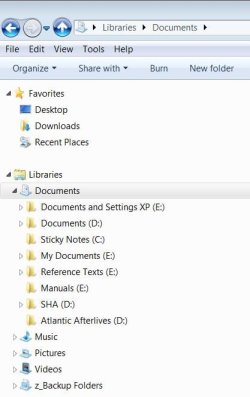
Does anyone know how to sort the links in a library by name, so the A's come first, or if a folder name starts with, say "!" or "_", then it goes before the A's. I never really paid attention to this but it isn't happening because I added one starting with "A" I want to come first anyway, and it is placed at the end. It seems a simple option but I haven't found a mention on forums.

Thanks,
Nick
 

Attachments
  • WinExplorer_How to Sort in Library.JPG
    WinExplorer_How to Sort in Library.JPG
    35.2 KB · Views: 16

My Computer My Computer

Computer type
PC/Desktop
Computer Manufacturer/Model Number
AusPC build
OS
Microsoft Windows 7 Professional 64-bit 7601 Multiprocessor Free Service Pack 1
CPU
Intel(R) Core(TM) i7-4790K CPU @ 4.00GHz
Motherboard
ASUSTeK COMPUTER INC. Z97-PRO(Wi-Fi ac)
Memory
16GB Corsair (2x8GB) DDR3 2133MHz Dimm, Unbuffered, 11
Graphics Card(s)
Leadtek nVidia Quadro K620 PCI Express 3.0 x16, 2GB DDR3, 12
Sound Card
(1) Bluetooth Hands-free Audio (2) NVIDIA High Definition
Monitor(s) Displays
Eizo
Screen Resolution
1920 x nnnn
Hard Drives
(1) Samsung SSD 840 EVO 120G SCSI Disk Device
(2) Samsung SSD 840 EVO 120G SCSI Disk Device
(3) ST2000DM 001-1CH164 SCSI Disk Device
(4) LaCie Rugged FW/USB USB Device
(5) WD Elements 10B8 USB Device
(6) WD Elements 10B8 USB Devic
PSU
850W Seasonic S12D Power Supply PSUSEAS12-D850W
Case
Black PC-9F Mid Tower Chassis (USB3)
Keyboard
Dell
Mouse
Mionix Naos 7000 Optical Gaming Mouse, ADNS-3100 Optical Sen
Antivirus
MSE plus Malwarebytes
Browser
Firefox
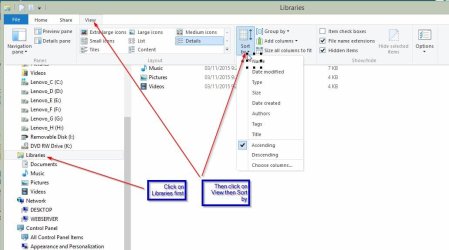
Click on Libraries then Click on View in the ribbon bar then Sort by?
 

My Computer My Computer

Computer type
PC/Desktop
Computer Manufacturer/Model Number
Lenovo IdeaCenter 450
OS
Windows 10 Pro X64
CPU
Intel Quad Core i7-4770 @ 3.4Ghz
Memory
16.0GB PC3-12800 DDR3 SDRAM 1600 MHz
Graphics Card(s)
Intel Integrated HD Graphics
Sound Card
Realtek HD Audio
Monitor(s) Displays
HP 22" LCD
Screen Resolution
1680 x 1050
Hard Drives
250GB Samsung EVO SATA-3 SSD
2TB Seagate ST2000DM001 SATA-2
1.5TB Seagate ST3150041AS SATA
Keyboard
Dell USB
Mouse
Lenovo USB
Internet Speed
Cable via Road Runner 3MB Upload, 30MB Download
Antivirus
Windows Defender, MBAM Pro, MBAE
Browser
Seamonkey
Other Info
UEFI/GPT
PLDS DVD-RW DH16AERSH
Thanks for your reply.

That makes sense but I just tried Sort by and it does not affect the display. I used by Name + by Ascending (or Descending) in the top library and in an internal library (i.e. folders and libraries with Documents).

I am using Classic Shell, BTW,
 

My Computer My Computer

Computer type
PC/Desktop
Computer Manufacturer/Model Number
AusPC build
OS
Microsoft Windows 7 Professional 64-bit 7601 Multiprocessor Free Service Pack 1
CPU
Intel(R) Core(TM) i7-4790K CPU @ 4.00GHz
Motherboard
ASUSTeK COMPUTER INC. Z97-PRO(Wi-Fi ac)
Memory
16GB Corsair (2x8GB) DDR3 2133MHz Dimm, Unbuffered, 11
Graphics Card(s)
Leadtek nVidia Quadro K620 PCI Express 3.0 x16, 2GB DDR3, 12
Sound Card
(1) Bluetooth Hands-free Audio (2) NVIDIA High Definition
Monitor(s) Displays
Eizo
Screen Resolution
1920 x nnnn
Hard Drives
(1) Samsung SSD 840 EVO 120G SCSI Disk Device
(2) Samsung SSD 840 EVO 120G SCSI Disk Device
(3) ST2000DM 001-1CH164 SCSI Disk Device
(4) LaCie Rugged FW/USB USB Device
(5) WD Elements 10B8 USB Device
(6) WD Elements 10B8 USB Devic
PSU
850W Seasonic S12D Power Supply PSUSEAS12-D850W
Case
Black PC-9F Mid Tower Chassis (USB3)
Keyboard
Dell
Mouse
Mionix Naos 7000 Optical Gaming Mouse, ADNS-3100 Optical Sen
Antivirus
MSE plus Malwarebytes
Browser
Firefox
Did you click on Libraries first?

LibSBN.jpg
 

My Computer My Computer

Computer type
PC/Desktop
Computer Manufacturer/Model Number
Lenovo IdeaCenter 450
OS
Windows 10 Pro X64
CPU
Intel Quad Core i7-4770 @ 3.4Ghz
Memory
16.0GB PC3-12800 DDR3 SDRAM 1600 MHz
Graphics Card(s)
Intel Integrated HD Graphics
Sound Card
Realtek HD Audio
Monitor(s) Displays
HP 22" LCD
Screen Resolution
1680 x 1050
Hard Drives
250GB Samsung EVO SATA-3 SSD
2TB Seagate ST2000DM001 SATA-2
1.5TB Seagate ST3150041AS SATA
Keyboard
Dell USB
Mouse
Lenovo USB
Internet Speed
Cable via Road Runner 3MB Upload, 30MB Download
Antivirus
Windows Defender, MBAM Pro, MBAE
Browser
Seamonkey
Other Info
UEFI/GPT
PLDS DVD-RW DH16AERSH
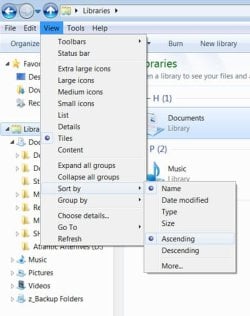
Yes I do follow the sequence of steps. Note that when I click Libraries then select View>Sort by>Name & Ascending the appearance is different, probably just a feature of Classic Shell, jpeg 01.

I am seeing my 5 top level libraries sort into alphabetical order. However, within them (e.g. Documents) I want the links there to sort as well, rather than appear in the sequence that I created them, jpeg 02.
 

Attachments

  • WinExplorer_How to Sort in Library_02.JPG
    WinExplorer_How to Sort in Library_02.JPG
    67.9 KB · Views: 2
  • WinExplorer_How to Sort in Library_01.JPG
    WinExplorer_How to Sort in Library_01.JPG
    51.1 KB · Views: 7

My Computer My Computer

Computer type
PC/Desktop
Computer Manufacturer/Model Number
AusPC build
OS
Microsoft Windows 7 Professional 64-bit 7601 Multiprocessor Free Service Pack 1
CPU
Intel(R) Core(TM) i7-4790K CPU @ 4.00GHz
Motherboard
ASUSTeK COMPUTER INC. Z97-PRO(Wi-Fi ac)
Memory
16GB Corsair (2x8GB) DDR3 2133MHz Dimm, Unbuffered, 11
Graphics Card(s)
Leadtek nVidia Quadro K620 PCI Express 3.0 x16, 2GB DDR3, 12
Sound Card
(1) Bluetooth Hands-free Audio (2) NVIDIA High Definition
Monitor(s) Displays
Eizo
Screen Resolution
1920 x nnnn
Hard Drives
(1) Samsung SSD 840 EVO 120G SCSI Disk Device
(2) Samsung SSD 840 EVO 120G SCSI Disk Device
(3) ST2000DM 001-1CH164 SCSI Disk Device
(4) LaCie Rugged FW/USB USB Device
(5) WD Elements 10B8 USB Device
(6) WD Elements 10B8 USB Devic
PSU
850W Seasonic S12D Power Supply PSUSEAS12-D850W
Case
Black PC-9F Mid Tower Chassis (USB3)
Keyboard
Dell
Mouse
Mionix Naos 7000 Optical Gaming Mouse, ADNS-3100 Optical Sen
Antivirus
MSE plus Malwarebytes
Browser
Firefox
You don't have the ribbon bar so it's definitely a Classic Shell side effect. Don't think it affects what sort does though.

As a test, uninstall Classic Shell and see what happens. You can always reinstall when done. I never found a need for Classic Shell or any other Start menu replacement until I got to Windows 8, then I went with Start8 instead.

Edit: I just realized, the folders not being sorted are in the Libraries subfolder of Documents, so click on Documents then try the View and Sort by.
 

My Computer My Computer

Computer type
PC/Desktop
Computer Manufacturer/Model Number
Lenovo IdeaCenter 450
OS
Windows 10 Pro X64
CPU
Intel Quad Core i7-4770 @ 3.4Ghz
Memory
16.0GB PC3-12800 DDR3 SDRAM 1600 MHz
Graphics Card(s)
Intel Integrated HD Graphics
Sound Card
Realtek HD Audio
Monitor(s) Displays
HP 22" LCD
Screen Resolution
1680 x 1050
Hard Drives
250GB Samsung EVO SATA-3 SSD
2TB Seagate ST2000DM001 SATA-2
1.5TB Seagate ST3150041AS SATA
Keyboard
Dell USB
Mouse
Lenovo USB
Internet Speed
Cable via Road Runner 3MB Upload, 30MB Download
Antivirus
Windows Defender, MBAM Pro, MBAE
Browser
Seamonkey
Other Info
UEFI/GPT
PLDS DVD-RW DH16AERSH
Back
Top