
How to unblock Windows Update?

altesilore

New member
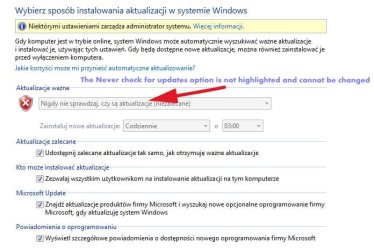
Hello forum members.I have a laptop from a friend with Windows 7 (Home Premium 64-bit). I wanted to install the driver for a certain device, but it failed because Windows Update is blocked in the settings. A friend once permanently blocked Win 7 updates when Win 7 support ended (he used some tips on the Internet, but now he doesn't remember how he did it). I tried to unblock it as administrator (services), but it didn't help. I am asking for help from more experienced users.
 

Attachments
  • 601911c691bb20d2b6ddfe48573ce73c2c211f92.jpeg
    601911c691bb20d2b6ddfe48573ce73c2c211f92.jpeg
    74.4 KB · Views: 9

My Computers

System One System Two

  • OS
    Windows 7 Home Premium 64bit
  • Computer type
    PC/Desktop

My Computers

System One System Two

if i remember rightly GP is not available on Home Premium,
suspect a3rd party prog is involved

please
a) what device is trying to be updated
b) perform the update - (via device manager) and post the error screenshot


note
device drivers do not have to be updated via MS windows updates.... can be done directly via thier vendor
 

My Computer

Computer type
PC/Desktop
Computer Manufacturer/Model Number
medionl/Aspire 6930G/acer x55a
OS
W7 home premium 32bit/W7HP 64bit/w10 tp insider ring
CPU
E5300 dual core
Motherboard
medion MS7366
Memory
3gb
Graphics Card(s)
Nvidia Geforce 7100 Nforce 630i
Monitor(s) Displays
avixc
Internet Speed
n (isp resticted to 72)
Antivirus
mse/pands
Browser
palemoon
Other Info
Belkin Fd7050 n USB using Railink RT2870 drivers, more upto date
@torchwood GP isn't available on home premium however the same settings can be implemented through the registry. That article shows how to disable updates both ways.
 

My Computers

System One System Two

Thank you for your answer.

"Windows Update is a great tool for updating your computers; however, if you want to control the deployment of fixes, you might want to disable Windows Update. How to Disable Windows Updates at the Group Policy Level

To disable it at a Group Policy level, perform the following steps:

  1. Start Group Policy Editor (GPE) and load the desired Group Policy Object (GPO).
  2. Expand User Configuration, Administrative Templates, Start Menu, and Taskbar.
  3. Double-click "Disable and Remove Links to Windows Update" (Windows 2000) or "Remove links and access to Windows Update" (Windows XP).
  4. Select Enabled and click OK.
  5. Close GPE.
How to Disable Windows Update for Individual Users

You can also edit the registry to disable Windows Update on a per user basis:

  1. Start regedit.exe on the machine where you want to disable Windows Update.
  2. Go to HKEY_CURRENT_USER\Software\Microsoft\Windows\CurrentVersion\Policies\Explorer.
  3. From the Edit menu, select New, DWORD value.
  4. Enter a name of NoWindowsUpdate, and press Enter.
  5. Double-click NoWindowsUpdate, and set it to 1.
  6. Close regedit.
You don't need to reboot. If the user tries to start Windows Update, the system will display the following error message:
Windows Update was disabled by your system Administrator."

In regedit NoWindowsUpdate the value is set to 0 (not 1). Will removing NoWindowsUpdate help?

I tried to install the 1000 Mbps Ethernet Adapter driver, because the old laptop only has a max of 100 Mbps. There was a message that it was downloading the driver via Windows Update and it was an unsuccessful attempt.
 

My Computers

System One System Two

  • OS
    Windows 7 Home Premium 64bit
  • Computer type
    PC/Desktop

My Computers

System One System Two

HKEY_LOCAL_MACHINE...........here it was 1. I changed it to 0 and Windows Update was unlocked.As for the Adapter driver, it says on the packaging that it does not require a driver, but it tries to download it.
Thank you very much for help.
 

My Computers

System One System Two

  • OS
    Windows 7 Home Premium 64bit
  • Computer type
    PC/Desktop
Back
Top