
How to whitelist which websites can be opened in IE 11 from admin act.

dc2000

New member
Member
VIP
Local time
10:38 AM
Messages
153
I'm looking for a solution for a small business. Due to some proprietary software that they have (required to service their hardware) the following had to be done on this Windows 7 Pro installation:

- Turn off UAC
- Log in as administrator

So there's no way around the stipulations above.

I'm looking for a solution to restrict which web sites a user can visit. Kind of like white-listing. The only web browser installed on that system is IE 11. Users are restricted from installing any software via local group policies.

The only users on that desktop are two women in their 60's that will not try to do "bad things" on purpose. They did not grow up with computers, so they are struggling to understand basic online security principles.

My goal is to prevent them from going to any web sites that can exploit a zero-day vulnerability in IE, or in some way harm the computer. I can't just block the internet, because their job requires going to some specific websites to retrieve reports, as well as to Amazon.com for occasional business-related purchase. Disabling JavaScript unfortunately wouldn't work because it is required in the web sites that they have to use.

PS1. I tried to enable family safety in IE settings, but unfortunately it refused to work as I had to log in to that account as administrator.


PS2. Here's what happened this month. One of the women called me up and told me that she can't close a web site. When I came over she had IE open on some strange page that had a popup saying that computer is infected. Closing the popup didn't make it go away. Moreover, trying to terminate IE with the Task Manager did not work. There were two copies running side by side, so when I killed one, the other one restarted it. (The only way to kill it was possible by using Sysinternal's tool Procexp by suspending both IE processes.) After that, I could see that there were some changes done to IE, and namely downloading files no longer worked and caused an error, which was not happening before.

After this incident I immediately cleared the temp files as well as IE cache and ran all system files via Virus Total scan. I did not find any infections.

When asked what caused that popup the woman said that she went to Google and searched for a product to buy at Home Depot. After that she clicked the first item on top of the Google search and got this popup. Like I said, the user was quite computer-illiterate for me to instruct her any further or to expect a different behavior. Thus my intentions to whitelist websites in the web browser.
 

My Computer My Computer

At a glance

Windows
OS
Windows
Due to some proprietary software that they have (required to service their hardware) the following had to be done on this Windows 7 Pro installation:

- Turn off UAC
- Log in as administrator

So there's no way around the stipulations above.

This is your cancer. Those are completely ridiculous requirements that under no way can be ever be accepted. Doing so will give everything in the computer full power to do anything it likes, which is a terrible thing to do security-wise. Put simply, no company will ever accept those requirements if they care about security, which you seem to do.

Reasons for asking for this is poorly designed software, careless or incompetent developers or terribly outdated software that doesn't accounted for changes in the last 10 years. A more reasonable design is to ask for administrator access to that program only, and a proper software would only ask for admin only when its absolutely needed.

Without employing proper security practices, it's impossible to keep a safe system. That's the exact message you're getting from parental controls. My first suggestion would be to get in contact with the developer of this buggy software and get it fixed. Find a way around that ridiculous requirement first, then parental controls can easily deal with your requirement.
 

My Computer My Computer

At a glance

Windows 7 Ultimate x64Intel Core i7-740QM8 GB DDR3NVIDIA GeForce 330GT
Computer type
Laptop
Computer Manufacturer/Model Number
Toshiba Sattelite A665-S6092
OS
Windows 7 Ultimate x64
CPU
Intel Core i7-740QM
Memory
8 GB DDR3
Graphics Card(s)
NVIDIA GeForce 330GT
Screen Resolution
1366x768
Hard Drives
Samsung 840 SSD 500GB
1TB USB3 external HD
Cooling
Coolermaster Notepal U3 notebook cooling pad
Internet Speed
3mbps ASDL
Antivirus
ClamWin 0.98.7
Browser
Opera 12.17 x86 (main), Firefox 38 (sec), IE11 (last resort)
This is your cancer. Those are completely ridiculous requirements that under no way can be ever be accepted....

Reasons for asking for this is poorly designed software, careless or incompetent developers or terribly outdated software that doesn't accounted for changes in the last 10 years. ....

Thanks for your input. I totally agree.

Here it is, SiteLink Web Edition, you can see it for yourself. They kinda downplay it with that message.

I also tried to contact their developers, but it's a total dead-end. It's a small market niche software and everyone seem to be kissing their ____ so they can get anyway with it. Plus people who pay the monthly bill for that software (the owner of the company) has no idea what all this UAC, administrator account "nonsense" is. What matters for him is the balance sheet for the company. So I'm back to square one...
 

My Computer My Computer

At a glance

Windows
OS
Windows
That's very bad for them to not provide good software at all. Problem is that blindly following their suggestion leads directly to an insecure system, there is no way around security if you're running with full admin permissions.

Seems like you're on your own here. Probably you can reenable UAC, downgrade to a regular user account and try to run this particular program as admin instead of the whole system. Basically, experimenting on your own. Your other options would be to try to run this program on a virtual machine (so that this one is the only compromised thing) or just accept that yon can't possibly achieve a secure system while accepting the ridiculous restrictions this system impose.

Yeah, managers only care about money and couldn't care less about administrative things, permissions and the like. The only possible defense to that would be to point them out that running an insecure system could lead to privacy problems, and maybe downtime if some malware slips though it can cause issues and even downtime, which costs money down the road. Usually non technical people only care about that once everything is already broken :p
 

My Computer My Computer

At a glance

Windows 7 Ultimate x64Intel Core i7-740QM8 GB DDR3NVIDIA GeForce 330GT
Computer type
Laptop
Computer Manufacturer/Model Number
Toshiba Sattelite A665-S6092
OS
Windows 7 Ultimate x64
CPU
Intel Core i7-740QM
Memory
8 GB DDR3
Graphics Card(s)
NVIDIA GeForce 330GT
Screen Resolution
1366x768
Hard Drives
Samsung 840 SSD 500GB
1TB USB3 external HD
Cooling
Coolermaster Notepal U3 notebook cooling pad
Internet Speed
3mbps ASDL
Antivirus
ClamWin 0.98.7
Browser
Opera 12.17 x86 (main), Firefox 38 (sec), IE11 (last resort)
If Ransomware hits that system, accounting will wake up quick.

It reminds me of baseball and a great shortstop.
His record show he is not a great batter.
But when you figure in the runs he has stopped from the other team because of his great defense he is a great player.

Stopping problems is cheaper than removing problems.
The bean counters don't know how to put that into a P&L statement.

Just my thoughts.

Jack
 

My Computer My Computer

At a glance

Windows 10 Pro. 64/ version 1709 Windows 7 Pr...Intel i7-6800K @ 4.3Corsair Platinum 16 gig @2400EVGA GTX 1070 OC
Computer type
PC/Desktop
Computer Manufacturer/Model Number
Home made Desktop
OS
Windows 10 Pro. 64/ version 1709 Windows 7 Pro/64
CPU
Intel i7-6800K @ 4.3
Motherboard
ASUS X-99 Deluxe II
Memory
Corsair Platinum 16 gig @2400
Graphics Card(s)
EVGA GTX 1070 OC
Monitor(s) Displays
Asus 27" LED LCD/VE278Q
Screen Resolution
1920-1080 or 1280-720 HDMI
Hard Drives
INTEL SSD 730-240 Gb Sata 3.0/
PSU
EVGA Platium 1200W
Case
Phanteks Luxe Tempered Glass 8 fans/ one radiator
Cooling
XSPC/ Water Cooled CPU
Keyboard
Das 4 Professional
Mouse
Logitech M705/MX Anywhere 2-S
Internet Speed
100 mbits
Antivirus
Microsoft Security Essentials/ Malwarebytes Premium 3.0/ SAS
Browser
I.E. 11 default/Firefox/ ISP Time Warner Cable/Spectrum
Other Info
LG BluRay Burner/
Sound system-KLipsch-THX/
Icy Dock ssd Hot Swap bays.
Thank you, guys.

Yes, I did bring all of that up in front of the management. Do you want know what the response was? "Well, we have Norton on that system, right?" People blindly believe that an AV can protect them.

When i heard such a statement I couldn't argue any further. With that statement a person clearly demonstrated a fundamental lack of knowledge in computer security.

As for ransomware, the good thing is that the software in question (SiteLink) is cloud-based, meaning that its database is located in their cloud servers. (Of course the second question that can be raised is this -- seeing how badly their developers comprehend Windows security, one may only guess how well they implemented their cloud) but still in case of a local ransomware infection the thought is that the company will be able to continue using the database from another unaffected terminal. In that case, of course, they will have to pay additionally to restore each affected workstation, which will cost them money.
 

My Computer My Computer

At a glance

Windows
OS
Windows

My Computer My Computer

At a glance

Microsoft Windows 7 Home Premium 64-bit 7601 ...AMD C-60 APU with Radeon(tm) HD Graphics4.00 GBAMD Radeon HD 6290 Graphics
Computer type
Laptop
Computer Manufacturer/Model Number
ASUS
OS
Microsoft Windows 7 Home Premium 64-bit 7601 Multiprocessor Free Service Pack 1
CPU
AMD C-60 APU with Radeon(tm) HD Graphics
Motherboard
ASUSTeK COMPUTER INC. X501U
Memory
4.00 GB
Graphics Card(s)
AMD Radeon HD 6290 Graphics
Sound Card
(1) AMD High Definition Audio Device (2) Realtek High Defi
Screen Resolution
1366 x 768 x 32 bits (4294967296 colors) @ 60 Hz
Hard Drives
Hitachi HTS545050A7E380 SATA Disk Device
Antivirus
Comodo CIS & FW, SecureAplus App Whitelisting, Threatfire
Browser
Cyberfox 64bit, Opera 64bit, Airfox
Other Info
Spy-The-Spy, HitmanPro.Alert, Norton Connect Safe, MJRegWatcher, BitDefender TrafficLight, Voodoo Shield, Zemana AntiMalware
You might want to try enabling UAC on one machine as a test then launch that software from an Elevated Shortcut to bypass UAC for that particular app.

Sorry forgot to mention. I did test it. What happens if I do not disable UAC, that software will begin popping up UAC prompts pretty much for everything you do in it. (Printing a report prompts for UAC.) I did some digging into it, and it looks like the software starts new processes for different functions. I need to mention that it is a very old looking software (something that we've used back in the days of Windows 95.) Thus such an unorthodox approach. For instance, it stores its data files it works with in "C:\Program Files\<CompanyName>" even if it is a 32-bit application. Thus, this is probably one of the main reasons why it needs UAC disabled.

Secondly, even if you coax it to work and instruct office ladies to ignore UAC prompts (which already defeats the purpose of UAC security if office people start clicking Yes for everything they do) when something stops working and you call tech support for that company, the first thing they do is yell at you for not following their instructions. I went thru this originally. The tech support guy connected to the machine via Logme In remote console and said, "You see. You need to do this!" and showed me how to drag that slider all the way down to disable UAC. So I'm afraid if I enable it and people in that office encounter an issue, the tech support for that SiteLink software will make me into a scapegoat for "not following their instructions."

Lastly, worse still, some minimal features don't work at all and display an error, something "helpful" like this, "Report failed. Reinstall application."

So as you can imagine I cannot subject those office ladies to all this. They'll hate it more than if it got a virus.


As for the other suggestions -- that I forgot to mention in my previous reply -- to install this software in a VM. I looked into it as well. Here is why it will not work:

- The interface between the VM and the host OS is very clunky. It's OK for advanced users, but not OK for the office ladies that will be using it. For instance, I went as far as downloaded an evaluation copy of Windows Server 2016 Essentials, installed Windows 7 in a hyper-V and made this "Crappy" software run in its own VM. They started complaining almost immediately. Things were slow, jittery and the final nail in the coffin was one evening when they called me up. When I came over they somehow managed to close the VM window off the screen and couldn't find it. (And to bring it up one needed to fire up Hyper-V manager and connect to the VM. Which I obviously cannot expect them to do.) So yeah... Microsoft's Hyper-V is too "advanced" for general public to use at this point.

And as for VMware Workstation, I use it myself. And even though I haven't tried it in that setting, I can envision the same problems cropping up with it as well -- namely, confusion over open VM window, wrong buttons clicked, closed VM window, stuff running slow, etc.

- Additionally the software in question needs to interface with the documents folder, printers, Outlook email, etc. That Site Link literally takes over your PC! So even if I moved it to a VM I will have to move the rest of the stuff from the host PC into VM as well, which will defeat the purpose...

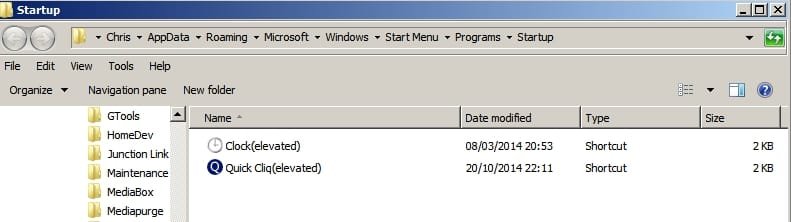
If the program needs to launch on boot then you'd place the elevated shrortcut in the user's startup folder.

From Start> Run dialog box or Explorer Address Bar:

%USERPROFILE%\AppData\Roaming\Microsoft\Windows\Start Menu\Programs\Startup

No, the software doesn't use auto-start. But just FYI, a process that is marked as "elevated" in its manifest will not auto-start from those locations. It's due to security model implemented since Vista. Well, it will if you disable UAC :) One can do it only manually, or via a convoluted Task Scheduler task (in some cases.)
 

My Computer My Computer

At a glance

Windows
OS
Windows
This launches these programs on boot for me:
Startup.jpg

Or this script placed in the same folder to launch programs elevated:
StartupQueue.jpg

However if the programs once running launch other processes that require elevation then like you say it's no good.

Suggest: Look into the possiblity of using malware blocking DNS. Here are two examples.
Also check out Bidefender TrafficLight browser addon. There are verions for Chrome, Firefox ans Safari.

Bitdefender TrafficLight for Firefox :: Add-ons for Firefox

There is also a beta cross browser version that can be installed but I can't comment on it as I only used it briefly before uninstalling it and switching to the browser extension.

Download BitDefender TrafficLight - MajorGeeks
 
Last edited:

My Computer My Computer

At a glance

Microsoft Windows 7 Home Premium 64-bit 7601 ...AMD C-60 APU with Radeon(tm) HD Graphics4.00 GBAMD Radeon HD 6290 Graphics
Computer type
Laptop
Computer Manufacturer/Model Number
ASUS
OS
Microsoft Windows 7 Home Premium 64-bit 7601 Multiprocessor Free Service Pack 1
CPU
AMD C-60 APU with Radeon(tm) HD Graphics
Motherboard
ASUSTeK COMPUTER INC. X501U
Memory
4.00 GB
Graphics Card(s)
AMD Radeon HD 6290 Graphics
Sound Card
(1) AMD High Definition Audio Device (2) Realtek High Defi
Screen Resolution
1366 x 768 x 32 bits (4294967296 colors) @ 60 Hz
Hard Drives
Hitachi HTS545050A7E380 SATA Disk Device
Antivirus
Comodo CIS & FW, SecureAplus App Whitelisting, Threatfire
Browser
Cyberfox 64bit, Opera 64bit, Airfox
Other Info
Spy-The-Spy, HitmanPro.Alert, Norton Connect Safe, MJRegWatcher, BitDefender TrafficLight, Voodoo Shield, Zemana AntiMalware
Thanks. I'll check it out.
 

My Computer My Computer

At a glance

Windows
OS
Windows
Back
Top