Belarc Advisor shows a list of all the software I have installed on my PC however the problem I have with it is that it is too detailed and by this I mean for ex. it has:
[FONT="]Adobe - Shockwave Flash Ver. 11,4,402,278
Adobe - Shockwave Flash Ver. 14,0,0,176 [/FONT][FONT="](32/64-bt)[/FONT]
[FONT="]Adobe - Shockwave Flash Ver. 15,0,0,152 [/FONT][FONT="](32/64-bt)[/FONT]
Well I do not want to know how many versions of FLASH I have but just that I have it.
And then it also has things like:
[FONT="]No Company Name - AC3Flter Config
No Company Name - Adobe Help
No Company Name - Advanced Scan to PDF Free
No Company Name - Applicaton Ver. 0, 2, 50, 7
No Company Name - Atwtusb.exe Ver. 1, 0, 0, 0 [/FONT][FONT="](64-bt)[/FONT]
[FONT="]No Company Name - CsrSyncMLServer [/FONT][FONT="](64-bt)[/FONT]
The problem I have here is:
1st, What do you mean "[FONT="]No Company Name" or Who cares, all I want is the name of the software really[/FONT]
Also how is "Adobe Help" a software? I would not consider this to be nor want it on my list
and finally, What are, "[FONT="]Applicaton Ver. 0, 2, 50, 7" OR [/FONT]"[FONT="]Atwtusb.exe Ver. 1, 0, 0, 0 "
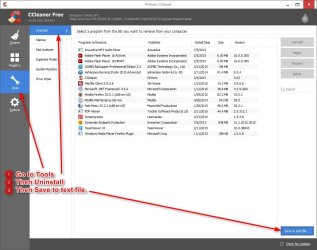
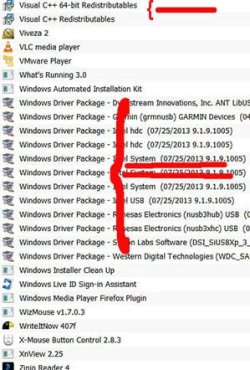
[/FONT]Basically what I would like is a list of my software as shown on my Start Menu that and only that (or in the 'Programs and Features" [whereby I prefer the old XP name of it "Add Remove Programs]
Up to now I used the Windows SNIP IT tool to take a snap photo of 'Programs and Features" in series. The problem here is that
_A_ it can't be done all in one shot and
_B_ it doesn't have everything (The Start Menu does)
Can anyone help with this?[FONT="][/FONT][FONT="][/FONT]
Thank you
[FONT="]Adobe - Shockwave Flash Ver. 11,4,402,278
Adobe - Shockwave Flash Ver. 14,0,0,176 [/FONT][FONT="](32/64-bt)[/FONT]
[FONT="]Adobe - Shockwave Flash Ver. 15,0,0,152 [/FONT][FONT="](32/64-bt)[/FONT]
Well I do not want to know how many versions of FLASH I have but just that I have it.
And then it also has things like:
[FONT="]No Company Name - AC3Flter Config
No Company Name - Adobe Help
No Company Name - Advanced Scan to PDF Free
No Company Name - Applicaton Ver. 0, 2, 50, 7
No Company Name - Atwtusb.exe Ver. 1, 0, 0, 0 [/FONT][FONT="](64-bt)[/FONT]
[FONT="]No Company Name - CsrSyncMLServer [/FONT][FONT="](64-bt)[/FONT]
The problem I have here is:
1st, What do you mean "[FONT="]No Company Name" or Who cares, all I want is the name of the software really[/FONT]
Also how is "Adobe Help" a software? I would not consider this to be nor want it on my list
and finally, What are, "[FONT="]Applicaton Ver. 0, 2, 50, 7" OR [/FONT]"[FONT="]Atwtusb.exe Ver. 1, 0, 0, 0 "
[/FONT]Basically what I would like is a list of my software as shown on my Start Menu that and only that (or in the 'Programs and Features" [whereby I prefer the old XP name of it "Add Remove Programs]
Up to now I used the Windows SNIP IT tool to take a snap photo of 'Programs and Features" in series. The problem here is that
_A_ it can't be done all in one shot and
_B_ it doesn't have everything (The Start Menu does)
Can anyone help with this?[FONT="][/FONT][FONT="][/FONT]
Thank you
My Computer
At a glance
Windows 7 Home Premium 64Intel Core i5 760 @ 2800MHz12288MBAMD Radeon HD 7800 Series
- Computer type
- PC/Desktop
- Computer Manufacturer/Model Number
- OEM Designed by me :-)
- OS
- Windows 7 Home Premium 64
- CPU
- Intel Core i5 760 @ 2800MHz
- Motherboard
- Asus P7P55D-E LX
- Memory
- 12288MB
- Graphics Card(s)
- AMD Radeon HD 7800 Series
- Sound Card
- ASUS Xonar DG
- Monitor(s) Displays
- ViewSonic VX2453 Series, HDMI 1080p Full HD
- Screen Resolution
- 1920X1080
- Hard Drives
- Samsung SSD 840 EVO 250GB& two others
- PSU
- Tagan BZ Series, TG800-BZ 800W
- Keyboard
- Logitech MK250
- Mouse
- Logitech M310
- Internet Speed
- toppest, mostest :-) <-- bad, but fun English
- Browser
- Firefox, Crrome, IE