HP Pavillion p6310y stuck on start black screen with white text?

justabluejay

New member
Local time
12:15 PM
Messages
38
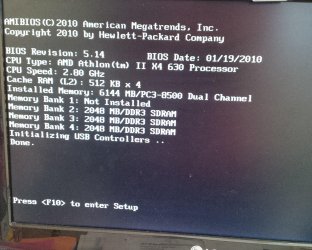
The computer had been working fine before, but now it is stuck on a black screen saying things like "memory bank 1: not installed" and other various banks up to 4 which say "2048 MB/DDR3 SDRAM" and also "initializing USB controllers...done".
I tried shutting the power off and on but the same screen stays.
It also says to press F10 to enter setup but when I press the key, nothing works and is completely stuck.
 

My Computer My Computer

At a glance

windows 7 Home Premium 64 BitAMD FX-83504 GB RAM
Computer type
PC/Desktop
Computer Manufacturer/Model Number
Custom Build
OS
windows 7 Home Premium 64 Bit
CPU
AMD FX-8350
Motherboard
ASUS M5A78L-M/USB3
Memory
4 GB RAM
Monitor(s) Displays
Acer
Screen Resolution
1600x900
Hard Drives
WB Blue 7200RPM 1TB
Case
Antec 900
Cooling
Cooler Master Hyper Evo 212
Keyboard
SONY PCVA-KB4P/U
Mouse
Vivitar
Antivirus
Microsoft Security Essentials/Avira
Browser
Google Chrome
Mate first reseat all the sticks and clan the slots if it is an older machine

SLOTCLEANING

Now as for the slots to clean them use astrip of old credit card about 1/2 inch wide nip the corners off one end - preferably round them off hold apiece of thin lint free cloth over the end dab on some form of alcohol - isopropyl alcohol (what we swab the skin with before an injection) is good and GENTLY swipe along the slots.

This can also be done for the GPU slot/s.

then run this if it does not function

MEMTEST

http://www.sevenforums.com/tutorials/105647-ram-test-memtest86.html this one you will need to make a bootable disk set the BIOSto optical (or USB if preferred) boot the machine and let it run for at LEAST 8 passes unless the errors come upstraight away. Takes a fair time to complete and some leave it runningovernight.

If you do get errors and have morethan one stick then you will need to test each one separately and maybe even inthe separate slots.
 

Attachments

  • STICK CLEANER.PNG
    STICK CLEANER.PNG
    4.9 KB · Views: 26

My Computer My Computer

At a glance

Desk1 7 Home Prem / Desk2 10 Pro / Main lap A...Desk1 i5 3750K / Laptop i7 GTX 860M / Desk2 i...Desk1 8GB (1866) / Desk2 16GB (1333) / Laptop...Desk 1& 2NVidia GTX 650 & Laptops on board Intel
Computer type
PC/Desktop
Computer Manufacturer/Model Number
Own build (new) Desk1 / Asus ROG Win 7 / Desk2 1st build
OS
Desk1 7 Home Prem / Desk2 10 Pro / Main lap Asus ROG 10 Pro 2 laptop Toshiba 7 Pro Asus P2520 7 & 10
CPU
Desk1 i5 3750K / Laptop i7 GTX 860M / Desk2 i5 2500
Motherboard
Desk1 Asus P877-V / Desk2 Gigabyte H67 UD3H / Laptop ?
Memory
Desk1 8GB (1866) / Desk2 16GB (1333) / Laptop 8Gb DDR3
Graphics Card(s)
Desk 1& 2NVidia GTX 650 & Laptops on board Intel
Sound Card
Desk 1 & 2 -XONAR DG Realtek High Def audio Laptop
Monitor(s) Displays
Desk 1 Benq HD 2450 / Desk2 Philips 24" / Laptop 17.5"
Screen Resolution
1920x1080 D1 & D2 & Laptop 1
Hard Drives
Desk1 Samsung 120GB 830 SSD
Asus ROG 256GB 850 Pro SSD
Desk2 Samsung 840 256 SSD
Toshiba 120GB EVO
PSU
Desk 1 Corsair HX 1050/ Laptop ? / Desk 2 Corsair HX 650
Case
Desk 1 Cooler HAF XM ? Toshiba laptop / Desk2 Coolermaster
Cooling
Fans on all Desk1 -2 Desk2 - all Coolermasters 5 Laptop ?
Keyboard
Desk 1 MS Sidewinder X6 Desk 2 MS Sidewinder X 4
Mouse
Desk 1&2 - Gigabyte MS 900 gamer - laptop - Logitec wireless
Internet Speed
ADSL2+
Other Info
One other Desktop (tester) and spare Toshba laptop both with SSD's
Running Kaspersky 2016 ISS on all machines config'd identically
Logitec audio stereo systems on each machine (x3)
Canon MG5250MFC
Router/modem TP-Link running WPA2SK
Well actually, new things had occurred. It can start up if i wait long enough when turned, but eventually when in use, it just froze(with the mouse only able to be moved.)
Also, sometimes it recommends me to go with startup repair. It froze a couple seconds during its run but got to completion with a variety of options at the end such as system restore, startup repair, etc. None of the options could be done as it showed me an error to do those things, the only option that worked was startup repair again...and that only worked for a second before the computer showed a windows error and automatically shut down without me able to do anything. The startup repair i tried to do again, only to have the same thing happen.
But for your method, im afraid to try the cleaning part because i do not have very extensive knowledge of this or much computer-repairing. The desktop is about 2 or 3 years old, has 1 tb of HDD memory, and about 6 gb RAM? in my book it is still fairly new, and of course runs windows 7 home premium. The cleaning part you were referring to the RAM slots, correct? I'm unsure where those are even located in the tower, nor do I know if I can clean them carefully. I might try the USB RAM test method if you still think the desktop is suffering a RAM problem. Thanks, ill await your reply.
 

My Computer My Computer

At a glance

windows 7 Home Premium 64 BitAMD FX-83504 GB RAM
Computer type
PC/Desktop
Computer Manufacturer/Model Number
Custom Build
OS
windows 7 Home Premium 64 Bit
CPU
AMD FX-8350
Motherboard
ASUS M5A78L-M/USB3
Memory
4 GB RAM
Monitor(s) Displays
Acer
Screen Resolution
1600x900
Hard Drives
WB Blue 7200RPM 1TB
Case
Antec 900
Cooling
Cooler Master Hyper Evo 212
Keyboard
SONY PCVA-KB4P/U
Mouse
Vivitar
Antivirus
Microsoft Security Essentials/Avira
Browser
Google Chrome
Mate first reseat all the sticks and clan the slots if it is an older machine

SLOTCLEANING

Now as for the slots to clean them use astrip of old credit card about 1/2 inch wide nip the corners off one end - preferably round them off hold apiece of thin lint free cloth over the end dab on some form of alcohol - isopropyl alcohol (what we swab the skin with before an injection) is good and GENTLY swipe along the slots.

This can also be done for the GPU slot/s.

then run this if it does not function

MEMTEST

http://www.sevenforums.com/tutorials/105647-ram-test-memtest86.html this one you will need to make a bootable disk set the BIOSto optical (or USB if preferred) boot the machine and let it run for at LEAST 8 passes unless the errors come upstraight away. Takes a fair time to complete and some leave it runningovernight.

If you do get errors and have morethan one stick then you will need to test each one separately and maybe even inthe separate slots.

Alright so I tried that buy the same results happen.

IMG_20140326_204448.jpg


THis is what happens when i boot it up and it just stays there. Any idea how it could be fixed?
 

My Computer My Computer

At a glance

windows 7 Home Premium 64 BitAMD FX-83504 GB RAM
Computer type
PC/Desktop
Computer Manufacturer/Model Number
Custom Build
OS
windows 7 Home Premium 64 Bit
CPU
AMD FX-8350
Motherboard
ASUS M5A78L-M/USB3
Memory
4 GB RAM
Monitor(s) Displays
Acer
Screen Resolution
1600x900
Hard Drives
WB Blue 7200RPM 1TB
Case
Antec 900
Cooling
Cooler Master Hyper Evo 212
Keyboard
SONY PCVA-KB4P/U
Mouse
Vivitar
Antivirus
Microsoft Security Essentials/Avira
Browser
Google Chrome

Sorry late reply I cannot ID what this is to be honest but Googles throw upsome hints that you have an application that is preventing you logging in.


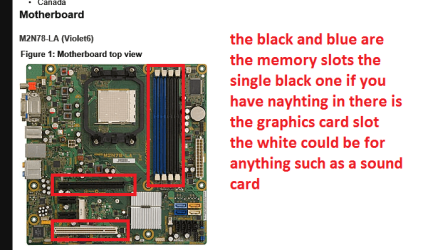
The slots are what are indicated in the pic in the link
http://h20565.www2.hp.com/portal/si...ac.admitted=1395911289354.876444892.492883150
that is the motherboard and the slots are the ones I have outlined in the pic.

Now one thing you can let us know is have you backed up any important data yet? because this is beginning to look like something a little more than a simple problem.

By the way can you get into safe mode - power up and tap F8 - if you can run these

http://www.sevenforums.com/tutorials/1538-sfc-scannow-command-system-file-checker.html

http://www.sevenforums.com/tutorials/433-disk-check.html
 

Attachments

  • HP.PNG
    HP.PNG
    76.7 KB · Views: 22

My Computer My Computer

At a glance

Desk1 7 Home Prem / Desk2 10 Pro / Main lap A...Desk1 i5 3750K / Laptop i7 GTX 860M / Desk2 i...Desk1 8GB (1866) / Desk2 16GB (1333) / Laptop...Desk 1& 2NVidia GTX 650 & Laptops on board Intel
Computer type
PC/Desktop
Computer Manufacturer/Model Number
Own build (new) Desk1 / Asus ROG Win 7 / Desk2 1st build
OS
Desk1 7 Home Prem / Desk2 10 Pro / Main lap Asus ROG 10 Pro 2 laptop Toshiba 7 Pro Asus P2520 7 & 10
CPU
Desk1 i5 3750K / Laptop i7 GTX 860M / Desk2 i5 2500
Motherboard
Desk1 Asus P877-V / Desk2 Gigabyte H67 UD3H / Laptop ?
Memory
Desk1 8GB (1866) / Desk2 16GB (1333) / Laptop 8Gb DDR3
Graphics Card(s)
Desk 1& 2NVidia GTX 650 & Laptops on board Intel
Sound Card
Desk 1 & 2 -XONAR DG Realtek High Def audio Laptop
Monitor(s) Displays
Desk 1 Benq HD 2450 / Desk2 Philips 24" / Laptop 17.5"
Screen Resolution
1920x1080 D1 & D2 & Laptop 1
Hard Drives
Desk1 Samsung 120GB 830 SSD
Asus ROG 256GB 850 Pro SSD
Desk2 Samsung 840 256 SSD
Toshiba 120GB EVO
PSU
Desk 1 Corsair HX 1050/ Laptop ? / Desk 2 Corsair HX 650
Case
Desk 1 Cooler HAF XM ? Toshiba laptop / Desk2 Coolermaster
Cooling
Fans on all Desk1 -2 Desk2 - all Coolermasters 5 Laptop ?
Keyboard
Desk 1 MS Sidewinder X6 Desk 2 MS Sidewinder X 4
Mouse
Desk 1&2 - Gigabyte MS 900 gamer - laptop - Logitec wireless
Internet Speed
ADSL2+
Other Info
One other Desktop (tester) and spare Toshba laptop both with SSD's
Running Kaspersky 2016 ISS on all machines config'd identically
Logitec audio stereo systems on each machine (x3)
Canon MG5250MFC
Router/modem TP-Link running WPA2SK

Sorry late reply I cannot ID what this is to be honest but Googles throw upsome hints that you have an application that is preventing you logging in.


The slots are what are indicated in the pic in the link
http://h20565.www2.hp.com/portal/si...ac.admitted=1395911289354.876444892.492883150
that is the motherboard and the slots are the ones I have outlined in the pic.

Now one thing you can let us know is have you backed up any important data yet? because this is beginning to look like something a little more than a simple problem.

By the way can you get into safe mode - power up and tap F8 - if you can run these

http://www.sevenforums.com/tutorials/1538-sfc-scannow-command-system-file-checker.html

http://www.sevenforums.com/tutorials/433-disk-check.html

Well I actually can't go to safe mode, i try pressing the key but the screen i get stuck on just doeesn't allow me to. Even jf I get past it, it checks the disks, still on a black screen with white text, and then afterwards says "insert boot disk". I can barely do anything. I didn't even back up my files since I can't at the moment.

But I did do a mem test since i got it to work recently. Here are the results:
IMG_20140330_114341.jpg


Does there seen to be a problem so far? I left it overnight.
 

My Computer My Computer

At a glance

windows 7 Home Premium 64 BitAMD FX-83504 GB RAM
Computer type
PC/Desktop
Computer Manufacturer/Model Number
Custom Build
OS
windows 7 Home Premium 64 Bit
CPU
AMD FX-8350
Motherboard
ASUS M5A78L-M/USB3
Memory
4 GB RAM
Monitor(s) Displays
Acer
Screen Resolution
1600x900
Hard Drives
WB Blue 7200RPM 1TB
Case
Antec 900
Cooling
Cooler Master Hyper Evo 212
Keyboard
SONY PCVA-KB4P/U
Mouse
Vivitar
Antivirus
Microsoft Security Essentials/Avira
Browser
Google Chrome
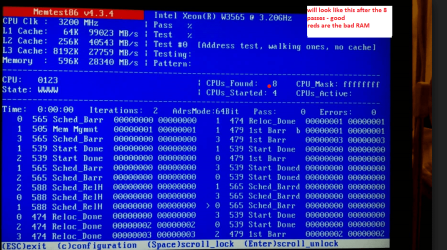
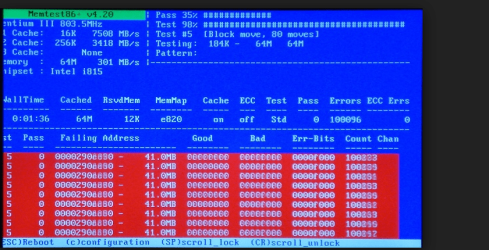
Jay mate I cannot pull up that shot you sent so I cannot say if you have a problem if the screen looks like in the pic with no red bards then it is ok with red bars than the RAM is bad and will need replacing mate see pics.

Now to retrieve data I use this

BOOTABLE UBUNTU

Make a bootable Ubuntu disk or stick http://www.ubuntu.com/download

Set the BIOS to boot from theoptical or a USB port when the machine boots it will show you a screen with TRY or INSTALL> select TRYnot INSTALL

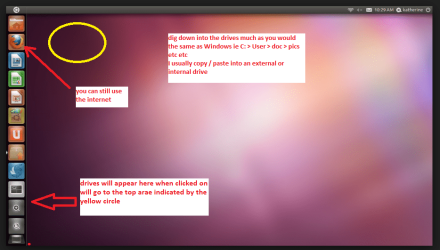
When it is finished - it takes verylittle time you will get a screen like in the pic .

Open the drive you want > Userand dig down until you get to the data / settings you may be able to copy /paste the material you want to an external source or other installed drive doingthis.

I am not sure if it will but I haverecovered tons of data etc using this method both on "dead" or justplain drives that you cannot get data from using Windows.
Personally I would go this way and then do a reinstall using this
http://www.sevenforums.com/tutorials/219487-clean-reinstall-factory-oem-windows-7-a.html
 

Attachments

  • MEM1.PNG
    MEM1.PNG
    282.2 KB · Views: 0
  • MEM2.PNG
    MEM2.PNG
    192.8 KB · Views: 0
  • Ubuntu screen.PNG
    Ubuntu screen.PNG
    103 KB · Views: 0

My Computer My Computer

At a glance

Desk1 7 Home Prem / Desk2 10 Pro / Main lap A...Desk1 i5 3750K / Laptop i7 GTX 860M / Desk2 i...Desk1 8GB (1866) / Desk2 16GB (1333) / Laptop...Desk 1& 2NVidia GTX 650 & Laptops on board Intel
Computer type
PC/Desktop
Computer Manufacturer/Model Number
Own build (new) Desk1 / Asus ROG Win 7 / Desk2 1st build
OS
Desk1 7 Home Prem / Desk2 10 Pro / Main lap Asus ROG 10 Pro 2 laptop Toshiba 7 Pro Asus P2520 7 & 10
CPU
Desk1 i5 3750K / Laptop i7 GTX 860M / Desk2 i5 2500
Motherboard
Desk1 Asus P877-V / Desk2 Gigabyte H67 UD3H / Laptop ?
Memory
Desk1 8GB (1866) / Desk2 16GB (1333) / Laptop 8Gb DDR3
Graphics Card(s)
Desk 1& 2NVidia GTX 650 & Laptops on board Intel
Sound Card
Desk 1 & 2 -XONAR DG Realtek High Def audio Laptop
Monitor(s) Displays
Desk 1 Benq HD 2450 / Desk2 Philips 24" / Laptop 17.5"
Screen Resolution
1920x1080 D1 & D2 & Laptop 1
Hard Drives
Desk1 Samsung 120GB 830 SSD
Asus ROG 256GB 850 Pro SSD
Desk2 Samsung 840 256 SSD
Toshiba 120GB EVO
PSU
Desk 1 Corsair HX 1050/ Laptop ? / Desk 2 Corsair HX 650
Case
Desk 1 Cooler HAF XM ? Toshiba laptop / Desk2 Coolermaster
Cooling
Fans on all Desk1 -2 Desk2 - all Coolermasters 5 Laptop ?
Keyboard
Desk 1 MS Sidewinder X6 Desk 2 MS Sidewinder X 4
Mouse
Desk 1&2 - Gigabyte MS 900 gamer - laptop - Logitec wireless
Internet Speed
ADSL2+
Other Info
One other Desktop (tester) and spare Toshba laptop both with SSD's
Running Kaspersky 2016 ISS on all machines config'd identically
Logitec audio stereo systems on each machine (x3)
Canon MG5250MFC
Router/modem TP-Link running WPA2SK
Jay mate I cannot pull up that shot you sent so I cannot say if you have a problem if the screen looks like in the pic with no red bards then it is ok with red bars than the RAM is bad and will need replacing mate see pics.

Now to retrieve data I use this

BOOTABLE UBUNTU

Make a bootable Ubuntu disk or stick http://www.ubuntu.com/download

Set the BIOS to boot from theoptical or a USB port when the machine boots it will show you a screen with TRY or INSTALL> select TRYnot INSTALL

When it is finished - it takes verylittle time you will get a screen like in the pic .

Open the drive you want > Userand dig down until you get to the data / settings you may be able to copy /paste the material you want to an external source or other installed drive doingthis.

I am not sure if it will but I haverecovered tons of data etc using this method both on "dead" or justplain drives that you cannot get data from using Windows.
Personally I would go this way and then do a reinstall using this
http://www.sevenforums.com/tutorials/219487-clean-reinstall-factory-oem-windows-7-a.html


Ok, so I am now unable to do those because it seems my screen is permanantly stuck on the screen on the image attached below. Right when I turn it on, it just goes to this page and stays there as if it is frozen or something along those lines. IT seems i'm more stuck now that things have worsened. :/

But this occurred after I did MEMTEST, which apparently nothing was wrong as I didn't see any red bars...but at the same time I didn't see white text when it was occurring,
 

Attachments

  • Evangelion.jpg
    Evangelion.jpg
    504.6 KB · Views: 0
Last edited:

My Computer My Computer

At a glance

windows 7 Home Premium 64 BitAMD FX-83504 GB RAM
Computer type
PC/Desktop
Computer Manufacturer/Model Number
Custom Build
OS
windows 7 Home Premium 64 Bit
CPU
AMD FX-8350
Motherboard
ASUS M5A78L-M/USB3
Memory
4 GB RAM
Monitor(s) Displays
Acer
Screen Resolution
1600x900
Hard Drives
WB Blue 7200RPM 1TB
Case
Antec 900
Cooling
Cooler Master Hyper Evo 212
Keyboard
SONY PCVA-KB4P/U
Mouse
Vivitar
Antivirus
Microsoft Security Essentials/Avira
Browser
Google Chrome
Hum mate run one of these 5 Bootable AntiVirus Rescue CD for Windows: Free Download it will scan form power up and not have to involve the OS.

Unfortunately as I type the Kaspersky server is down but hopefully by the time you get this it may be going again.
The scan takes some time but it is good at winkling out stuff that maybe there before Windows even starts to run.

I am really surprised the reinstall would not go maybe this is a hardware problem too:(
 

My Computer My Computer

At a glance

Desk1 7 Home Prem / Desk2 10 Pro / Main lap A...Desk1 i5 3750K / Laptop i7 GTX 860M / Desk2 i...Desk1 8GB (1866) / Desk2 16GB (1333) / Laptop...Desk 1& 2NVidia GTX 650 & Laptops on board Intel
Computer type
PC/Desktop
Computer Manufacturer/Model Number
Own build (new) Desk1 / Asus ROG Win 7 / Desk2 1st build
OS
Desk1 7 Home Prem / Desk2 10 Pro / Main lap Asus ROG 10 Pro 2 laptop Toshiba 7 Pro Asus P2520 7 & 10
CPU
Desk1 i5 3750K / Laptop i7 GTX 860M / Desk2 i5 2500
Motherboard
Desk1 Asus P877-V / Desk2 Gigabyte H67 UD3H / Laptop ?
Memory
Desk1 8GB (1866) / Desk2 16GB (1333) / Laptop 8Gb DDR3
Graphics Card(s)
Desk 1& 2NVidia GTX 650 & Laptops on board Intel
Sound Card
Desk 1 & 2 -XONAR DG Realtek High Def audio Laptop
Monitor(s) Displays
Desk 1 Benq HD 2450 / Desk2 Philips 24" / Laptop 17.5"
Screen Resolution
1920x1080 D1 & D2 & Laptop 1
Hard Drives
Desk1 Samsung 120GB 830 SSD
Asus ROG 256GB 850 Pro SSD
Desk2 Samsung 840 256 SSD
Toshiba 120GB EVO
PSU
Desk 1 Corsair HX 1050/ Laptop ? / Desk 2 Corsair HX 650
Case
Desk 1 Cooler HAF XM ? Toshiba laptop / Desk2 Coolermaster
Cooling
Fans on all Desk1 -2 Desk2 - all Coolermasters 5 Laptop ?
Keyboard
Desk 1 MS Sidewinder X6 Desk 2 MS Sidewinder X 4
Mouse
Desk 1&2 - Gigabyte MS 900 gamer - laptop - Logitec wireless
Internet Speed
ADSL2+
Other Info
One other Desktop (tester) and spare Toshba laptop both with SSD's
Running Kaspersky 2016 ISS on all machines config'd identically
Logitec audio stereo systems on each machine (x3)
Canon MG5250MFC
Router/modem TP-Link running WPA2SK
Hum mate run one of these 5 Bootable AntiVirus Rescue CD for Windows: Free Download it will scan form power up and not have to involve the OS.

Unfortunately as I type the Kaspersky server is down but hopefully by the time you get this it may be going again.
The scan takes some time but it is good at winkling out stuff that maybe there before Windows even starts to run.

I am really surprised the reinstall would not go maybe this is a hardware problem too:(

I got past that black screen now by rapidly tapping a F# key, so nevermind. I installed Ubuntu on a DVD-R but when i get to the black "enter a boot device screen" it does not work, even if I keep pressing keys."
Also I'm a bit confused on what to install to clean reinstall Windows 7. I know I probably won't get to most steps on that page as I can't boot up Windows 7 in the first place, so what is primarily needed to install?
 
Last edited:

My Computer My Computer

At a glance

windows 7 Home Premium 64 BitAMD FX-83504 GB RAM
Computer type
PC/Desktop
Computer Manufacturer/Model Number
Custom Build
OS
windows 7 Home Premium 64 Bit
CPU
AMD FX-8350
Motherboard
ASUS M5A78L-M/USB3
Memory
4 GB RAM
Monitor(s) Displays
Acer
Screen Resolution
1600x900
Hard Drives
WB Blue 7200RPM 1TB
Case
Antec 900
Cooling
Cooler Master Hyper Evo 212
Keyboard
SONY PCVA-KB4P/U
Mouse
Vivitar
Antivirus
Microsoft Security Essentials/Avira
Browser
Google Chrome
Hum mate run one of these 5 Bootable AntiVirus Rescue CD for Windows: Free Download it will scan form power up and not have to involve the OS.

Unfortunately as I type the Kaspersky server is down but hopefully by the time you get this it may be going again.
The scan takes some time but it is good at winkling out stuff that maybe there before Windows even starts to run.

I am really surprised the reinstall would not go maybe this is a hardware problem too:(

Also I found something interesting with the HP checkup when I pressed a specific f# key.
 

Attachments

  • IMG_20140410_021233.jpg
    IMG_20140410_021233.jpg
    528.5 KB · Views: 3

My Computer My Computer

At a glance

windows 7 Home Premium 64 BitAMD FX-83504 GB RAM
Computer type
PC/Desktop
Computer Manufacturer/Model Number
Custom Build
OS
windows 7 Home Premium 64 Bit
CPU
AMD FX-8350
Motherboard
ASUS M5A78L-M/USB3
Memory
4 GB RAM
Monitor(s) Displays
Acer
Screen Resolution
1600x900
Hard Drives
WB Blue 7200RPM 1TB
Case
Antec 900
Cooling
Cooler Master Hyper Evo 212
Keyboard
SONY PCVA-KB4P/U
Mouse
Vivitar
Antivirus
Microsoft Security Essentials/Avira
Browser
Google Chrome
Is your hard drive seen in the BIOS?
 

My Computer My Computer

At a glance

Windows 7 Home Premium SP1, 64-bitIntel Skylake i5-6600K, not overclocked8 GB HyperX DDR4-2666 (2 x 4 GB)none; graphics are integrated on CPU
Computer type
PC/Desktop
Computer Manufacturer/Model Number
Ignatz Special; 4 speed manual gearbox; factory air conditioning; one of one
OS
Windows 7 Home Premium SP1, 64-bit
CPU
Intel Skylake i5-6600K, not overclocked
Motherboard
AsRock Z170M Extreme 4, micro ATX
Memory
8 GB HyperX DDR4-2666 (2 x 4 GB)
Graphics Card(s)
none; graphics are integrated on CPU
Sound Card
onboard: Realtek ALC1150; external: USB Behringer UF0-202
Monitor(s) Displays
Dell S2340M 23 inch IPS
Screen Resolution
1600 x 900
Hard Drives
System: Crucial MX100 series SSD, 128 GB;
Data: Samsung Spinpoint 103SJ, 1 TB;
Backup: WD Caviar Green WD30EZRX-00D8PB0, 3 TB
PSU
Rosewill SilentNight 500 watt fanless, semi-modular
Case
Antec Solo II
Cooling
Noctua NH-U12S; Noctua F12 intake, Noctua S12A exhaust
Keyboard
Microsoft 200 6JH-00001 USB
Mouse
Dell or Microsoft optical wired; USB
Antivirus
Microsoft Security Essentials and Malwarebytes Premium
Browser
Pale Moon
Other Info
All fans PWM; speeds at idle: CPU circa 500 rpm; intake circa 600 rpm; exhaust circa 600 rpm; CPU temps 27 idle and 47 C load in a warm room (27 C/81 F) when running Intel Extreme Tuning Utility stress test.
Hum mate run one of these 5 Bootable AntiVirus Rescue CD for Windows: Free Download it will scan form power up and not have to involve the OS.

Unfortunately as I type the Kaspersky server is down but hopefully by the time you get this it may be going again.
The scan takes some time but it is good at winkling out stuff that maybe there before Windows even starts to run.

I am really surprised the reinstall would not go maybe this is a hardware problem too:(

Also I found something interesting with the HP checkup when I pressed a specific f# key.
Jay plus what iganzatsonic has asked I cannot quite see that error code (am on my laptop) and if it is not detecting a drive then it would explain why the Ubuntu is not working.
If the drive is the optical then try the same with a USB stick.
 

My Computer My Computer

At a glance

Desk1 7 Home Prem / Desk2 10 Pro / Main lap A...Desk1 i5 3750K / Laptop i7 GTX 860M / Desk2 i...Desk1 8GB (1866) / Desk2 16GB (1333) / Laptop...Desk 1& 2NVidia GTX 650 & Laptops on board Intel
Computer type
PC/Desktop
Computer Manufacturer/Model Number
Own build (new) Desk1 / Asus ROG Win 7 / Desk2 1st build
OS
Desk1 7 Home Prem / Desk2 10 Pro / Main lap Asus ROG 10 Pro 2 laptop Toshiba 7 Pro Asus P2520 7 & 10
CPU
Desk1 i5 3750K / Laptop i7 GTX 860M / Desk2 i5 2500
Motherboard
Desk1 Asus P877-V / Desk2 Gigabyte H67 UD3H / Laptop ?
Memory
Desk1 8GB (1866) / Desk2 16GB (1333) / Laptop 8Gb DDR3
Graphics Card(s)
Desk 1& 2NVidia GTX 650 & Laptops on board Intel
Sound Card
Desk 1 & 2 -XONAR DG Realtek High Def audio Laptop
Monitor(s) Displays
Desk 1 Benq HD 2450 / Desk2 Philips 24" / Laptop 17.5"
Screen Resolution
1920x1080 D1 & D2 & Laptop 1
Hard Drives
Desk1 Samsung 120GB 830 SSD
Asus ROG 256GB 850 Pro SSD
Desk2 Samsung 840 256 SSD
Toshiba 120GB EVO
PSU
Desk 1 Corsair HX 1050/ Laptop ? / Desk 2 Corsair HX 650
Case
Desk 1 Cooler HAF XM ? Toshiba laptop / Desk2 Coolermaster
Cooling
Fans on all Desk1 -2 Desk2 - all Coolermasters 5 Laptop ?
Keyboard
Desk 1 MS Sidewinder X6 Desk 2 MS Sidewinder X 4
Mouse
Desk 1&2 - Gigabyte MS 900 gamer - laptop - Logitec wireless
Internet Speed
ADSL2+
Other Info
One other Desktop (tester) and spare Toshba laptop both with SSD's
Running Kaspersky 2016 ISS on all machines config'd identically
Logitec audio stereo systems on each machine (x3)
Canon MG5250MFC
Router/modem TP-Link running WPA2SK
Well I suspect it might be that your hard disk is dying..so..just put the windows 7 sytem repair dvd ... and rescue your data using .. at command prompt type notepad.exe.. then file ..open.. and then select all files.. and then restore your data on a usb .. and then try whatever you want to

P.S When you do a copy and paste using this notepad.exe method it would not show you the progress bar
 

My Computer My Computer

At a glance

Windows 7 Home Premium
Computer type
Laptop
OS
Windows 7 Home Premium
An alternative to nooruddin's suggestion is this

BOOTABLEUBUNTU

Makea bootable Ubuntu disk http://www.ubuntu.com/download

Setthe BIOS to boot from the optical when the machine boots it will show you ascreen with TRY or INSTALL > select TRY

Whenit is finished - it takes very little time you will get a screen like in thepic .

Openthe drive you want > User and dig down until you get to the data / settingsyou may be able to copy / paste the material you want to an external source orother installed drive doing this.

Iam not sure if it will but I have recovered tons of data etc using this methodboth on "dead" or just plain drives that you cannot get data fromusing Windows.

This way you don't need to boot Windows at all and if you have access to another machine then with a USB to SATA gadget the hard drive can still be accessed.
 

Attachments

  • UBUTUX.PNG
    UBUTUX.PNG
    128.9 KB · Views: 0

My Computer My Computer

At a glance

Desk1 7 Home Prem / Desk2 10 Pro / Main lap A...Desk1 i5 3750K / Laptop i7 GTX 860M / Desk2 i...Desk1 8GB (1866) / Desk2 16GB (1333) / Laptop...Desk 1& 2NVidia GTX 650 & Laptops on board Intel
Computer type
PC/Desktop
Computer Manufacturer/Model Number
Own build (new) Desk1 / Asus ROG Win 7 / Desk2 1st build
OS
Desk1 7 Home Prem / Desk2 10 Pro / Main lap Asus ROG 10 Pro 2 laptop Toshiba 7 Pro Asus P2520 7 & 10
CPU
Desk1 i5 3750K / Laptop i7 GTX 860M / Desk2 i5 2500
Motherboard
Desk1 Asus P877-V / Desk2 Gigabyte H67 UD3H / Laptop ?
Memory
Desk1 8GB (1866) / Desk2 16GB (1333) / Laptop 8Gb DDR3
Graphics Card(s)
Desk 1& 2NVidia GTX 650 & Laptops on board Intel
Sound Card
Desk 1 & 2 -XONAR DG Realtek High Def audio Laptop
Monitor(s) Displays
Desk 1 Benq HD 2450 / Desk2 Philips 24" / Laptop 17.5"
Screen Resolution
1920x1080 D1 & D2 & Laptop 1
Hard Drives
Desk1 Samsung 120GB 830 SSD
Asus ROG 256GB 850 Pro SSD
Desk2 Samsung 840 256 SSD
Toshiba 120GB EVO
PSU
Desk 1 Corsair HX 1050/ Laptop ? / Desk 2 Corsair HX 650
Case
Desk 1 Cooler HAF XM ? Toshiba laptop / Desk2 Coolermaster
Cooling
Fans on all Desk1 -2 Desk2 - all Coolermasters 5 Laptop ?
Keyboard
Desk 1 MS Sidewinder X6 Desk 2 MS Sidewinder X 4
Mouse
Desk 1&2 - Gigabyte MS 900 gamer - laptop - Logitec wireless
Internet Speed
ADSL2+
Other Info
One other Desktop (tester) and spare Toshba laptop both with SSD's
Running Kaspersky 2016 ISS on all machines config'd identically
Logitec audio stereo systems on each machine (x3)
Canon MG5250MFC
Router/modem TP-Link running WPA2SK
Back
Top