HP printers install/uninstall conflicts

tonyvella

New member
Member
VIP
Local time
3:51 PM
Messages
161
There is a problem associated with HP printers that I myself have experienced more than once. Say, you have HP model A printer installed and you go out and buy a model B. If you install the software for model B before you uninstall everything, I mean everything, relating to model A, you will never see the end of conflicts. And over many years I have been unable to find a way of completely, totally getting rid of everything connected with model A. So the next time I needed a printer, I bought an Epson and have had no printing-conflicts-problems since.

Now, out of curiosity, happily belonging to this forum and having the time to do my homework, I ask: How does one get rid of everything related to an installed HP printer completely and totally?

Note: "Remove Device" from "Devices and Printers" is only the first step. I believe there is a heck of a lot more involved. I did write twice to HP Canada and never got a reply. Thanks to one and all for all help, opinions, advice, gossip, etc.

Regards.
 

My Computer

OS
windows 7 Home Premium
Download and install "Revo uninstaller" (it's free). It will find any leftovers for you with a couple of things to remember.
It will only work if you start the deletion within Revo itself. If you have "half" deleted the HP, reinstall it and then use Revo to uninstall it. If prompted to restart by the HP program, don't. Let Revo find the fiddly bits and get rid of them first. You have the choice when deleting leftovers of safe, moderate or advanced. I've always selected advanced and never had a problem.
"Ccleaner" (free again) is also a good program to check for registry leftovers after a deletion.
"Everything" also free, is another good little program to find any fiddly bits.
Hope this helps :)
 

My Computer

Computer type
PC/Desktop
Computer Manufacturer/Model Number
Self built
OS
Windows 7 home premium 64bit
CPU
intel Core i7 4790 3.6Ghz
Motherboard
Gigabyte H97-D3H
Memory
16Gb G.Skill Sniper
Graphics Card(s)
Nvidia GTX 760
Sound Card
Realtek ALC1150 115dB SNR HD Audio
Monitor(s) Displays
LG 32" TV as monitor
Screen Resolution
1920 x 1080
Hard Drives
Samsung 840 PRO series SATA3 256Gb SSD.
Western Digital Black SATA3 -1Tb.
Western Digital external HDD-1TB.

Pioneer DVD-RW.
PSU
Antec HCG 620w
Case
Thermaltake A41
Cooling
Stock fans x 3. After market Arctic Freezer i11 cpu cooler
Keyboard
Logitech M520r wireless
Mouse
Logitech M310t wireless
Internet Speed
Fair to middlin'
Antivirus
Avast free
Browser
Firefox
Other Info
MBAM Pro
SuperAntiSpyware free edition
AdwCleaner
Ccleaner
Revo uninstaller Pro
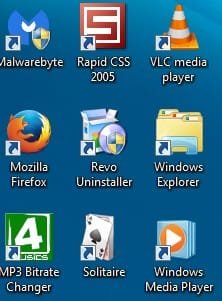
Thanks Iffoar for your reply. Guess what I used:

2015-06-05_161240.jpg

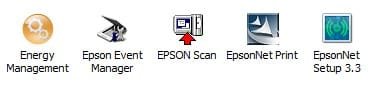
That's why I bought an Epson! Frustration! see, for example, if I wanted to completely uninstall my current Epson. I open Revo and get this:

2015-06-05_161938.jpg

Well, with my Epson you have four to choose from; with an HP printer you have seven. You must uninstall them in some logical sequence, I presume, and if you don't or get the sequence wrong ......
 

My Computer

OS
windows 7 Home Premium
I'm not familiar with Epson gear but I would look for "Epson printer software" or the like to start, then the others if they still show up. What Revo doesn't clear, check for leftovers with Ccleaner and Everything. Finally, I would check regedit for any entries for Epson. If you can't identify definitely unwanted little buggars, leave them there, they probably won't do any harm anyway.
 

My Computer

Computer type
PC/Desktop
Computer Manufacturer/Model Number
Self built
OS
Windows 7 home premium 64bit
CPU
intel Core i7 4790 3.6Ghz
Motherboard
Gigabyte H97-D3H
Memory
16Gb G.Skill Sniper
Graphics Card(s)
Nvidia GTX 760
Sound Card
Realtek ALC1150 115dB SNR HD Audio
Monitor(s) Displays
LG 32" TV as monitor
Screen Resolution
1920 x 1080
Hard Drives
Samsung 840 PRO series SATA3 256Gb SSD.
Western Digital Black SATA3 -1Tb.
Western Digital external HDD-1TB.

Pioneer DVD-RW.
PSU
Antec HCG 620w
Case
Thermaltake A41
Cooling
Stock fans x 3. After market Arctic Freezer i11 cpu cooler
Keyboard
Logitech M520r wireless
Mouse
Logitech M310t wireless
Internet Speed
Fair to middlin'
Antivirus
Avast free
Browser
Firefox
Other Info
MBAM Pro
SuperAntiSpyware free edition
AdwCleaner
Ccleaner
Revo uninstaller Pro
Back
Top