hyperlinks in Outlook 2007

Greg the bear

New member
Local time
11:47 AM
Messages
20
When I click on any hyperlink in outlook I get "This operation was cancelled due to restrictions on this computer. Contact your administrator" How do I get hyperlinks to work? I am the administrator!

By the way, I am running Windows 7 64, and I am using Outlook 2007,
 

My Computer

Computer Manufacturer/Model Number
Dell XPS 710
OS
Windows 7 64
CPU
Intel 2.66 Quad
Memory
6G
Graphics Card(s)
NVideo
Sound Card
SB XFI
Monitor(s) Displays
Dell Flat Screen and HP 2010I
Hard Drives
2-500g 7200 SATA
Case
XPS 710
Cooling
Fans
Keyboard
Dell
Mouse
wireless
Internet Speed
Cable
This can happen if you install another Browser and make it your default. To reset go to control panel, select Internet Options, Programs and set IE as default.
 

My Computer

Computer Manufacturer/Model Number
Home Built
OS
Windows 7 SP1 x64
CPU
AMD 9850 X4
Motherboard
ASUS
Memory
Corsair
Graphics Card(s)
ATI Radeon
Sound Card
Sigmatel
Monitor(s) Displays
Dell
Screen Resolution
1600X900
Hard Drives
(1) WD 1TB
Cooling
Corsair H60
Internet Speed
UVerse 12MB
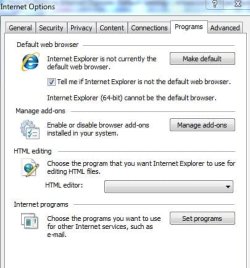
I have not installed another browser. When I go to the options page under programs, it does say that Internet explorer is not the default. When I click it it changes to the default, but the whole time at the bottom, there is the line that says " Internet Explorer (64-Bit) cannot be the default browser.

Any other ideas?
 

My Computer

Computer Manufacturer/Model Number
Dell XPS 710
OS
Windows 7 64
CPU
Intel 2.66 Quad
Memory
6G
Graphics Card(s)
NVideo
Sound Card
SB XFI
Monitor(s) Displays
Dell Flat Screen and HP 2010I
Hard Drives
2-500g 7200 SATA
Case
XPS 710
Cooling
Fans
Keyboard
Dell
Mouse
wireless
Internet Speed
Cable
Here is a screen cut of the options screen
 

Attachments

  • Capture.JPG
    Capture.JPG
    35.9 KB · Views: 18

My Computer

Computer Manufacturer/Model Number
Dell XPS 710
OS
Windows 7 64
CPU
Intel 2.66 Quad
Memory
6G
Graphics Card(s)
NVideo
Sound Card
SB XFI
Monitor(s) Displays
Dell Flat Screen and HP 2010I
Hard Drives
2-500g 7200 SATA
Case
XPS 710
Cooling
Fans
Keyboard
Dell
Mouse
wireless
Internet Speed
Cable
I had the same problem; dont ask me how this works but it does.

Download and install firefox; then check the links in OL and they will work. Once that is fixed you can uninstall firefox and all is fine.

I found this trick on another forum, sounded stupid but it dam sure worked.
 

My Computer

Computer Manufacturer/Model Number
My Build
OS
win7 Ult 64
CPU
i7 3930K & 3960X
Motherboard
ASUS P9X79 Deluxe
Memory
16GB G-Skill 2133MHz
Graphics Card(s)
Sapphire HD 7970
Sound Card
On-board
Monitor(s) Displays
ASUS 27 inch
Screen Resolution
1920X1080
Hard Drives
Crucial M4 256GB, 1.5TB WD Black for Data/Images
PSU
Corsair AX1200
Case
NZXT 810
Cooling
Custom Loop, Swiftech HDBlock
Keyboard
Mionix
Mouse
Mionix
Internet Speed
Cable
Go Figure! Thanks! I loaded it up and it did the trick! I did not unload it though. I'm thinking tat maybe since it is working I should keep Firefox, So I'm going to run it for a while and see.
 

My Computer

Computer Manufacturer/Model Number
Dell XPS 710
OS
Windows 7 64
CPU
Intel 2.66 Quad
Memory
6G
Graphics Card(s)
NVideo
Sound Card
SB XFI
Monitor(s) Displays
Dell Flat Screen and HP 2010I
Hard Drives
2-500g 7200 SATA
Case
XPS 710
Cooling
Fans
Keyboard
Dell
Mouse
wireless
Internet Speed
Cable
Back
Top