I am using now 6 GB of RAM instead of 8, is this STILL okay???

montecarlo1987

New member
Member
VIP
Local time
4:04 PM
Messages
145
Hello. I need your honest opinion. This is very interesting and COULD BE detrimental to my computer regarding RAM...

For a couple of years now since I built my own ASUS P5Q system, I have been using a total of 4GB of RAM (Corsair XMS2 4GB 2x2GB modules; TWIN2X4096-6400C5) since I was using Windows XP 32-bit at the time. As you know, that is the max. amount of RAM that XP can use for 32-bit (Technically, just over 3 GB.). Several months ago, I upgraded to Windows 7 Professional with 64-bit. Since then, I even purchased more memory, exactly the same type and design I am currently using. The only difference is that the new twin RAM kit is labeled version 6.1 and my original twin RAM kit is labeled version 3.1. Both new and original RAM kits ahve the same 1.80 V ratings labeled on each module. I know my ASUS P5Q can handle up to a max. of 16 GB, so I figured I would take it to 8 GB having 2 sets of 2 kits of the TWIN2X4096-6400C5 modules. So I installed them. For the few months I had 8GB of RAM, the system ran fairly okay most of the time (say 95% good) except for playing longer online videos (like from YouTube) where the system would BSOD and/or the system would freeze during playback (later in the playback). Other than that it ran great. The system seemed more perky than 4 GB! I never modified the BIOS and left everything on "Auto" configuration (like timings and voltages) even after installing the added 4 GB of RAM. However, I never had this random freezing and BSOD happen before since I installed the additional RAM. It always ran great with only 4GB. I have been putting up with this issue for months. Then I decided to get to the bottom of it. I ran Prime95 Torture Test and other software tests to see what the issue was. The system froze exactly 6 minutes into the Prime95 test each time. I decided to take out the added 4 GB of RAM (left with 4 GB) and ran Prime95 and the tests ran smoothly. I played longer online videos with only 4GB of RAM. The videos played smoothly too.

One of things I did is that I looked into ASUS User Guide and RE-CHECKED the QVL (Qualified Vendors Lists) for compatible RAM. I realized I misread the module type in the QVL list before I purchased the same RAM kit thinking just adding another 4 GB to my system would be fine since I know my motherboard can handle up to 16 GB. According to the QVL list, for my type of modules I ALREADY HAD, I CAN NOT add anymore modules. For DIMM socket support per QVL list, these modules do NOT support FOUR modules inserted into both the yellow and black slots as two pairs of dual-channel memory configuration. *ONE* RAM kit only supports *ONE* pair (TWO modules) dual-channel memory configuration per QVL list. WELL, THAT MIGHT EXPLAIN THE ISSUES!!!

Well. I cannot get a refund now and I am stuck with the modules. I wanted and needed more memory too. At 4 GB of RAM, running Prime95 uses ALL the 4 GB of RAM. Also, I do video editing and needed a little more RAM anyways. So I got curious! What if I just install ONE of the TWO modules in the RAM kit (or only add 2 GB) to the already installed 4 GB of RAM for a total of 6 GB of RAM? I would have more RAM (greater than 4 GB)! Would that be okay? BUT WOULD MY SYSTEM BE STABLE??? I knew that my system was "fairly" stable at 8 GB most of the time. Lowering to 6 GB, but more than 4GB MIGHT be a good choice.

I added ONE 2 GB RAM module to the second DIMM slot between the other pair. I ran Prime95 at 6 GB of RAM since Prime95 always seemed to catch issues. RESULT: NO ISSUES!!! Prime 95 ran smoothly. I notice that using 6 GB of RAM, I was left with at least 50% free unused RAM even using labor intensive Prime95. I figure I should be fine for video editing now. I have ran several long You Tube videos for testing purposes. NO SYSTEM FREEZES EITHER!!! I figure if my system is stable at 6 GB of RAM FOR A SHORT TIME NOW. My system seems more perky now than with just 4 GB of RAM. I did not make any modifications to my BIOS either.

What is your honest overall opinion of this scenario??? Do you think I am okay or not with 6 GB of RAM???

Please reply!

Thank you!

Some basic general stats of my system:
- Windows 7 Pro 64-Bit.
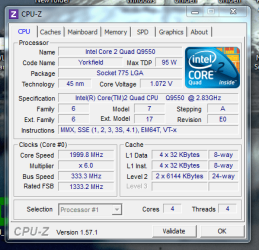
- Intel Core 2 Quad Q9550 -- Yorkfield 2.83 GHz 1333 MHz processor.
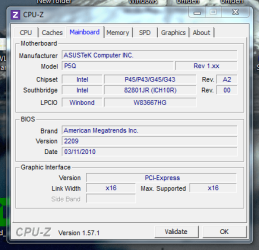
- ASUS P5Q desktop motherboard.
- 6 GB of Corsair XMS2 3x2 GB DDR2 RAM.
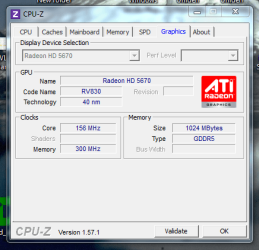
- XFX Radeon HD5670 GDDR5 1GB RAM Graphics Card.
 

My Computer My Computer

At a glance

Windows 7 Pro x64 SP1 & Windows 8 & 8.1 Pro x64
Computer type
PC/Desktop
OS
Windows 7 Pro x64 SP1 & Windows 8 & 8.1 Pro x64
I think you may be running all 6 gb in single channel mode with that configuration. Or at least the single stick would be in single channel. It's OK, won't hurt anything.

What happens if you remove the original 2 sticks and just use the new 2 sticks? Can you then run Prime 95 with no errors??? I'm just wondering if one of the 2 new sticks is in fact defective??

Have you considered running memtest on the RAM?
 

My Computer My Computer

At a glance

Windows 7 Home Premium SP1, 64-bitIntel Skylake i5-6600K, not overclocked8 GB HyperX DDR4-2666 (2 x 4 GB)none; graphics are integrated on CPU
Computer type
PC/Desktop
Computer Manufacturer/Model Number
Ignatz Special; 4 speed manual gearbox; factory air conditioning; one of one
OS
Windows 7 Home Premium SP1, 64-bit
CPU
Intel Skylake i5-6600K, not overclocked
Motherboard
AsRock Z170M Extreme 4, micro ATX
Memory
8 GB HyperX DDR4-2666 (2 x 4 GB)
Graphics Card(s)
none; graphics are integrated on CPU
Sound Card
onboard: Realtek ALC1150; external: USB Behringer UF0-202
Monitor(s) Displays
Dell S2340M 23 inch IPS
Screen Resolution
1600 x 900
Hard Drives
System: Crucial MX100 series SSD, 128 GB;
Data: Samsung Spinpoint 103SJ, 1 TB;
Backup: WD Caviar Green WD30EZRX-00D8PB0, 3 TB
PSU
Rosewill SilentNight 500 watt fanless, semi-modular
Case
Antec Solo II
Cooling
Noctua NH-U12S; Noctua F12 intake, Noctua S12A exhaust
Keyboard
Microsoft 200 6JH-00001 USB
Mouse
Dell or Microsoft optical wired; USB
Antivirus
Microsoft Security Essentials and Malwarebytes Premium
Browser
Pale Moon
Other Info
All fans PWM; speeds at idle: CPU circa 500 rpm; intake circa 600 rpm; exhaust circa 600 rpm; CPU temps 27 idle and 47 C load in a warm room (27 C/81 F) when running Intel Extreme Tuning Utility stress test.
What happens if you remove the original 2 sticks and just use the new 2 sticks? Can you then run Prime 95 with no errors??? I'm just wondering if one of the 2 new sticks is in fact defective??

Have you considered running memtest on the RAM?

Hello. Thanks for your reply!

Yes, I have ran both Memtest and Windows Memory Diagnostic Tool (WMDT) on all 4 modules (when I had the full 8 GB RAM installed) a few weeks ago. After 5 passes (approx. 12 hours of testing) with Memtest, the results were fine. WMDT even passed when I set the most comprehensive test settings. Yah, I know the tests are not 100% accurate, so there STILL could be a faulty module.

I even have ran for testing purposes both 4 GB kits (original and new) SEPARATELY in my system. I never saw any issues -- testing or just using them.

I have to think it is the "FULL" 8 GB gets the system a little cranky at times! Yah, have to remember ASUS's QVL list does NOT recommend more than TWO of THESE PARTICULAR modules in my motherboard.

YET...

I read online that you can mix and match modules (to some degree) and you will still get more RAM?!?!? (My 4 modules are almost matches which goes against the QVL requirements for this particular RAM for my motherboard.)
 

My Computer My Computer

At a glance

Windows 7 Pro x64 SP1 & Windows 8 & 8.1 Pro x64
Computer type
PC/Desktop
OS
Windows 7 Pro x64 SP1 & Windows 8 & 8.1 Pro x64
I'd say the results speak for themselves. Knowing the model# of your motherboard, however, could produce more information:

How to fill out system specs

James
 

My Computer My Computer

At a glance

Win7U 64 RTMQ95508GB GskillASUS|EAH4850/HTDI/1GD3/A
OS
Win7U 64 RTM
CPU
Q9550
Motherboard
GA-EP45-UD3R
Memory
8GB Gskill
Graphics Card(s)
ASUS|EAH4850/HTDI/1GD3/A
Sound Card
xfi Plat
Monitor(s) Displays
Dell 2405fpw
Screen Resolution
1920x1200
Hard Drives
Seagate & WD sata Drives
PSU
Antec
Case
Antec
Keyboard
MS Natural Ergonomic 4000
Mouse
Logitech MX610 USB Cordless
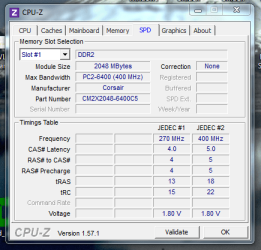
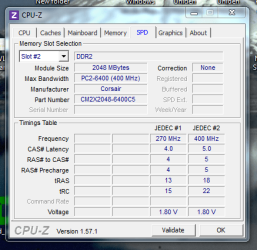
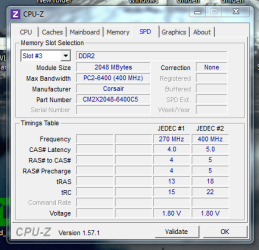
How about downloading and installing CPU-Z, run it and then post four screenshots of the four memory slots using the SPD tab.

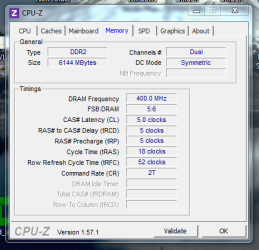
Also, please post two screenshots of the CPU and Memory tabs.

These should be very helpful in figuring out what's really going on.
 

My Computer My Computer

At a glance

Windows 7 Pro x64 (1), Win7 Pro X64 (2)i5-3350p 3.1Ghz/6MB-cache (1); E8400 3.0Ghz/6...8GB PC3-12800 DDR3 (1); 4GB PC3-10600 DDR3 (2)ATI HD7750 (1), (see TV cards); ATI R7 250 (2)
Computer type
PC/Desktop
Computer Manufacturer/Model Number
Home-built, two systems (1) and (2)
OS
Windows 7 Pro x64 (1), Win7 Pro X64 (2)
CPU
i5-3350p 3.1Ghz/6MB-cache (1); E8400 3.0Ghz/6MB-cache (2)
Motherboard
ASUS P8Z77-V Pro (1); ASUS P5Q3 (2)
Memory
8GB PC3-12800 DDR3 (1); 4GB PC3-10600 DDR3 (2)
Graphics Card(s)
ATI HD7750 (1), (see TV cards); ATI R7 250 (2)
Sound Card
Realtek ALC892 HD Audio (1); Realtek ALC1200 HD Audio (2)
Monitor(s) Displays
Eizo HD2441W LCD, Eizo S2433W (1); Eizo 24" S2433W (2)
Screen Resolution
1920x1200, 1920x1200 (1); 1920x1200 (2)
Hard Drives
(1) 1TB SATA-II (7200RPM), 2x2TB SATA-III (7200RPM), 250GB SATA-III (10000RPM) for OS; 2x2TB external USB 3.0

(2) 320GB SATA-II (7200RPM), 750GB SATA-II (7200RPM), 150GB SATA-II (10000RPM) for OS; 2TB external USB 3.0
PSU
Nesteq ECS-6001 600W (1); Nesteq ECS-5001 500W (2)
Case
Acousti-Case 360 (1) and (2)
Cooling
Noctua NH-U12P SE2 for CPU, 2x120mm case fans (1) and (2)
Keyboard
IBM PS/2 (1) and (2)
Mouse
Logitech MX Revolution wireless (1); Microsoft wired (2)
Internet Speed
100mbps down / 10mbps up
Antivirus
Microsoft Security Essentials; Malwarebyte Anti-Malware Pro
Browser
Firefox
Other Info
Ceton InfiniTV 4-tuner cablecard-enabled TV card as well as Hauppauge HVR-2250 OTA/ATSC 2-tuner TV card in (1), running under Win7 WMC
If you are sure the RAM modules themselves are good, the problem obviously lies elsewhere.

I would try as suggested, and take a look at what CPUZ has to say.
Then, manually set the Voltage/Timings/speeds in the bios to match whatever the weakest kit is of the bunch.

Again, as mentioned, knowing more about your system will be beneficial.
Its possible that the NB may need a slight little bump in voltage to stabilize the system with 4 DIMMS in use.
Or, that the the DIMMS will need to run at a slightly lower frequency.

My board for example will run my 2 DIMMS at thier 1066 speed all day stable as can be.
Throw another 2 in there for a total of 4, 8GB, and theres a stability issues at 1066 speed and stock voltages.


4 DIMMS put more stress on the NB, so youll need to find where its happy to run them all. No board/config is the same.
Some will have no issues, some will be get grumpy.


Manually setting the RAM to run at DDR 800 5-5-5-15 (1.8v) may actually stabilize it.
 

My Computer My Computer

At a glance

Windows 7 Home Premium 64bitIntel Core i7 2700k8GB Mushkin Redline Ridgebacks @1866EVGA GTX570 SC
Computer Manufacturer/Model Number
Custom (Self Build)
OS
Windows 7 Home Premium 64bit
CPU
Intel Core i7 2700k
Motherboard
eVGA P67 SLI
Memory
8GB Mushkin Redline Ridgebacks @1866
Graphics Card(s)
EVGA GTX570 SC
Sound Card
XiFi Titanium HD
Monitor(s) Displays
LG W2453V
Screen Resolution
1920x1080
Hard Drives
Intel 320 80GB -- Intel X25-V 40GB --WD Black 1TB x2 -- WD Blue 640GB
PSU
Seasonic x750
Case
Corsair 600T SE White
Cooling
eVGA Superclocked CPU Cooler
Keyboard
Saitek Cyborg
Antivirus
Kaspersky
Browser
IE
Other Info
LG BD/DVD
Sounds like the NB is stressing with 4 dimms, are the dimms single banked or double banked, this will affect them too if I remember correctly, as wishmaster said bump the voltage a tad.
 

My Computer My Computer

At a glance

Win 10 ProE3-1230 V22 X 4gb Samsung Green Wonder RamDiamond HD7970
Computer type
PC/Desktop
Computer Manufacturer/Model Number
Custom Build
OS
Win 10 Pro
CPU
E3-1230 V2
Motherboard
Asus P8Z77 LX
Memory
2 X 4gb Samsung Green Wonder Ram
Graphics Card(s)
Diamond HD7970
Sound Card
ALC892 8-Channel High Definition
Monitor(s) Displays
ASUS VN247/Sanyo 42 1080p LCD
Screen Resolution
1920x1080
Hard Drives
Sandisk Extreme II 240GB SSD/
1 X WD 1 TB Black Spinner
PSU
OCZ 600W Mod X Stream Modular
Case
Lian Li Pc7b-modded
Cooling
H100
Keyboard
Saitek Eclipse KYB
Mouse
Logitech G400
Internet Speed
90Mb D/L 15Mb upload
Antivirus
Webroot Secure Anywhere Endpoint Protection
Browser
Cyberfox/Chrome
Other Info
Logitech 5500 Speakers 5.1 / sOME kiND OF rUSSIAN TURNTABLE
Some say IT HAS BLOOD ON IT FETUS OIL,EWWWW DIAPHRAGM LIKERS
Still waiting for the requested CPU-Z screenshots, so that we can look at the hardware details of his machine, look up the specifics from manufacturer sites, etc..

Otherwise... it's sheer speculation.
 

My Computer My Computer

At a glance

Windows 7 Pro x64 (1), Win7 Pro X64 (2)i5-3350p 3.1Ghz/6MB-cache (1); E8400 3.0Ghz/6...8GB PC3-12800 DDR3 (1); 4GB PC3-10600 DDR3 (2)ATI HD7750 (1), (see TV cards); ATI R7 250 (2)
Computer type
PC/Desktop
Computer Manufacturer/Model Number
Home-built, two systems (1) and (2)
OS
Windows 7 Pro x64 (1), Win7 Pro X64 (2)
CPU
i5-3350p 3.1Ghz/6MB-cache (1); E8400 3.0Ghz/6MB-cache (2)
Motherboard
ASUS P8Z77-V Pro (1); ASUS P5Q3 (2)
Memory
8GB PC3-12800 DDR3 (1); 4GB PC3-10600 DDR3 (2)
Graphics Card(s)
ATI HD7750 (1), (see TV cards); ATI R7 250 (2)
Sound Card
Realtek ALC892 HD Audio (1); Realtek ALC1200 HD Audio (2)
Monitor(s) Displays
Eizo HD2441W LCD, Eizo S2433W (1); Eizo 24" S2433W (2)
Screen Resolution
1920x1200, 1920x1200 (1); 1920x1200 (2)
Hard Drives
(1) 1TB SATA-II (7200RPM), 2x2TB SATA-III (7200RPM), 250GB SATA-III (10000RPM) for OS; 2x2TB external USB 3.0

(2) 320GB SATA-II (7200RPM), 750GB SATA-II (7200RPM), 150GB SATA-II (10000RPM) for OS; 2TB external USB 3.0
PSU
Nesteq ECS-6001 600W (1); Nesteq ECS-5001 500W (2)
Case
Acousti-Case 360 (1) and (2)
Cooling
Noctua NH-U12P SE2 for CPU, 2x120mm case fans (1) and (2)
Keyboard
IBM PS/2 (1) and (2)
Mouse
Logitech MX Revolution wireless (1); Microsoft wired (2)
Internet Speed
100mbps down / 10mbps up
Antivirus
Microsoft Security Essentials; Malwarebyte Anti-Malware Pro
Browser
Firefox
Other Info
Ceton InfiniTV 4-tuner cablecard-enabled TV card as well as Hauppauge HVR-2250 OTA/ATSC 2-tuner TV card in (1), running under Win7 WMC
Have you checked to make sure there where now BIOS updates? This might be an issue they sorted out with a firmware update.
 

My Computer My Computer

At a glance

Windows 7 Ultimate x64 SP1AMD Phenom II 1090 3.2 six core16 gig DDR3MSI R6950 2gig
Computer Manufacturer/Model Number
Custom Build
OS
Windows 7 Ultimate x64 SP1
CPU
AMD Phenom II 1090 3.2 six core
Motherboard
MSI 890FXA-GD65
Memory
16 gig DDR3
Graphics Card(s)
MSI R6950 2gig
Sound Card
on board
Monitor(s) Displays
Acer 23inch led
Screen Resolution
1900x1080 widescreen
Hard Drives
Seagate 1tb SATA6
2x 1tb HITACHI Deskstar
PSU
CORSAIR Enthusiast Series TX750 V2 750W
Case
CoolMaster HAF 922
Cooling
Box AMD Heatsink/Fan
Internet Speed
Cable 12Mbps/3Mbps
Hello. I am back. I have been quite busy and I will not drop this issue!! I apologize for my tardiness!

First off, thanks for ALL your responses!!! :) I see I have friends here! ;)

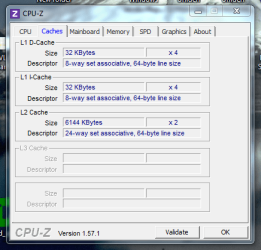
Okay, regarding the requested screen shots of CPU-Z. These CPU-Z screen shots are regarding this STABLE system with 6 GB of RAM. I have attached ALL (more than you requested) of them (All its tabs except the "About" tab, obviously.) for your information. I figured more information the better for you to get a better idea of what is going on here. I see you can tell A LOT about my system from this program. Yes, slot number 4 is empty because there is no RAM module in there.

What to additionally note to assist you and some of you even asked for as well:

1. Yes, I stable right now as I said in my initial post with the 6 GB of RAM. It's when I go to 8 GB of RAM when that random video freezes and BSODs happen during playback (later on during the playback) like watching a long You Tube video (BCCode: 117 & 119) -- see my initial post.

2. I have all my BIOS settings set to default or "Auto" with *NO* BIOS modifications of any kind (voltages, timings, temps, etc.) at this point because at 6 GB of RAM things are working fine.

3. You may be wondering on the way my motherboard configures memory -- like single or dual channel configuration with my installed odd 6 GB. This is what my ASUS User Guide states in regard about this:

"You may install varying memory sizes in Channel A and Channel B. The system maps the total size of the lower-sized channel for the dual-channel configuration. Any excess memory from the higher-sized channel is then mapped for single channel operation."

So... ...I take it to mean that since my ASUS P5Q has 4 RAM slots called Channel A that is DIMM_A1 and DIMM_A2 (These are paired together in terms of proximity -- yellow and black slots.) and likewise Channel B that is DIMM_B1 and DIMM_B2, where Channel A has 4 GB installed and Channel B has 2 GB installed; I STILL HAVE SOME *DUAL* channel configuration for both channel slots DIMM_A1 & DIMM_B1 since Channel B is smaller than Channel A and Channel B determines the minimum mapping for dual channel configuration. The excess RAM (2 GB) in the Channel A (DIMM_A2) is the SINGLE channel mapping configuration. So I have BOTH kinds of mapping channel configurations. My system can do both and not just stick with complete single channel mode.

4. With the Corsair XMS2 4GB 2x2GB modules; TWIN2X4096-6400C5 -- They are double banked or chips on both sides of each module covered by heat-sinks on both sides.

5. In terms of the BIOS Update for my particular ASUS P5Q, I am running the latest from the ASUS website: that is 2209. It was flashed quite some time ago.


...BUT I WOULD LOVE TO GET IT TO UP TO *8* GB OF RAM!!!! THAT IS MY GOAL!!!!

Let me ask you this... ...Would you like or need to compare this CPU-Z data with current stable 6 GB RAM system to the similar CPU-Z data when I am running my system with *8* GB of RAM and this particular issue???????????? Let me know!


I hope all this data helps you get to the bottom of this issue with 8 GB of RAM! :)

Please reply.

Any more questions, please let me know.

Thank you!
 

Attachments

  • CPU-Z - SPD - Slot No. 1 - 5-21-11 PM.PNG
    CPU-Z - SPD - Slot No. 1 - 5-21-11 PM.PNG
    23.5 KB · Views: 1
  • CPU-Z - SPD - Slot No. 2 - 5-21-11 PM.PNG
    CPU-Z - SPD - Slot No. 2 - 5-21-11 PM.PNG
    26.3 KB · Views: 0
  • CPU-Z - SPD - Slot No. 3 - 5-21-11 PM.PNG
    CPU-Z - SPD - Slot No. 3 - 5-21-11 PM.PNG
    24.7 KB · Views: 1
  • CPU-Z _ SPD - Slot No. 4 - 5-21-11 PM.PNG
    CPU-Z _ SPD - Slot No. 4 - 5-21-11 PM.PNG
    25.2 KB · Views: 0
  • CPU-Z - Memory - 5-21-11 PM.PNG
    CPU-Z - Memory - 5-21-11 PM.PNG
    23.9 KB · Views: 0
  • CPU-Z - CPU - 5-21-11 PM.PNG
    CPU-Z - CPU - 5-21-11 PM.PNG
    31.2 KB · Views: 0
  • CPU-Z - Mainboard - 5-21-11 PM.PNG
    CPU-Z - Mainboard - 5-21-11 PM.PNG
    24.6 KB · Views: 1
  • CPU-Z - Caches - 5-21-11 PM.PNG
    CPU-Z - Caches - 5-21-11 PM.PNG
    21.4 KB · Views: 0
  • CPU-Z - Graphics - 5-21-11 PM.PNG
    CPU-Z - Graphics - 5-21-11 PM.PNG
    24.7 KB · Views: 0

My Computer My Computer

At a glance

Windows 7 Pro x64 SP1 & Windows 8 & 8.1 Pro x64
Computer type
PC/Desktop
OS
Windows 7 Pro x64 SP1 & Windows 8 & 8.1 Pro x64
Just a comment...

I have a system built around an ASUS P5Q3 board, which I believe is essentially the same as your P5Q board except for supporting faster DDR3 memory. My CPU is a Duo E8400, and I only have 2x2GB of DDR3 (PC3-10700) memory installed into DIMM slots A1+B1.

And my board has the same layout of A1/A2 and B1/B2 color-coded DIMM slots for memory.

I believe that to take advantage of dual-channel memory configurations, if you only have TWO cards (e.g. a 2x2GB "kit" with two 2GB cards) you would insert them into A1 and B1, not A1 and A2 (which would force single-channel memory operation). Is that how you originally had your two cards installed, before you upgraded? A1+B1?

Now in your upgraded setup, you've bought what you believed to be identical memory... which simply had a newer "version number" on it from the manufacturer. Personally I think that means nothing in terms of it being compatible with the older versions of the identical memory. I think the new ones should really be considered identical.

So now you have FOUR identical cards. I would have thought that if you inserted the new cards into the "second pair of dual-channel slots", namely A2+B2, leaving your original memory cards in A1+B1, that this should likely provide perfect operation. Sure seems like all four cards are "identical" and have the same internally recognizable part # from CPU-Z's output. The three screenshots look identical (although the "version" number is not shown) in every respect, but if there is even the slightest difference in the old pair and new pair I would think inserting them as A1+B1 and A2+B2, that this should certainly minimize or eliminate any possible effect.

With only three memory cards inserted, again I would put the old pair in A1+B1 and the new "orphan" in A2... as you've done (although I don't know if your original two card setup was A1+B1 to utilize dual-channel performance, or A1+A2 which would have forced single-channel performance).

But other than being caused by some other instability on this whole hardware setup (perhaps from other hardware), I do believe that since you've tried FOUR identical memory sticks it really shouldn't make a difference where you insert them, except that my own understanding is that for dual-channel operation you should be using A1+B1 for 2x2GB, and then A2+B2 for the upgrade to use the second 2x2GB purchase.
 

My Computer My Computer

At a glance

Windows 7 Pro x64 (1), Win7 Pro X64 (2)i5-3350p 3.1Ghz/6MB-cache (1); E8400 3.0Ghz/6...8GB PC3-12800 DDR3 (1); 4GB PC3-10600 DDR3 (2)ATI HD7750 (1), (see TV cards); ATI R7 250 (2)
Computer type
PC/Desktop
Computer Manufacturer/Model Number
Home-built, two systems (1) and (2)
OS
Windows 7 Pro x64 (1), Win7 Pro X64 (2)
CPU
i5-3350p 3.1Ghz/6MB-cache (1); E8400 3.0Ghz/6MB-cache (2)
Motherboard
ASUS P8Z77-V Pro (1); ASUS P5Q3 (2)
Memory
8GB PC3-12800 DDR3 (1); 4GB PC3-10600 DDR3 (2)
Graphics Card(s)
ATI HD7750 (1), (see TV cards); ATI R7 250 (2)
Sound Card
Realtek ALC892 HD Audio (1); Realtek ALC1200 HD Audio (2)
Monitor(s) Displays
Eizo HD2441W LCD, Eizo S2433W (1); Eizo 24" S2433W (2)
Screen Resolution
1920x1200, 1920x1200 (1); 1920x1200 (2)
Hard Drives
(1) 1TB SATA-II (7200RPM), 2x2TB SATA-III (7200RPM), 250GB SATA-III (10000RPM) for OS; 2x2TB external USB 3.0

(2) 320GB SATA-II (7200RPM), 750GB SATA-II (7200RPM), 150GB SATA-II (10000RPM) for OS; 2TB external USB 3.0
PSU
Nesteq ECS-6001 600W (1); Nesteq ECS-5001 500W (2)
Case
Acousti-Case 360 (1) and (2)
Cooling
Noctua NH-U12P SE2 for CPU, 2x120mm case fans (1) and (2)
Keyboard
IBM PS/2 (1) and (2)
Mouse
Logitech MX Revolution wireless (1); Microsoft wired (2)
Internet Speed
100mbps down / 10mbps up
Antivirus
Microsoft Security Essentials; Malwarebyte Anti-Malware Pro
Browser
Firefox
Other Info
Ceton InfiniTV 4-tuner cablecard-enabled TV card as well as Hauppauge HVR-2250 OTA/ATSC 2-tuner TV card in (1), running under Win7 WMC
@ dsperber:

Hello. Regarding your comment...

"But other than being caused by some other instability on this whole hardware setup (perhaps from other hardware), I do believe that since you've tried FOUR identical memory sticks it really shouldn't make a difference where you insert them, except that my own understanding is that for dual-channel operation you should be using A1+B1 for 2x2GB, and then A2+B2 for the upgrade to use the second 2x2GB purchase."

...Yes, that makes complete sense to me! I did have the correct module arrangement when the 8 GB RAM was installed. I must of confused you, sorry! Now, the only slot I am not using is the B2 slot. The orphan RAM module is in A2 for me. I am thinking just maybe I should try the other way that is not recommended (A1 +A2) with one kit just to see what happens?!? You never know. :confused: Who knows? I may get single channel configuration now, but without this issue I am getting?!?
Is it possible the B2 *slot* on the mobo is defective, maybe???

It STILL could mean that a module in the NEW kit is bad and it just may be the other module I am not using now that is defective regardless if Memtest and Windows Memory Diagnostic tests indicated they all are okay? I have heard these tests are NOT 100% perfect.

I am also wondering if my slower RAM could be the reason for this issue????????????????????????

Let me ask you this... ....did YOU have to change the voltages and timings (like the DRAM or the northbridge) at all with your ASUS P5Q3 with 8 GB of RAM installed????????? PLEASE LET ME KNOW!


Let me bring up this and please let me know what you think. This is what I found about my RAM and where I found my mistake AFTER THE FACT:

I want to mention this...

First, let me throw out a tidbit and be MORE SPECIFIC about the memory I HAVE and the similar 'recommended' Corsair RAM that is recommend for all 4 slots or 8 GB:

A. What I am using (I HAVE) that is NOT recommended for ALL 4 slots in my mobo, only 2 slots max. is:
Corsair XMS2 4 GB 2 x 2 GB Modules DDR2 TWIN2X4096-6400C5

B. What is recommended to use with my mobo for ALL 4 slots for 8 GB:
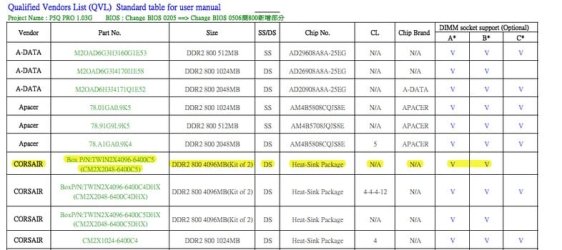
Please see the attached QVL RAM Mobo chart for your help. You may have seen this at some point. Basically, my RAM is NOT recommended for 2 set of kits, but only 1 kit. [SOURCE: ASUS P5Q Motherboard User Guide E3790]

Take note of the 4 Corsair modules groupings in the chart. The two sets of kits I have is the same one and is highlighted in yellow. Like I said in my initial post, I misread the QVL chart before I purchased the second RAM kit and realized the mistake no too long ago.

Also...
*let me add some information to the charts so you can interpret A, B, and C for "DIMM Socket Support" mean since it is not explained here:

A = Supports one module inserted into either slot as a single-channel memory configuration.

B = Supports one pair of modules inserted into either the yellow slots or the black slots as one pair of dual-channel memory configuration.

C = Supports four modules inserted into both the yellow and black slots as two pairs of dual-channel memory configuration.

My highlighted memory is missing the "C" potential. That is what I am trying to do. I already have "B". I mean... ...and the real question is this... ...CAN I STILL TRY TO GET IT WORK FOR ALL 4 SLOTS (BOTH KITS) IF IT IS NOT RECOMMENDED OR CAN'T I?!?!? In-other-words, does "not recommended" mean that it MAY not work or NOT WORK at ALL?????????????????????????????
Hmmmmmm.... :confused:


Please reply.

Thanks again!
 

Attachments

  • QVL RAM Chart for ASUS P5Q Info. - 5-20-11 PM.jpg
    QVL RAM Chart for ASUS P5Q Info. - 5-20-11 PM.jpg
    48.1 KB · Views: 16

My Computer My Computer

At a glance

Windows 7 Pro x64 SP1 & Windows 8 & 8.1 Pro x64
Computer type
PC/Desktop
OS
Windows 7 Pro x64 SP1 & Windows 8 & 8.1 Pro x64
I did have the correct module arrangement when the 8 GB RAM was installed. I must of confused you, sorry! Now, the only slot I am not using is the B2 slot. The orphan RAM module is in A2 for me.
I see. Sounds perfect to me.


I am thinking just maybe I should try the other way that is not recommended (A1 +A2) with one kit just to see what happens?!? You never know. :confused: Who knows? I may get single channel configuration now, but without this issue I am getting?!?
But that would only be 4GB, and surely undesirable. No? Am I misreading what you're suggesting?


Is it possible the B2 *slot* on the mobo is defective, maybe???
I suppose so. It does seem like you have some kind of intermittent or flaky hardware issue, rather than a hard failure.


It STILL could mean that a module in the NEW kit is bad and it just may be the other module I am not using now that is defective regardless if Memtest and Windows Memory Diagnostic tests indicated they all are okay? I have heard these tests are NOT 100% perfect.
Possible, I suppose.


I am also wondering if my slower RAM could be the reason for this issue????????????????????????
WHAT "SLOWER RAM"???

Did I miss something?? I thought these were all four "identical" memory cards in all respects, other than for the minor "version number" difference on the newer ones.


Let me ask you this... ....did YOU have to change the voltages and timings (like the DRAM or the northbridge) at all with your ASUS P5Q3 with 8 GB of RAM installed????????? PLEASE LET ME KNOW!
I don't have 8GB of RAM installed. I only have 2x2GB=4GB installed, with 2GB in each slot A1+B1.

But the answer is NO, I did not change anything in my BIOS memory settings. I let the hardware figure out for itself what is right and proper. Every single one of my memory-related settings is set to "AUTO". I never changed one of them.

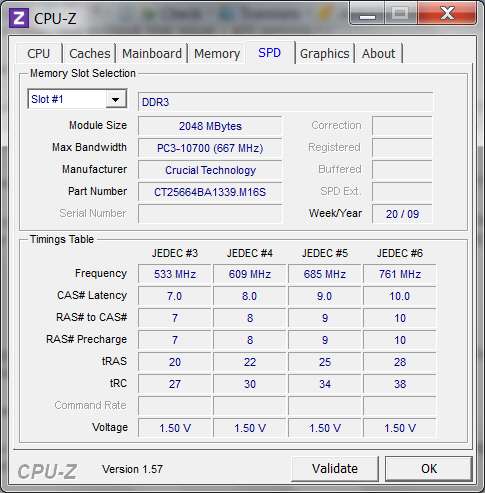
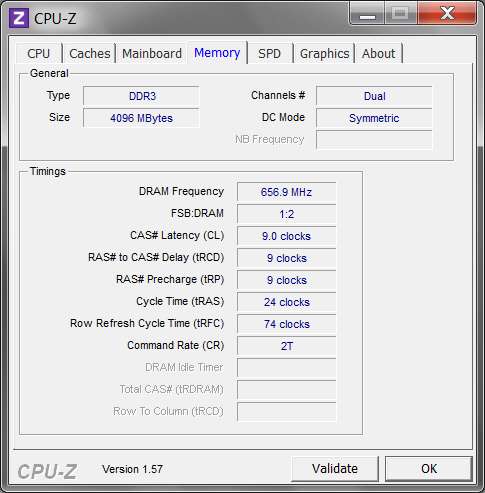
My memory is from Crucial (aka Micron) as has ALL of my memory been ever since I built my very first computer. The QVL chart in the ASUS user manual for the P5Q3 shows the exact "part number" for my Crucial memory that is presented by CPU-Z:

cpuzspd.jpg


Again, I only have A1+B1 (slot #1 and slot #3 for CPU-Z) populated, with truly identical 2GB memory cards from Crucial as shown above. The two cards were purchased as a "2x2GB kit".

cpuzmemoryo.jpg


As far as your other thoughts and comments, I would still like to see the four slots on the SPD tab from CPU-Z. I'd thought all four memory cards were identical, but now I think you're saying that they're NOT identical... but rather have "different speeds".

A picture's worth 1000 words, so let's see those screenshots from CPU-Z.
 

My Computer My Computer

At a glance

Windows 7 Pro x64 (1), Win7 Pro X64 (2)i5-3350p 3.1Ghz/6MB-cache (1); E8400 3.0Ghz/6...8GB PC3-12800 DDR3 (1); 4GB PC3-10600 DDR3 (2)ATI HD7750 (1), (see TV cards); ATI R7 250 (2)
Computer type
PC/Desktop
Computer Manufacturer/Model Number
Home-built, two systems (1) and (2)
OS
Windows 7 Pro x64 (1), Win7 Pro X64 (2)
CPU
i5-3350p 3.1Ghz/6MB-cache (1); E8400 3.0Ghz/6MB-cache (2)
Motherboard
ASUS P8Z77-V Pro (1); ASUS P5Q3 (2)
Memory
8GB PC3-12800 DDR3 (1); 4GB PC3-10600 DDR3 (2)
Graphics Card(s)
ATI HD7750 (1), (see TV cards); ATI R7 250 (2)
Sound Card
Realtek ALC892 HD Audio (1); Realtek ALC1200 HD Audio (2)
Monitor(s) Displays
Eizo HD2441W LCD, Eizo S2433W (1); Eizo 24" S2433W (2)
Screen Resolution
1920x1200, 1920x1200 (1); 1920x1200 (2)
Hard Drives
(1) 1TB SATA-II (7200RPM), 2x2TB SATA-III (7200RPM), 250GB SATA-III (10000RPM) for OS; 2x2TB external USB 3.0

(2) 320GB SATA-II (7200RPM), 750GB SATA-II (7200RPM), 150GB SATA-II (10000RPM) for OS; 2TB external USB 3.0
PSU
Nesteq ECS-6001 600W (1); Nesteq ECS-5001 500W (2)
Case
Acousti-Case 360 (1) and (2)
Cooling
Noctua NH-U12P SE2 for CPU, 2x120mm case fans (1) and (2)
Keyboard
IBM PS/2 (1) and (2)
Mouse
Logitech MX Revolution wireless (1); Microsoft wired (2)
Internet Speed
100mbps down / 10mbps up
Antivirus
Microsoft Security Essentials; Malwarebyte Anti-Malware Pro
Browser
Firefox
Other Info
Ceton InfiniTV 4-tuner cablecard-enabled TV card as well as Hauppauge HVR-2250 OTA/ATSC 2-tuner TV card in (1), running under Win7 WMC
Back
Top