I am using windows 7 Ultimate and my processor (CPU) is

wizard25

New member
My processor is AMD Athlon II X2 250 3.0Ghz.When I am running windows 7 my processor is working at 20%-30% when I am doing nothing.My processor is he working on empty or what.


Here i my configuration for each case:

AMD Athlon II X2 250
AMD 760G
4GB DDR2-800
Radeon HD 4730 512MB GDDR5
500GB SATAII 7200rpm 16MB
DVD±R/RW 20x SATAII
Ethernet, Audio
3.5" Card reader 15-in-1
CoolerMaster MidiTower 420W
Windows 7 Ultimate

992s1e.png

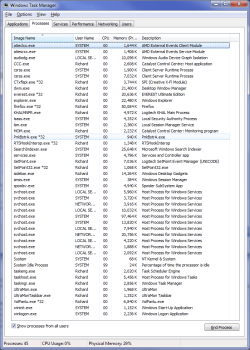
look at this in task manager look at CPU For all Processes and look on the other side
how much is my processor working 29% (it should be about 6%) sometimes is higher.

If my processor is working on empty,is it possible to break?
Is this because of my operating system?
Is there any Solution
 

My Computer

Computer Manufacturer/Model Number
ComTrade PerfeCT 5400
OS
Windows 7 Ultimate SP1 64-bit
CPU
AMD Athlon II X2 250 3.0Ghz
Motherboard
AMD 760G
Memory
4GB DDR2-800Mhz
Graphics Card(s)
Radeon HD 4730 512MB GDDR5
Monitor(s) Displays
Acer H223HQ,ViewSonic VE510b
Screen Resolution
1920x1080 (1080p),1024x768
Hard Drives
3.5" Card reader 15-in-1
Keyboard
Logitech G11
Mouse
Thermaltake Mouse
Internet Speed
4Mbits/s
This is normal for Win & 64bit and 4 gig of memory BUT
after looking at many of the things you have running in the background this can be reduced by shutting down dome of the services that don't need to be on after a clean boot.

Man do you have extra baggage that you don't need running.
I'm not talking Win7 stuff but the other stuff.
Google Chrome, Microsoft messenger, PowerISO,Nero Home just to name a few.
You don't need that stuff running all the time inthe background.
I only have 2 gig and running 32bit Win7 Ultimate and here are the few things I have that are not for Win7 OS.
 
Last edited:

My Computer

Computer type
PC/Desktop
Computer Manufacturer/Model Number
Self Built
OS
Windows 10 Pro
CPU
Intel i5
Motherboard
I have a fatherboard
Memory
I'm old and lost a few chips
Graphics Card(s)
Yup
Sound Card
Yup
Monitor(s) Displays
Samsung 32" UHD
Screen Resolution
3840 x 2160
Hard Drives
Samsung 860 EVO drives
PSU
450 Watt and some fans that blow
Case
Small tower
Cooling
Yes I am cool. lol
Keyboard
Who needs a keyboard?
Mouse
Logitech Laser G7 wireless
Internet Speed
Zippy fast UP and DOWN
Antivirus
I got a shot
Browser
The new Improved EDGE 2020
What does it show if you close all programs, put it to sleep, then wake it up? That RAM percentage seems high for doing nothing too.
 

My Computer

Computer type
PC/Desktop
Computer Manufacturer/Model Number
Gigabyte Technology Co., Ltd.
OS
Win 7 Ultimate 64-bit SP1 (desktop)
CPU
Intel Core 2 Duo E8400
Motherboard
Gigabyte GA-EP35-DS3R
Memory
2x 2GB OCZ DDR II SDRAM PC2-6400
Graphics Card(s)
NVIDIA GeForce 9400GT
Monitor(s) Displays
HP 2009m(primary), Acer P191W
Screen Resolution
1600x900, 1440x900
Hard Drives
Internal:WD Caviar Black 640GB 32MB cache 7200RPM
External:Samsung Story Station 1TB HDD desktop drive
500GB Toshiba portable drive
PSU
Antec Earthwatts EA500D
Case
Antec Sonata III
Cooling
4 fans
Keyboard
Logitech Wave
Mouse
Logitech M-SBF90
Internet Speed
Slow due to home Wireless-G router
Antivirus
MSE, Hitman Pro, Malwarebytes
Browser
Chrome and Palemoon
Other Info
Laptop....Acer 5750Z-4835
15.6" HD Widescreen CineCrystal™ LED-backlit LCD Display: (1366x768 resolution, 16:9 aspect ratio)
Intel® Pentium® Processor B940 (2.0GHz, 2MB L3 cache)
Windows® 7 Home Premium,500GB Hard Drive,4GB DDR3 RAM, Intel® HD Graphics,8X DVD-Super Multi Double-Layer Drive
Multi-in-1 Digital Media Card Reader,802.11b/g/n Wi-Fi
Chrome and Palemoon, MSE, Hitman Pro

My Computer

Computer Manufacturer/Model Number
ComTrade PerfeCT 5400
OS
Windows 7 Ultimate SP1 64-bit
CPU
AMD Athlon II X2 250 3.0Ghz
Motherboard
AMD 760G
Memory
4GB DDR2-800Mhz
Graphics Card(s)
Radeon HD 4730 512MB GDDR5
Monitor(s) Displays
Acer H223HQ,ViewSonic VE510b
Screen Resolution
1920x1080 (1080p),1024x768
Hard Drives
3.5" Card reader 15-in-1
Keyboard
Logitech G11
Mouse
Thermaltake Mouse
Internet Speed
4Mbits/s
This is normal for Win & 64bit and 4 gig of memory
Really? My CPU is hovering between 2-4% playing music and reading this forum(granted, it's clocked higher than the OP's). My RAM is around 30% right now, but if I closed everythingt out and put it to sleep, then upon re-awakening the RAM would drop down to like 15%.
 

My Computer

Computer type
PC/Desktop
Computer Manufacturer/Model Number
Gigabyte Technology Co., Ltd.
OS
Win 7 Ultimate 64-bit SP1 (desktop)
CPU
Intel Core 2 Duo E8400
Motherboard
Gigabyte GA-EP35-DS3R
Memory
2x 2GB OCZ DDR II SDRAM PC2-6400
Graphics Card(s)
NVIDIA GeForce 9400GT
Monitor(s) Displays
HP 2009m(primary), Acer P191W
Screen Resolution
1600x900, 1440x900
Hard Drives
Internal:WD Caviar Black 640GB 32MB cache 7200RPM
External:Samsung Story Station 1TB HDD desktop drive
500GB Toshiba portable drive
PSU
Antec Earthwatts EA500D
Case
Antec Sonata III
Cooling
4 fans
Keyboard
Logitech Wave
Mouse
Logitech M-SBF90
Internet Speed
Slow due to home Wireless-G router
Antivirus
MSE, Hitman Pro, Malwarebytes
Browser
Chrome and Palemoon
Other Info
Laptop....Acer 5750Z-4835
15.6" HD Widescreen CineCrystal™ LED-backlit LCD Display: (1366x768 resolution, 16:9 aspect ratio)
Intel® Pentium® Processor B940 (2.0GHz, 2MB L3 cache)
Windows® 7 Home Premium,500GB Hard Drive,4GB DDR3 RAM, Intel® HD Graphics,8X DVD-Super Multi Double-Layer Drive
Multi-in-1 Digital Media Card Reader,802.11b/g/n Wi-Fi
Chrome and Palemoon, MSE, Hitman Pro
What does it show if you close all programs, put it to sleep, then wake it up? That RAM percentage seems high for doing nothing too.

its lower 20 %
 

My Computer

Computer Manufacturer/Model Number
ComTrade PerfeCT 5400
OS
Windows 7 Ultimate SP1 64-bit
CPU
AMD Athlon II X2 250 3.0Ghz
Motherboard
AMD 760G
Memory
4GB DDR2-800Mhz
Graphics Card(s)
Radeon HD 4730 512MB GDDR5
Monitor(s) Displays
Acer H223HQ,ViewSonic VE510b
Screen Resolution
1920x1080 (1080p),1024x768
Hard Drives
3.5" Card reader 15-in-1
Keyboard
Logitech G11
Mouse
Thermaltake Mouse
Internet Speed
4Mbits/s
wizard25 another screenshot with "Show Processes from all users" checked and showing everything that is running would help.
 

My Computer

Computer type
PC/Desktop
Computer Manufacturer/Model Number
Me
OS
Win 7 Ultimate x64
CPU
FX-8350 @ 4.6 GHz so far
Motherboard
Asus M5A97 EVO
Memory
ADATA XPG V1 Series Black 8GB DDR3 1600
Graphics Card(s)
Sapphire R9 270x Dual-X
Sound Card
Xonar DGX w/ Corsair Vengence 1300
Monitor(s) Displays
Acer S232HL Abid
Screen Resolution
1920x1080
Hard Drives
120 GB OCZ Vertex 3
500 GB Seagate 7200.12
PSU
Antec Earthwatts 650W Green
Case
Antec Three Hundred
Cooling
Cooler Master 212 EVO
Keyboard
Logitech G510
Mouse
Logitech G500s
Internet Speed
35000/3000
wizard25 another screenshot with "Show Processes from all users" checked and showing everything that is running would help.

yes i see system idle process is most using the cpu.
and the other processes CPU as about 00-06
xqidzp.png

Is my CPU so high because of that?
And how some windows 7 users CPU works so Low (for example 5%).
is there any solution for this?
 

My Computer

Computer Manufacturer/Model Number
ComTrade PerfeCT 5400
OS
Windows 7 Ultimate SP1 64-bit
CPU
AMD Athlon II X2 250 3.0Ghz
Motherboard
AMD 760G
Memory
4GB DDR2-800Mhz
Graphics Card(s)
Radeon HD 4730 512MB GDDR5
Monitor(s) Displays
Acer H223HQ,ViewSonic VE510b
Screen Resolution
1920x1080 (1080p),1024x768
Hard Drives
3.5" Card reader 15-in-1
Keyboard
Logitech G11
Mouse
Thermaltake Mouse
Internet Speed
4Mbits/s
And how some windows 7 users CPU works so Low (for example 5%).

Or less,

taskman1.png

It will bounce up around 5-10% when playing music with Winamp, but when no music and just browsing what you see there is about it.

Grab this,

Process Explorer

and post back a screen shot of everything it shows.
 

My Computer

Computer type
PC/Desktop
Computer Manufacturer/Model Number
Me
OS
Win 7 Ultimate x64
CPU
FX-8350 @ 4.6 GHz so far
Motherboard
Asus M5A97 EVO
Memory
ADATA XPG V1 Series Black 8GB DDR3 1600
Graphics Card(s)
Sapphire R9 270x Dual-X
Sound Card
Xonar DGX w/ Corsair Vengence 1300
Monitor(s) Displays
Acer S232HL Abid
Screen Resolution
1920x1080
Hard Drives
120 GB OCZ Vertex 3
500 GB Seagate 7200.12
PSU
Antec Earthwatts 650W Green
Case
Antec Three Hundred
Cooling
Cooler Master 212 EVO
Keyboard
Logitech G510
Mouse
Logitech G500s
Internet Speed
35000/3000
And how some windows 7 users CPU works so Low (for example 5%).

Or less,

View attachment 46934

It will bounce up around 5-10% when playing music with Winamp, but when no music and just browsing what you see there is about it.

Grab this,

Process Explorer

and post back a screen shot of everything it shows.

But your processes are like my system idle process CPU is about 70-99 and the rest are about 00-06.
But You have 5%-10%
But my is stil 30%-50%

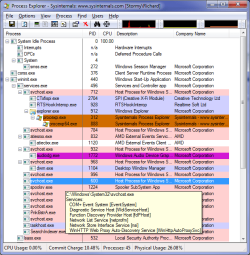
Heres a screenshot

2d8j9qo.png
 

My Computer

Computer Manufacturer/Model Number
ComTrade PerfeCT 5400
OS
Windows 7 Ultimate SP1 64-bit
CPU
AMD Athlon II X2 250 3.0Ghz
Motherboard
AMD 760G
Memory
4GB DDR2-800Mhz
Graphics Card(s)
Radeon HD 4730 512MB GDDR5
Monitor(s) Displays
Acer H223HQ,ViewSonic VE510b
Screen Resolution
1920x1080 (1080p),1024x768
Hard Drives
3.5" Card reader 15-in-1
Keyboard
Logitech G11
Mouse
Thermaltake Mouse
Internet Speed
4Mbits/s
Do we have a tutorial about how to stop all these extra programs from loading in startup? This has been my biggest gripe. The developers all want part of their programs running in memory even if the user isn't running it yet.
As you see in my screen above I have stopped all operations that were not needed and save a lot of memory space for other things.


Oh one last thing. Uncheck the box in the lower left of your screen. You just want your processes. This will eliminate many Microsoft stuff.
 

My Computer

Computer type
PC/Desktop
Computer Manufacturer/Model Number
Self Built
OS
Windows 10 Pro
CPU
Intel i5
Motherboard
I have a fatherboard
Memory
I'm old and lost a few chips
Graphics Card(s)
Yup
Sound Card
Yup
Monitor(s) Displays
Samsung 32" UHD
Screen Resolution
3840 x 2160
Hard Drives
Samsung 860 EVO drives
PSU
450 Watt and some fans that blow
Case
Small tower
Cooling
Yes I am cool. lol
Keyboard
Who needs a keyboard?
Mouse
Logitech Laser G7 wireless
Internet Speed
Zippy fast UP and DOWN
Antivirus
I got a shot
Browser
The new Improved EDGE 2020
Oh one last thing. Uncheck the box in the lower left of your screen. You just want your processes. This will eliminate many Microsoft stuff.

Only problem with that is, what if it is one of those Microsoft processes (and some programs even go so far as to list themselves as a "system" service) that is causing the problem? And if you look at his Process Explorer screen shot, 3 of those Microsoft processes are what is using most of the CPU,

2x svchost.exe @14.41% between them
1x wisptis.exe @4.55%- this one is the Tablet service, and only needed if you have a tablet connected.

which takes of ~20% of the CPU usage.

wizard25 if you mouse over any of the items shown in PE a balloon will appear showing what each process is, and in the case of the svchost.exe's, which processes are attached to them. If you could with the ones showing CPU usage, do that and make note of what is listed and post it back here.
 

My Computer

Computer type
PC/Desktop
Computer Manufacturer/Model Number
Me
OS
Win 7 Ultimate x64
CPU
FX-8350 @ 4.6 GHz so far
Motherboard
Asus M5A97 EVO
Memory
ADATA XPG V1 Series Black 8GB DDR3 1600
Graphics Card(s)
Sapphire R9 270x Dual-X
Sound Card
Xonar DGX w/ Corsair Vengence 1300
Monitor(s) Displays
Acer S232HL Abid
Screen Resolution
1920x1080
Hard Drives
120 GB OCZ Vertex 3
500 GB Seagate 7200.12
PSU
Antec Earthwatts 650W Green
Case
Antec Three Hundred
Cooling
Cooler Master 212 EVO
Keyboard
Logitech G510
Mouse
Logitech G500s
Internet Speed
35000/3000
Oh one last thing. Uncheck the box in the lower left of your screen. You just want your processes. This will eliminate many Microsoft stuff.

Only problem with that is, what if it is one of those Microsoft processes (and some programs even go so far as to list themselves as a "system" service) that is causing the problem? And if you look at his Process Explorer screen shot, 3 of those Microsoft processes are what is using most of the CPU,

2x svchost.exe @14.41% between them
1x wisptis.exe @4.55%- this one is the Tablet service, and only needed if you have a tablet connected.

which takes of ~20% of the CPU usage.

wizard25 if you mouse over any of the items shown in PE a balloon will appear showing what each process is, and in the case of the svchost.exe's, which processes are attached to them. If you could with the ones showing CPU usage, do that and make note of what is listed and post it back here.

2uoi4uf.png
 

My Computer

Computer Manufacturer/Model Number
ComTrade PerfeCT 5400
OS
Windows 7 Ultimate SP1 64-bit
CPU
AMD Athlon II X2 250 3.0Ghz
Motherboard
AMD 760G
Memory
4GB DDR2-800Mhz
Graphics Card(s)
Radeon HD 4730 512MB GDDR5
Monitor(s) Displays
Acer H223HQ,ViewSonic VE510b
Screen Resolution
1920x1080 (1080p),1024x768
Hard Drives
3.5" Card reader 15-in-1
Keyboard
Logitech G11
Mouse
Thermaltake Mouse
Internet Speed
4Mbits/s
No like this,

proecessexplorer.png

the mouse disappeared in the screen shot, but it was over the one that is blue. Each of the svchost.exe's (and everything else) will show a balloon like that when you mouse over it.
 

My Computer

Computer type
PC/Desktop
Computer Manufacturer/Model Number
Me
OS
Win 7 Ultimate x64
CPU
FX-8350 @ 4.6 GHz so far
Motherboard
Asus M5A97 EVO
Memory
ADATA XPG V1 Series Black 8GB DDR3 1600
Graphics Card(s)
Sapphire R9 270x Dual-X
Sound Card
Xonar DGX w/ Corsair Vengence 1300
Monitor(s) Displays
Acer S232HL Abid
Screen Resolution
1920x1080
Hard Drives
120 GB OCZ Vertex 3
500 GB Seagate 7200.12
PSU
Antec Earthwatts 650W Green
Case
Antec Three Hundred
Cooling
Cooler Master 212 EVO
Keyboard
Logitech G510
Mouse
Logitech G500s
Internet Speed
35000/3000
Back
Top