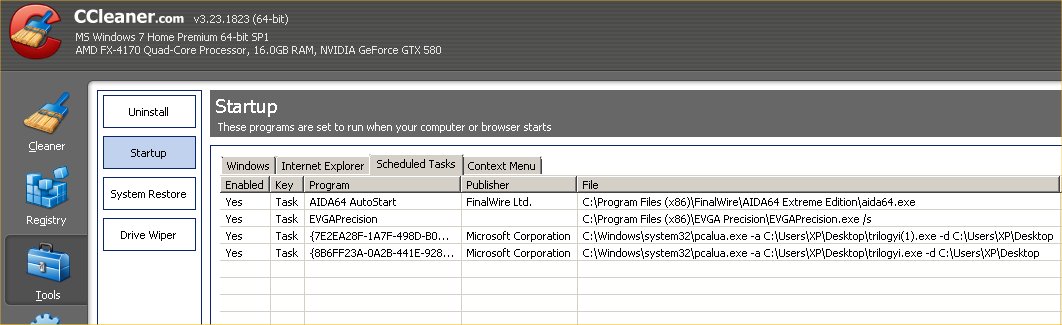
I find these entries on the Scheduled Tasks tab of CCleaner

Ghot

New member
Local time
4:27 PM
Messages
23
Yes Task {7E2EA28F-1A7F-498D-B0A7-D33F02B8C378} Microsoft Corporation C:\Windows\system32 pcalua.exe -a C:\Users\XP\Desktop \trilogyi(1).exe -d C:\Users\XP\Desktop

Yes Task {8B6FF23A-0A2B-441E-928E-095AB67A51CB} Microsoft Corporation C:\Windows\system32\pcalua.exe -a C:\Users\XP\Desktop \trilogyi.exe -d C:\Users\XP\Desktop


Does it need to be a scheduled task or not? If it does, what program is responsible for it being there? I know it's a valid MS program with Win 7 Home Premium x64.
 
Last edited:

My Computer My Computer

At a glance

Windows 7 Home Premium x64 SP1AMD FX-8350 Vishera 4.0GHz (4.2GHz Turbo) (st...CORSAIR Dominator Platinum 16GB (2 x 8GB) DDR...EVGA GeForce GTX 780 Ti (stock)
Computer type
PC/Desktop
Computer Manufacturer/Model Number
Me
OS
Windows 7 Home Premium x64 SP1
CPU
AMD FX-8350 Vishera 4.0GHz (4.2GHz Turbo) (stock speed)
Motherboard
ASUS SABERTOOTH 990FX R2.0 AM3+
Memory
CORSAIR Dominator Platinum 16GB (2 x 8GB) DDR3 1866Mhz
Graphics Card(s)
EVGA GeForce GTX 780 Ti (stock)
Sound Card
onboard
Monitor(s) Displays
DELL Ultrasharp U3011, 30" IPS monitor
Screen Resolution
2560 x 1600
Hard Drives
WD 500GB Velociraptor,
WD 2TB Caviar Black FZEX (2)
PSU
PC Power & Cooling Silencer 750W Quad EPS12V
Case
Coolermaster ATCS 840 Full Tower Case
Cooling
COOLER MASTER Hyper 212 EVO (push/pull), 7 case fans
Keyboard
Ducky DK9008 Shine II Blue LED Backlit Mechanical (MX Black)
Mouse
$15 Logiitech
Internet Speed
50/50 Verizon FIOS
Antivirus
Bitdefender Internet Security 2019 (paid)
Browser
Mozilla Firefox 67.0.2 x64
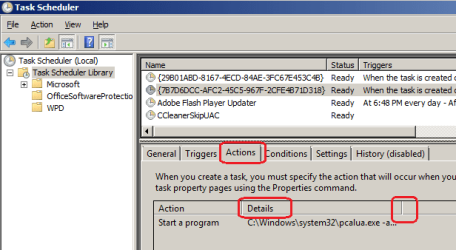
CCleaner writes a scheduled task that's only Run on Demand when CCleaner is started, and all it does is skip the UAC prompt.

It seems harmless enough but you can always delete a Scheduler item if you don't want it running on your property.
 
CCleaner writes a scheduled task that's only Run on Demand when CCleaner is started, and all it does is skip the UAC prompt.

It seems harmless enough but you can always delete a Scheduler item if you don't want it running on your property.


so you're saying that C:\Windows\system32 pcalua.exe is a CCleaner task ??
 

My Computer My Computer

At a glance

Windows 7 Home Premium x64 SP1AMD FX-8350 Vishera 4.0GHz (4.2GHz Turbo) (st...CORSAIR Dominator Platinum 16GB (2 x 8GB) DDR...EVGA GeForce GTX 780 Ti (stock)
Computer type
PC/Desktop
Computer Manufacturer/Model Number
Me
OS
Windows 7 Home Premium x64 SP1
CPU
AMD FX-8350 Vishera 4.0GHz (4.2GHz Turbo) (stock speed)
Motherboard
ASUS SABERTOOTH 990FX R2.0 AM3+
Memory
CORSAIR Dominator Platinum 16GB (2 x 8GB) DDR3 1866Mhz
Graphics Card(s)
EVGA GeForce GTX 780 Ti (stock)
Sound Card
onboard
Monitor(s) Displays
DELL Ultrasharp U3011, 30" IPS monitor
Screen Resolution
2560 x 1600
Hard Drives
WD 500GB Velociraptor,
WD 2TB Caviar Black FZEX (2)
PSU
PC Power & Cooling Silencer 750W Quad EPS12V
Case
Coolermaster ATCS 840 Full Tower Case
Cooling
COOLER MASTER Hyper 212 EVO (push/pull), 7 case fans
Keyboard
Ducky DK9008 Shine II Blue LED Backlit Mechanical (MX Black)
Mouse
$15 Logiitech
Internet Speed
50/50 Verizon FIOS
Antivirus
Bitdefender Internet Security 2019 (paid)
Browser
Mozilla Firefox 67.0.2 x64
No I'm saying that if you look in Task Scheduler and see an Active CCleaner task under Scheduled listings, then it is likely for that.
 
ZPS4O.jpg
No I'm saying that if you look in Task Scheduler and see an Active CCleaner task under Scheduled listings, then it is likely for that.

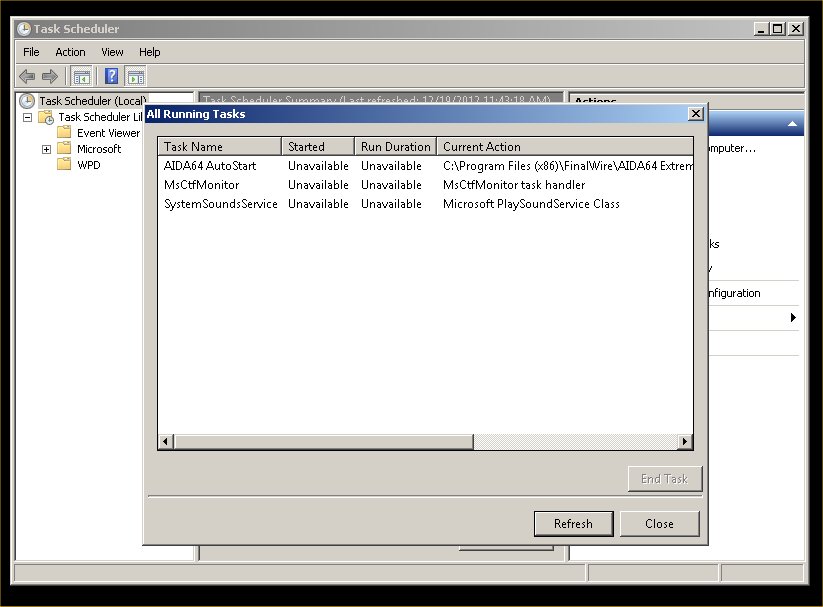
No bro, they don't show in Task Scheduler...they show up in the Scheduled Tasks tab of CCleaner THIS is what Task Scheduler shows:
 

My Computer My Computer

At a glance

Windows 7 Home Premium x64 SP1AMD FX-8350 Vishera 4.0GHz (4.2GHz Turbo) (st...CORSAIR Dominator Platinum 16GB (2 x 8GB) DDR...EVGA GeForce GTX 780 Ti (stock)
Computer type
PC/Desktop
Computer Manufacturer/Model Number
Me
OS
Windows 7 Home Premium x64 SP1
CPU
AMD FX-8350 Vishera 4.0GHz (4.2GHz Turbo) (stock speed)
Motherboard
ASUS SABERTOOTH 990FX R2.0 AM3+
Memory
CORSAIR Dominator Platinum 16GB (2 x 8GB) DDR3 1866Mhz
Graphics Card(s)
EVGA GeForce GTX 780 Ti (stock)
Sound Card
onboard
Monitor(s) Displays
DELL Ultrasharp U3011, 30" IPS monitor
Screen Resolution
2560 x 1600
Hard Drives
WD 500GB Velociraptor,
WD 2TB Caviar Black FZEX (2)
PSU
PC Power & Cooling Silencer 750W Quad EPS12V
Case
Coolermaster ATCS 840 Full Tower Case
Cooling
COOLER MASTER Hyper 212 EVO (push/pull), 7 case fans
Keyboard
Ducky DK9008 Shine II Blue LED Backlit Mechanical (MX Black)
Mouse
$15 Logiitech
Internet Speed
50/50 Verizon FIOS
Antivirus
Bitdefender Internet Security 2019 (paid)
Browser
Mozilla Firefox 67.0.2 x64
This should explain what pcalua.exe is.
What does PCALUA.EXE do? - Microsoft Community

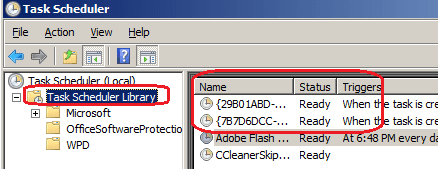
To see the task in Task Scheduler, click on Task Scheduler Library.
You are on Task Scheduler (Local), and then you displayed All Running Tasks.

You need to run Task Scheduler with Administrator authority to see these tasks.

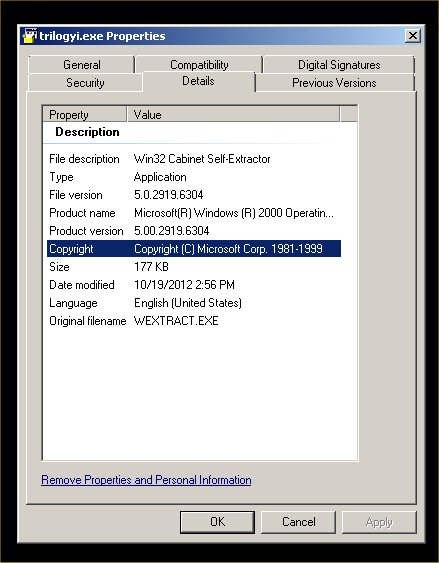
trilogyi.exe is the program you have that causes these tasks...
 

My Computer My Computer

At a glance

Multi-Boot W7_Pro_x64 W8.1_Pro_x64 W10_Pro_x6...AMD Athlon II x4 6206GB GSkill DDR2 800AMD 4670 GPU + AMD 4200 IGP
Computer type
PC/Desktop
Computer Manufacturer/Model Number
home built
OS
Multi-Boot W7_Pro_x64 W8.1_Pro_x64 W10_Pro_x64 +Linux_VMs +Chromium_VM
CPU
AMD Athlon II x4 620
Motherboard
Gigabyte GA-MA785G-UD3H
Memory
6GB GSkill DDR2 800
Graphics Card(s)
AMD 4670 GPU + AMD 4200 IGP
Sound Card
on board Realtek ALC889A
Monitor(s) Displays
RCA 40" LCD TV, Insignia 32" LCD TV, HP 15" LCD monitor
Screen Resolution
1680 x 1050
Hard Drives
OCZ Vertex 3 120GB,
Samsung F3 1TB (3),
Several others - WD, Seagate, Hitachi, ...
PSU
Corsair 500 W
Case
Rosewill mid tower
Cooling
CM 90mm rifle
Keyboard
Gyration wireless, Logitech wireless, Dell USB wired
Mouse
Gyration wireless, Logitech wireless, V7 USB wired
Internet Speed
Spectrum - 100Mbps D / 10Mbps U
Antivirus
Avast, MBAM3, EMET, WinPatrol
Browser
Pale Moon, Firefox, IE
Other Info
2 multi-boot PC's
Mainly HTPC/Office/Gen purpose (no gaming).
Trendnet USB KVM.
LG DVD burner/Blue Ray Player.
Tray system for removable SATA backup drives.

Not currently OCd, under-volted.
I use Hybrid sleep, rarely re-boot or shutdown.

Hauppauge HD-PVR, Avermedia PCIe TV Tuner, Hauppauge PCI TV Tuner.
UXG0Y.jpg


Any ideas ??
 

My Computer My Computer

At a glance

Windows 7 Home Premium x64 SP1AMD FX-8350 Vishera 4.0GHz (4.2GHz Turbo) (st...CORSAIR Dominator Platinum 16GB (2 x 8GB) DDR...EVGA GeForce GTX 780 Ti (stock)
Computer type
PC/Desktop
Computer Manufacturer/Model Number
Me
OS
Windows 7 Home Premium x64 SP1
CPU
AMD FX-8350 Vishera 4.0GHz (4.2GHz Turbo) (stock speed)
Motherboard
ASUS SABERTOOTH 990FX R2.0 AM3+
Memory
CORSAIR Dominator Platinum 16GB (2 x 8GB) DDR3 1866Mhz
Graphics Card(s)
EVGA GeForce GTX 780 Ti (stock)
Sound Card
onboard
Monitor(s) Displays
DELL Ultrasharp U3011, 30" IPS monitor
Screen Resolution
2560 x 1600
Hard Drives
WD 500GB Velociraptor,
WD 2TB Caviar Black FZEX (2)
PSU
PC Power & Cooling Silencer 750W Quad EPS12V
Case
Coolermaster ATCS 840 Full Tower Case
Cooling
COOLER MASTER Hyper 212 EVO (push/pull), 7 case fans
Keyboard
Ducky DK9008 Shine II Blue LED Backlit Mechanical (MX Black)
Mouse
$15 Logiitech
Internet Speed
50/50 Verizon FIOS
Antivirus
Bitdefender Internet Security 2019 (paid)
Browser
Mozilla Firefox 67.0.2 x64
David may have more on it but it appears to be the Program Compatibility Assistant scheduled to run itself. It is a MS System file so I would leave it alone to assure it does what Win7 wants it to.

What threw me off is your insisting this is a CCleaner task. Where does it appear anywhere related to CCleaner - which also has a task it runs listed in Active Tasks>Scheduled to bypass UAC when you open it?
 
Greg just replied and I agree with him to keep the task.

I was typing this, so I'll add my 2 cents.

With a user name of XP, i wonder what legacy stuff you are running under Win 7...

I'm just guessing here, but i expect Win 7 detects something you have that needs compatibility checking.

I have one of these tasks in Win 7 x64 for an old printer/scanner i have.
Some features don't work for this device in x64 but work fine in x86.
 

My Computer My Computer

At a glance

Multi-Boot W7_Pro_x64 W8.1_Pro_x64 W10_Pro_x6...AMD Athlon II x4 6206GB GSkill DDR2 800AMD 4670 GPU + AMD 4200 IGP
Computer type
PC/Desktop
Computer Manufacturer/Model Number
home built
OS
Multi-Boot W7_Pro_x64 W8.1_Pro_x64 W10_Pro_x64 +Linux_VMs +Chromium_VM
CPU
AMD Athlon II x4 620
Motherboard
Gigabyte GA-MA785G-UD3H
Memory
6GB GSkill DDR2 800
Graphics Card(s)
AMD 4670 GPU + AMD 4200 IGP
Sound Card
on board Realtek ALC889A
Monitor(s) Displays
RCA 40" LCD TV, Insignia 32" LCD TV, HP 15" LCD monitor
Screen Resolution
1680 x 1050
Hard Drives
OCZ Vertex 3 120GB,
Samsung F3 1TB (3),
Several others - WD, Seagate, Hitachi, ...
PSU
Corsair 500 W
Case
Rosewill mid tower
Cooling
CM 90mm rifle
Keyboard
Gyration wireless, Logitech wireless, Dell USB wired
Mouse
Gyration wireless, Logitech wireless, V7 USB wired
Internet Speed
Spectrum - 100Mbps D / 10Mbps U
Antivirus
Avast, MBAM3, EMET, WinPatrol
Browser
Pale Moon, Firefox, IE
Other Info
2 multi-boot PC's
Mainly HTPC/Office/Gen purpose (no gaming).
Trendnet USB KVM.
LG DVD burner/Blue Ray Player.
Tray system for removable SATA backup drives.

Not currently OCd, under-volted.
I use Hybrid sleep, rarely re-boot or shutdown.

Hauppauge HD-PVR, Avermedia PCIe TV Tuner, Hauppauge PCI TV Tuner.
ZPS4O.jpg
No I'm saying that if you look in Task Scheduler and see an Active CCleaner task under Scheduled listings, then it is likely for that.

No bro, they don't show in Task Scheduler...they show up in the Scheduled Tasks tab of CCleaner THIS is what Task Scheduler shows:

Your screenshot shows what is currently running via scheduled tasks. The tasks that CCleaner kindly showed you will also show in Task Scheduler (but they are not currently running). Select one level down in the left hand pane - then look in the center pane:
ts.png
 

My Computer My Computer

At a glance

W7 Pro SP1 64biti78GBIntel HD Graphics
Computer type
Laptop
Computer Manufacturer/Model Number
Employer provided Dell Latitude
OS
W7 Pro SP1 64bit
CPU
i7
Memory
8GB
Graphics Card(s)
Intel HD Graphics
Hard Drives
crappy SSD
Antivirus
Employer mandated Symantec Endpoint Protection
Browser
Pale Moon 64bit, IE11 64bit & Chrome 64bit
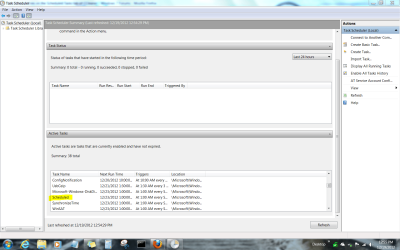
Active tasks are also displayed in a pane in the lower center of the screen once it loads Scheduler.

Scroll down to click on Scheduler which is where I found CCleaner's task.

Capture.PNGclick to enlarge picture
 
Yes Task {7E2EA28F-1A7F-498D-B0A7-D33F02B8C378} Microsoft Corporation C:\Windows\system32 pcalua.exe -a C:\Users\XP\Desktop \trilogyi(1).exe -d C:\Users\XP\Desktop

Yes Task {8B6FF23A-0A2B-441E-928E-095AB67A51CB} Microsoft Corporation C:\Windows\system32\pcalua.exe -a C:\Users\XP\Desktop \trilogyi.exe -d C:\Users\XP\Desktop


Does it need to be a scheduled task or not? If it does, what program is responsible for it being there? I know it's a valid MS program with Win 7 Home Premium x64.
Do you have a user (or an app) that created a user profile using the name "XP"?
 

My Computer My Computer

At a glance

W7 Pro SP1 64biti78GBIntel HD Graphics
Computer type
Laptop
Computer Manufacturer/Model Number
Employer provided Dell Latitude
OS
W7 Pro SP1 64bit
CPU
i7
Memory
8GB
Graphics Card(s)
Intel HD Graphics
Hard Drives
crappy SSD
Antivirus
Employer mandated Symantec Endpoint Protection
Browser
Pale Moon 64bit, IE11 64bit & Chrome 64bit
David may have more on it but it appears to be the Program Compatibility Assistant scheduled to run itself. It is a MS System file so I would leave it alone to assure it does what Win7 wants it to.

What threw me off is your insisting this is a CCleaner task. Where does it appear anywhere related to CCleaner - which also has a task it runs listed in Active Tasks>Scheduled to bypass UAC when you open it?

In CCleaner under Tools - Startup there is a Scheduled Tasks tab and that is what the OP was referring.

Jim :cool:
 

My Computer My Computer

At a glance

Windows 8.1 Pro w/Media Center 64bit, Windows...Phenom II X6 1100TCrucial Balistic 8gb DDR3-1866 CL9MSI R6850 Cyclone IGD5 PE
Computer type
PC/Desktop
Computer Manufacturer/Model Number
Home Built
OS
Windows 8.1 Pro w/Media Center 64bit, Windows 7 HP 64bit
CPU
Phenom II X6 1100T
Motherboard
ASUS M5A99X EVO
Memory
Crucial Balistic 8gb DDR3-1866 CL9
Graphics Card(s)
MSI R6850 Cyclone IGD5 PE
Sound Card
On Board
Monitor(s) Displays
ASUS VE258Q 25" LED with DVI-HDMI-DisplayPort
Screen Resolution
1920 x 1080
Hard Drives
Two WD Cavier Black 2TB Sata III, WD My Book Essential 2TB USB 3.0
PSU
Seasonic X650 80 Plus GOLD Modular
Case
Corsair 400R
Cooling
Antec Kuhler H2O 620, Two 120mm and four 140mm
Keyboard
Logitech K120
Mouse
Logitech Marble Mouse USB, Logitech Precision Game Pad
Internet Speed
15MB
Antivirus
Norton IS 2013, Malwarebytes Pro Beta 2
Browser
IE-11, FF-27
Other Info
APC UPS ES 750, Netgear WNR3500L Gigabit & Wireless N Router with SamKnows Test Program, Motorola SB6120 Gigabit Cable Modem. Brother HL-2170W Laser Printer, Epson V300 Scanner
Well here's what CCleaner shows....but I can't find the trilogyi.exe thing anywhere in task scheduler. You've kindly explained what pcalua was (found that myself though before I even posted...I know bad title) when I first installed Win 7 I made a folder on my storage drive and download everything I would need for a 64 bit OS. One of those things was: trilogyi.exe and the SS up above is it's properties sheet.....that's why I'm trying to find out what it's for...

I DL'd lot of things recommended on this and similar site, including MS. Trilogyi.exe was one of those things. It was like 2 months ago, I DL'd it and can find no info on it anywhere.


So far this is what Google has turned up:

trilogyi.exe is required by third-party software or hardware and should not disabled.

trilogyi.exe is a process which belongs to Microsoft(R) Windows (R) 2000 Operating System from Microsoft Corporation.


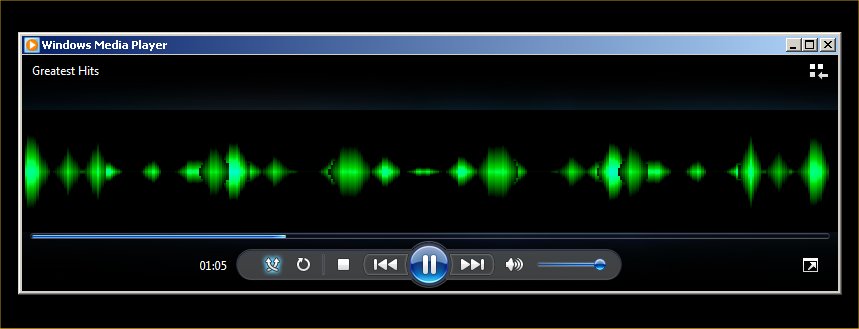
LOL...forget it...I found it....it's a pulsing waveform Visualization for WMP :/


I take one, "derp" for this post :/


spacer.gif


cOCvI.jpg
 

My Computer My Computer

At a glance

Windows 7 Home Premium x64 SP1AMD FX-8350 Vishera 4.0GHz (4.2GHz Turbo) (st...CORSAIR Dominator Platinum 16GB (2 x 8GB) DDR...EVGA GeForce GTX 780 Ti (stock)
Computer type
PC/Desktop
Computer Manufacturer/Model Number
Me
OS
Windows 7 Home Premium x64 SP1
CPU
AMD FX-8350 Vishera 4.0GHz (4.2GHz Turbo) (stock speed)
Motherboard
ASUS SABERTOOTH 990FX R2.0 AM3+
Memory
CORSAIR Dominator Platinum 16GB (2 x 8GB) DDR3 1866Mhz
Graphics Card(s)
EVGA GeForce GTX 780 Ti (stock)
Sound Card
onboard
Monitor(s) Displays
DELL Ultrasharp U3011, 30" IPS monitor
Screen Resolution
2560 x 1600
Hard Drives
WD 500GB Velociraptor,
WD 2TB Caviar Black FZEX (2)
PSU
PC Power & Cooling Silencer 750W Quad EPS12V
Case
Coolermaster ATCS 840 Full Tower Case
Cooling
COOLER MASTER Hyper 212 EVO (push/pull), 7 case fans
Keyboard
Ducky DK9008 Shine II Blue LED Backlit Mechanical (MX Black)
Mouse
$15 Logiitech
Internet Speed
50/50 Verizon FIOS
Antivirus
Bitdefender Internet Security 2019 (paid)
Browser
Mozilla Firefox 67.0.2 x64
Just cause I now know everyone is curious...

I KNEW I should renamed that file, I remember thinking that when I DL'd it from MS :/


"Another One Bites the Dust" ....with the Pulsar Visualization in the Trilogy Set :)


SrhKv.jpg


Maybe this was a two-derp post :/
 

My Computer My Computer

At a glance

Windows 7 Home Premium x64 SP1AMD FX-8350 Vishera 4.0GHz (4.2GHz Turbo) (st...CORSAIR Dominator Platinum 16GB (2 x 8GB) DDR...EVGA GeForce GTX 780 Ti (stock)
Computer type
PC/Desktop
Computer Manufacturer/Model Number
Me
OS
Windows 7 Home Premium x64 SP1
CPU
AMD FX-8350 Vishera 4.0GHz (4.2GHz Turbo) (stock speed)
Motherboard
ASUS SABERTOOTH 990FX R2.0 AM3+
Memory
CORSAIR Dominator Platinum 16GB (2 x 8GB) DDR3 1866Mhz
Graphics Card(s)
EVGA GeForce GTX 780 Ti (stock)
Sound Card
onboard
Monitor(s) Displays
DELL Ultrasharp U3011, 30" IPS monitor
Screen Resolution
2560 x 1600
Hard Drives
WD 500GB Velociraptor,
WD 2TB Caviar Black FZEX (2)
PSU
PC Power & Cooling Silencer 750W Quad EPS12V
Case
Coolermaster ATCS 840 Full Tower Case
Cooling
COOLER MASTER Hyper 212 EVO (push/pull), 7 case fans
Keyboard
Ducky DK9008 Shine II Blue LED Backlit Mechanical (MX Black)
Mouse
$15 Logiitech
Internet Speed
50/50 Verizon FIOS
Antivirus
Bitdefender Internet Security 2019 (paid)
Browser
Mozilla Firefox 67.0.2 x64
....but I can't find the trilogyi.exe thing anywhere in task scheduler....
Look at the screenshot that I showed in post #10... the screenshot below where I quoted your post.

See where I selected Task Scheduler Library in the left hand pane?
Now look in the center pane in the name column...
...see the task that starts with {29B01A.....?

When I look at the CCleaner info from your screenshots, I see a column named "Program"...
...under that are two "programs":
{7E2EA....
{8B6FF....
Still looking at CCleaner - there is a column named "File"...
...under that I see the pcalua app and the rest of the command line info for the task.

Now go to your Task Scheduler
select Task Scheduler Library in the left hand pane
select {7E2EA.... from the center pane
select the tab named "Actions" from the bottom part of the center pane.
Now do you see the pcalua app and the rest of the command line info for the task?
(You might need to expand the column named "File".)

ts2.png


Hopefully now you have located the info in both CCleaner and the Windows native interface to those tasks.

It appears that you downloaded and ran the file named trilogyi.exe two times. The second copy was automatically named trilogyi(1).exe. My suggestion would be that you delete the file named "trilogyi(1).exe" and delete the task associated with it. You probably only need the first file and the scheduled task associated with it.
 

My Computer My Computer

At a glance

W7 Pro SP1 64biti78GBIntel HD Graphics
Computer type
Laptop
Computer Manufacturer/Model Number
Employer provided Dell Latitude
OS
W7 Pro SP1 64bit
CPU
i7
Memory
8GB
Graphics Card(s)
Intel HD Graphics
Hard Drives
crappy SSD
Antivirus
Employer mandated Symantec Endpoint Protection
Browser
Pale Moon 64bit, IE11 64bit & Chrome 64bit
What task would be needed for such a program that visualizes music?

I would run Malwarebytes and SUPERAntiSpyware.com - Downloads full scans to see what they have to say about it.

Do you have such a service in msconfig>Startup or Services after Hiding all MS Services? I would remove them and then uninstall the program if you don't want it. At the minimum it probably doesn't need to start up with WIndows or schedule anything.

What do the others think?
 
No I want it. In WMP 12 u can DL visualizations from MS FOR the media player....that's what the trilogyi.exe was...but that was back on OCT 8th lol

and I couldn't remember what that file was that I DL'd from MS :/


In other words...


Thx guys got it figured out :)
 

My Computer My Computer

At a glance

Windows 7 Home Premium x64 SP1AMD FX-8350 Vishera 4.0GHz (4.2GHz Turbo) (st...CORSAIR Dominator Platinum 16GB (2 x 8GB) DDR...EVGA GeForce GTX 780 Ti (stock)
Computer type
PC/Desktop
Computer Manufacturer/Model Number
Me
OS
Windows 7 Home Premium x64 SP1
CPU
AMD FX-8350 Vishera 4.0GHz (4.2GHz Turbo) (stock speed)
Motherboard
ASUS SABERTOOTH 990FX R2.0 AM3+
Memory
CORSAIR Dominator Platinum 16GB (2 x 8GB) DDR3 1866Mhz
Graphics Card(s)
EVGA GeForce GTX 780 Ti (stock)
Sound Card
onboard
Monitor(s) Displays
DELL Ultrasharp U3011, 30" IPS monitor
Screen Resolution
2560 x 1600
Hard Drives
WD 500GB Velociraptor,
WD 2TB Caviar Black FZEX (2)
PSU
PC Power & Cooling Silencer 750W Quad EPS12V
Case
Coolermaster ATCS 840 Full Tower Case
Cooling
COOLER MASTER Hyper 212 EVO (push/pull), 7 case fans
Keyboard
Ducky DK9008 Shine II Blue LED Backlit Mechanical (MX Black)
Mouse
$15 Logiitech
Internet Speed
50/50 Verizon FIOS
Antivirus
Bitdefender Internet Security 2019 (paid)
Browser
Mozilla Firefox 67.0.2 x64

My Computer My Computer

At a glance

Multi-Boot W7_Pro_x64 W8.1_Pro_x64 W10_Pro_x6...AMD Athlon II x4 6206GB GSkill DDR2 800AMD 4670 GPU + AMD 4200 IGP
Computer type
PC/Desktop
Computer Manufacturer/Model Number
home built
OS
Multi-Boot W7_Pro_x64 W8.1_Pro_x64 W10_Pro_x64 +Linux_VMs +Chromium_VM
CPU
AMD Athlon II x4 620
Motherboard
Gigabyte GA-MA785G-UD3H
Memory
6GB GSkill DDR2 800
Graphics Card(s)
AMD 4670 GPU + AMD 4200 IGP
Sound Card
on board Realtek ALC889A
Monitor(s) Displays
RCA 40" LCD TV, Insignia 32" LCD TV, HP 15" LCD monitor
Screen Resolution
1680 x 1050
Hard Drives
OCZ Vertex 3 120GB,
Samsung F3 1TB (3),
Several others - WD, Seagate, Hitachi, ...
PSU
Corsair 500 W
Case
Rosewill mid tower
Cooling
CM 90mm rifle
Keyboard
Gyration wireless, Logitech wireless, Dell USB wired
Mouse
Gyration wireless, Logitech wireless, V7 USB wired
Internet Speed
Spectrum - 100Mbps D / 10Mbps U
Antivirus
Avast, MBAM3, EMET, WinPatrol
Browser
Pale Moon, Firefox, IE
Other Info
2 multi-boot PC's
Mainly HTPC/Office/Gen purpose (no gaming).
Trendnet USB KVM.
LG DVD burner/Blue Ray Player.
Tray system for removable SATA backup drives.

Not currently OCd, under-volted.
I use Hybrid sleep, rarely re-boot or shutdown.

Hauppauge HD-PVR, Avermedia PCIe TV Tuner, Hauppauge PCI TV Tuner.
Back
Top