
You are using an out of date browser. It may not display this or other websites correctly.
You should upgrade or use an alternative browser.
You should upgrade or use an alternative browser.
icon customization
- Thread starter thungmail
- Start date

ryo
New member
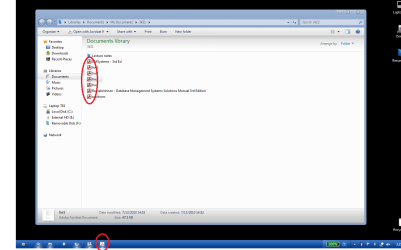
Old Good Freeware - Icon Phile
you can try this.
you can try this.
My Computer
- Computer Manufacturer/Model Number
- built up
- OS
- windows 7
- CPU
- Phenom II AMD Dragon 3.5Ghz
- Memory
- DDR3 4GB
- Graphics Card(s)
- ATI Radeon 512Mb
- Monitor(s) Displays
- HP L1506
- Screen Resolution
- 1152 x 864
- Hard Drives
- WDC 1 TB SATA-II Green Power
- Keyboard
- HP wireless keyboard
- Mouse
- HP Optic
- Internet Speed
- 1GB
ryo
New member
you can try tuneup utilities
My Computer
- Computer Manufacturer/Model Number
- built up
- OS
- windows 7
- CPU
- Phenom II AMD Dragon 3.5Ghz
- Memory
- DDR3 4GB
- Graphics Card(s)
- ATI Radeon 512Mb
- Monitor(s) Displays
- HP L1506
- Screen Resolution
- 1152 x 864
- Hard Drives
- WDC 1 TB SATA-II Green Power
- Keyboard
- HP wireless keyboard
- Mouse
- HP Optic
- Internet Speed
- 1GB

Arc
٩͡[๏̯͡๏]۶

My Computer
- Computer type
- PC/Desktop
- Computer Manufacturer/Model Number
- Self Assembled
- OS
- Microsoft Windows 10 Pro Insider Preview 64-bit
- CPU
- Intel(R) Core(TM) i3-4130 CPU @ 3.40GHz
- Motherboard
- Gigabyte Technology Co., Ltd. B85M-D3H
- Memory
- Corsair Vengence 4GB x2 (8.00GB Dual-Channel DDR3 @ 798MHz)
- Graphics Card(s)
- 2047MB GeForce GTS 450 (ZOTAC International)
- Sound Card
- Onboard (Realtek High Definition Audio)
- Monitor(s) Displays
- LG Flatron E2040T
- Screen Resolution
- 1600x900
- Hard Drives
- Western Digital 1 TB
Seagate 500 GB
- PSU
- Corsair VS550
- Case
- Cooler Master K380
- Cooling
- Cooler Master Seidon 120V Plus
- Keyboard
- Logitech MK260r
- Mouse
- Logitech MK260r
- Internet Speed
- PMPL Broadband
- Antivirus
- Windows Defender + MBAM
- Browser
- Firefox
- Other Info
- Dell Studio 15" Laptop

Sympatico
Expelled
The icons you want to change are kept in one of the folders located in the Installer folder (C:\Windows\Installer). Which one it is I can't tell you 'cos I dumped Adobe Reader ages ago in favour of something lighter and faster (NitroPDF), but it is in there.
No 3rd party apps. need apply.
No 3rd party apps. need apply.
My Computer
- OS
- Windows 7 Ultimatum
Arc
٩͡[๏̯͡๏]۶
C:\Windows\Installer ...... nothing like this in my computer 

I use Win7 home premium 32 bit .... unchecked hide protected OS files , too , still .....
Any suggestion please ?
I use Win7 home premium 32 bit .... unchecked hide protected OS files , too , still .....
Any suggestion please ?
My Computer
- Computer type
- PC/Desktop
- Computer Manufacturer/Model Number
- Self Assembled
- OS
- Microsoft Windows 10 Pro Insider Preview 64-bit
- CPU
- Intel(R) Core(TM) i3-4130 CPU @ 3.40GHz
- Motherboard
- Gigabyte Technology Co., Ltd. B85M-D3H
- Memory
- Corsair Vengence 4GB x2 (8.00GB Dual-Channel DDR3 @ 798MHz)
- Graphics Card(s)
- 2047MB GeForce GTS 450 (ZOTAC International)
- Sound Card
- Onboard (Realtek High Definition Audio)
- Monitor(s) Displays
- LG Flatron E2040T
- Screen Resolution
- 1600x900
- Hard Drives
- Western Digital 1 TB
Seagate 500 GB
- PSU
- Corsair VS550
- Case
- Cooler Master K380
- Cooling
- Cooler Master Seidon 120V Plus
- Keyboard
- Logitech MK260r
- Mouse
- Logitech MK260r
- Internet Speed
- PMPL Broadband
- Antivirus
- Windows Defender + MBAM
- Browser
- Firefox
- Other Info
- Dell Studio 15" Laptop
Sympatico
Expelled
Def there, where windows keeps all its installation bits n pieces. Show Hidden etc. etc.. Think folder name inside begins with something like Adb?? I'm not sure, not installing to find out, took me long enuff to clear it out the system!!C:\Windows\Installer ...... nothing like this in my computer
I use Win7 home premium 32 bit .... unchecked hide protected OS files , too , still .....
Any suggestion please ?
My Computer
- OS
- Windows 7 Ultimatum
Arc
٩͡[๏̯͡๏]۶
This is what I made visible in folder options ....
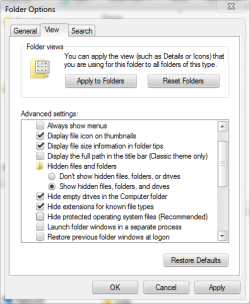
And this is my windows folder . Where I should search ?
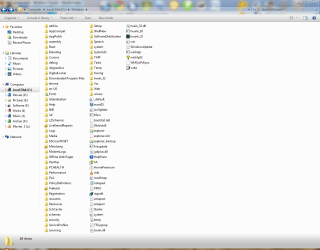
And this is my windows folder . Where I should search ?
My Computer
- Computer type
- PC/Desktop
- Computer Manufacturer/Model Number
- Self Assembled
- OS
- Microsoft Windows 10 Pro Insider Preview 64-bit
- CPU
- Intel(R) Core(TM) i3-4130 CPU @ 3.40GHz
- Motherboard
- Gigabyte Technology Co., Ltd. B85M-D3H
- Memory
- Corsair Vengence 4GB x2 (8.00GB Dual-Channel DDR3 @ 798MHz)
- Graphics Card(s)
- 2047MB GeForce GTS 450 (ZOTAC International)
- Sound Card
- Onboard (Realtek High Definition Audio)
- Monitor(s) Displays
- LG Flatron E2040T
- Screen Resolution
- 1600x900
- Hard Drives
- Western Digital 1 TB
Seagate 500 GB
- PSU
- Corsair VS550
- Case
- Cooler Master K380
- Cooling
- Cooler Master Seidon 120V Plus
- Keyboard
- Logitech MK260r
- Mouse
- Logitech MK260r
- Internet Speed
- PMPL Broadband
- Antivirus
- Windows Defender + MBAM
- Browser
- Firefox
- Other Info
- Dell Studio 15" Laptop
Sympatico
Expelled
Well, I dunno where you've gone wrong, it appears between (obviously, its alphabetical!!) inf & L2schemas folders, usually after inf on every windows system I've ever laid my hands on. If you ever have any issues un-installing software, you've deleted the folder, and trust me, you can, it looks like you have. Also none of the other hidden stuff shows in your Windows folder picture. See if I can search a picture on the net.
I'm a bit confused Arc, you got a ribbon of badges under your name, gfx team badge, gold member badge and a seven guru badge and you've never heard/seen the Installer folder?
I'm a bit confused Arc, you got a ribbon of badges under your name, gfx team badge, gold member badge and a seven guru badge and you've never heard/seen the Installer folder?
Last edited:
My Computer
- OS
- Windows 7 Ultimatum
ryo
New member
friend,check this one..This is what I made visible in folder options ....
View attachment 85703
And this is my windows folder . Where I should search ?
View attachment 85704
File Extension Type Icon - Change - Vista Forums
My Computer
- Computer Manufacturer/Model Number
- built up
- OS
- windows 7
- CPU
- Phenom II AMD Dragon 3.5Ghz
- Memory
- DDR3 4GB
- Graphics Card(s)
- ATI Radeon 512Mb
- Monitor(s) Displays
- HP L1506
- Screen Resolution
- 1152 x 864
- Hard Drives
- WDC 1 TB SATA-II Green Power
- Keyboard
- HP wireless keyboard
- Mouse
- HP Optic
- Internet Speed
- 1GB
Arc
٩͡[๏̯͡๏]۶
Hi Ryo pal ! I am not too much familiar with the registry tweaksfriend,check this one..
File Extension Type Icon - Change - Vista Forums
But I am wondering why I do not have the C:\Windows\Installer folder . Do you know it ?
My Computer
- Computer type
- PC/Desktop
- Computer Manufacturer/Model Number
- Self Assembled
- OS
- Microsoft Windows 10 Pro Insider Preview 64-bit
- CPU
- Intel(R) Core(TM) i3-4130 CPU @ 3.40GHz
- Motherboard
- Gigabyte Technology Co., Ltd. B85M-D3H
- Memory
- Corsair Vengence 4GB x2 (8.00GB Dual-Channel DDR3 @ 798MHz)
- Graphics Card(s)
- 2047MB GeForce GTS 450 (ZOTAC International)
- Sound Card
- Onboard (Realtek High Definition Audio)
- Monitor(s) Displays
- LG Flatron E2040T
- Screen Resolution
- 1600x900
- Hard Drives
- Western Digital 1 TB
Seagate 500 GB
- PSU
- Corsair VS550
- Case
- Cooler Master K380
- Cooling
- Cooler Master Seidon 120V Plus
- Keyboard
- Logitech MK260r
- Mouse
- Logitech MK260r
- Internet Speed
- PMPL Broadband
- Antivirus
- Windows Defender + MBAM
- Browser
- Firefox
- Other Info
- Dell Studio 15" Laptop

Arc
٩͡[๏̯͡๏]۶
Thanks a lot for the help, but I dont have it. I have made the hidden files and folders visible, and made protected OS files visible, too. Still it is not thereHere you go Arc!!
The hidden Installer folder

Is it due to my 32 bit os ? Or I have messed something ?
My Computer
- Computer type
- PC/Desktop
- Computer Manufacturer/Model Number
- Self Assembled
- OS
- Microsoft Windows 10 Pro Insider Preview 64-bit
- CPU
- Intel(R) Core(TM) i3-4130 CPU @ 3.40GHz
- Motherboard
- Gigabyte Technology Co., Ltd. B85M-D3H
- Memory
- Corsair Vengence 4GB x2 (8.00GB Dual-Channel DDR3 @ 798MHz)
- Graphics Card(s)
- 2047MB GeForce GTS 450 (ZOTAC International)
- Sound Card
- Onboard (Realtek High Definition Audio)
- Monitor(s) Displays
- LG Flatron E2040T
- Screen Resolution
- 1600x900
- Hard Drives
- Western Digital 1 TB
Seagate 500 GB
- PSU
- Corsair VS550
- Case
- Cooler Master K380
- Cooling
- Cooler Master Seidon 120V Plus
- Keyboard
- Logitech MK260r
- Mouse
- Logitech MK260r
- Internet Speed
- PMPL Broadband
- Antivirus
- Windows Defender + MBAM
- Browser
- Firefox
- Other Info
- Dell Studio 15" Laptop
ryo
New member
i'm already check with the OS win 7 ultimate 32bit and there is not have the folder installer. :sarc:
My Computer
- Computer Manufacturer/Model Number
- built up
- OS
- windows 7
- CPU
- Phenom II AMD Dragon 3.5Ghz
- Memory
- DDR3 4GB
- Graphics Card(s)
- ATI Radeon 512Mb
- Monitor(s) Displays
- HP L1506
- Screen Resolution
- 1152 x 864
- Hard Drives
- WDC 1 TB SATA-II Green Power
- Keyboard
- HP wireless keyboard
- Mouse
- HP Optic
- Internet Speed
- 1GB
Arc
٩͡[๏̯͡๏]۶
So what will do the 32 bit users to change those icons ??
My Computer
- Computer type
- PC/Desktop
- Computer Manufacturer/Model Number
- Self Assembled
- OS
- Microsoft Windows 10 Pro Insider Preview 64-bit
- CPU
- Intel(R) Core(TM) i3-4130 CPU @ 3.40GHz
- Motherboard
- Gigabyte Technology Co., Ltd. B85M-D3H
- Memory
- Corsair Vengence 4GB x2 (8.00GB Dual-Channel DDR3 @ 798MHz)
- Graphics Card(s)
- 2047MB GeForce GTS 450 (ZOTAC International)
- Sound Card
- Onboard (Realtek High Definition Audio)
- Monitor(s) Displays
- LG Flatron E2040T
- Screen Resolution
- 1600x900
- Hard Drives
- Western Digital 1 TB
Seagate 500 GB
- PSU
- Corsair VS550
- Case
- Cooler Master K380
- Cooling
- Cooler Master Seidon 120V Plus
- Keyboard
- Logitech MK260r
- Mouse
- Logitech MK260r
- Internet Speed
- PMPL Broadband
- Antivirus
- Windows Defender + MBAM
- Browser
- Firefox
- Other Info
- Dell Studio 15" Laptop

A Guy
Righteous Dude
While in windows folder (or any folder). Click on Organize in upper left, then on Folder And Search Options. On the view tab, scroll down to Hide protected operating system files. Uncheck that. This isn't recommended of course. Here's an easier way.
Start> Type in run> Click on run in results above and type (or paste in)
C:\Windows\Installer
This will open the installer folder. It's always suggested not to alter or delete anything in this protected folder. You actually have to disable UAC to do anything I believe. I know you know how to unhide the protected folders and use the run window Arc, I'm just laying out the steps should others need them
However, I'd think that the icon that the OP wants to change will be in a dll or exe file in the C:\program files\Adobe folder. You can use resource hacker to change it, but I don't know which is the taskbar icon.
A Guy
Start> Type in run> Click on run in results above and type (or paste in)
C:\Windows\Installer
This will open the installer folder. It's always suggested not to alter or delete anything in this protected folder. You actually have to disable UAC to do anything I believe. I know you know how to unhide the protected folders and use the run window Arc, I'm just laying out the steps should others need them
However, I'd think that the icon that the OP wants to change will be in a dll or exe file in the C:\program files\Adobe folder. You can use resource hacker to change it, but I don't know which is the taskbar icon.
A Guy
My Computer
- Computer type
- PC/Desktop
- OS
- Windows 10 Home x64
- CPU
- INTEL Core i5-750 Quad-Core 3.37GHz
- Motherboard
- ASUS P7P55D
- Memory
- HyperX Fury Black Series 8GB (2 x 4GB) 1866Mhz
- Graphics Card(s)
- EVGA GeForce GTX 750 Superclocked 1GB 128-Bit GDDR5
- Monitor(s) Displays
- LG 32MA68HY 32" IPS
- Screen Resolution
- 1920 x 1080
- Hard Drives
- Samsung 840 Evo 120GB, SEAGATE 500GB Barracuda® 7200.12, SATA 3 Gb/s, 7200 RPM, 16MB cache
- PSU
- ANTEC TruePower New TP-550, 80 PLUS, 550W
- Case
- ANTEC Three Hundred Illusion
- Cooling
- COOLER MASTER Hyper 212 Plus, 4 x 120mm 1 x 140mm Noctua's
- Internet Speed
- 85 + Mbps
- Antivirus
- Avast
- Browser
- Vivaldi
Arc
٩͡[๏̯͡๏]۶
My Computer
- Computer type
- PC/Desktop
- Computer Manufacturer/Model Number
- Self Assembled
- OS
- Microsoft Windows 10 Pro Insider Preview 64-bit
- CPU
- Intel(R) Core(TM) i3-4130 CPU @ 3.40GHz
- Motherboard
- Gigabyte Technology Co., Ltd. B85M-D3H
- Memory
- Corsair Vengence 4GB x2 (8.00GB Dual-Channel DDR3 @ 798MHz)
- Graphics Card(s)
- 2047MB GeForce GTS 450 (ZOTAC International)
- Sound Card
- Onboard (Realtek High Definition Audio)
- Monitor(s) Displays
- LG Flatron E2040T
- Screen Resolution
- 1600x900
- Hard Drives
- Western Digital 1 TB
Seagate 500 GB
- PSU
- Corsair VS550
- Case
- Cooler Master K380
- Cooling
- Cooler Master Seidon 120V Plus
- Keyboard
- Logitech MK260r
- Mouse
- Logitech MK260r
- Internet Speed
- PMPL Broadband
- Antivirus
- Windows Defender + MBAM
- Browser
- Firefox
- Other Info
- Dell Studio 15" Laptop
A Guy
Righteous Dude
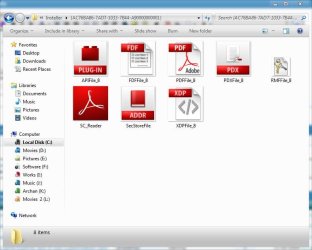
Great What kind of files are those Arc? It would be way easier if the images were indeed there as suggested. And thank you for reminding me about Win + R Arc, I always forget the easy way
A Guy
What kind of files are those Arc? It would be way easier if the images were indeed there as suggested. And thank you for reminding me about Win + R Arc, I always forget the easy way A Guy
My Computer
- Computer type
- PC/Desktop
- OS
- Windows 10 Home x64
- CPU
- INTEL Core i5-750 Quad-Core 3.37GHz
- Motherboard
- ASUS P7P55D
- Memory
- HyperX Fury Black Series 8GB (2 x 4GB) 1866Mhz
- Graphics Card(s)
- EVGA GeForce GTX 750 Superclocked 1GB 128-Bit GDDR5
- Monitor(s) Displays
- LG 32MA68HY 32" IPS
- Screen Resolution
- 1920 x 1080
- Hard Drives
- Samsung 840 Evo 120GB, SEAGATE 500GB Barracuda® 7200.12, SATA 3 Gb/s, 7200 RPM, 16MB cache
- PSU
- ANTEC TruePower New TP-550, 80 PLUS, 550W
- Case
- ANTEC Three Hundred Illusion
- Cooling
- COOLER MASTER Hyper 212 Plus, 4 x 120mm 1 x 140mm Noctua's
- Internet Speed
- 85 + Mbps
- Antivirus
- Avast
- Browser
- Vivaldi
Sympatico
Expelled
Thats the bugger Arc!!Thanks a lot for the idea, Bil ! I unchecked hide protected os files earlier .... it does not make the installer folder visible.
After your advise ... I pressed Win+R, put the directory there, and searched .... and I got it .
Attaching the snip
 PDF FILE_8 was the one I always changed as I made me own pdf file icon.!
My Computer
- OS
- Windows 7 Ultimatum