JavaScript is disabled. For a better experience, please enable JavaScript in your browser before proceeding.
You are using an out of date browser. It may not display this or other websites correctly.
You should upgrade or use an
alternative browser .
icons not display properly
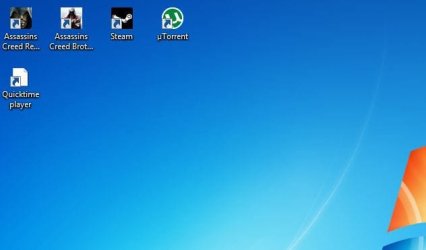
Hello guys i have a little problem about my win 7 performance.here is the problem-
my icons look like this ,and you know what is the real icon of quicktime player .the program or what is that file it works but it looks kinda ugly or you know what i mean.
Administrator
Staff member
Hello burningknight, and welcome to Seven Forums.
You might see if
rebuilding the icon cache may be able to help.
If not, then you might see if deleting that QP shortcut, and creating a new on directly from the .exe file may help.
If still not, then you might reinstall QP to sort any of the program's files that may be corrupted causing this.
Hope this helps,
Shawn
64-bit Windows 11 Pro for Workstations Intel i7-8700K OC'd to 5 GHz 64 GB (4x16GB) G.SKILL TridentZ RGB DDR4 3600... ASUS ROG-STRIX-GTX1080TI-O11G-GAMING PC/Desktop Self built custom 64-bit Windows 11 Pro for Workstations Intel i7-8700K OC'd to 5 GHz ASUS ROG Maximus XI Formula Z390 64 GB (4x16GB) G.SKILL TridentZ RGB DDR4 3600 MHz ASUS ROG-STRIX-GTX1080TI-O11G-GAMING Integrated 2 x Samsung Odyssey G7 27" 2560x1440 1TB Samsung 990 PRO M.2, Seasonic Prime Titanium 850W Thermaltake Core P3 Corsair Hydro H115i Logitech wireless K800 Logitech MX Master 4 2 Gb/s Download and 100 Mb/s Upload Malwarebyte Anti-Malware Premium Google Chrome Logitech Z625 speaker system,