Identifying Connection

bartonsam

New member
Been searching around google for days with this one.

Upgraded to Windows 7 (Ultimate 64-bit) from vista 2 weeks ago. Then 3 days ago decided to add a new HDD due to the fact my other was close to overflowing. Shut down computer pulled out power cable, usual safety things to do. Plugged everything back up HDD working fine, then I noticed Network icon was still identifying. It then went to Public Network - No Internet access. So had a little fiddle around (as one does) Set an IP...Nothing. Reset adapter.....Nothing. Changed it back to auto-detect......nothing. I even dug up an old wireless network PCI card (thinking it could be hardware related) but alas......nothing.

Could really do with some help

N.B.
-Have another computer on same network with Vista
-Connected via cable (no problem there, tried with laptop, worked straight away)
-Have tried iprenew iprelease etc

Also the thing that really through me off the scent of the problem was as I thought it could be to do with the recent addition of HDD I took it out , resulted in nothing.
Anyway I´ve also linked this as it could be mighty helpful.

Untitled.png
 

My Computer

Computer Manufacturer/Model Number
Custom
OS
Windows 7 Ultimate 64-bit
CPU
Intel Q6600 2.4ghz
Motherboard
Asus P5N-E SLI
Memory
4gb 1066mhz Corsair
Graphics Card(s)
Nvidia 8800GT SLI
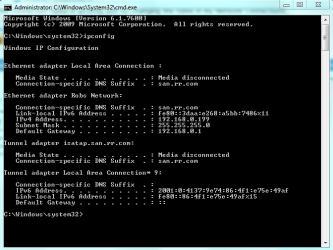
You have no default gateway showing, usually just resetting the router will get your DHCP assignments working again. Sometimes you have to reset everything starting from the modem. Have you tried doing that yet?

I'm not sure if you reinstalled Win 7 on the new harddrive or not? If so don't forget to reinstall the Nvidia drivers. http://www.nvidia.com/Download/index.aspx?lang=en-us
 

My Computer

Computer type
PC/Desktop
Computer Manufacturer/Model Number
Home built
OS
Windows 7 Ult, Windows 8.1 Pro,
CPU
Q9650-4.275GHz, E8600 4.5GHz, E6750-3.8GHz
Motherboard
Evga 780i FTW
Memory
G.Skill PC2 9600 1200Mhz 5 5 5 15 2T
Graphics Card(s)
GTX480
Sound Card
Asus Xonar D2
Monitor(s) Displays
HannsG
Screen Resolution
1680X1050
Hard Drives
GSkill Phoenix Pro 120GB SSD
PSU
ThermalTake Toughpower 1000Watt modular
Case
ThermalTake XaserV
Cooling
Xigmatek S1283
Keyboard
Logitech G15
Mouse
Logitech G9
Internet Speed
T1
Hmm... looking at your screenshot, the Network adapter status shows "Media unoperational", which is VERY bad... Try reinstalling your network devices (I see that you have nVidia, reinstall nForce software).

zzz2496
 

My Computer

Computer Manufacturer/Model Number
Self Built
OS
Windows7 Ultimate 64bit
CPU
Intel Core 2 Quad Q6600
Motherboard
Abit IN9-32X-MMAX
Memory
DDR2 Adata 4GB
Graphics Card(s)
Nvidia GeForce GTX 285 1024 and Nvidia GeForce 8800GT 512
Sound Card
Asus Xonar HDAV 1.3
Monitor(s) Displays
Dell 2407WFP and BenQ 2400v and Philips 150v3
Screen Resolution
3840x1200 and 1024x768
Hard Drives
2 WDC 1TB
1 WDC 1.5TB
1 WDC 640GB
1 WDC 320GB
1 Seagate 200GB
PSU
Corsair TX 850W
Case
Cooler Master HAF932
Cooling
Arctic Cooling Freezer Extreme and plenty of fans...
Keyboard
MicrosoftNaturalKeyboard 4000/Apple Alu keyboard/Dinovo mini
Mouse
Logitech G5/MarbleMouseTrackball/PerformanceMX/SpacePilotPRO
Internet Speed
1.5Mbps down/384Kbps up
Other Info
APC SURT 1000XL
Logitech Z-560
Wiimote
Mikrotik Router
Linksys (now Cisco) SD2008 8 port Gigabit switch
Linksys WRT54G (acting as AP)
Apple wireless Aluminium keyboard
Apple Magic Mouse
Xbox360 wired controller
May not have made it clear in the OP that the HDD was added, it wasn´t a clean install just an additional HDD. Will try reinstalling the drivers.

Will keep you posted, Thanks
 

My Computer

Computer Manufacturer/Model Number
Custom
OS
Windows 7 Ultimate 64-bit
CPU
Intel Q6600 2.4ghz
Motherboard
Asus P5N-E SLI
Memory
4gb 1066mhz Corsair
Graphics Card(s)
Nvidia 8800GT SLI
It's strange that just adding another harddrive would have that effect on your connection. From what I'm seeing the router needs to be reset.
 

My Computer

Computer type
PC/Desktop
Computer Manufacturer/Model Number
Home built
OS
Windows 7 Ult, Windows 8.1 Pro,
CPU
Q9650-4.275GHz, E8600 4.5GHz, E6750-3.8GHz
Motherboard
Evga 780i FTW
Memory
G.Skill PC2 9600 1200Mhz 5 5 5 15 2T
Graphics Card(s)
GTX480
Sound Card
Asus Xonar D2
Monitor(s) Displays
HannsG
Screen Resolution
1680X1050
Hard Drives
GSkill Phoenix Pro 120GB SSD
PSU
ThermalTake Toughpower 1000Watt modular
Case
ThermalTake XaserV
Cooling
Xigmatek S1283
Keyboard
Logitech G15
Mouse
Logitech G9
Internet Speed
T1
chev65, look at his screenshot, it says "Media unoperational", that means a bad driver... that has nothing to do with his router in anyway (it is working because other computers can access the internet)...

zzz2496
 

My Computer

Computer Manufacturer/Model Number
Self Built
OS
Windows7 Ultimate 64bit
CPU
Intel Core 2 Quad Q6600
Motherboard
Abit IN9-32X-MMAX
Memory
DDR2 Adata 4GB
Graphics Card(s)
Nvidia GeForce GTX 285 1024 and Nvidia GeForce 8800GT 512
Sound Card
Asus Xonar HDAV 1.3
Monitor(s) Displays
Dell 2407WFP and BenQ 2400v and Philips 150v3
Screen Resolution
3840x1200 and 1024x768
Hard Drives
2 WDC 1TB
1 WDC 1.5TB
1 WDC 640GB
1 WDC 320GB
1 Seagate 200GB
PSU
Corsair TX 850W
Case
Cooler Master HAF932
Cooling
Arctic Cooling Freezer Extreme and plenty of fans...
Keyboard
MicrosoftNaturalKeyboard 4000/Apple Alu keyboard/Dinovo mini
Mouse
Logitech G5/MarbleMouseTrackball/PerformanceMX/SpacePilotPRO
Internet Speed
1.5Mbps down/384Kbps up
Other Info
APC SURT 1000XL
Logitech Z-560
Wiimote
Mikrotik Router
Linksys (now Cisco) SD2008 8 port Gigabit switch
Linksys WRT54G (acting as AP)
Apple wireless Aluminium keyboard
Apple Magic Mouse
Xbox360 wired controller
chev65, look at his screenshot, it says "Media unoperational", that means a bad driver... that has nothing to do with his router in anyway (it is working because other computers can access the internet)...

zzz2496

Don't you think it's a little strange that there is no default gateway listed? That seems to be a problem for me anyway. Seems to me that the problem machine is not getting the default gateway at all because it certainly should be on the list.

I'm not trying to disagree with you at all because it just as easily could be a driver problem.

I'm also wondering how adding a harddrive would cause his Nvidia driver to not work?
 

My Computer

Computer type
PC/Desktop
Computer Manufacturer/Model Number
Home built
OS
Windows 7 Ult, Windows 8.1 Pro,
CPU
Q9650-4.275GHz, E8600 4.5GHz, E6750-3.8GHz
Motherboard
Evga 780i FTW
Memory
G.Skill PC2 9600 1200Mhz 5 5 5 15 2T
Graphics Card(s)
GTX480
Sound Card
Asus Xonar D2
Monitor(s) Displays
HannsG
Screen Resolution
1680X1050
Hard Drives
GSkill Phoenix Pro 120GB SSD
PSU
ThermalTake Toughpower 1000Watt modular
Case
ThermalTake XaserV
Cooling
Xigmatek S1283
Keyboard
Logitech G15
Mouse
Logitech G9
Internet Speed
T1
Tried reinstalling drivers, No luck, I reset router and an interesting thing happened. My other computer was unable to connect to router and router was showing that it was receiving no internet, so I unplugged powerpack (get electricity through the mains) The Vista computer started to work again. Seems it could be something to do with how the network is set up as my computer was clearly interfering with this one. Also how would I go about
re-enabling media?
Also on reconnecting the problem pc via mains it stays ok.
 

My Computer

Computer Manufacturer/Model Number
Custom
OS
Windows 7 Ultimate 64-bit
CPU
Intel Q6600 2.4ghz
Motherboard
Asus P5N-E SLI
Memory
4gb 1066mhz Corsair
Graphics Card(s)
Nvidia 8800GT SLI
So the router reset did have an effect...Interesting indeed. Looks like the router was part of the problem after all, the no default gateway tipped me off to that. The fact that reinstalling the drivers did nothing and then after a reset the problem pc magically works again proves that not having a default gateway was part of the problem.

You may want to reset everything starting from the modem next time if you keep having connection problems.

I can only hope that you are using Workgroup for sharing and not Homegroups as Homegroups is only for Win 7 machines and won't work properly with other Op systems.

As for re-enabling the media, The media disconnected is what it says in ipconfig all the time that doesn't change, you can see that mine says media disconnected also in the picture below "normal".

But the media inoperational problem should be fixed as soon as you get the default gateway back. Resetting the router and modem should have fixed that problem. Just look in ipconfig again, it should now say media disconnected and the default gateway should be showing up again as 192.168.x.x what ever gateway your router uses. If not then perform a reset starting with the modem first.
 

Attachments

  • ipconfig both connections.PNG
    ipconfig both connections.PNG
    60.2 KB · Views: 306
Last edited:

My Computer

Computer type
PC/Desktop
Computer Manufacturer/Model Number
Home built
OS
Windows 7 Ult, Windows 8.1 Pro,
CPU
Q9650-4.275GHz, E8600 4.5GHz, E6750-3.8GHz
Motherboard
Evga 780i FTW
Memory
G.Skill PC2 9600 1200Mhz 5 5 5 15 2T
Graphics Card(s)
GTX480
Sound Card
Asus Xonar D2
Monitor(s) Displays
HannsG
Screen Resolution
1680X1050
Hard Drives
GSkill Phoenix Pro 120GB SSD
PSU
ThermalTake Toughpower 1000Watt modular
Case
ThermalTake XaserV
Cooling
Xigmatek S1283
Keyboard
Logitech G15
Mouse
Logitech G9
Internet Speed
T1
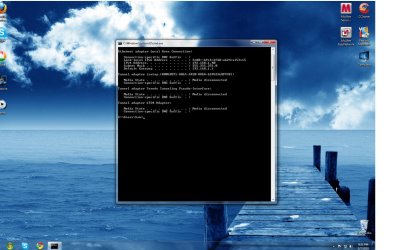
Still isn´t working even after countless ways of reseting etc. Set an IP and DNS, still not working.
 

Attachments

  • Untitled.jpg
    Untitled.jpg
    195.7 KB · Views: 186

My Computer

Computer Manufacturer/Model Number
Custom
OS
Windows 7 Ultimate 64-bit
CPU
Intel Q6600 2.4ghz
Motherboard
Asus P5N-E SLI
Memory
4gb 1066mhz Corsair
Graphics Card(s)
Nvidia 8800GT SLI
What exactly isn't working?

I now see the default gateway again and your IPv4 address is now showing up. It also doesn't say Media Unoperational any more, so those problems are gone because of resetting the router just like I mentioned in my first post. I hope you have your router set up for auto DHCP assignments?

You might also try flushing the DNS by typing
ipconfig /release
ipconfig /renew
ipconfig /flushdns
into the command prompt one at a time then hit enter.

Also try returning your HDD to the normal state, plugged back in like it was before into the same SATA port and remove the new one that you added for now since changing them seemed to cause this problem to begin with.

Also if you are using anti virus software or a third party firewall uninstall it for now.

Your DNS connection suffix should be showing your ISP name like mine shows san.rr.com, which tends to go back to the modem needing a reset like I mentioned earlier. Have you performed a complete reset starting from the Modem yet?

If you are concerend about where it says Media Disconnected? If so that is perfectly normal as I already mentioned before, that is what it always says there, notice my ipconfig says the same thing as yours and everything is working for me.

If you are running Apple programs with Bonjour try this. Start > Control Panel ( Large Icons ) > Windows Firewall > Allow a program or feature > Allow another program > Right click on Bonjour Sevices and delete .
 
Last edited:

My Computer

Computer type
PC/Desktop
Computer Manufacturer/Model Number
Home built
OS
Windows 7 Ult, Windows 8.1 Pro,
CPU
Q9650-4.275GHz, E8600 4.5GHz, E6750-3.8GHz
Motherboard
Evga 780i FTW
Memory
G.Skill PC2 9600 1200Mhz 5 5 5 15 2T
Graphics Card(s)
GTX480
Sound Card
Asus Xonar D2
Monitor(s) Displays
HannsG
Screen Resolution
1680X1050
Hard Drives
GSkill Phoenix Pro 120GB SSD
PSU
ThermalTake Toughpower 1000Watt modular
Case
ThermalTake XaserV
Cooling
Xigmatek S1283
Keyboard
Logitech G15
Mouse
Logitech G9
Internet Speed
T1
Back
Top