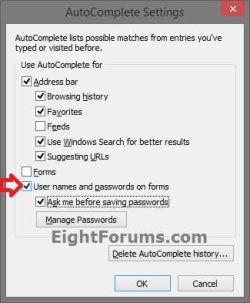
All three win 7 machines (two laptops one PC) continually prompt for saving passwords/autocomplete in IE-11. I have consistently disabled all references in IE Options settings but it continues to ask if I want to save these specific items. Been bugging me for months, a simple annoyance, but should not be present if disabled in settings at Content/autocomplete in IE options AND in advance/browsing 'use inline..' 2 boxes unchecked. Am I missing something?
I may have disabled it somewhere else but right now cannot remember where. Thanks for any help.
My Computer
At a glance
Windows 7 Ult 32Pentium(R) 4-M 2.6Ghz2GBNVIDIA Quatro 700 GoGl
Double check using the tutorial below to see if you have unchecked the User names and passwords on forms box to turn it off in "AutoComplete Settings".
Hello Brink. Yes as posted all the checkmark places in that panel are completely blank. After every 'update' (security only) I recheck, still unchecked. I have a number of times 'reset' all IE to default setting and 're-unchecked' all the places I OP'd about. It is an annoying glitch that will not go away. Any other places this might be 'stuck' in?
Attachments
IE_Auto_Complete-3.jpg
20.4 KB
· Views: 13
My Computer
At a glance
Windows 7 Ult 32Pentium(R) 4-M 2.6Ghz2GBNVIDIA Quatro 700 GoGl
As mentioned in post 3, reset IE to default many times, no change. Since posting, wrote down the text of one of the prompts "Do you want autocomplete to remember webform entries? (yes) (no)". The other annoying one asks to save password information. Saw the links (in tutorials page you listed) about the 'regfiles' to disable (one for each passwords/autocomplete), am wondering if I should go ahead and run those listed?
EDIT: Read the reg keys info in the tools, says the same 'no' in the places where the information is in my registry. Running the 'tools' would change nothing. The more I look into this, the more weird it gets.
Tool info at location = "FormSuggest Passwords"="no"
My registry at location = FormSuggest Passwords REG_SZ no
Tool info at location = "Append Completion"="no"
My Registry at location = Append Completion REG_SZ no
Last edited:
My Computer
At a glance
Windows 7 Ult 32Pentium(R) 4-M 2.6Ghz2GBNVIDIA Quatro 700 GoGl

 All three win 7 machines (two laptops one PC) continually prompt for saving passwords/autocomplete in IE-11. I have consistently disabled all references in IE Options settings but it continues to ask if I want to save these specific items. Been bugging me for months, a simple annoyance, but should not be present if disabled in settings at Content/autocomplete in IE options AND in advance/browsing 'use inline..' 2 boxes unchecked. Am I missing something?
  I may have disabled it somewhere else but right now cannot remember where. Thanks for any help.