

Noticed this when I had accidentally selected Keep me signed in on a PC not belonging to me when checking my Outlook.com emails using Windows 7, IE10 and Outlook.com web interface. Need help to find out how to avoid this kind of situation.
Scenario: Opening Outlook.com with IE10. Logging in with my [email protected], accidentally selecting Keep me signed in. All is well, check mails, reply to a few, sign out, closed IE10, shut down the computer.
Was leaving when someone I was waiting to go with asked me to wait 10 more minutes. With extra time in my hands decided to check my other Hotmail account, too. Booted the same PC, opened IE10, went again to Outlook.com and to my surprise it opened to my outlook.com account I had checked earlier, directly without asking for credentials.
I was absolutely sure I had not only closed the IE10 and shut down the PC, but first selected Sign Out from Outlook.com menus. In my opinion this, selecting to log out / sign out should invalidate earlier Keep me signed in selection?
Came home, decided to test this. Here's how it went:
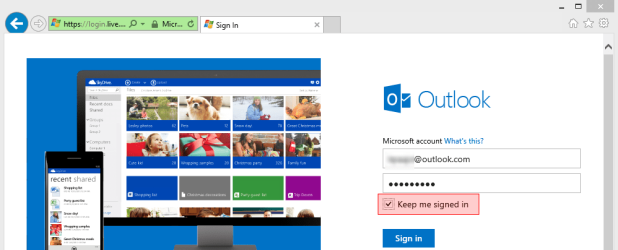
Opening Outlook.com on IE10, entering my [email protected] credentials and selecting Keep me signed in (this time deliberately):
Web interface opens, everything OK:
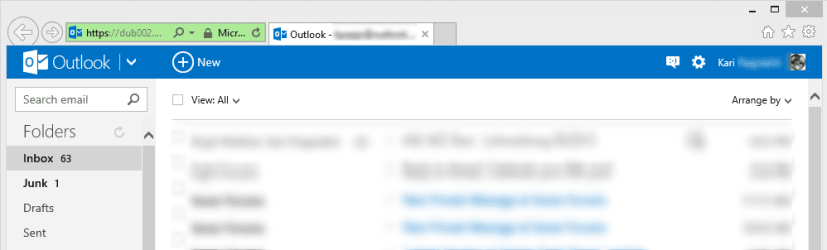
Selecting Sign Out:
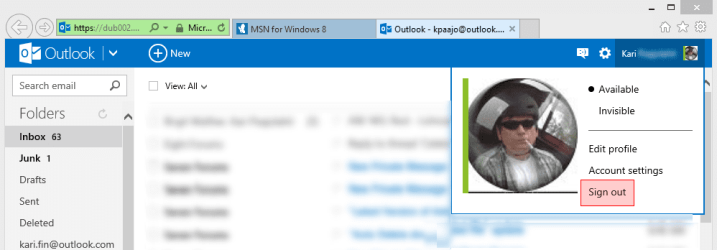
Sign out successful:

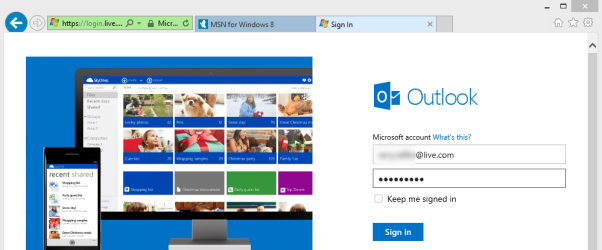
Logging in with another Hotmail account, this time with [email protected], not selecting Keep me signed in:
Signing out from this second account:
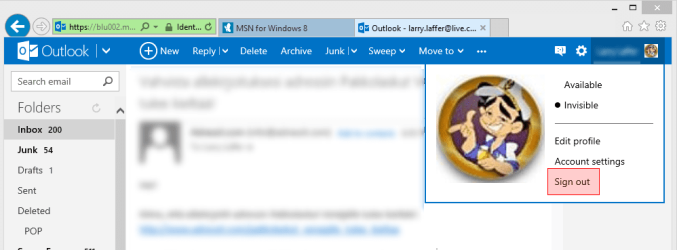
Sign out successful:
Closed IE10. Reopened IE10, the first mail account ([email protected]) appears on Outlook.com as soon as the page is opened, credentials never asked:
My email account can be viewed without credentials simply by closing and reopening IE10, regardless which Hotmail / Live / Outlook.com was opened and signed in and when the account was signed out when the browser was closed.
It seems to me that Outlook.com is not allowing to completely sign out from Outlook.com if Keep me signed in has been selected. In my tests now the account used to sign in with this option will always open automatically without credentials when IE10 is restarted.
Any opinions, tips, advice? I do not like this kind of security leaks, I'm even willing to take the Darwin Award if needed: if this is my own doing, please tell it for me!
Kari
Scenario: Opening Outlook.com with IE10. Logging in with my [email protected], accidentally selecting Keep me signed in. All is well, check mails, reply to a few, sign out, closed IE10, shut down the computer.
Was leaving when someone I was waiting to go with asked me to wait 10 more minutes. With extra time in my hands decided to check my other Hotmail account, too. Booted the same PC, opened IE10, went again to Outlook.com and to my surprise it opened to my outlook.com account I had checked earlier, directly without asking for credentials.
I was absolutely sure I had not only closed the IE10 and shut down the PC, but first selected Sign Out from Outlook.com menus. In my opinion this, selecting to log out / sign out should invalidate earlier Keep me signed in selection?
Came home, decided to test this. Here's how it went:
Opening Outlook.com on IE10, entering my [email protected] credentials and selecting Keep me signed in (this time deliberately):
Web interface opens, everything OK:
Selecting Sign Out:
Sign out successful:
Logging in with another Hotmail account, this time with [email protected], not selecting Keep me signed in:
Signing out from this second account:
Sign out successful:
Closed IE10. Reopened IE10, the first mail account ([email protected]) appears on Outlook.com as soon as the page is opened, credentials never asked:
My email account can be viewed without credentials simply by closing and reopening IE10, regardless which Hotmail / Live / Outlook.com was opened and signed in and when the account was signed out when the browser was closed.
It seems to me that Outlook.com is not allowing to completely sign out from Outlook.com if Keep me signed in has been selected. In my tests now the account used to sign in with this option will always open automatically without credentials when IE10 is restarted.
Any opinions, tips, advice? I do not like this kind of security leaks, I'm even willing to take the Darwin Award if needed: if this is my own doing, please tell it for me!
Kari
Last edited:
My Computer
- Computer type
- Laptop
- Computer Manufacturer/Model Number
- HP ENVY 17-1150eg
- OS
- Windows 10 Pro x64 EN-GB
- CPU
- 1.6 GHz Intel Core i7-720QM Processor
- Memory
- 6 GB
- Graphics Card(s)
- ATI Mobility Radeon HD 5850 Graphics
- Sound Card
- Beats sound system with integrated subwoofer
- Monitor(s) Displays
- 17" laptop display, 22" LED and 32" Full HD TV through HDMI
- Screen Resolution
- 1600*900 (1), 1920*1080 (2&3)
- Hard Drives
- Internal: 2 x 500 GB SATA Hard Disk Drive 7200 rpm
External: 2TB for backups, 3TB USB3 network drive for media
- Cooling
- As Envy runs a bit warm, I have it on a Cooler Master pad
- Keyboard
- Logitech diNovo Media Desktop Laser (bluetooth)
- Mouse
- Logitech Performance Mouse MX
- Internet Speed
- 50/10 Mbps VDSL
- Antivirus
- Windows Defender 4.3.9431.0
- Browser
- Maxthon 3.5.2., IE11


