Solved ie11 menu bar and toolbars missing

I did remove the offending software after the Microsoft Safety Scanner found it.

So I did a windows repair install from another post I found in this site: http://www.sevenforums.com/tutorials/3413-repair-install.html

IE is back and functioning properly. All of the devices appear in the Devices and Printers area. The features in "Turn Windows features on or off" all appear.

The only remaining issue is that there are now 143 important updates and 10 optional updates to install. (I'll skip the Bing Desktop and Bing Bar for sure.)
 

My Computer

Computer type
PC/Desktop
Computer Manufacturer/Model Number
HP p6210y
OS
Windows 7 Home Premium 64 bit
CPU
AMD Athlon II X4 620
Motherboard
MsN78-LA (Violet)
Memory
6GB
Graphics Card(s)
ATI Radeon HD 5450 (added)
Hard Drives
WDC WD10 EARS-00Y5B1
WDC WD64 00AAKS-65A7B
Antivirus
Panda Cloud Antivirus PRO
Browser
Chrome, Firefox
Hi and thanks for the update,
I would just load the Important updates for now,
Optional updates are just that Optional,
Review them before downloading and installing them,
I never deal with optional update,
Cheers.
 

My Computer

Computer type
PC/Desktop
Computer Manufacturer/Model Number
Custom assembled by me :}
OS
Win-7-Pro64bit 7-H-Prem-64bit
CPU
i7-5930K 2nd i9-9940x both water blocked VRM's too
Motherboard
ASUS SABERTOOTH X99 2nd ASUS x299 Apex
Memory
Trident-z 3200C14 2nd Trident-z 3600C16
Graphics Card(s)
EVGA 1080ti ftw3 2nd Titan Xp both water blocked
Sound Card
Built-in Realtek
Monitor(s) Displays
1-AOC G2460PG 24"G-Sync 144Hz/ 2nd 1-ASUS VG248QE 24" 144Hz
Screen Resolution
1920 x 1080 144Hz
Hard Drives
2-Samsung M.2 Evo & Evo Plus
2-Samsung 850 EVO 500GB SSD's/ 3-2.5 W.D. Black 1tb-&3-1tb/3-3.5 WD Black 1tb hdd's
PSU
EVGA SuperNOVA 1000-P2 2nd 1200-P2
Case
2-Corsair Obsidian Series 450D Black ATX Mid Tower
Cooling
Custom water loops
Keyboard
Logitech G710+/ 2nd Logitech G910
Mouse
2-RedDragon M901 Perdition 16400 dpi Gaming mouse = wired
Internet Speed
Comcast Ping 19ms 89.31mbps download speed 6.12mbps upload
Antivirus
Malwarebytes Pro/ Superantispyware Pro
Browser
FireFox & Pale moon
Other Info
2nd ASUS X299 Apex/Intel i9-9940x with Custom water loop/7H-Prem-x64/Corsair 450D case/Ram Trident-z 3600C16 4x8gb / Samsung970Evo plus 500gb SSD/Dual ssd EZ swap evo/PSU EVGA SuperNova 1200w-P2 80+Platinum/GPU Titan Xp /8-ML-140 on push-pull on 2-280GTX rads
Glad your problem is solved.

Please stay away from keygens, cracks, etc. They bring plenty of malware with them.

Good luck, jmw082.
 

My Computer

Computer type
PC/Desktop
Computer Manufacturer/Model Number
An ol' eMachines
OS
Windows 7 Home Premium
Internet Speed
Fine for me...I'm retired!
F11, f11, f11

Ok, before you do anything, try simply pressing F11.

if you're in Full Screen Mode, the Favorites Tool Bar won't show, no matter what you do.
Simply pressing F11 to get out of Full Screen Mode usually fixes it. I spent an hour on this before realizing I was Fill Screen. There's no way to tell by a quick look. I Felt like an Idiot, but it worked.. :-)
 

My Computer

Computer type
PC/Desktop
Computer Manufacturer/Model Number
Custom Build
OS
Windows 7 (64bit)
CPU
Intel Core i7 2600k CPU 3.4Ghz 8MB L3
Motherboard
Gigabyte GA-Z68X-UD5-B3
Memory
G.Skill 8GB (4 x 4GB) 240-Pin DDR3 SDRAM 1600
Graphics Card(s)
EVGA 02G-P3-1559-KR GeForce GTX 550 Ti
Hard Drives
Intel 320 Series SSDSA2CW160G3K5 160GB SATA II MLC
Western Digital Caviar Black WD1001FALS 1T
Antivirus
BitDefender Internet Security
Browser
IE 11
Thanks for posting your findings lennyn.

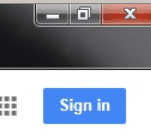
If you look at the screenshot in the first post, you will see this...
ie.PNG
...in the upper right corner.

That indicates that the browser was not in the Full Screen Mode.
 

My Computer

Computer type
Laptop
Computer Manufacturer/Model Number
Employer provided Dell Latitude
OS
W7 Pro SP1 64bit
CPU
i7
Memory
8GB
Graphics Card(s)
Intel HD Graphics
Hard Drives
crappy SSD
Antivirus
Employer mandated Symantec Endpoint Protection
Browser
Pale Moon 64bit, IE11 64bit & Chrome 64bit
Understood, thank you for the Update, Appreciated.
 

My Computer

Computer type
PC/Desktop
Computer Manufacturer/Model Number
Custom Build
OS
Windows 7 (64bit)
CPU
Intel Core i7 2600k CPU 3.4Ghz 8MB L3
Motherboard
Gigabyte GA-Z68X-UD5-B3
Memory
G.Skill 8GB (4 x 4GB) 240-Pin DDR3 SDRAM 1600
Graphics Card(s)
EVGA 02G-P3-1559-KR GeForce GTX 550 Ti
Hard Drives
Intel 320 Series SSDSA2CW160G3K5 160GB SATA II MLC
Western Digital Caviar Black WD1001FALS 1T
Antivirus
BitDefender Internet Security
Browser
IE 11
Back
Top