
IE8 shows Hard Drive Folders into Favorites

Ehrad

New member
Local time
4:42 PM
Messages
5
Hi everybody!

Please, I need your help. I have Win 7 Enterprise installed.
When I click into my IE8 Favorites, my HD folders are appearing there. I did some tests and if I try to delete them, my original HD files are deleted.
Maybe it happened when I tried do bring back my favorites from my backup files (ex Win XP), and I think that IE8 added all folders of my c: hard drive instead of only my favorites bookmarks.
Now, I can't even add new bookmarks.
Please my friends, is there anyway to fix that?
Sorry about english errors, I'm typing from Brazil.
 

Attachments
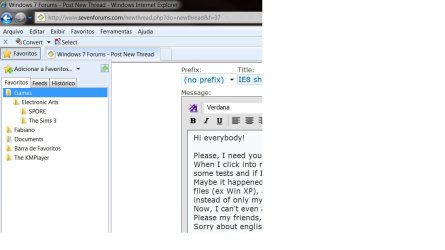
  • IE8 Bookmarks.jpg
    IE8 Bookmarks.jpg
    56.8 KB · Views: 72

My Computer My Computer

At a glance

Windows 7
OS
Windows 7
What I would do is copy from you favorites all of your files into a different folder then delete them off your favorites?? That should work..

You said that these files are XP files not Seven correct??
 

My Computer My Computer

At a glance

Windows Seven x642.2 GHz Dual Core4GBATI Mobility RADEON HD 3470
Computer Manufacturer/Model Number
HP Pavilion dv5 Notebook PC
OS
Windows Seven x64
CPU
2.2 GHz Dual Core
Motherboard
Quanta 3600
Memory
4GB
Graphics Card(s)
ATI Mobility RADEON HD 3470
Sound Card
ATI
Monitor(s) Displays
Laptop
Hard Drives
ATA Hitachi HTS543215 (5400RPM)
Case
Laptop
Cooling
Fan
Internet Speed
Basic DSL 1.5 up and Down
Go to your 'Home' folder and open up the favourites folder, delete whatever you don't want from in there :)
 

My Computer My Computer

At a glance

Windows 7 Ultimate x64AMD Turion(tm) 64 X2 Mobile Technology TL-563GB Nanya PC2-6400 DDR2-SDRAM SO-DIM (400MHz)NVIDIA GeForce Go 7600 256MB GDDR3 SDRAM
Computer Manufacturer/Model Number
HP Touchsmart IQ771.uk
OS
Windows 7 Ultimate x64
CPU
AMD Turion(tm) 64 X2 Mobile Technology TL-56
Motherboard
ASUS Pheonix
Memory
3GB Nanya PC2-6400 DDR2-SDRAM SO-DIM (400MHz)
Graphics Card(s)
NVIDIA GeForce Go 7600 256MB GDDR3 SDRAM
Sound Card
High Definition Intergrated NVIDIA MCP51
Monitor(s) Displays
46" Sony Bravia HDTV
Screen Resolution
1600x1200
Hard Drives
1.5TB Samsug
320GB Seagate ST3320820AS - SATA 3Gb/s 8MB
500GB Maxtor Basics STM305003EHD301-RK
Internet Speed
↓6.32 Mb/s ↑0.35 Mb/s ↔26ms
Other Info
BIOS - American Megatrends Inc. 5.07
Ethernet Port - NVIDIA nForce 10/100/1000 Mbps
DVD Drive - TSSTcorp DVDR/RW TS-T632L
Thank you very much for the suggestions, but I can't fix the problem.
My HD partition that is appearing inside IE8's favorites has more than 200 gigs.
I'm pretty sure that I did something wrong when trying to import my old XP favorites and I added the whole HD drive partition.
What would be the most import thing is the way to disassociate my HD from IE8 favorites. Even deleting the files, they will continue to be associated with that HD drive and I can't find any option inside IE8 to do that. Already tried all right click buttons possible, inside IE8 favorites and even with the windows explorer.
What can I do?
Thank you very much.
 

My Computer My Computer

At a glance

Windows 7
OS
Windows 7
There are no system files in the favourites displayed is there? (ie. Windows folder or system32 folder)
If this is correct and the files are purely media files (ie. documents, music, pics etc.) Why can't you just move the files from Favourites to where you want them?
 

My Computer My Computer

At a glance

Windows 7 Ultimate x64AMD Turion(tm) 64 X2 Mobile Technology TL-563GB Nanya PC2-6400 DDR2-SDRAM SO-DIM (400MHz)NVIDIA GeForce Go 7600 256MB GDDR3 SDRAM
Computer Manufacturer/Model Number
HP Touchsmart IQ771.uk
OS
Windows 7 Ultimate x64
CPU
AMD Turion(tm) 64 X2 Mobile Technology TL-56
Motherboard
ASUS Pheonix
Memory
3GB Nanya PC2-6400 DDR2-SDRAM SO-DIM (400MHz)
Graphics Card(s)
NVIDIA GeForce Go 7600 256MB GDDR3 SDRAM
Sound Card
High Definition Intergrated NVIDIA MCP51
Monitor(s) Displays
46" Sony Bravia HDTV
Screen Resolution
1600x1200
Hard Drives
1.5TB Samsug
320GB Seagate ST3320820AS - SATA 3Gb/s 8MB
500GB Maxtor Basics STM305003EHD301-RK
Internet Speed
↓6.32 Mb/s ↑0.35 Mb/s ↔26ms
Other Info
BIOS - American Megatrends Inc. 5.07
Ethernet Port - NVIDIA nForce 10/100/1000 Mbps
DVD Drive - TSSTcorp DVDR/RW TS-T632L
HI,

Because where they are is the wrong place. I can't left a hard drive of 200 gigs with just Favorites folder :), understand?
I need to discover a registry key to change IE8 favourites to default.
Thanks.
 

My Computer My Computer

At a glance

Windows 7
OS
Windows 7
Excuse the language a bit, I will try to make it go quicker

Oi Ehrad, bem vindo ao forum

Você identificou o problema, mas está tentando a solução errada. Seus arquivos estão sim na pasta Favoritos (provavelmente pelo erro que você mencionou). Abra o Windows Explorer (não o Internet Explorer), procure seu User, procure a pasta Favoritos e os arquivos em questão devem estar lá. Você só precisa movê-los para outra pasta, onde desejar

Avise se funcionar, ou se continua com o problema. Estamos aqui para ajudar

Quick summary: I recommend Ehrad goes into Windows Explorer and moves the files from the Favorites folder to wherever.
 

My Computer My Computer

At a glance

Windows 7 x64 finally!AMD Athlon II X2 240OCZ Platinum 4GB DDR2 1066 (will not work pas...MSI R4670-MD1G Radeon HD 4670 1GB 128-bit GDDR3
Computer Manufacturer/Model Number
Wally, Innc.
OS
Windows 7 x64 finally!
CPU
AMD Athlon II X2 240
Motherboard
Biostar TA790GX XE
Memory
OCZ Platinum 4GB DDR2 1066 (will not work past 800MHz)
Graphics Card(s)
MSI R4670-MD1G Radeon HD 4670 1GB 128-bit GDDR3
Sound Card
ATI High Definition Audio Device Realtek ALC888
Monitor(s) Displays
HP w19e
Screen Resolution
1440x900
Hard Drives
Western Digital Caviar Green WD5000AADS 500GB SATA
Western Digital Caviar Blue WD5000AAKS 500GB SATA
PSU
Athena Power Micro ATX 400W
Case
HEC 6T 6T10BB Black MicroATX Mini Tower
Cooling
stock
Keyboard
wired, many keys
Mouse
HP wireless, 2 buttons, 1 wheel
Internet Speed
DSL 2Mb (recently getting 1.65M!)
First of all, thank you very much for your support. I hope to support you like you did for me, for future issues.
I tried everything on my desktop with win 7, unfortunately, the problem was persisting.
So, I went to IE8 options and I used the redefine option.
The favorites started from the default and my previous installed add-ons was still there (surprised)! Very good.
So, opened my work's notebook (XP Pro with IE8) and with a pendrive I got a copy from my favorites from two weeks ago (:cry:) and it was very easy to copy and paste it to XP, without any import export/action, just copy and paste inside docs and settings etc (I think Win 7 should be easy like that but it is not).
Then, I created a bookmark.htm file, exporting the favorites. I Got the pen drive again, saved to my desktop with Win 7 and tried to import the bookmark.htm file with the IE8. This time it works like a charm!
I think I did some error at some point for that problem appears, but I think that XP Pro has a very simple way to solve issues like that and Microsoft should pay some attention for that.
Topic closed and thanks again!

wallyinnc: Rio de Janeiro 2016 ;) !!
 

My Computer My Computer

At a glance

Windows 7
OS
Windows 7
Ehrad, thanks for the feedback. Stay around and share the knowledge with others.

Although I am in doubt: if you opened C:\ -> Usuarios -> " Ehrad -> Favoritos, weren't your files that you didn't want to show in IE8 there?

I had not noticed before, but there is no "Documents and Settings" in Win7, that is probably what threw you off

Go Rio!! (embora eu seja Paulista...) :)
 

My Computer My Computer

At a glance

Windows 7 x64 finally!AMD Athlon II X2 240OCZ Platinum 4GB DDR2 1066 (will not work pas...MSI R4670-MD1G Radeon HD 4670 1GB 128-bit GDDR3
Computer Manufacturer/Model Number
Wally, Innc.
OS
Windows 7 x64 finally!
CPU
AMD Athlon II X2 240
Motherboard
Biostar TA790GX XE
Memory
OCZ Platinum 4GB DDR2 1066 (will not work past 800MHz)
Graphics Card(s)
MSI R4670-MD1G Radeon HD 4670 1GB 128-bit GDDR3
Sound Card
ATI High Definition Audio Device Realtek ALC888
Monitor(s) Displays
HP w19e
Screen Resolution
1440x900
Hard Drives
Western Digital Caviar Green WD5000AADS 500GB SATA
Western Digital Caviar Blue WD5000AAKS 500GB SATA
PSU
Athena Power Micro ATX 400W
Case
HEC 6T 6T10BB Black MicroATX Mini Tower
Cooling
stock
Keyboard
wired, many keys
Mouse
HP wireless, 2 buttons, 1 wheel
Internet Speed
DSL 2Mb (recently getting 1.65M!)
Yes, I think it was the problem. First of all, I tried to import the favorites archive with win 7, but, even ignoring the bookmark.htm that it asks and choosing Favoritos, Win 7 did not accepted. So, someway wrong, I choose my whole HD and it accepted :cry:. So, one lesson to learn: always try to use the bookmark.htm. I will buy the win 7 ultimate in october 22, but before the the install, I'll create a bookmark.htm...

Estou aqui em Copacabana, carioca há 38 anos, já trabalhei em Coral Gables, em Miami, mas me amarro em São Paulo, coração paulistano.
Abraços!
 

My Computer My Computer

At a glance

Windows 7
OS
Windows 7
Rather than import the favorites I just save them to a file on my home server then I just put the contents into my favorites folder after I reinstall the Op system. After that I use faviconizer to retrieve the favicons.
 

My Computer My Computer

At a glance

Windows 7 Ult, Windows 8.1 Pro,Q9650-4.275GHz, E8600 4.5GHz, E6750-3.8GHzG.Skill PC2 9600 1200Mhz 5 5 5 15 2TGTX480
Computer type
PC/Desktop
Computer Manufacturer/Model Number
Home built
OS
Windows 7 Ult, Windows 8.1 Pro,
CPU
Q9650-4.275GHz, E8600 4.5GHz, E6750-3.8GHz
Motherboard
Evga 780i FTW
Memory
G.Skill PC2 9600 1200Mhz 5 5 5 15 2T
Graphics Card(s)
GTX480
Sound Card
Asus Xonar D2
Monitor(s) Displays
HannsG
Screen Resolution
1680X1050
Hard Drives
GSkill Phoenix Pro 120GB SSD
PSU
ThermalTake Toughpower 1000Watt modular
Case
ThermalTake XaserV
Cooling
Xigmatek S1283
Keyboard
Logitech G15
Mouse
Logitech G9
Internet Speed
T1
Back
Top