IE8 stops working after searching

Allenren

New member
Local time
11:29 AM
Messages
2
Hi, I am new here. I came here to hopefully get a solution to a serious problem with my internet explorer.

The system I use is Win7, IE8.
The problem is that everytime I open an IE window and do some google search (I can open Google home page with no problem), the IE will stop working immediately after the search results come out.
Then there is a pop-up message saying "a problem caused the problem to work correctly. Windows will close the program and notify you if a solution is available".

After I close the message, it says" the tab has been recovered. A problem with the webpage caused the internet explorer to close and reopen the tab". It seems the IE recovered itself but actually the first message popped up again saying the same thing that IE stopped working correctly.

I tried MSN search bar and yahoo and got the same problem. I can go to normal webpages as long as I dont use the search bar. The system has been scanned and no virus has been found.

Does anyone know this problem? I will appreciate if I can get a solution, becasue I really dont wanna reinstall the system.
 

My Computer My Computer

OS
Win 7
Welcome to the forum,

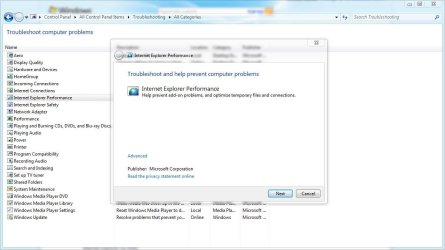
There's a troubleshooter in the control panel for internet explorer, That might be a good place to start to see if this is a fairly simple fix.
 

Attachments

  • ie 8.JPG
    ie 8.JPG
    77.5 KB · Views: 67

My Computer My Computer

Computer type
PC/Desktop
Computer Manufacturer/Model Number
Self Built
OS
Win 10 Pro x64
CPU
Intel I5-2500K @3.3GHz
Motherboard
Asrock P67 Extreme4
Memory
16GB G.Skill Ripjaws X (4x4GB)
Graphics Card(s)
EVGA GeForce 750 Ti SC 2GB
Sound Card
ASUS Xonar DG 5.1 Channels 24-bit 96KHz PCI Interface Sound
Monitor(s) Displays
auria eq2367
Screen Resolution
1920 x 1080
Hard Drives
250GB Samsung 850 EVO SSD
1TB WD Blue
1TB Hitachi
PSU
SeaSonic X 650W 80 Plus Gold
Case
Corsair Obsidian 750D
Cooling
Corsair H60, Three 140mm case fans
Keyboard
Logitech Wireless Keyboard K520
Mouse
Logitech Wireless Mouse M310
Internet Speed
Wave Broadband ~ 100 dn 5 up
Antivirus
Windows Defender, Malwarebytes Premium
Browser
Edge, IE11, Chrome
Other Info
Laptop specs: HP g7-1365dx /
CPU: AMD A6-3420M APU with Radeon(tm) HD Graphics /
RAM: Crucial 8Gb (2x4Gb) /
SSD: Crucial M4-CT128M4SSD2 ATA Device/ FW 000F /
GFX: AMD Radeon HD 6520G /
OS: Windows 10 Pro x64
Most problems with IE are due to corrupt or conflicting 3rd party add-ons. If the troubleshooter does not identify any problems, I would recommend you "reset" IE. Go to Tools > Internet Options > Advanced then click on Reset. From there, see if all works. If okay, then you can start adding your add-ons, one at a time.
 

My Computer My Computer

Computer Manufacturer/Model Number
BrightWorks Systems B4
OS
Windows 7 Profession 64-bit
CPU
Intel Core i7-860 Quad
Motherboard
Gigabyte P55-UD4P
Memory
Mushkin 4x2Gb PC12800
Graphics Card(s)
Gigabyte GTX260 896Mb
Sound Card
Integrated 7.1 HD Dolby
Monitor(s) Displays
2 Samsung 2220wm-HAS 22"
Screen Resolution
1680 x 1050 | 1680 x 1050
Hard Drives
WD HE 1Tb
PSU
Corsair TX-750W
Case
Ultra M998
Cooling
OEM
Keyboard
MS Wireless Comfort 5000
Mouse
MS Wireless 5000
Internet Speed
Cable and pretty darn fast
Most problems with IE are due to corrupt or conflicting 3rd party add-ons. If the troubleshooter does not identify any problems, I would recommend you "reset" IE. Go to Tools > Internet Options > Advanced then click on Reset. From there, see if all works. If okay, then you can start adding your add-ons, one at a time.
Very nice. Also, after resetting IE8, go to Tools>Internet Options>Advanced and uncheck Enable 3rd party browser extension. Click Apple and OK.
 

My Computer My Computer

Computer Manufacturer/Model Number
Samsung NP530U4B-S02IN
OS
Windows® 8 Pro (64-bit)
CPU
Intel® Core™ i5 Processor 2467M (1.60GHz, 3MB L3 Cache)
Motherboard
Samsung Electronics
Memory
6GB DDR3 System Memory at 1,333MHz (on BD 4GB + 2GB x 1)
Graphics Card(s)
AMD Radeon™ HD7550M 1GB DDR3 (Ext. Graphic)
Sound Card
Realtek High Definition Audio
Monitor(s) Displays
35.56cm (14.0) SuperBright 300nit HD LED Display
Screen Resolution
1366x768
Hard Drives
1TB S-ATA II Hard Drive (5400RPM) with ExpressCache 16GB SSD
Internet Speed
sucks
Antivirus
Microsoft Security Essentials
Browser
Google Chrome (Sync enabled)
Most problems with IE are due to corrupt or conflicting 3rd party add-ons. If the troubleshooter does not identify any problems, I would recommend you "reset" IE. Go to Tools > Internet Options > Advanced then click on Reset. From there, see if all works. If okay, then you can start adding your add-ons, one at a time.

Thanks, problem was solved right after resetting.:D
 

My Computer My Computer

OS
Win 7
Thanks for posting your solution.:)
 

My Computer My Computer

Computer type
PC/Desktop
Computer Manufacturer/Model Number
Self Built
OS
Win 10 Pro x64
CPU
Intel I5-2500K @3.3GHz
Motherboard
Asrock P67 Extreme4
Memory
16GB G.Skill Ripjaws X (4x4GB)
Graphics Card(s)
EVGA GeForce 750 Ti SC 2GB
Sound Card
ASUS Xonar DG 5.1 Channels 24-bit 96KHz PCI Interface Sound
Monitor(s) Displays
auria eq2367
Screen Resolution
1920 x 1080
Hard Drives
250GB Samsung 850 EVO SSD
1TB WD Blue
1TB Hitachi
PSU
SeaSonic X 650W 80 Plus Gold
Case
Corsair Obsidian 750D
Cooling
Corsair H60, Three 140mm case fans
Keyboard
Logitech Wireless Keyboard K520
Mouse
Logitech Wireless Mouse M310
Internet Speed
Wave Broadband ~ 100 dn 5 up
Antivirus
Windows Defender, Malwarebytes Premium
Browser
Edge, IE11, Chrome
Other Info
Laptop specs: HP g7-1365dx /
CPU: AMD A6-3420M APU with Radeon(tm) HD Graphics /
RAM: Crucial 8Gb (2x4Gb) /
SSD: Crucial M4-CT128M4SSD2 ATA Device/ FW 000F /
GFX: AMD Radeon HD 6520G /
OS: Windows 10 Pro x64
Most problems with IE are due to corrupt or conflicting 3rd party add-ons. If the troubleshooter does not identify any problems, I would recommend you "reset" IE. Go to Tools > Internet Options > Advanced then click on Reset. From there, see if all works. If okay, then you can start adding your add-ons, one at a time.

Thanks, problem was solved right after resetting.:D
You are welcome and thanks for the followup.
 

My Computer My Computer

Computer Manufacturer/Model Number
BrightWorks Systems B4
OS
Windows 7 Profession 64-bit
CPU
Intel Core i7-860 Quad
Motherboard
Gigabyte P55-UD4P
Memory
Mushkin 4x2Gb PC12800
Graphics Card(s)
Gigabyte GTX260 896Mb
Sound Card
Integrated 7.1 HD Dolby
Monitor(s) Displays
2 Samsung 2220wm-HAS 22"
Screen Resolution
1680 x 1050 | 1680 x 1050
Hard Drives
WD HE 1Tb
PSU
Corsair TX-750W
Case
Ultra M998
Cooling
OEM
Keyboard
MS Wireless Comfort 5000
Mouse
MS Wireless 5000
Internet Speed
Cable and pretty darn fast
Back
Top