
tracingspirals
New member
- Local time
- 9:02 PM
- Messages
- 20
If I try to "extend volume" it gives "not enough space on the disk(s)"
Here's the story. I bought this new Samsung 840 250GB SSD.
I first did a clean install of windows 7 on it and it worked fine. Windows installed without much problem and everything. Then something didn't look right about the partitions. It looked like because I had all my HDDs connected while installing windows on the SSD the windows created the system reserve on the old HDD rather than the SSD. So I went back and decided to start from scratch with all the HDDs except for the SSD disconnected. I tried reinstalling windows on it but this time it didn't work. I tried formatting the SSD and it just gave me an error saying windows couldn't install on a GPT disk. I went into bios, made sure the PC was booting from the UEFI DVD drive and it still kept giving me the same error.
So I then booted up my old HDD. I tried formatting my SSD and now I can't delete the partition!
This is what my disk set up looks like:
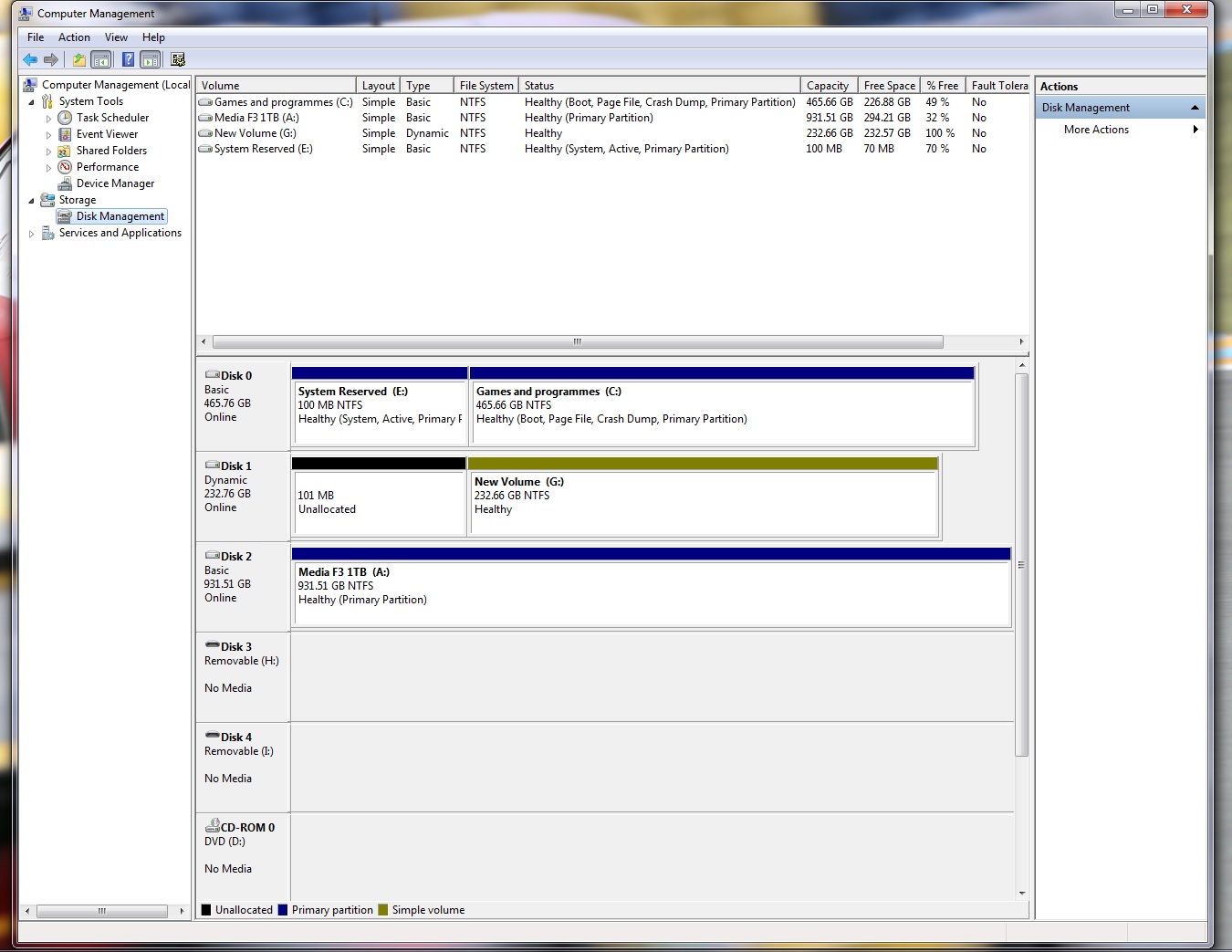
If I click "extend volume" on the "New Volume (G " disk, it says "there is not enough space on the disk(s) to complete this operation".
If I try to create a "new simple volume" on the "unallocated" partition, it says the same...
Have I destroyed my new SSD now?! I just want it to work like a new clean disk...
Here's the story. I bought this new Samsung 840 250GB SSD.
I first did a clean install of windows 7 on it and it worked fine. Windows installed without much problem and everything. Then something didn't look right about the partitions. It looked like because I had all my HDDs connected while installing windows on the SSD the windows created the system reserve on the old HDD rather than the SSD. So I went back and decided to start from scratch with all the HDDs except for the SSD disconnected. I tried reinstalling windows on it but this time it didn't work. I tried formatting the SSD and it just gave me an error saying windows couldn't install on a GPT disk. I went into bios, made sure the PC was booting from the UEFI DVD drive and it still kept giving me the same error.
So I then booted up my old HDD. I tried formatting my SSD and now I can't delete the partition!
This is what my disk set up looks like:
If I click "extend volume" on the "New Volume (G
" disk, it says "there is not enough space on the disk(s) to complete this operation".If I try to create a "new simple volume" on the "unallocated" partition, it says the same...
Have I destroyed my new SSD now?! I just want it to work like a new clean disk...
My Computer
At a glance
Windows 7 Home Premium 64bitIntel i7 2600kG-Skill DDR3 2x4GB 1600MhzAsus Nvidia 570GTX Direct CUii
- OS
- Windows 7 Home Premium 64bit
- CPU
- Intel i7 2600k
- Motherboard
- Asus Maximus IV Gene-Z
- Memory
- G-Skill DDR3 2x4GB 1600Mhz
- Graphics Card(s)
- Asus Nvidia 570GTX Direct CUii
- Monitor(s) Displays
- LG W2361v
- Screen Resolution
- 1080p
- Hard Drives
- 1 x Samsung F3 500GB - Boot + Programs
1 x Samsung F3 1TB - Media
- PSU
- Corsair HX750 - 750W
- Case
- NZXT Vulcan
- Cooling
- Antec Kuhler 920
- Keyboard
- Logitech
- Mouse
- Roccat

