I'm Getting REALLY SICK of this (XP sharing with W7)

jimbo45

New member
Guru
Gold Member
VIP
Local time
10:13 AM
Messages
5,941
Location
Hafnarfjörður IS
Hi all

What's up with simple Networking -- Why does Microsoft make it such a pain to get 2 computers to share files etc.

(W7 build 7077 X-64)

The frustrating thing about this is that sometimes it works and sometimes it just DOESN'T.

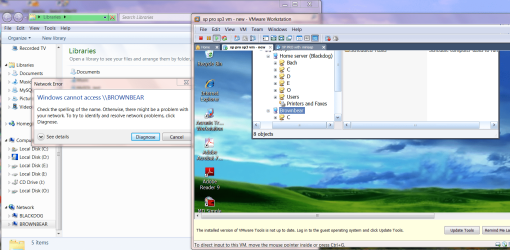
I can see W7 from a Windows XP virtual machine and access all the files on it. This works 100% every time. (Image 1).

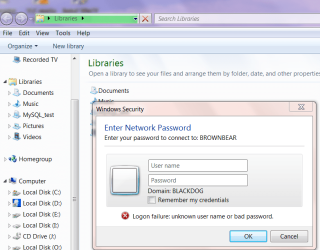
I can SEE the XP virtual machine from W7 but can't access anything on it unless I right mouse click Connect Network drive -- then I get the login screen correctly which prompts for a password (image 2).

It shouldn't work like that -- I should get the logon screen if I click the Brownbear computer (the XP machine)

All firewalls disabled etc etc.

Why on Earth should something SO SIMPLE be so complicated to get working properly. (And Working EVERY time -- not just randomly).

I have ZERO problems with setting up SAMBA shares on a Linux machine which in theory should be a lot more complicated -- and it works EVERY TIME.

Sorry for the RANT but I'm beginning to get a bit frustrated with this -- I need the shares to work every time.

I've been using computers for a long time -- so I can just imagine the pure hell some newbies must be going through with this stuff.

Images shown

Cheers
jimbo
 

Attachments
  • shares1.png
    shares1.png
    199.1 KB · Views: 58
  • network2.png
    network2.png
    58.8 KB · Views: 38

My Computer My Computer

At a glance

Linux CENTOS 7 / various Windows OS'es and se...Intel i7 Intel i58GB, 16GBOn Motherboard
Computer type
PC/Desktop
Computer Manufacturer/Model Number
Custom built, several laptops HP/ASUS
OS
Linux CENTOS 7 / various Windows OS'es and servers
CPU
Intel i7 Intel i5
Memory
8GB, 16GB
Graphics Card(s)
On Motherboard
Sound Card
Realtek HD audio
Monitor(s) Displays
Apple Cinema display, Samsung LCD
Screen Resolution
1920 X 1080
Hard Drives
4 X 1TB SATA
Mouse
Toshiba wireless laser
Internet Speed
> 20MB up
I have similar problem. I have a desktop and a laptop with W7 7077 and my wife's desktop has XP. XP to W7... No problem. I couldn't get either w7 machine to connect to XP. It sees the machine in the Network but when I click on it, I get "Windows cannot access \\computer name. I don't even have the option of "connect network drive". I did a clean install of 7077 on my desktop and now it works fine with XP. I have not done this yet on my laptop. I've compared all settings and can't find any differences. I guess something got messed up during the upgrade install. I'll wait for RC and then do a clean install on the laptop and hope that it will fix it once and for all! :sarc:
 

My Computer My Computer

At a glance

Windows7 x64 7600 16385Intel I7 9206GB DDR3ATI Radeon HD4350
Computer Manufacturer/Model Number
Dell / Studio xps
OS
Windows7 x64 7600 16385
CPU
Intel I7 920
Motherboard
Dell
Memory
6GB DDR3
Graphics Card(s)
ATI Radeon HD4350
Sound Card
Integrated 7.1 channel
Hard Drives
Hitachi HDT721064SLA360 (596 GB)
Keyboard
Logitech EX110
Mouse
Logitech LX8
I agree with you. I have a six pc home network. two have seven on them and four are xp. Networking on xp just works all the time with seven not so much. Most of the time I have to jump thru hoops to get anything from or to a seven os.However my two sevens seem to sync up well so that is promising
 

My Computer My Computer

At a glance

Windows 7 Ulti. x64AMD Phenom 8450 triple-core 2.10 ghz4GBATI Radion HD 3200
Computer Manufacturer/Model Number
Gateway GT5692
OS
Windows 7 Ulti. x64
CPU
AMD Phenom 8450 triple-core 2.10 ghz
Memory
4GB
Graphics Card(s)
ATI Radion HD 3200
Monitor(s) Displays
Gateway FPD1775W
Screen Resolution
1280x720
Hard Drives
465.6613 Gibibytes
what about checkmarking "remember my credentials" ? or maybe i'm just not hearing/reading/understanding exactly what your problem/issue is. I have no problems at all here jim, not on a VM, but still ...

Are you on about having to connect the drive, or having to input the password, or what exactly?? You know for the shares to work, XP has to be passworded... this is the security. I dont think i'm telling you anything you dont already know, this is why i'm confused as to what the issue is exactly.

[edit] Also, the way homegroups work Jim, MS advises to use the same passwords on all the 7 machines. If not you will get the prompt for 7 to 7 connections

[edit #2] Do you recall this problem in 7000 jim... i'm still on that one, i know you arent currently. I'm thinking it could be that 48 build you are on.... how bout 68 or 77? I would also advise that all pc's of 7 be on the same build on the network.
 

My Computer My Computer

At a glance

XP/win7 x86 build 7127Athlon64 X2 DUAL 4200+ 2.21ghz2GB Dual Chan DDR2 CorsairNvidia 6800GT
Computer Manufacturer/Model Number
CUSTOM
OS
XP/win7 x86 build 7127
CPU
Athlon64 X2 DUAL 4200+ 2.21ghz
Motherboard
ASUS K8 PRO SLI
Memory
2GB Dual Chan DDR2 Corsair
Graphics Card(s)
Nvidia 6800GT
Sound Card
nvidia
Monitor(s) Displays
19' LCD
Screen Resolution
1280x1024
Hard Drives
WD 250, 2x500, 2x1TB IDE/USB
WD 250 SATA (system)
SEAGATE 120 Sata
PSU
coolermaster 450
Case
SUPERFLOWER
Cooling
1 HDD bay fan, 5x80mm Case Fans, AEROGATE II Fan/Temp
Keyboard
MS wireless
Mouse
MS Wireless
Internet Speed
fassssssssst
I turn off passworded sharing, works like XP then.
 

My Computer My Computer

At a glance

Windows 7077
OS
Windows 7077
Hi there
I'm on build 7077 (need to update my profile) X-64.

The example I gave was just with one XP system (VM - although behaves 100% like a Real machine on a network) just hopefully to make the problem clearer.

I have a number of machines in a network consisting of both VM's and real machines. It's a mix of a SUSE 11.1 Linux server (64 bit), several XP and W7 machines.

The problem is (whether user id / password the same / different / passwords switched on / off -- I've tried all possible combinations) as follows.

1) ALL XP machines can SEE and connect to shares on W7 and SAMBA by just clicking on the networked computer -- BLACKDOG in the example in my first post. You get a password prompt and then you can browse the shares.

Works 100% every time.

2) W7 machines can "Sometimes" see W7 machines. When they can you get the message as shown in the first post Windows cannot access \\BROWNBEAR.

3) If the Brownbear computer (XP machine) is in the network list you CAN connect manually by context menu -- right mouse click , connect network drive then \\BROWNBEAR\SHARENAME. You then get the password prompt and it's OK.

4) If the BROWNBEAR (or other XP machines) DON'T appear in the list you can still connect by manually doing a Connect network drive from the explorer menu -- as above \\BROWNBEAR\SHARENAME and then as 3) you'll get the password logon screen and you can connect. Now if you know neither the computer name nor share name this method won't be any good.

IT SHOULDN'T WORK LIKE THIS.:mad:

5) W7 Networked computers - no problem works like 1) above

Computers should be in the Network shared list ALWAYS and just double clicking on the computer should either throw up a password (preferably) or just list the shares.

The LINUX system (SAMBA) works 100% whatever is thrown at it.
The SMB:/ command (from a GNOME / KDE / Linux Browser GUI) just shows throws up the entire Network map with ALL (none missing) the SAMBA shares. -- If you have Linux and are uncomfortable with SAMBA commands then there's also a Linux Network neighbourhood program that does the same thing.

Cheers
jimbo
 

My Computer My Computer

At a glance

Linux CENTOS 7 / various Windows OS'es and se...Intel i7 Intel i58GB, 16GBOn Motherboard
Computer type
PC/Desktop
Computer Manufacturer/Model Number
Custom built, several laptops HP/ASUS
OS
Linux CENTOS 7 / various Windows OS'es and servers
CPU
Intel i7 Intel i5
Memory
8GB, 16GB
Graphics Card(s)
On Motherboard
Sound Card
Realtek HD audio
Monitor(s) Displays
Apple Cinema display, Samsung LCD
Screen Resolution
1920 X 1080
Hard Drives
4 X 1TB SATA
Mouse
Toshiba wireless laser
Internet Speed
> 20MB up
Back
Top