I'm in the same spot, but I am joined to a domain.

Gnaglor

New member
Local time
2:06 AM
Messages
10
I'm having the same 'issue'. I've been told to try and find a way to have the computer boot to the login screen and display a specific user name, not necessarily the last user name to log in. For some reason(s), the extra clicks it takes to switch users or leaving the default account blank is not acceptable, so I'm also trying to find a way to do what vao wants to do. Any ideas? Someone tried the HKLM\Software\Microsoft\Windows\CurrentVersion\Authentication\LogonUI
LastLoggedOnSAMUser = Computername\username (or domainname\username for a domain account)
LastLoggedOnUser = .\username (or domainname\username for a domain account), but apparently it didn't work.

I'm going to give it a shot of mine own just because, but any other ideas?

Thanks
 
Last edited by a moderator:

My Computer My Computer

At a glance

XP Pro
OS
XP Pro
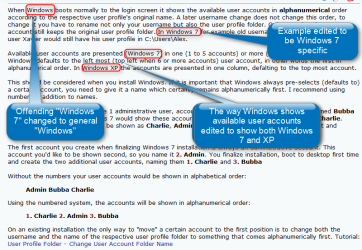
When Windows boots normally to the login screen it shows the available user accounts in alphanumerical order according to the respective user profile's original name. A later username change does not change this order, to change it you have to rename not only your username but also the user profile folder. Only renaming the user account still keeps the original user profile folder. In Windows 7 for example old username Alex changed to Xavier, user Xavier would still have his user profile in C:\Users\Alex.

Available user accounts are presented (Windows 7) in one (1 to 5 accounts) or more (6 or more accounts) rows. Windows defaults to the left most (top left when 6 or more accounts) user account, in other words the first in alphanumerical order. In Windows XP the accounts are presented in one column, defalting to the top most account.

This should be considered when you install Windows. If it is important that Windows always pre-selects (defaults to) a certain account, you need to give it a name which certainly remains alphanumerically first. I recommend using numbers in addition to names.

An example: Your goal is to have 1 administrative user, account name Admin, and 2 standard users named Bubba and Charlie. By default Windows 7 would show these accounts in alphabetical order, Admin, Bubba, Charlie. However, you'd like accounts to be shown as Charlie, Admin, Bubba, showing the account Charlie first and defaulting to it.

The first account you create when finalizing Windows 7 installation is always an administrative account. This account you'd like to be shown second, so you name it 2. Admin. You finalize installation, boot to desktop first time and create the two additional user accounts, naming them 1. Charlie and 3. Bubba

Without the numbers your user accounts would be shown in alphabetical order:
Admin Bubba Charlie

Using the numbered system, the accounts will be shown in alphanumerical order:
1. Charlie 2. Admin 3. Bubba

On an existing installation the only way to "move" a certain account to the first position is to change both the username and the name of the respective user profile folder to something that comes alphanumerically first. Tutorial: http://www.sevenforums.com/tutorials/147545-user-profile-folder-change-user-account-folder-name.html

Kari
 

My Computer My Computer

At a glance

Windows 10 Pro x64 EN-GB1.6 GHz Intel Core i7-720QM Processor6 GBATI Mobility Radeon HD 5850 Graphics
Computer type
Laptop
Computer Manufacturer/Model Number
HP ENVY 17-1150eg
OS
Windows 10 Pro x64 EN-GB
CPU
1.6 GHz Intel Core i7-720QM Processor
Memory
6 GB
Graphics Card(s)
ATI Mobility Radeon HD 5850 Graphics
Sound Card
Beats sound system with integrated subwoofer
Monitor(s) Displays
17" laptop display, 22" LED and 32" Full HD TV through HDMI
Screen Resolution
1600*900 (1), 1920*1080 (2&3)
Hard Drives
Internal: 2 x 500 GB SATA Hard Disk Drive 7200 rpm
External: 2TB for backups, 3TB USB3 network drive for media
Cooling
As Envy runs a bit warm, I have it on a Cooler Master pad
Keyboard
Logitech diNovo Media Desktop Laser (bluetooth)
Mouse
Logitech Performance Mouse MX
Internet Speed
50/10 Mbps VDSL
Antivirus
Windows Defender 4.3.9431.0
Browser
Maxthon 3.5.2., IE11

My Computer My Computer

At a glance

W7 Pro SP1 64biti78GBIntel HD Graphics
Computer type
Laptop
Computer Manufacturer/Model Number
Employer provided Dell Latitude
OS
W7 Pro SP1 64bit
CPU
i7
Memory
8GB
Graphics Card(s)
Intel HD Graphics
Hard Drives
crappy SSD
Antivirus
Employer mandated Symantec Endpoint Protection
Browser
Pale Moon 64bit, IE11 64bit & Chrome 64bit

My Computer My Computer

At a glance

Windows 10 Pro x64 EN-GB1.6 GHz Intel Core i7-720QM Processor6 GBATI Mobility Radeon HD 5850 Graphics
Computer type
Laptop
Computer Manufacturer/Model Number
HP ENVY 17-1150eg
OS
Windows 10 Pro x64 EN-GB
CPU
1.6 GHz Intel Core i7-720QM Processor
Memory
6 GB
Graphics Card(s)
ATI Mobility Radeon HD 5850 Graphics
Sound Card
Beats sound system with integrated subwoofer
Monitor(s) Displays
17" laptop display, 22" LED and 32" Full HD TV through HDMI
Screen Resolution
1600*900 (1), 1920*1080 (2&3)
Hard Drives
Internal: 2 x 500 GB SATA Hard Disk Drive 7200 rpm
External: 2TB for backups, 3TB USB3 network drive for media
Cooling
As Envy runs a bit warm, I have it on a Cooler Master pad
Keyboard
Logitech diNovo Media Desktop Laser (bluetooth)
Mouse
Logitech Performance Mouse MX
Internet Speed
50/10 Mbps VDSL
Antivirus
Windows Defender 4.3.9431.0
Browser
Maxthon 3.5.2., IE11
Sorry, I did not mean to offend.

It sounds like you are describing the Welcome Screen.

Can the OP use the Welcome screen while XP pro is a member of a domain?
 

My Computer My Computer

At a glance

W7 Pro SP1 64biti78GBIntel HD Graphics
Computer type
Laptop
Computer Manufacturer/Model Number
Employer provided Dell Latitude
OS
W7 Pro SP1 64bit
CPU
i7
Memory
8GB
Graphics Card(s)
Intel HD Graphics
Hard Drives
crappy SSD
Antivirus
Employer mandated Symantec Endpoint Protection
Browser
Pale Moon 64bit, IE11 64bit & Chrome 64bit
Can the OP use the Welcome screen while XP pro is a member of a domain?
Normally no. The whole issue is something the OP should talk with his domain admins, as even the account and profile folder name changes should not be done by the user, especially if the domain is a corporate one.
 

My Computer My Computer

At a glance

Windows 10 Pro x64 EN-GB1.6 GHz Intel Core i7-720QM Processor6 GBATI Mobility Radeon HD 5850 Graphics
Computer type
Laptop
Computer Manufacturer/Model Number
HP ENVY 17-1150eg
OS
Windows 10 Pro x64 EN-GB
CPU
1.6 GHz Intel Core i7-720QM Processor
Memory
6 GB
Graphics Card(s)
ATI Mobility Radeon HD 5850 Graphics
Sound Card
Beats sound system with integrated subwoofer
Monitor(s) Displays
17" laptop display, 22" LED and 32" Full HD TV through HDMI
Screen Resolution
1600*900 (1), 1920*1080 (2&3)
Hard Drives
Internal: 2 x 500 GB SATA Hard Disk Drive 7200 rpm
External: 2TB for backups, 3TB USB3 network drive for media
Cooling
As Envy runs a bit warm, I have it on a Cooler Master pad
Keyboard
Logitech diNovo Media Desktop Laser (bluetooth)
Mouse
Logitech Performance Mouse MX
Internet Speed
50/10 Mbps VDSL
Antivirus
Windows Defender 4.3.9431.0
Browser
Maxthon 3.5.2., IE11
Back
Top