Solved Install sys image Win7 home prem 64bit in Dell Inspiron 5748

djbeede54

New member
Local time
2:52 PM
Messages
12
Location
Melrose, Florida
I have a Dell Inspiron 5721 running Win7 home premium 64bit SP1 - 3rd Gen i7-3537U proc

I'm trying to save a System Image and transfer it to a

Dell Inspiron 5748 that is running Win 8.1 - 4th Gen i7-4510U proc.

The 5748 had Win7 HP64bit SP1 loaded on it, but I lost it due to an unsuccessful
attempt to load a Sys Image into it.
[I didn't know my last success doing this was because I had identical computers]

And the 5748 only came with Win 8.1 Disk, which I loaded to see if i could live with it, but I can't.
[Too many legacy programs that won't run in 8.1]

Dell did send me the Sys7 Disk and license code for the 5748, if that would help at any stage.

I've read a lot on the forums about Sysprep, OOBE and Generalizing and Audit Mode and I'm not clear which tutorial i should use to get this to work? I believe I need to reconfig the BIOS in some ways too?
I also have downloaded all suggested drivers from Dell and have them on a USB drive.

Thanks in advance for any help. From my browsing this looks like a pretty amazing forum.
 
Last edited:

My Computer My Computer

At a glance

Windows 7 Home Premium 64bit SP1Intel 4th gen Core i7-4510U8 GB 1600MHz DDR3LIntel HD Graphics
Computer type
Laptop
Computer Manufacturer/Model Number
Dell Inspiron 17 5748
OS
Windows 7 Home Premium 64bit SP1
CPU
Intel 4th gen Core i7-4510U
Memory
8 GB 1600MHz DDR3L
Graphics Card(s)
Intel HD Graphics
Hard Drives
1 TB SATA Hard Drive (5400 RPM)
Antivirus
Avast
Browser
Chrome and IE
I'm not sure I follow you, but:

You aren't likely to get away with moving a Windows installation from Inspiron 5721 to some other machine, Inspiron 5748 or not. That would violate the license terms, let alone whatever other issues you might run into--different drivers, different chipsets, different Intel generations, etc.

Is that what you have in mind?

Or do you in fact have another Windows 7 license that you want to put on the 5748?

Or?

You say "Dell did send me the Sys7 Disk and license code". For which machine?
 

My Computer My Computer

At a glance

Windows 7 Home Premium SP1, 64-bitIntel Skylake i5-6600K, not overclocked8 GB HyperX DDR4-2666 (2 x 4 GB)none; graphics are integrated on CPU
Computer type
PC/Desktop
Computer Manufacturer/Model Number
Ignatz Special; 4 speed manual gearbox; factory air conditioning; one of one
OS
Windows 7 Home Premium SP1, 64-bit
CPU
Intel Skylake i5-6600K, not overclocked
Motherboard
AsRock Z170M Extreme 4, micro ATX
Memory
8 GB HyperX DDR4-2666 (2 x 4 GB)
Graphics Card(s)
none; graphics are integrated on CPU
Sound Card
onboard: Realtek ALC1150; external: USB Behringer UF0-202
Monitor(s) Displays
Dell S2340M 23 inch IPS
Screen Resolution
1600 x 900
Hard Drives
System: Crucial MX100 series SSD, 128 GB;
Data: Samsung Spinpoint 103SJ, 1 TB;
Backup: WD Caviar Green WD30EZRX-00D8PB0, 3 TB
PSU
Rosewill SilentNight 500 watt fanless, semi-modular
Case
Antec Solo II
Cooling
Noctua NH-U12S; Noctua F12 intake, Noctua S12A exhaust
Keyboard
Microsoft 200 6JH-00001 USB
Mouse
Dell or Microsoft optical wired; USB
Antivirus
Microsoft Security Essentials and Malwarebytes Premium
Browser
Pale Moon
Other Info
All fans PWM; speeds at idle: CPU circa 500 rpm; intake circa 600 rpm; exhaust circa 600 rpm; CPU temps 27 idle and 47 C load in a warm room (27 C/81 F) when running Intel Extreme Tuning Utility stress test.
I'm sorry, I wasn't clear. The Win7 disk and license from Dell is for the 5748.

I believe I've studied tutorials geared towards this very kind of migration to a new computer?

I'd rather not do a clean install if possible. I have over 120 programs loaded on the 5721.
 

My Computer My Computer

At a glance

Windows 7 Home Premium 64bit SP1Intel 4th gen Core i7-4510U8 GB 1600MHz DDR3LIntel HD Graphics
Computer type
Laptop
Computer Manufacturer/Model Number
Dell Inspiron 17 5748
OS
Windows 7 Home Premium 64bit SP1
CPU
Intel 4th gen Core i7-4510U
Memory
8 GB 1600MHz DDR3L
Graphics Card(s)
Intel HD Graphics
Hard Drives
1 TB SATA Hard Drive (5400 RPM)
Antivirus
Avast
Browser
Chrome and IE
Off the top of my head, I think you are out of luck.

The "migration" stuff you've read about is to move an installation from one drive to another, in the same machine. Like if the 5721 was running fine and you just wanted to move to a larger hard drive in it. Or if the 5721's hard drive failed and you put another new hard drive in it.

Not from one PC to another. At least not with OEM licenses, which is what Dell provides.

You can change certain stuff and it would still be considered the same PC--such as a new hard drive. But your 2 machines are totally different--motherboard, processor, RAM, the whole works.

If you had a RETAIL Windows license, it would be different.

Someone else may have another idea, but I think you have to install 7 on the 5748, activate with the Product Key that Dell sent you with that disc, and then reinstall programs.

Unless I'm misunderstanding your situation.

There are programs such as Paragon Adaptive Restore that will help you when the hardware is completely different, but you still face the licensing issue and I'm not sure if Paragon can in effect transfer but let you slip in your new Windows license along the way.
 

My Computer My Computer

At a glance

Windows 7 Home Premium SP1, 64-bitIntel Skylake i5-6600K, not overclocked8 GB HyperX DDR4-2666 (2 x 4 GB)none; graphics are integrated on CPU
Computer type
PC/Desktop
Computer Manufacturer/Model Number
Ignatz Special; 4 speed manual gearbox; factory air conditioning; one of one
OS
Windows 7 Home Premium SP1, 64-bit
CPU
Intel Skylake i5-6600K, not overclocked
Motherboard
AsRock Z170M Extreme 4, micro ATX
Memory
8 GB HyperX DDR4-2666 (2 x 4 GB)
Graphics Card(s)
none; graphics are integrated on CPU
Sound Card
onboard: Realtek ALC1150; external: USB Behringer UF0-202
Monitor(s) Displays
Dell S2340M 23 inch IPS
Screen Resolution
1600 x 900
Hard Drives
System: Crucial MX100 series SSD, 128 GB;
Data: Samsung Spinpoint 103SJ, 1 TB;
Backup: WD Caviar Green WD30EZRX-00D8PB0, 3 TB
PSU
Rosewill SilentNight 500 watt fanless, semi-modular
Case
Antec Solo II
Cooling
Noctua NH-U12S; Noctua F12 intake, Noctua S12A exhaust
Keyboard
Microsoft 200 6JH-00001 USB
Mouse
Dell or Microsoft optical wired; USB
Antivirus
Microsoft Security Essentials and Malwarebytes Premium
Browser
Pale Moon
Other Info
All fans PWM; speeds at idle: CPU circa 500 rpm; intake circa 600 rpm; exhaust circa 600 rpm; CPU temps 27 idle and 47 C load in a warm room (27 C/81 F) when running Intel Extreme Tuning Utility stress test.
ON this thread:
http://www.sevenforums.com/tutorials/135077-windows-7-installation-transfer-new-computer.html
They said I might not be able to activate this without phone activation option.

The 5748 is a replacement "certified refurbished" machine. I've had a dozen issues with the 5721. 5 tech visits, one shipping back to the depot, 3 fans, a battery, a keyboard and 4 motherboards. They finally agreed it was a lemon and sent me the 5748. It's still under warranty and I'm hoping they'll be willing to do what's needed to get me back up and running.

I thought all that syspreping stripped away all particulars making it ready for another computer.
to quote that thread.

"You can use this method for instance when you have bought a new PC and want to transfer your existing setup completely, without need to reinstall everything, or when you want to make major hardware changes like change the motherboard or GPU, which would usually cause Windows to stop booting normally."

I will be loading the exact same version of Windows 7 that the 5748 is licensed for and I'm sending back the 5721 to Dell. Due to these circumstance, in a way isn't it like continuing my current license in a dif. machine?
 

My Computer My Computer

At a glance

Windows 7 Home Premium 64bit SP1Intel 4th gen Core i7-4510U8 GB 1600MHz DDR3LIntel HD Graphics
Computer type
Laptop
Computer Manufacturer/Model Number
Dell Inspiron 17 5748
OS
Windows 7 Home Premium 64bit SP1
CPU
Intel 4th gen Core i7-4510U
Memory
8 GB 1600MHz DDR3L
Graphics Card(s)
Intel HD Graphics
Hard Drives
1 TB SATA Hard Drive (5400 RPM)
Antivirus
Avast
Browser
Chrome and IE
I'm researching Paragon. There were a couple of rants about how it didn't work very well, but perhaps not representative.
Do you have any experience with ACRONIS True Image WD? I saw some good reviews of it and it came with my WD hard drive.
 

My Computer My Computer

At a glance

Windows 7 Home Premium 64bit SP1Intel 4th gen Core i7-4510U8 GB 1600MHz DDR3LIntel HD Graphics
Computer type
Laptop
Computer Manufacturer/Model Number
Dell Inspiron 17 5748
OS
Windows 7 Home Premium 64bit SP1
CPU
Intel 4th gen Core i7-4510U
Memory
8 GB 1600MHz DDR3L
Graphics Card(s)
Intel HD Graphics
Hard Drives
1 TB SATA Hard Drive (5400 RPM)
Antivirus
Avast
Browser
Chrome and IE
I am somewhat familiar with Acronis, the WD version. I assume you mean the free version available to WD owners. As far as I know, it does not claim to be able to help in a "new hardware" situation.

I am quite familiar with Macrium Reflect Free Edition, but it doesn't have a "new hardware" capability either.

Certain of the non-free versions of Macrium Reflect do claim to help with new hardware, much like Paragon Adaptive Restore. I do not know how well it works.

There may also be a paid version of Acronis that helps with "new hardware".

I do not know the finer points of Sysprep. I've never used it.

Windows licensing is subject to some interpretation, but the general rule for OEM licenses is "one license, one machine". In a typical "transfer" to another PC or laptop, you are attempting "one license, two machines" unless you can somehow work around it with Paragon or Sysprep. As I said earlier in this thread, I don't know if either of those methods can effectively allow you to use your new Product Key without formally re-installing.

At some point, you have to evaluate the chances of ultimate failure with either of those methods and the hours it might take you to fail versus the hours required to swallow hard and reinstall.

Kari is the resident forum expert on Sysprep. Perhaps he can help.
 

My Computer My Computer

At a glance

Windows 7 Home Premium SP1, 64-bitIntel Skylake i5-6600K, not overclocked8 GB HyperX DDR4-2666 (2 x 4 GB)none; graphics are integrated on CPU
Computer type
PC/Desktop
Computer Manufacturer/Model Number
Ignatz Special; 4 speed manual gearbox; factory air conditioning; one of one
OS
Windows 7 Home Premium SP1, 64-bit
CPU
Intel Skylake i5-6600K, not overclocked
Motherboard
AsRock Z170M Extreme 4, micro ATX
Memory
8 GB HyperX DDR4-2666 (2 x 4 GB)
Graphics Card(s)
none; graphics are integrated on CPU
Sound Card
onboard: Realtek ALC1150; external: USB Behringer UF0-202
Monitor(s) Displays
Dell S2340M 23 inch IPS
Screen Resolution
1600 x 900
Hard Drives
System: Crucial MX100 series SSD, 128 GB;
Data: Samsung Spinpoint 103SJ, 1 TB;
Backup: WD Caviar Green WD30EZRX-00D8PB0, 3 TB
PSU
Rosewill SilentNight 500 watt fanless, semi-modular
Case
Antec Solo II
Cooling
Noctua NH-U12S; Noctua F12 intake, Noctua S12A exhaust
Keyboard
Microsoft 200 6JH-00001 USB
Mouse
Dell or Microsoft optical wired; USB
Antivirus
Microsoft Security Essentials and Malwarebytes Premium
Browser
Pale Moon
Other Info
All fans PWM; speeds at idle: CPU circa 500 rpm; intake circa 600 rpm; exhaust circa 600 rpm; CPU temps 27 idle and 47 C load in a warm room (27 C/81 F) when running Intel Extreme Tuning Utility stress test.
I got everything backed up and created a system image using the Windows software tools.
I also made repair disc.
Downloaded Paragon Adaptive Restore and burned it to a DVD.

Then when I went to restore the system image I couldn't get the repair disc software to recognize the external hard drive the image is on.

I looked to see what driver(s) ran them [tried it with two dif hard drives, a WD and Fantom] and where they were located, but even if i navigated the program to them, it wasn't what it needed.

I tried two dif. repair discs to see if the software was corrupted but they behaved the same. I tried to find info on the foum re. this issue but without success.

I have succeeded in loading a system image in this computer before. But didn't know about Paragon yet to repair the install. Now i can't get to that point.

The drives are both visible when booted from the C drive.

Not sure what my next option is. Command prompts?
 

My Computer My Computer

At a glance

Windows 7 Home Premium 64bit SP1Intel 4th gen Core i7-4510U8 GB 1600MHz DDR3LIntel HD Graphics
Computer type
Laptop
Computer Manufacturer/Model Number
Dell Inspiron 17 5748
OS
Windows 7 Home Premium 64bit SP1
CPU
Intel 4th gen Core i7-4510U
Memory
8 GB 1600MHz DDR3L
Graphics Card(s)
Intel HD Graphics
Hard Drives
1 TB SATA Hard Drive (5400 RPM)
Antivirus
Avast
Browser
Chrome and IE
First thing I'd do is use another tool to make your images. Not Windows Backup and Restore.

Tool of choice for many here is Macrium Reflect. I've never heard of it complaining about external drives, but you may have some sort of oddball situation. I have no idea how flaky Windows Backup can be, but I hear it likes images to be stored in specific locations.
 

My Computer My Computer

At a glance

Windows 7 Home Premium SP1, 64-bitIntel Skylake i5-6600K, not overclocked8 GB HyperX DDR4-2666 (2 x 4 GB)none; graphics are integrated on CPU
Computer type
PC/Desktop
Computer Manufacturer/Model Number
Ignatz Special; 4 speed manual gearbox; factory air conditioning; one of one
OS
Windows 7 Home Premium SP1, 64-bit
CPU
Intel Skylake i5-6600K, not overclocked
Motherboard
AsRock Z170M Extreme 4, micro ATX
Memory
8 GB HyperX DDR4-2666 (2 x 4 GB)
Graphics Card(s)
none; graphics are integrated on CPU
Sound Card
onboard: Realtek ALC1150; external: USB Behringer UF0-202
Monitor(s) Displays
Dell S2340M 23 inch IPS
Screen Resolution
1600 x 900
Hard Drives
System: Crucial MX100 series SSD, 128 GB;
Data: Samsung Spinpoint 103SJ, 1 TB;
Backup: WD Caviar Green WD30EZRX-00D8PB0, 3 TB
PSU
Rosewill SilentNight 500 watt fanless, semi-modular
Case
Antec Solo II
Cooling
Noctua NH-U12S; Noctua F12 intake, Noctua S12A exhaust
Keyboard
Microsoft 200 6JH-00001 USB
Mouse
Dell or Microsoft optical wired; USB
Antivirus
Microsoft Security Essentials and Malwarebytes Premium
Browser
Pale Moon
Other Info
All fans PWM; speeds at idle: CPU circa 500 rpm; intake circa 600 rpm; exhaust circa 600 rpm; CPU temps 27 idle and 47 C load in a warm room (27 C/81 F) when running Intel Extreme Tuning Utility stress test.
Well I got Macrium reflect [free] and saved a system image with it.
Now the software on the WinPE Macrium disc doesn't "see" my external hard drive either?

Again the external hard drive is accessible when booting windows from the C drive. Hmmmm?

Update:
I finally got the Macrium disk to see the image on the external hard drive. I switched it to another USB port, I'm thinking it was in a USB3 and it only could read the USB2 port? Anyway, it's restoring the image now. I'll see if it boots or if Paragon will be necessary.
 
Last edited:

My Computer My Computer

At a glance

Windows 7 Home Premium 64bit SP1Intel 4th gen Core i7-4510U8 GB 1600MHz DDR3LIntel HD Graphics
Computer type
Laptop
Computer Manufacturer/Model Number
Dell Inspiron 17 5748
OS
Windows 7 Home Premium 64bit SP1
CPU
Intel 4th gen Core i7-4510U
Memory
8 GB 1600MHz DDR3L
Graphics Card(s)
Intel HD Graphics
Hard Drives
1 TB SATA Hard Drive (5400 RPM)
Antivirus
Avast
Browser
Chrome and IE
Thanks for those tips Gregrock.

It didn't boot initially but after running Paragon Adaptive Restore it did.

I've been restoring drivers and downloading Windows updates for a while now.

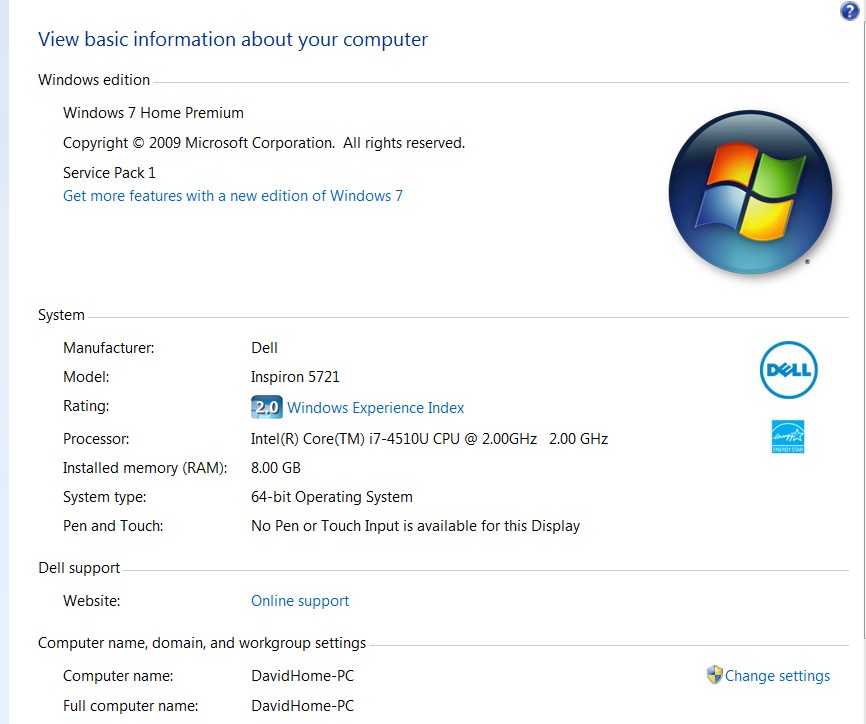
Here's one odd thing. When I go to "about your computer" it Identifies the model as Inspiron 5721, which is the computer the system image sourced from. It is actually a 5748. Any ideas about this?

When I go to the Dell site it does correctly identify the Service Tag number.

Thanks...
 

My Computer My Computer

At a glance

Windows 7 Home Premium 64bit SP1Intel 4th gen Core i7-4510U8 GB 1600MHz DDR3LIntel HD Graphics
Computer type
Laptop
Computer Manufacturer/Model Number
Dell Inspiron 17 5748
OS
Windows 7 Home Premium 64bit SP1
CPU
Intel 4th gen Core i7-4510U
Memory
8 GB 1600MHz DDR3L
Graphics Card(s)
Intel HD Graphics
Hard Drives
1 TB SATA Hard Drive (5400 RPM)
Antivirus
Avast
Browser
Chrome and IE
No, it's not the computer name.
New%20Dell%20comp%20info.jpg


My Windows Experience index is 2, so I guess I still have some tweaking to do, but it sure is nice to have all my programs installed.

I was never asked for my license key either, which is a little confusing?
 

My Computer My Computer

At a glance

Windows 7 Home Premium 64bit SP1Intel 4th gen Core i7-4510U8 GB 1600MHz DDR3LIntel HD Graphics
Computer type
Laptop
Computer Manufacturer/Model Number
Dell Inspiron 17 5748
OS
Windows 7 Home Premium 64bit SP1
CPU
Intel 4th gen Core i7-4510U
Memory
8 GB 1600MHz DDR3L
Graphics Card(s)
Intel HD Graphics
Hard Drives
1 TB SATA Hard Drive (5400 RPM)
Antivirus
Avast
Browser
Chrome and IE
And ignatzatsonic, thanks a million for the lead on Paragon Adaptive Restore.
I don't think I would have gotten this working without it.
Appreciate it.
 

My Computer My Computer

At a glance

Windows 7 Home Premium 64bit SP1Intel 4th gen Core i7-4510U8 GB 1600MHz DDR3LIntel HD Graphics
Computer type
Laptop
Computer Manufacturer/Model Number
Dell Inspiron 17 5748
OS
Windows 7 Home Premium 64bit SP1
CPU
Intel 4th gen Core i7-4510U
Memory
8 GB 1600MHz DDR3L
Graphics Card(s)
Intel HD Graphics
Hard Drives
1 TB SATA Hard Drive (5400 RPM)
Antivirus
Avast
Browser
Chrome and IE
Run the WEI again from link.

The model number there on System page along with the branding are from the Dell Factiry install or clean Dell Reinstallation DVD they provide. It isn't removed by PAR because it's OEM branding.

Scroll down the System page to see the Activation status and change to the new PC's COA key.

Just so there isn't any confusion the OEM license for the old PC is not transferred along with the OS. You should reactivate at the System page link ASAP with the new PC's OEM Product Key as it may not hold activation once it realizes it is not on the same hardware config. The time it takes for this to occur varies depending on whether this was the original factory install or whether the COA key had already been used in a Clean Reinstall.

I don't know why Dell didn't ship the PC with COA sticker attached unless it was Win8 PC specially ordered with Win7 but it still should have been provided any time Win7 is pre-installed.
 
Last edited:
Since I migrated this system from my old Dell, Inspiron 5721, at the moment it thinks it's activated and there is no option to click to insert a license key.

The new computer Inspiron 5748 is a certified refurb shipping to me a few days ago by Dell to replace the 5721. The computer chasis doesn't have a license key on it anywhere. Not even under the batter - which is where it is on the old one. They did provide a Windows 7 home premium 64bit disc with the License key on it.

I just used the Forum's guidance to input the new product key number with Elevated Command Prompts
Here's hoping.

Is there any way to get properties to display the model of the new Dell properly?
 

My Computer My Computer

At a glance

Windows 7 Home Premium 64bit SP1Intel 4th gen Core i7-4510U8 GB 1600MHz DDR3LIntel HD Graphics
Computer type
Laptop
Computer Manufacturer/Model Number
Dell Inspiron 17 5748
OS
Windows 7 Home Premium 64bit SP1
CPU
Intel 4th gen Core i7-4510U
Memory
8 GB 1600MHz DDR3L
Graphics Card(s)
Intel HD Graphics
Hard Drives
1 TB SATA Hard Drive (5400 RPM)
Antivirus
Avast
Browser
Chrome and IE
Just rebooted and the new Product ID # displays.
Also the proper CPU displays - i7-4510U
It does still Display the wrong Model number, which might be an issue if I were to try to sell it.

I'll make up a synopsis of what I did that worked and post that shortly.

Thanks again for all your help - happy holidays!
 

My Computer My Computer

At a glance

Windows 7 Home Premium 64bit SP1Intel 4th gen Core i7-4510U8 GB 1600MHz DDR3LIntel HD Graphics
Computer type
Laptop
Computer Manufacturer/Model Number
Dell Inspiron 17 5748
OS
Windows 7 Home Premium 64bit SP1
CPU
Intel 4th gen Core i7-4510U
Memory
8 GB 1600MHz DDR3L
Graphics Card(s)
Intel HD Graphics
Hard Drives
1 TB SATA Hard Drive (5400 RPM)
Antivirus
Avast
Browser
Chrome and IE
Synopsis of what finally worked to migrate my system to a new laptop.

Backed up all my files. Moved my Documents Folder to an external hard drive to limit image size.
I also downloaded all drivers from Dell for the target computer. I stored these on a USB drive and also put them in a file on the C drive of the source computer.

Used Macrium Reflect free version to save system images on both source computer and target computer.
If this didn’t work I wanted to be able to return the target computer to factory system.

This good person on the forum, “whs” had a link to the WinPE disc needed to restore Macrium image files.
That was essential as I have a very slow DSL line and Macrium wants you to download 1.7 gig WAIK to create it.

http://www.sevenforums.com/backup-restore/229409-macrium-winpe-iso-download.html

I had some trouble getting restore software to locate the image file as it couldn't "see" my hard drive.
Turned out it was plugged into a USB3 port. When I switched to a USB2 port it became visible.

Followed the Macrium prompts to migrate the image to the target computer.

When it tried to boot it flashed a blue screen and went to a System Repair choices screen.
I expected this would happen.

Per instructions on this SEVEN thread:

http://www.sevenforums.com/tutorials/292068-make-windows-7-bootable-after-motherboard-swap.html

I downloaded an .iso of Pargon Adaptive Restore 2010 and burned it to disk using Windows software.

I ran it in Adjust OS mode, first on Automatic and then on manual where I directed it to the file with the drivers on it.

This allowed the system to boot. I then still needed to install drivers I got from Dell in the recommended order.

I also did all Windows updates and as many restarts as required.

The new machine was nearly identical to the old machine at this point.
In fact it was TOO identical. It showed the same model number and software license.

For some reason my System Property page didn’t have the clickable link to change that product key.

Of course you can’t run two computers on one OEM license so I used this forum page:

http://www.sevenforums.com/tutorials/18630-product-key-number-change.html

It showed how to change Product Key with Elevated Command prompts, which made me nervous but it was easier than I anticipated.

I now have my new computer as replica of my old one complete with about 120 programs that I DID NOT have to reinstall because of the generous sharing of the folks on this forum.

Almost every other place I visited on the web told me what I was trying to do was impossible.

I completed this happy ending on Christmas day which was a very welcome gift.
I am a very happy camper!!:party:

Thanks again to everyone who helped!
 

My Computer My Computer

At a glance

Windows 7 Home Premium 64bit SP1Intel 4th gen Core i7-4510U8 GB 1600MHz DDR3LIntel HD Graphics
Computer type
Laptop
Computer Manufacturer/Model Number
Dell Inspiron 17 5748
OS
Windows 7 Home Premium 64bit SP1
CPU
Intel 4th gen Core i7-4510U
Memory
8 GB 1600MHz DDR3L
Graphics Card(s)
Intel HD Graphics
Hard Drives
1 TB SATA Hard Drive (5400 RPM)
Antivirus
Avast
Browser
Chrome and IE
Back
Top