Solved install w/7 on ssd, booted up, existing drive came back as RAW

moseley

New member
Local time
6:08 PM
Messages
13
I installed windows 7 on a new SSD = (SanDisk Ultra II 480GB SATA III 2.5-Inch).

I then plugged in the 2 other hard drives and booted the pc.

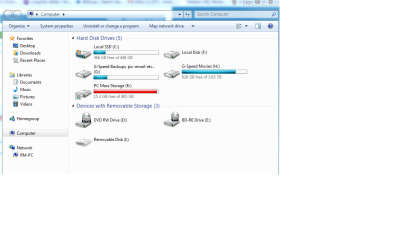
I saw the SSD C: and one of the previous internal drives but the 2nd internal drive was jacked.

The pc recognized it as a drive but without any drive space for storage. see pic below

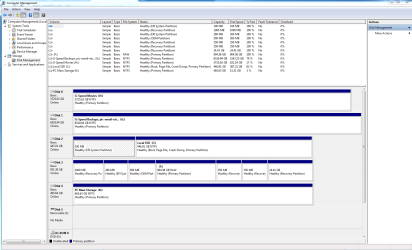
I looked in "Manage" and it indicates the lost drive F: is RAW.
But the RAW drive has 6 other partitions on it so that tells me it was a boot drive. see pic below

I want to know how to get that drive recognized again so I can regain access to the valuable data on it.
 

Attachments
  • jacked drive F.png
    jacked drive F.png
    33 KB · Views: 2
  • manage.png
    manage.png
    46.3 KB · Views: 9
  • Machine specs.png
    Machine specs.png
    69.3 KB · Views: 1

My Computer My Computer

At a glance

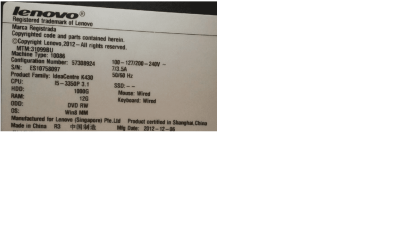
Windows 7 Professional 64 bit os service pack 1i5 3.10 GHz16GBNavidia GT 620
Computer type
PC/Desktop
Computer Manufacturer/Model Number
Lanevo IdeaCenter K450
OS
Windows 7 Professional 64 bit os service pack 1
CPU
i5 3.10 GHz
Motherboard
unknown
Memory
16GB
Graphics Card(s)
Navidia GT 620
Monitor(s) Displays
24" Acer
Hard Drives
SSD, 2 internal hard drives (both 1TB's) also have external RAID G-speed es 3 G-speed 4-bay housings filled with 1TB drives. 2 of the housings are set to RAID.
PSU
300
Case
Factory Lenovo IdeaCenter K430
Cooling
Factory fans
Keyboard
Logitech (wired)
Mouse
Lenovo (wired)
Internet Speed
50/50
Antivirus
McAfee
Browser
Google Chrome
Other Info
G-Speed RAID. added 3 housings 4TB /each.
Hello? Anyone?
 

My Computer My Computer

At a glance

Windows 7 Professional 64 bit os service pack 1i5 3.10 GHz16GBNavidia GT 620
Computer type
PC/Desktop
Computer Manufacturer/Model Number
Lanevo IdeaCenter K450
OS
Windows 7 Professional 64 bit os service pack 1
CPU
i5 3.10 GHz
Motherboard
unknown
Memory
16GB
Graphics Card(s)
Navidia GT 620
Monitor(s) Displays
24" Acer
Hard Drives
SSD, 2 internal hard drives (both 1TB's) also have external RAID G-speed es 3 G-speed 4-bay housings filled with 1TB drives. 2 of the housings are set to RAID.
PSU
300
Case
Factory Lenovo IdeaCenter K430
Cooling
Factory fans
Keyboard
Logitech (wired)
Mouse
Lenovo (wired)
Internet Speed
50/50
Antivirus
McAfee
Browser
Google Chrome
Other Info
G-Speed RAID. added 3 housings 4TB /each.
To me it appears that this was your original Lenovo boot drive. If I remember correct, when Lenovo boot drive is connected as a secondary drive it presents this sort of strange partition structure with many recovery partitions.

Please try this. Plug out all other drives and restore the original boot drive as it was before. When the system boots as before copy all data you would like to retain to another external drive.

Once you make sure you no longer need any data from it, go back to your present setup and wipe this erstwhile boot drive clean and format it.

( I am assuming that your current Windows 7 install on the SSD is legitimate and activated and you no longer require the OEM installation on the old boot drive. I would desist any attempt to unRAW that partition in the current setup in any other manner, if you need data on it.).
 
Last edited:

My Computer My Computer

At a glance

Windows 7 Home Premium 32 bit
OS
Windows 7 Home Premium 32 bit
Thanks Jumanji. That sounds very reasonable, I will give it a try and let you know.

Best,
Moseley
 

My Computer My Computer

At a glance

Windows 7 Professional 64 bit os service pack 1i5 3.10 GHz16GBNavidia GT 620
Computer type
PC/Desktop
Computer Manufacturer/Model Number
Lanevo IdeaCenter K450
OS
Windows 7 Professional 64 bit os service pack 1
CPU
i5 3.10 GHz
Motherboard
unknown
Memory
16GB
Graphics Card(s)
Navidia GT 620
Monitor(s) Displays
24" Acer
Hard Drives
SSD, 2 internal hard drives (both 1TB's) also have external RAID G-speed es 3 G-speed 4-bay housings filled with 1TB drives. 2 of the housings are set to RAID.
PSU
300
Case
Factory Lenovo IdeaCenter K430
Cooling
Factory fans
Keyboard
Logitech (wired)
Mouse
Lenovo (wired)
Internet Speed
50/50
Antivirus
McAfee
Browser
Google Chrome
Other Info
G-Speed RAID. added 3 housings 4TB /each.
Well Jumanji,

First I unplugged F: Drive and booted win-7 just to make sure I knew which SATA was F: ( I was satisfied when F: did not show up in (MY Computer) after the boot.

I then powered down, plugged in the SATA connector on the F: drive and disconnected the SATA connector from the SSD. During boot-up I entered the BIOS and made the following changes: SATA MODE = (IDE) and BOOT MODE = (Auto). Save & Exit.

The OS did not boot as it was not found: "OS missing hit any key to continue"

I then repeated the boot process but in BIOS I changed Boot Mode to (Legacy) Still a no go. "OS missing hit any key to continue"

I am stumped, if there is good data on the RAW partition I should be able to see it.....Just not sure how.

Thanks Jumanji, it was a good idea and quite frankly, I'm surprised it did not work.

Best,
Moseley
 

My Computer My Computer

At a glance

Windows 7 Professional 64 bit os service pack 1i5 3.10 GHz16GBNavidia GT 620
Computer type
PC/Desktop
Computer Manufacturer/Model Number
Lanevo IdeaCenter K450
OS
Windows 7 Professional 64 bit os service pack 1
CPU
i5 3.10 GHz
Motherboard
unknown
Memory
16GB
Graphics Card(s)
Navidia GT 620
Monitor(s) Displays
24" Acer
Hard Drives
SSD, 2 internal hard drives (both 1TB's) also have external RAID G-speed es 3 G-speed 4-bay housings filled with 1TB drives. 2 of the housings are set to RAID.
PSU
300
Case
Factory Lenovo IdeaCenter K430
Cooling
Factory fans
Keyboard
Logitech (wired)
Mouse
Lenovo (wired)
Internet Speed
50/50
Antivirus
McAfee
Browser
Google Chrome
Other Info
G-Speed RAID. added 3 housings 4TB /each.
Well, I don't purport to know anything firsthand about GPT setups and super-large drives and partitions.

But I certainly would have expected to see "active" for one partition on your SSD (almost certainly in the small 100MB "EFI system partition"), which presumably you had set to be the first hard drive in the boot sequence of the BIOS. I don't see any "active" partition in your picture.

Also, that other drive with the seven partitions... as was suggested this presumably was your original Lenovo hard drive but it's got seven PRIMARY partitions (which requires GPT partitioning), and again none of them is "active" either. I don't know what all of these partitions contain... do you? Presumably you knew what was on this drive before you started this SSD project.

If this had been your OS boot drive originally, I would again have expected to see an "active" partition perhaps just residually. So whatever you did when installing Win7 onto the SSD must have included some steps to un-mark "active" if there had been such a boot partition originally.

Anyway, if EFI and GPT and all of this "new stuff" has somehow eliminated the need for an "active" partition on the first hard drive shown in the BIOS boot sequence list, I'm not aware of it. I would expect that the need for an "active" partition on that drive still exists, so that the BIOS can go there to find Boot Manager and begin the boot process. At least that's how things work in Win7, which I'm quite familiar with (although ignorant on firsthand knowledge about GPT and EFI, as I've never worked with machines involving them).
 

My Computer My Computer

At a glance

Windows 7 Pro x64 (1), Win7 Pro X64 (2)i5-3350p 3.1Ghz/6MB-cache (1); E8400 3.0Ghz/6...8GB PC3-12800 DDR3 (1); 4GB PC3-10600 DDR3 (2)ATI HD7750 (1), (see TV cards); ATI R7 250 (2)
Computer type
PC/Desktop
Computer Manufacturer/Model Number
Home-built, two systems (1) and (2)
OS
Windows 7 Pro x64 (1), Win7 Pro X64 (2)
CPU
i5-3350p 3.1Ghz/6MB-cache (1); E8400 3.0Ghz/6MB-cache (2)
Motherboard
ASUS P8Z77-V Pro (1); ASUS P5Q3 (2)
Memory
8GB PC3-12800 DDR3 (1); 4GB PC3-10600 DDR3 (2)
Graphics Card(s)
ATI HD7750 (1), (see TV cards); ATI R7 250 (2)
Sound Card
Realtek ALC892 HD Audio (1); Realtek ALC1200 HD Audio (2)
Monitor(s) Displays
Eizo HD2441W LCD, Eizo S2433W (1); Eizo 24" S2433W (2)
Screen Resolution
1920x1200, 1920x1200 (1); 1920x1200 (2)
Hard Drives
(1) 1TB SATA-II (7200RPM), 2x2TB SATA-III (7200RPM), 250GB SATA-III (10000RPM) for OS; 2x2TB external USB 3.0

(2) 320GB SATA-II (7200RPM), 750GB SATA-II (7200RPM), 150GB SATA-II (10000RPM) for OS; 2TB external USB 3.0
PSU
Nesteq ECS-6001 600W (1); Nesteq ECS-5001 500W (2)
Case
Acousti-Case 360 (1) and (2)
Cooling
Noctua NH-U12P SE2 for CPU, 2x120mm case fans (1) and (2)
Keyboard
IBM PS/2 (1) and (2)
Mouse
Logitech MX Revolution wireless (1); Microsoft wired (2)
Internet Speed
100mbps down / 10mbps up
Antivirus
Microsoft Security Essentials; Malwarebyte Anti-Malware Pro
Browser
Firefox
Other Info
Ceton InfiniTV 4-tuner cablecard-enabled TV card as well as Hauppauge HVR-2250 OTA/ATSC 2-tuner TV card in (1), running under Win7 WMC
I am not an expert or Admin either. I do know that all of these drives are GPT and All of the drives say "Primary".

Original setup:
The Lenovo drive's were setup with the multiple partitions as they provided the user a plethora of options that needed to be set during the first boot out of the box. They were or are also big on providing multiple ways to recover from a software fault. The key word is "drive's". I wish I knew for sure but I suspect the drive's were setup in tandem meaning they relied on each-other to complete the boot-up process.

Anyway:
Last night I surrendered to my curiosity about software data recovery. I found a software program "M3 software" who has a couple of programs that are suppose to work on RAW and or Formatted drives to rebuild them and recover lost data.

For a mere $70 I bought into the notion that a RAW drive could be fixed by their "M3 RAW Drive Recovery" program. The program claimed to be able to slip the NTFS file system onto a RAW drive without disturbing the files. Well, that program chewed on the drive for a couple of hours and then spit it back up advising me that I needed to try their other program.

"M3 Data Recovery" worked on the drive for several hours and when it had completed its work. Walla! The program exclaimed that it had recovered all the files!

I would say there were at-least 3000 folders (names I did not recognize). I drilled down into every one of them. I spent about 2 hours discovering NOT ONE file had been recovered.

Fool me once, shame on you. But as Mick Jagger would say, "We won't be fooled again".

I will leave this post out here for a week or two just to see if anyone can unravel this conundrum all wrapped up in a enigma that looks like a riddle. Then I will put it to bed and just format the D%$%M! thing.

Thank You for your assistance,
Moseley
 

My Computer My Computer

At a glance

Windows 7 Professional 64 bit os service pack 1i5 3.10 GHz16GBNavidia GT 620
Computer type
PC/Desktop
Computer Manufacturer/Model Number
Lanevo IdeaCenter K450
OS
Windows 7 Professional 64 bit os service pack 1
CPU
i5 3.10 GHz
Motherboard
unknown
Memory
16GB
Graphics Card(s)
Navidia GT 620
Monitor(s) Displays
24" Acer
Hard Drives
SSD, 2 internal hard drives (both 1TB's) also have external RAID G-speed es 3 G-speed 4-bay housings filled with 1TB drives. 2 of the housings are set to RAID.
PSU
300
Case
Factory Lenovo IdeaCenter K430
Cooling
Factory fans
Keyboard
Logitech (wired)
Mouse
Lenovo (wired)
Internet Speed
50/50
Antivirus
McAfee
Browser
Google Chrome
Other Info
G-Speed RAID. added 3 housings 4TB /each.
Back
Top