Hi guys. I have a terrible problem and I desperately hope someone could help me fix it.
So, I'm trying to reinstall win 7 on a Samsung laptop. I have an original ISO that I burned with the native Windows Disc Image Burner. Then when I booted from it the only option I got was "Windows Setup (EMS enabled)". This looked strange, I've reinstalled win 7 many times and never seen such a thing, as far as I recall.
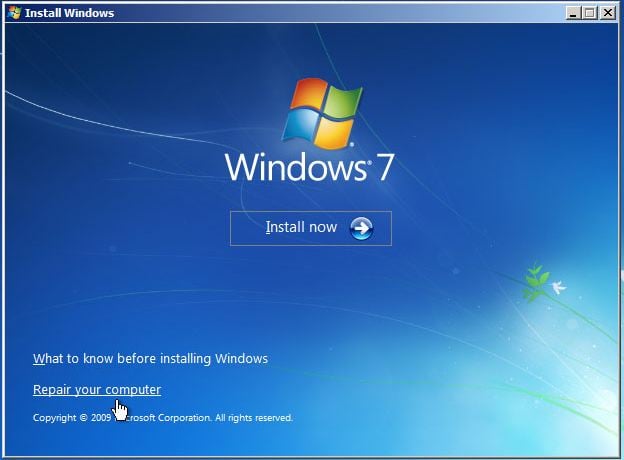
Yet since there was no alternative I hit enter and proceeded. It started loading files, ask about region and lang, choose a partition, then copying, expanding files etc. - all looked normal. Until the first restart (of course I didn't touch any key). After which it's stuck at the 'Install now' screen:
I waited for a while and since it didn't move anywhere I hit enter, repeated the process (reformatting the sys partion of this old drive once again) only to be looped to this exactly same point!!
Well, it could be that the computer's boot initialisation sequence is ignoring the DVD (ie the DVD is non-bootable), or the that boot\bcd store (on the actual DVD) contains an /ems redirection switch.
Basically, if you have an iso burned onto a DVD and the DVD is first boot option, then you should not be seeing the [Ems enabled] menu item. It should also be obvious to you that the computer is booting from DVD because it takes much longer to load (and you can hear the disk rattle in the DVD tray, see the green drive lights).
~~ Might be worth your while trying this DVD as first boot device in another computer?
My Computer
Computer type
PC/Desktop
OS
Windows 7 x64, Vista x64, 8.1 smartphone
CPU
Intel E8400 65W 64-bit
Motherboard
Gigabyte EP45-UD3LR
Memory
DDR2 2 x 2GB, 1GB x 2
Graphics Card(s)
XFX Radeon HD5750
Sound Card
AMD High Definition Audio; Realtek High Definition Audio
Well, that's confusing. Unfortunately I have no other computer with а DVD drive at hand to check it but I think I heard the noises you talk about. It shall definitely have loaded from the DVD, how else would I get through all these phases that I went through:
(It goes without saying that the pictures are purely for illustration).
And finally this one:
After which it rebooted and brought me to the beginning (on a couple of times).
These have nowhere else to come from other than the DVD I guess?
Now unfortunately my screen died meanwhile so I'll have to give up the struggle anyway for the near future.
When you get "Press any key to boot from CD or DVD ...." the second time, ignore the prompt and allow the computer to boot to the HDD. It should then say "Starting Windows", and then it will reach the "Set up Windows/Type a user Name" dialog box.
My Computer
Computer type
PC/Desktop
OS
Windows 7 x64, Vista x64, 8.1 smartphone
CPU
Intel E8400 65W 64-bit
Motherboard
Gigabyte EP45-UD3LR
Memory
DDR2 2 x 2GB, 1GB x 2
Graphics Card(s)
XFX Radeon HD5750
Sound Card
AMD High Definition Audio; Realtek High Definition Audio