Installed or not Installed

motim

New member
Hello,
Here is a strange story: For some time I was looking for a program which searches text into files, I found
a nice program "FileSeek" here "https://www.fileseek.ca/Download/", downloaded the .zip file, unzipped it into a folder (not installed) and made a try by clicking the .exe file. Found it works for me - still not installed. By curiosity I opened the registry and made a search for the program - it was spread in several places in the registry. The program is not listed in the installed programs since it is not installed.
My question: How is this possible a not installed program entered into the registry, and what happens if I remove it from there, as there is not an uninstaller ?
Answers will be appreciated.
Thanks
Motim
 

My Computer

Computer type
PC/Desktop
Computer Manufacturer/Model Number
custom built
OS
Windows 7 Pro 32 bit
CPU
intel celeron 2.66GH 2.56GH
Memory
2.00 GB
Graphics Card(s)
Nvidia fx5500
Hard Drives
Western digital
Antivirus
AVG
Browser
firefox
Is it possible that this is a portable program. Those will run without installation.
 

My Computer

Computer Manufacturer/Model Number
HP, Dell, Gateway, Toshiba - 4 laptops and 2 desktops
OS
Vista, Windows7, Mint Mate, Zorin, Windows 8
CPU
from 1.6GHz Duo to i7
Monitor(s) Displays
2x HP w2207
Hard Drives
5x HDD, 7x SSD, 12x Externals
Keyboard
with trackball - no mices
Mouse
Trackball mice
Internet Speed
DSL 6000
Smooth things out by installing FileSeek free or FileSeek Pro [pay-for]. If the program works for you very well, the registry entries won't matter. :) I've FileSeek for some time now, I like the EZ usage. Concerning removing programs, I paid for Revo Uninstaller Pro [does 32 and 64 bit removals] -- and Revo really works, including removing all registry entries also.
 

My Computer

Computer type
PC/Desktop
Computer Manufacturer/Model Number
Antec desktop; Acer Aspire laptops
OS
Windows 7 Professional 64-bit
CPU
Desktop i5; Acers i5 & i7
Memory
desktop 16GB; 1 Acer 8GB & 1 Acer 16GB
Hard Drives
1TB split into 2 equal partitions [OS and data] usable by RJS
Internet Speed
AT&T DSL
Browser
FF, GChrome, msIE
Other Info
Windows 7 Firewall, Emsisoft AM/AV, MSE [scan-only], SpywareBlaster, Ruiware/BillP combine
Installed or not installed

Hello RolandJS,
Thanks for the answer.
The program is indeed portable, I prefer such so I can test them before installing and uninstalling if they do not suit me. To use the free version I just have to remove the built-in license. And since it was not installed
it is not in the list of installed programs, therefor there is not an uninstaller. But what bothers me (if I remove the program) the entries it made in the registry even not installed.
Does the recommended "Revo" look for such 'orphan' registry entries ?
Answers will be appreciated.
Thanks
Motim


http://www.sevenforums.com/member.php?u=424815
 

My Computer

Computer type
PC/Desktop
Computer Manufacturer/Model Number
custom built
OS
Windows 7 Pro 32 bit
CPU
intel celeron 2.66GH 2.56GH
Memory
2.00 GB
Graphics Card(s)
Nvidia fx5500
Hard Drives
Western digital
Antivirus
AVG
Browser
firefox
It's not portable:

Click the 'Download Now' button to download FileSeek (recommended)
Download without Installer (1.84 M)
Download MSI Installer (2.02 M)

MSI = windows installer.

Without (MSI) just means that it installs anyway.

Okay forget the above - it is portable.

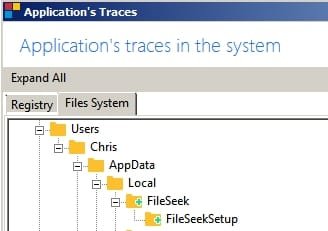
Ran the program and I get this:

Folder in AppData
Traces1.jpg

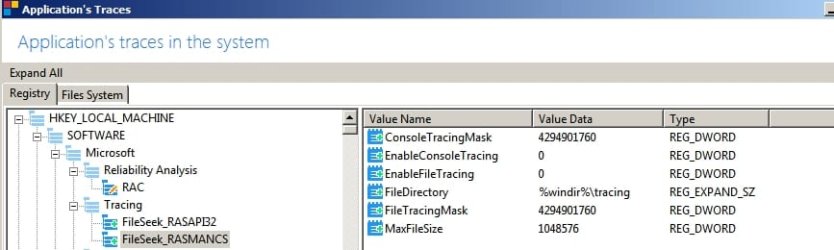
Windows Tracing
Traces2.jpg

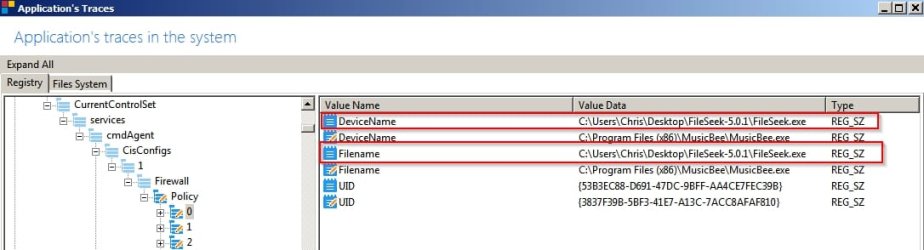
Firewall Rules
Traces3.jpg

Connects to check for updates and send usage statistics
Traces4.jpg

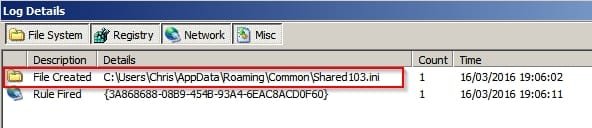
Creates hidden .ini file
Traces5.jpg

Creates a Shell Bag
Traces6.jpg

Shell Bag
Traces7.jpg

Revo Uninstaller won't help. You need to do a manual file/ folder / registry search.
 
Last edited:

My Computer

Computer type
Laptop
Computer Manufacturer/Model Number
ASUS
OS
Microsoft Windows 7 Home Premium 64-bit 7601 Multiprocessor Free Service Pack 1
CPU
AMD C-60 APU with Radeon(tm) HD Graphics
Motherboard
ASUSTeK COMPUTER INC. X501U
Memory
4.00 GB
Graphics Card(s)
AMD Radeon HD 6290 Graphics
Sound Card
(1) AMD High Definition Audio Device (2) Realtek High Defi
Screen Resolution
1366 x 768 x 32 bits (4294967296 colors) @ 60 Hz
Hard Drives
Hitachi HTS545050A7E380 SATA Disk Device
Antivirus
Comodo CIS & FW, SecureAplus App Whitelisting, Threatfire
Browser
Cyberfox 64bit, Opera 64bit, Airfox
Other Info
Spy-The-Spy, HitmanPro.Alert, Norton Connect Safe, MJRegWatcher, BitDefender TrafficLight, Voodoo Shield, Zemana AntiMalware
To cleanup delete:

%Userprofile%\AppData\Local\FileSeek

Here's a list of registry entries found on my machine. Yours will be different particularly the firewall and shell bags entries but it might help you to know where to look.


My Computer

Computer type
Laptop
Computer Manufacturer/Model Number
ASUS
OS
Microsoft Windows 7 Home Premium 64-bit 7601 Multiprocessor Free Service Pack 1
CPU
AMD C-60 APU with Radeon(tm) HD Graphics
Motherboard
ASUSTeK COMPUTER INC. X501U
Memory
4.00 GB
Graphics Card(s)
AMD Radeon HD 6290 Graphics
Sound Card
(1) AMD High Definition Audio Device (2) Realtek High Defi
Screen Resolution
1366 x 768 x 32 bits (4294967296 colors) @ 60 Hz
Hard Drives
Hitachi HTS545050A7E380 SATA Disk Device
Antivirus
Comodo CIS & FW, SecureAplus App Whitelisting, Threatfire
Browser
Cyberfox 64bit, Opera 64bit, Airfox
Other Info
Spy-The-Spy, HitmanPro.Alert, Norton Connect Safe, MJRegWatcher, BitDefender TrafficLight, Voodoo Shield, Zemana AntiMalware
Installed or not installed

Hello Callendar,
Many thanks for your detailed answer.
It is a little 'scary' to mess up the registry, I sometimes edit the registry only when I'm sure what I am doing,
this "file seek" entered deep into the registry.
On the PC is installed "AVG PC Tuneup" and it works fine, it has a function "clean registry", do you think it will find all those entries ?
Thanks for answers.
Motim
 

My Computer

Computer type
PC/Desktop
Computer Manufacturer/Model Number
custom built
OS
Windows 7 Pro 32 bit
CPU
intel celeron 2.66GH 2.56GH
Memory
2.00 GB
Graphics Card(s)
Nvidia fx5500
Hard Drives
Western digital
Antivirus
AVG
Browser
firefox
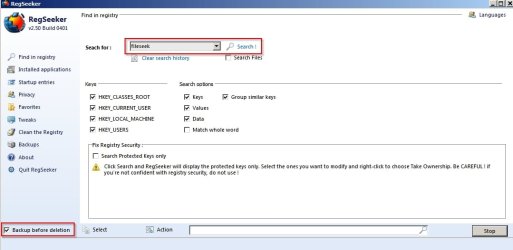
I've never used AVG PC Tuneup. Most users here would not use those types of utility especially without a backup. If you want to find the registry entries try searching using RegSeeker:

HoverDesk - Download

Run the search and check the results carefully when the scan finishes. Use the backup option.

RegSeeker.jpg

If you are sure that all entries related to the FileSeek program you can select them for deletion otherwise use [Ctrl+Enter] to highlight multiple entries one at a time.

When you are happy choose "Action" > "Delete Selected Entires"

Avoid the auto-clean feature.
 
Last edited:

My Computer

Computer type
Laptop
Computer Manufacturer/Model Number
ASUS
OS
Microsoft Windows 7 Home Premium 64-bit 7601 Multiprocessor Free Service Pack 1
CPU
AMD C-60 APU with Radeon(tm) HD Graphics
Motherboard
ASUSTeK COMPUTER INC. X501U
Memory
4.00 GB
Graphics Card(s)
AMD Radeon HD 6290 Graphics
Sound Card
(1) AMD High Definition Audio Device (2) Realtek High Defi
Screen Resolution
1366 x 768 x 32 bits (4294967296 colors) @ 60 Hz
Hard Drives
Hitachi HTS545050A7E380 SATA Disk Device
Antivirus
Comodo CIS & FW, SecureAplus App Whitelisting, Threatfire
Browser
Cyberfox 64bit, Opera 64bit, Airfox
Other Info
Spy-The-Spy, HitmanPro.Alert, Norton Connect Safe, MJRegWatcher, BitDefender TrafficLight, Voodoo Shield, Zemana AntiMalware
I've used Auslogics and Wise registry cleaners for some time now. If you choose those two utilities, do only registry cleaning, avoid the other stuff, such other stuff can cause problems. Both of those can remove many embedded but un-needed registry entries. Resplendence's Registrar Registry Manager also is a powerful registry editor -- use very cautiously.
And, before fiddling on the fiddle, make sure Rome is backed up via at least two full OS images on at least one if not two external hard-drives, lest ye find Rome burned down around ye, and ye standing and saying "Ooops."
 

My Computer

Computer type
PC/Desktop
Computer Manufacturer/Model Number
Antec desktop; Acer Aspire laptops
OS
Windows 7 Professional 64-bit
CPU
Desktop i5; Acers i5 & i7
Memory
desktop 16GB; 1 Acer 8GB & 1 Acer 16GB
Hard Drives
1TB split into 2 equal partitions [OS and data] usable by RJS
Internet Speed
AT&T DSL
Browser
FF, GChrome, msIE
Other Info
Windows 7 Firewall, Emsisoft AM/AV, MSE [scan-only], SpywareBlaster, Ruiware/BillP combine
Back
Top