installing a New PID as OS found to be non-genuine

masplin

New member
Member
VIP
Local time
12:54 PM
Messages
246
trans.gif


I bought a Sony laptop with Genuine Windows 7 Home Premium installed. I upgraded to Pro to match my desktop from what I thought was a genuine seller, but having read the threads I see 220 in the PID and getting messages it isn't genuine. :cry:


I was wondering what my options are to make getting a genuine PID as painless as possible:


1. Follow the windows validation route from laptop for £138 which seems to be buying a complete Win7 pro package. I am assuming this would be seemless and not affect any of my progrmas or files?


2. Purchase a full Win7 pro licence from another seller, assuming it is genuine. Question is what happens if you go to install Win7 pro genuine on a machine running Win7 Pro non-genuine? Can I use the upgrade menus and will this been a seemless "upgrade" leaving my programs and files OK?


3. Cheapest route reinstall Home premium OS that I have on disc then buying a genuine upgrade package for more like £80-90. While saving little bit of money I imagine this probably needs to be done as a clean install i.e. wipe all programs and files. Doesn't sound like a worthwhile saving in cash for the time involved.


Any advice appriciated especially if option 2. will work easily. i have asked this question in the MS forum and only anser was to use option 1, but £138 sounds expensive.


Mike
 

My Computer My Computer

At a glance

Windows 7 64 bitintel quad Q6600 2.4GHz4GBATI Radeon HD 4850 512Mb
Computer Manufacturer/Model Number
Dell XPS 430
OS
Windows 7 64 bit
CPU
intel quad Q6600 2.4GHz
Motherboard
Intel X48
Memory
4GB
Graphics Card(s)
ATI Radeon HD 4850 512Mb
Sound Card
ATI High Def
Monitor(s) Displays
Dell 1707FPV
Hard Drives
640GB RAID 0
320GB
PSU
425W
Keyboard
Logitech MX3000
Mouse
Logitech M-RAG97
Internet Speed
7Mb
There is usually a way to return to factory specs (the system on your computer when you bought it), if you can do that you can buy an upgrade version of Windows and install that.

Boot and try to hold f10 and alt key
 

My Computer My Computer

At a glance

Windows 10, Home Clean InstallIntel Core2 processsor Q8200(2.33Ghz 1333FSB)...6 gbATI Radeon 256MB HD3650
Computer type
PC/Desktop
Computer Manufacturer/Model Number
Dell XPS 420
OS
Windows 10, Home Clean Install
CPU
Intel Core2 processsor Q8200(2.33Ghz 1333FSB) Quad Core Tech
Motherboard
Dell
Memory
6 gb
Graphics Card(s)
ATI Radeon 256MB HD3650
Sound Card
Intergrated 7.1 Channel Audio
Monitor(s) Displays
Dell SP2009W 20"
Hard Drives
640 GB Serial ATA Hard drive
Cooling
Fan
Keyboard
Dell USB Keyboard
Mouse
Dell Premium Optical USB
Internet Speed
DSL 2.85
1) I'm having trouble understanding the difference between the packages in Option 1 and Option 2. MS is selling it to you for 138 pounds, somebody else is selling the same for less than that? Make sure you dont get taken for a ride again.

Once you get a genuine key for win7 pro full, it should be a simple matter of changing the product key in System properties and activating online.

Change the Windows 7 Key - How To Change the Windows 7 Product Key Code

Otherwise, you always have the option of calling MS and getting them to activate for you.

http://www.sevenforums.com/tutorials/18715-activate-windows-7-phone.html

2) Regarding the cheap upgrade license, I think running a repair install (that'll keep your apps and files intact) will let you enter an upgrade key.

http://www.sevenforums.com/tutorials/3413-repair-install.html
 

My Computer My Computer

At a glance

Windows 7 x64 pro/ Windows 7 x86 Pro/ XP SP3 x86
Computer Manufacturer/Model Number
Too many to describe...
OS
Windows 7 x64 pro/ Windows 7 x86 Pro/ XP SP3 x86
If the cheaper Anytime Upgrade is available in your region then you can use that to unlock Pro features but you will need to change back to activate Home Premium first. If you don't want to clean install HP, then use the popular workaround to change between Win7 versions:

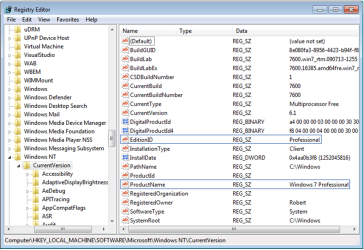
In your case, to in-place Upgrade from Pro to HP, you would change the two registry keys shown below to read exactly HOMEPREMIUM and Windows 7 HOMEPREMIUM to trick the installer into doing a same-version http://www.sevenforums.com/tutorials/3413-repair-install.html?ltr=R which is always allowed. It will reinstall HP while keeping all of your programs, files and settings in place, resetting activation.

regkeys.PNG

May I ask what are the features in Pro which you need that are not in HP? Is it really worth paying the extra? If so then buy an Anytime Upgrade key at a major retailer or from MS online. If it isn't avaiable there then buy a Pro Upgrade version to insert the key now, or reset activation first with a Repair install using Pro by unlocking all versions in the installer.
 
Last edited:
Back
Top