Intel Pro/Wireless Utility installed but not found

aberdan

New member
Local time
9:54 AM
Messages
8
Hi Guys,
On windows 7 64-bit with 4965AGN card I installed the Intel Pro/Wireless Utility for it. On the tray it doesn't seam to apear at all.
I tried searching it and I couldn't find it. Could anyone tell me if they ever had that working on win7? (my wireless works fine but I wanted to manage it through the Intel utility).

Many thanks in advance.
Alex
 

My Computer My Computer

OS
windows 7 64-bit
hi Chev65,
Thanks for you answer.
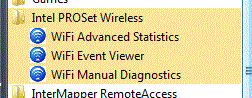
The Intel PROSet Wireless application is not there (see attached). I think I'm really dumb and don't see it.
In the taskbar there is also nothing (did show all icons).

I would really appreciate if you could help me telling me what's the shortcut of that exe so that I could start it from RUN.

Thanks
Alex
 

Attachments

  • Capture.GIF
    Capture.GIF
    7.3 KB · Views: 6,719

My Computer My Computer

OS
windows 7 64-bit
Last edited:

My Computer My Computer

Computer type
PC/Desktop
Computer Manufacturer/Model Number
Home built
OS
Windows 7 Ult, Windows 8.1 Pro,
CPU
Q9650-4.275GHz, E8600 4.5GHz, E6750-3.8GHz
Motherboard
Evga 780i FTW
Memory
G.Skill PC2 9600 1200Mhz 5 5 5 15 2T
Graphics Card(s)
GTX480
Sound Card
Asus Xonar D2
Monitor(s) Displays
HannsG
Screen Resolution
1680X1050
Hard Drives
GSkill Phoenix Pro 120GB SSD
PSU
ThermalTake Toughpower 1000Watt modular
Case
ThermalTake XaserV
Cooling
Xigmatek S1283
Keyboard
Logitech G15
Mouse
Logitech G9
Internet Speed
T1
hi Chev65,
This: Intel® PROSet/Wireless WiFi Connection Utility for Windows 7 64-Bit* is what I have downloaded. It reads 'Intel® PROSet/Wireless WiFi Connection Utility for Windows 7 64-Bit*'
I did uninstall and install already a few good times (same thing) but yeah ... it's crazy as I don't get anything.
Could you please would you be able to give me the shortcut of exe? May be I have it somewhere but it's not working who knows.

Many thanks for all your answers.
Alex
 

My Computer My Computer

OS
windows 7 64-bit
Hi Chev65,
I tried the documentation first and it's all for wired cards (at least that's what I have seen) and then the 14.8.3 drivers are the same for wired NICs. I'm on wireless card 4965AGN (not much luck).

May be the disable windows network control would work but I don't know how to do that in win7. Could you please can you let me know how to do it?

I'll that and reboot the laptop and see if the stupid wireless client application will be loaded.

Many thanks
Alex
 

My Computer My Computer

OS
windows 7 64-bit
Ok I was reading that incorrectly in your first post, sorry about that.

According to the directions a new tab should have been placed in your Device Manger so you can access the software. It might be worth while to look around in Device Manager for that software.
 

My Computer My Computer

Computer type
PC/Desktop
Computer Manufacturer/Model Number
Home built
OS
Windows 7 Ult, Windows 8.1 Pro,
CPU
Q9650-4.275GHz, E8600 4.5GHz, E6750-3.8GHz
Motherboard
Evga 780i FTW
Memory
G.Skill PC2 9600 1200Mhz 5 5 5 15 2T
Graphics Card(s)
GTX480
Sound Card
Asus Xonar D2
Monitor(s) Displays
HannsG
Screen Resolution
1680X1050
Hard Drives
GSkill Phoenix Pro 120GB SSD
PSU
ThermalTake Toughpower 1000Watt modular
Case
ThermalTake XaserV
Cooling
Xigmatek S1283
Keyboard
Logitech G15
Mouse
Logitech G9
Internet Speed
T1
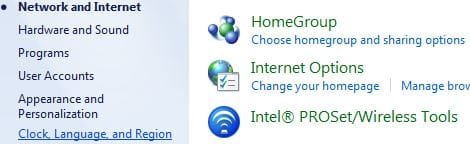
Here is what I see. Kinda of the same thing what I have in the Programs.
I remember very well that in XP to use the application I had to make windows 'give up' management rights to be able to manage with Intel Utility. If you could tell me how I could do that in win7 I think it might just work as well.

Thanks
Alex
 

Attachments

  • Capture1.JPG
    Capture1.JPG
    20.2 KB · Views: 52
  • Capture2.JPG
    Capture2.JPG
    29.3 KB · Views: 270

My Computer My Computer

OS
windows 7 64-bit
The user guide is old and shows how to do it in XP, not sure if it will work with Win 7 but worth a try.

To disable Microsoft Windows XP Wireless Zero Configuration as your wireless manager:
1. Click Start > Control Panel.
2. Double-click Network Connections.
3. Right-click Wireless Network Connection.
4. Click Properties.
5. Click Wireless Networks.
6. Verify that the Use Windows to configure my wireless network settings is not
selected. If it is, clear it.
7. Click OK. This confirms that the Intel(R) PROSet/Wireless utility is configured to manage
your network profiles.

http://download.intel.com/network/c.../Intel_PROSetWireless_Software_User_Guide.pdf
 

My Computer My Computer

Computer type
PC/Desktop
Computer Manufacturer/Model Number
Home built
OS
Windows 7 Ult, Windows 8.1 Pro,
CPU
Q9650-4.275GHz, E8600 4.5GHz, E6750-3.8GHz
Motherboard
Evga 780i FTW
Memory
G.Skill PC2 9600 1200Mhz 5 5 5 15 2T
Graphics Card(s)
GTX480
Sound Card
Asus Xonar D2
Monitor(s) Displays
HannsG
Screen Resolution
1680X1050
Hard Drives
GSkill Phoenix Pro 120GB SSD
PSU
ThermalTake Toughpower 1000Watt modular
Case
ThermalTake XaserV
Cooling
Xigmatek S1283
Keyboard
Logitech G15
Mouse
Logitech G9
Internet Speed
T1
hi Chev65,
There is nothing like 'use windows to configure my wireless network settings'. It's strange .. they changed it a bit on win7 and may be they don't allow that anymore something (my 2 cents).
Would you can if you would do a connect session with me and I'll be sharing my dekstop to you and you could check yourself?

thanks
Alex

PS. I know I'm already asking too much but I won't die asking at least.
 

My Computer My Computer

OS
windows 7 64-bit
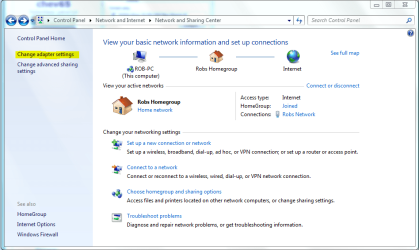
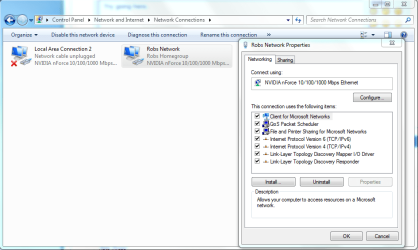
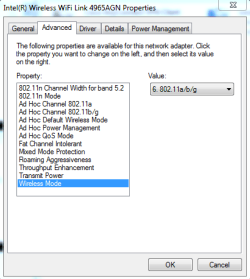
Try going here.> control panel>choose catagory then Network and Internet> Network and Sharing center> left collum > change adaptor settings>right click on the wireless connection and choose properties then choose configure, then advanced.

You can get there much faster from the Device Manager.

6. Verify that the Use Windows to configure my wireless network settings is not
selected. If it is, clear it.
7. Click OK. This confirms that the Intel(R) PROSet/Wireless utility is configured to manage your network profiles.

Not sure if you will have the option however. I sure don't have any options there anymore with Win7.
 

Attachments

  • CHANGE ADAPTOR SETTINGS.PNG
    CHANGE ADAPTOR SETTINGS.PNG
    42.9 KB · Views: 563
  • Network connection Properties.PNG
    Network connection Properties.PNG
    35.5 KB · Views: 830
  • Configure network advanced settings.PNG
    Configure network advanced settings.PNG
    26.6 KB · Views: 866

My Computer My Computer

Computer type
PC/Desktop
Computer Manufacturer/Model Number
Home built
OS
Windows 7 Ult, Windows 8.1 Pro,
CPU
Q9650-4.275GHz, E8600 4.5GHz, E6750-3.8GHz
Motherboard
Evga 780i FTW
Memory
G.Skill PC2 9600 1200Mhz 5 5 5 15 2T
Graphics Card(s)
GTX480
Sound Card
Asus Xonar D2
Monitor(s) Displays
HannsG
Screen Resolution
1680X1050
Hard Drives
GSkill Phoenix Pro 120GB SSD
PSU
ThermalTake Toughpower 1000Watt modular
Case
ThermalTake XaserV
Cooling
Xigmatek S1283
Keyboard
Logitech G15
Mouse
Logitech G9
Internet Speed
T1
hi Chev65.
I do appreciate all of your efforts but unfortunately I don't have that (see attached).
I may have to wait for someone which have my stupid wireless card. (why do I really need to have that utility as I had the flexibility to select which access points I can connect to [I have networks with up to 100 APes, same SSID and need sometime to connect to more specific ones forcing the mandatory AP feature].

Do you happen to know other utitilty which would be doing the same?

Thanks
Alex
 

Attachments

  • Capture3.PNG
    Capture3.PNG
    11.7 KB · Views: 30

My Computer My Computer

OS
windows 7 64-bit
Hi Alex
I don't have Intel Proset Wireless Utility installed on my 7 computer but here is the shortcut path for it from my XP computer (should be the same or similar):
"C:\Program Files\Common Files\Intel\WirelessCommon\iFrmewrk.exe" /af Intel PROSet/Wireless

I believe the Utility mounts as a addon/plugin in the iFrmewrk.exe environment.

I hope this helps,
Cheers,
Keith
 

My Computer My Computer

OS
7 Home Premium x64 / XP Professional x86
Hi Zedemmonk,
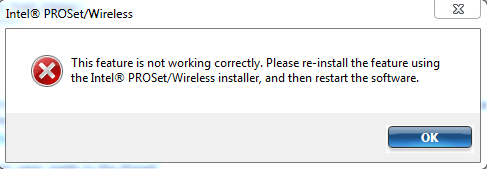
I have tried to start the ultlity with the shortcut provided but unfortunately I'm getting an error (see attached).
I'm really curious if anybody would make this working (I'm really dumb when comes with Windows).

Thanks for your time.
Alex
 

Attachments

  • Capture.PNG
    Capture.PNG
    5.2 KB · Views: 21

My Computer My Computer

OS
windows 7 64-bit
Microsoft and Intel

I spoke with Intel Tech support about the same issue. They informed me that the Pro/Wireless Utility was only supported by Microsoft up to Windows XP. After XP Microsoft refused to release the information to Intel that they need to write the code so the Utility would work with VISTA and 7. So the only option you have is to use the WLan Management provided by Microsoft in VISTA and 7. Hopes this helps.
 

My Computer My Computer

OS
Windows 7 Pro
Intel Proset Configuration Utility

I had the same problem...I downloaded the ProSet Advanced Enterprise Software for Windows 7 64 Bit and the Utility was there and worked fine.
 

My Computer My Computer

OS
Windows 7 Home - 64 bit
This may not be the Intel GUI, but it's how I got to the intel connection configuration settings (Setting a specific MAC for duplicate SSID's).

double click on connection (network connections),
click on wireless properties
check box 'allow intel connection settings'
click 'configure'

The other GUI I found in Win8.1 was under Network and Sharing, LOWER LEFT, there is a subtle link to:
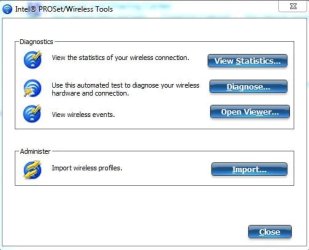
intel PROset/wireless tools, but it takes me to a tool that demands to import a profile. without importing a profile it will go no further.
 

My Computer My Computer

OS
windows 7 64-bit Ultimate
OK, to get the GUI in windows 8.1 I had to reinstall the ProSet utility and select CUSTOM. the default does not install the administration toolkit, and the enterprise option. with CUSTOM and checking all 3 boxes, I got the WIFI connection utility to show up in the task bar.
 

My Computer My Computer

OS
windows 7 64-bit Ultimate
Back
Top