
Internet Connection Drops After Being in Sleep Mode

jhubers

New member
Local time
11:21 PM
Messages
3
I just installed Windows 7 and like it for the most part, but everytime the computer goes into sleep mode and I turn it on again the internet cuts out. I'm on a cable, so it's not a wireless issue.

Any help would be most appreciated.
 

My Computer My Computer

At a glance

Windows 7 Ultimate Home Premium 32bit
OS
Windows 7 Ultimate Home Premium 32bit
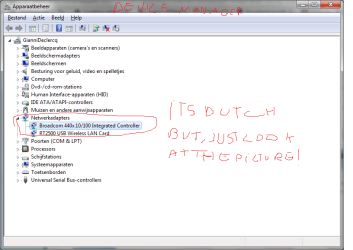
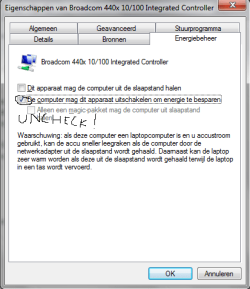
Go to Device Manager under 'Netwok Adapters' select your LAN driver and do as suggested in the picture.
 

Attachments

  • Lol.png
    Lol.png
    14.3 KB · Views: 214

My Computer My Computer

At a glance

Windows 7 Home Premium x64Core i7 2600K4GB DDR3 Kingston HyperXGigabyte GTX 670
Computer Manufacturer/Model Number
Homebuilt
OS
Windows 7 Home Premium x64
CPU
Core i7 2600K
Motherboard
Asus P8Z77-V LX
Memory
4GB DDR3 Kingston HyperX
Graphics Card(s)
Gigabyte GTX 670
Sound Card
Realtek HD Audio
Monitor(s) Displays
Delium Monitor
Screen Resolution
1360 x 768
Hard Drives
C: (500GB)
PSU
Corsair 620W
Case
Antec
Cooling
Cooling Master
Keyboard
Logitech
Mouse
Logitech wireless mouse M 505
Internet Speed
60MBPS
I think I found it. Yours in in German, but I believe in English it is under "Power Management." Is that correct? I turned off the button that would have enable it to wake the computer.
 

My Computer My Computer

At a glance

Windows 7 Ultimate Home Premium 32bit
OS
Windows 7 Ultimate Home Premium 32bit
btw, it isn't german it is dutch look at the picture again it's in device manager
 

Attachments

  • Lol2.png
    Lol2.png
    23.3 KB · Views: 193

My Computer My Computer

At a glance

Windows 7 Home Premium x64Core i7 2600K4GB DDR3 Kingston HyperXGigabyte GTX 670
Computer Manufacturer/Model Number
Homebuilt
OS
Windows 7 Home Premium x64
CPU
Core i7 2600K
Motherboard
Asus P8Z77-V LX
Memory
4GB DDR3 Kingston HyperX
Graphics Card(s)
Gigabyte GTX 670
Sound Card
Realtek HD Audio
Monitor(s) Displays
Delium Monitor
Screen Resolution
1360 x 768
Hard Drives
C: (500GB)
PSU
Corsair 620W
Case
Antec
Cooling
Cooling Master
Keyboard
Logitech
Mouse
Logitech wireless mouse M 505
Internet Speed
60MBPS
I believe that Gianni is referring to the power saver that says "Allow the computer to turn off this device to save power" uncheck that one which will prevent it from turning off the connection in sleep mode.

If you are having this problem it indicates that you should update the network driver.
 

My Computer My Computer

At a glance

Windows 7 Ult, Windows 8.1 Pro,Q9650-4.275GHz, E8600 4.5GHz, E6750-3.8GHzG.Skill PC2 9600 1200Mhz 5 5 5 15 2TGTX480
Computer type
PC/Desktop
Computer Manufacturer/Model Number
Home built
OS
Windows 7 Ult, Windows 8.1 Pro,
CPU
Q9650-4.275GHz, E8600 4.5GHz, E6750-3.8GHz
Motherboard
Evga 780i FTW
Memory
G.Skill PC2 9600 1200Mhz 5 5 5 15 2T
Graphics Card(s)
GTX480
Sound Card
Asus Xonar D2
Monitor(s) Displays
HannsG
Screen Resolution
1680X1050
Hard Drives
GSkill Phoenix Pro 120GB SSD
PSU
ThermalTake Toughpower 1000Watt modular
Case
ThermalTake XaserV
Cooling
Xigmatek S1283
Keyboard
Logitech G15
Mouse
Logitech G9
Internet Speed
T1
Please help. I am having this issue with an HP and Windows 7. I have to reboot every time I want to use my laptop. I don't understand these directions to fix the problem. Can anyone give me step by step instructions? Thanks so much.
 

My Computer My Computer

At a glance

Windows 7
Computer type
Laptop
Computer Manufacturer/Model Number
Hp
OS
Windows 7
Back
Top