Solved Internet Explorer 8 - I need a way to make it load modern sites.

lukewt1017

Banned
Local time
7:59 PM
Messages
50
Is there a way to make Internet Explorer 8 on Windows 7 (Internet Explorer 8.0.7601.17514) load modern sites just fine? Here's a list of useful things for me:

- A proxy that loads modern sites on Internet Explorer 8 so IE8 can load them right - that would work on Windows 7 SP1 if it was in an installer package.

- A browser that looks like Internet Explorer 8 but loads sites just fine, and is able to run on Windows 7.

- A patch to Internet Explorer 8 so it can load modern sites correctly.

Please help me and do not say it's impossible or to quit using Internet Explorer 8 or IE in general; if you want to do that just leave.
 

My Computers My Computers

  • At a glance

    Windows 7 Professional SP1 64 bit8 GB RAMIntegrated Intel® HD Graphics 4600
    Computer type
    PC/Desktop
    Computer Manufacturer/Model Number
    DELL
    OS
    Windows 7 Professional SP1 64 bit
    Memory
    8 GB RAM
    Graphics Card(s)
    Integrated Intel® HD Graphics 4600
    Sound Card
    High Definition Audio Device
    Monitor(s) Displays
    Dell™ E1910
    Screen Resolution
    1440 x 900
    Hard Drives
    1
    Keyboard
    HP KU-3016
    Mouse
    ione LYNX-M9 Optical Mouse
    Antivirus
    Microsoft Security Essentials
    Browser
    Mypal, Internet Explorer 8
    Other Info
    DELL™ Optiplex 9020
  • At a glance

    Windows 7 Ultimate SP1 64 bitIntel HD Graphics
    Computer type
    Laptop
    System Manufacturer/Model Number
    HP
    OS
    Windows 7 Ultimate SP1 64 bit
    Graphics Card(s)
    Intel HD Graphics
    Sound Card
    High Definition Audio Device
    Screen Resolution
    1440 x 900
    Keyboard
    Built in G72 Laptop Keyboard
    Mouse
    HP G72 Laptop Built in Touchpad
    Browser
    Mypal, Internet Explorer 8
    Other Info
    HP G72 C55DX Notebook PC
The first question that comes to mind is: Why? Why would you want to use a browser that's so old and was inheretly so bad at what it does?

Internet Explorer is a completely obsolete and abandoned browser, specially since IE8 is not even the latest version which is even worse in terms of compatibility.

There are a couple of reasons why it'll never work. First, IE8 is a 2009 browser, that's 15 years old browser that was made for the web standards existing in 2009 and totally unaware of the developments occured in the next 15 years. The web has changed too much for it to be compatible enough to run anything "modern", plain and simple. This is not a flaw in IE itself, put any 15 years old browser in today's web and it'll struggle to render anything. Internet Explorer is even worse because it was, in addition, very bad at complying with the web standards.

IE11 was a lot better and is still bundled in modern Windows versions, but again, it's still obsolete by modern standars and getting worse every day, as the web is still evolving quite fast. Not having received a single update in the last 10 years to address those means that it'll only be able to cope with the most simplistic pages, but anything using tech created in the last 10 years will fail to some degree. It's fundamentally a dead end.

Now to address your suggestions:

A proxy that loads modern sites on Internet Explorer 8 so IE8 can load them right - that would work on Windows 7 SP1 if it was in an installer package.

A proxy can help with newer security protocols that IE doesn't understands but are used extensively today, basically by downgrading security to the point that IE8 can understand it It also introduces a potential security problem in that you now have a program snooping everything you do though it so you can be victim of a man-in-the-middle attack (just like antiviruses snoop all your web traffic to "scan" it).
It won't, however, help in any way with web standards. You still get modern HTML out of it, so IE8 won't still be able to understand a great part of it.

A browser that looks like Internet Explorer 8 but loads sites just fine, and is able to run on Windows 7.

This is the best shot, with enough plugins and skinning any current browser could in theory be made to look like IE8 looked back in the day. Of course, it won't be the real thing, just a recreation using a modern browser to give an illusion instead. I'm not aware of any such a project going on, but googling around may get a good idea of any prospects for it.

A patch to Internet Explorer 8 so it can load modern sites correctly.

In theory a plugin might be able to parse current HTML/CSS/JavaScript and understand it correctly using the real IE8 engine. I have no idea if the IE8 extensibility model allows enough customization of web parsing to make it possible, and if so, if anyone made the effort to actually implement it. This in combination with the first point would make the real IE8 usable in some real-world situations, but a LOT of work is necesary and I'm not sure someone actually would do it. Googling around would tell if there is something like that.

do not say it's impossible or to quit using Internet Explorer 8 or IE in general

If it's close to impossible any other answer would be incorrect, even if you don't like it. I think it'll be very hard to see it done anytime, but with enough effort it could be done (and with "enough" I really mean a lot of work)

To give you some credit, and to contradict pretty much everything I've said, what you're proposing has been, to some point, already done for something similar.
Otter Browser is a project that tries to recreate the user interface of the old Opera 12 browser on a modern engine, not much different to your second proposed point. It's far from a good day-to-day browser but it did a relatively good job trying to clone the interface while keeping compatibility for current websites. Again, it's not the real thing, but an imitation powered by another browser engine, but for the UI parts it's a good thing if you liked the older version.
Maybe there is a chance a similar project exists somewhere for Internet Explorer somewhere, or you can create enough attention so someone starts it off.
 

My Computer My Computer

At a glance

Windows 7 Ultimate x64Intel Core i7-740QM8 GB DDR3NVIDIA GeForce 330GT
Computer type
Laptop
Computer Manufacturer/Model Number
Toshiba Sattelite A665-S6092
OS
Windows 7 Ultimate x64
CPU
Intel Core i7-740QM
Memory
8 GB DDR3
Graphics Card(s)
NVIDIA GeForce 330GT
Screen Resolution
1366x768
Hard Drives
Samsung 840 SSD 500GB
1TB USB3 external HD
Cooling
Coolermaster Notepal U3 notebook cooling pad
Internet Speed
3mbps ASDL
Antivirus
ClamWin 0.98.7
Browser
Opera 12.17 x86 (main), Firefox 38 (sec), IE11 (last resort)
This is the best shot, with enough plugins and skinning any current browser could in theory be made to look like IE8 looked back in the day. Of course, it won't be the real thing, just a recreation using a modern browser to give an illusion instead. I'm not aware of any such a project going on, but googling around may get a good idea of any prospects for it.

(Skip to end for why I quoted you) Yes, I found some project a few hours back (at the time of writing this) that was called "Windows 10 22H2 to 7". It is basically just Windows 10 22H2, but the Setup files have been modded for a few things:

1. The Setup has been modded so it looks exactly like Windows 7 (not too much, windows 10 standalone setup looks like Windows 7, just a different logo and background, it still has the Aero theme during Setup). The changes are:
- Windows 7 logon/setup wallpaper in background of Setup
- Instead of having the Windows 10 logo at the start of Setup, it has the Windows 7 logo

2. It installs Windows 10, but the Setup files have been modded so it installs Windows 10 with the look of Windows 7 (with no additional software!)


Here's why I quoted you there:


It has an Internet Explorer 7/8 icon pinned to the taskbar by default. However, this is not Internet Explorer 8. It's not any version of Internet Explorer. Not even Microsoft Edge!

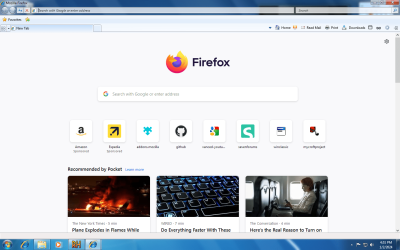
It is really Firefox that has been modded to look almost identical to Internet Explorer 8! I'll have to try and get that mod of Firefox.

- - - Updated - - -

--------Updated-------
Attention!!!

This is an update. I found a way to get Firefox looking like Internet Explorer 8. You guys can all download Firefox 109 and get 07Fox or Aerofox. You will need to note that it requires a few minutes of tweaking to get it working, and you need to have Firefox 109-112 and turn off automatic updating so it doesn't update to the latest Firefox version.

Internet Explorer 7 theme: 07Fox | A Internet Explorer 7 theme for Mozilla Firefox | WinClassic

Internet Explorer 8 theme: Aerofox. IE8 theme for Firefox 109 : Someone on the winclassic forums : Free Download, Borrow, and Streaming : Internet Archive

You will need to use the steps 07fox gave you, regardless if you are using 07Fox or Aerofox.
You will need to use Resource Hacker, also.

You WILL need to change settings in Firefox's options.

After using the steps 07Fox gave you, change your bookmarks. At first it may look terrible, but follow these steps:

1. Right click next to a tab. On the drop down menu, click "Customize Toolbar".

2. Customize your toolbar to look like Internet Explorer 8's.

3. While changing your toolbar design, be sure to check "Title Bar" at the bottom of your screen if it isn't already.
IE8FOX.png

 
Last edited:

My Computers My Computers

  • At a glance

    Windows 7 Professional SP1 64 bit8 GB RAMIntegrated Intel® HD Graphics 4600
    Computer type
    PC/Desktop
    Computer Manufacturer/Model Number
    DELL
    OS
    Windows 7 Professional SP1 64 bit
    Memory
    8 GB RAM
    Graphics Card(s)
    Integrated Intel® HD Graphics 4600
    Sound Card
    High Definition Audio Device
    Monitor(s) Displays
    Dell™ E1910
    Screen Resolution
    1440 x 900
    Hard Drives
    1
    Keyboard
    HP KU-3016
    Mouse
    ione LYNX-M9 Optical Mouse
    Antivirus
    Microsoft Security Essentials
    Browser
    Mypal, Internet Explorer 8
    Other Info
    DELL™ Optiplex 9020
  • At a glance

    Windows 7 Ultimate SP1 64 bitIntel HD Graphics
    Computer type
    Laptop
    System Manufacturer/Model Number
    HP
    OS
    Windows 7 Ultimate SP1 64 bit
    Graphics Card(s)
    Intel HD Graphics
    Sound Card
    High Definition Audio Device
    Screen Resolution
    1440 x 900
    Keyboard
    Built in G72 Laptop Keyboard
    Mouse
    HP G72 Laptop Built in Touchpad
    Browser
    Mypal, Internet Explorer 8
    Other Info
    HP G72 C55DX Notebook PC
Back
Top