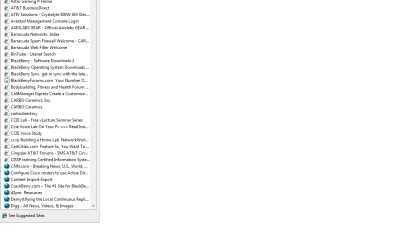
Internet Explorer - favorites menu

dirk digler

New member
Local time
5:32 AM
Messages
29
I find with the upgrade from 7068 to 7077, my favorites bar often will have the icons for the different web pages to be an globe symbol for a second before it shows the website logos. Is anyone else having this issue? it is more of a bother than a show stopper, but one i want to go away FAST! :D
 

My Computer My Computer

OS
Windows 7 build 7057

My Computer My Computer

Computer Manufacturer/Model Number
Compaq Desktop
OS
Windows 7 Ultimate x64
CPU
AMD Sempron Dual Core
Memory
3GB
Graphics Card(s)
NVIDIA GeForce 6150SE nForce 430
Screen Resolution
1024x768
Hard Drives
150GB Sata
Hm you are saying you are geting "generic" icon, instead of icon from web page?
 

My Computer My Computer

Computer Manufacturer/Model Number
Custom
OS
Windows 7 SP1 x64 build 7601.21701
CPU
Intel Q9450 @3608mhz (8x451)
Motherboard
Asus Rampage Formula
Memory
6GB - 2x Corsair CM2X1024-8500C5D and 2x CM2X2048-8500C5D
Graphics Card(s)
Zotac nVidia GTX295
Sound Card
SoundMAX ADI1988B (X-FI MB)
Monitor(s) Displays
LG L227WTP & Samsung LE26R71B LCD TV
Screen Resolution
1680x1050 & 1360x768
Hard Drives
2x Seagate ST3500630NS in RAID0
PSU
Thermaltake Toughpower 750W
Case
Thermaltake
Cooling
Thermalright Ultra-120 Extreme and couple of fans
Keyboard
Logitech G15 v2
Mouse
Razer DeathAdder
Internet Speed
FTTH 50/50 (dualstack IPv4 & native IPv6)
yes exactly, but after probably less than a second, it goes back to normal, i will try to get a print screen of it. it is there long enough to aggravate, but not enough for me to format and do a fresh install to see if it goes away.
 

My Computer My Computer

OS
Windows 7 build 7057
screenshot of what i am talking about

they all look like the bottom half for about a half second
 

Attachments

  • favorites.png
    favorites.png
    19.8 KB · Views: 87

My Computer My Computer

OS
Windows 7 build 7057
What are your internet settings showing? (e.g. Delete browsing history on exit).

I ask this as this will clear all browsing history including icons - Unless the 'Preserve favourites data' on the delete page is checked.
 

My Computer My Computer

Computer Manufacturer/Model Number
Compaq Desktop
OS
Windows 7 Ultimate x64
CPU
AMD Sempron Dual Core
Memory
3GB
Graphics Card(s)
NVIDIA GeForce 6150SE nForce 430
Screen Resolution
1024x768
Hard Drives
150GB Sata
no, i dont have that. Should i try it?
 

My Computer My Computer

OS
Windows 7 build 7057

My Computer My Computer

Computer Manufacturer/Model Number
Compaq Desktop
OS
Windows 7 Ultimate x64
CPU
AMD Sempron Dual Core
Memory
3GB
Graphics Card(s)
NVIDIA GeForce 6150SE nForce 430
Screen Resolution
1024x768
Hard Drives
150GB Sata
i read your post fully and i dont have delete browsing history, but maybe i will clear it all out and see how that works for me.
 

My Computer My Computer

OS
Windows 7 build 7057
Ok, that might do it.

Also, the 'Delete Browsing History' screen appears when you click 'Delete' in the 'Internet Settings' screen
 

My Computer My Computer

Computer Manufacturer/Model Number
Compaq Desktop
OS
Windows 7 Ultimate x64
CPU
AMD Sempron Dual Core
Memory
3GB
Graphics Card(s)
NVIDIA GeForce 6150SE nForce 430
Screen Resolution
1024x768
Hard Drives
150GB Sata
Hm i had problem with favorites icons, till build 7068, but they fixed it in that build... hope they didnt come back in build 7077 :s waiting for x64 to see...

What i had was, compleatly randomly favorites icon cache got reseted, after i visited a page it was fine again for random amount of time, then it got reseted again... But like i said this was fixed for me in 7068.
 

My Computer My Computer

Computer Manufacturer/Model Number
Custom
OS
Windows 7 SP1 x64 build 7601.21701
CPU
Intel Q9450 @3608mhz (8x451)
Motherboard
Asus Rampage Formula
Memory
6GB - 2x Corsair CM2X1024-8500C5D and 2x CM2X2048-8500C5D
Graphics Card(s)
Zotac nVidia GTX295
Sound Card
SoundMAX ADI1988B (X-FI MB)
Monitor(s) Displays
LG L227WTP & Samsung LE26R71B LCD TV
Screen Resolution
1680x1050 & 1360x768
Hard Drives
2x Seagate ST3500630NS in RAID0
PSU
Thermaltake Toughpower 750W
Case
Thermaltake
Cooling
Thermalright Ultra-120 Extreme and couple of fans
Keyboard
Logitech G15 v2
Mouse
Razer DeathAdder
Internet Speed
FTTH 50/50 (dualstack IPv4 & native IPv6)
I've not noticed it so far with 7077 so they could have addressed it
 

My Computer My Computer

Computer Manufacturer/Model Number
Compaq Desktop
OS
Windows 7 Ultimate x64
CPU
AMD Sempron Dual Core
Memory
3GB
Graphics Card(s)
NVIDIA GeForce 6150SE nForce 430
Screen Resolution
1024x768
Hard Drives
150GB Sata
that didnt work, but i will live with the problem. thanks for everyone's concern.
 

My Computer My Computer

OS
Windows 7 build 7057
Sorry to hear that, it might be fixed in the later releases (i've not seen it in 7077 so far).
 

My Computer My Computer

Computer Manufacturer/Model Number
Compaq Desktop
OS
Windows 7 Ultimate x64
CPU
AMD Sempron Dual Core
Memory
3GB
Graphics Card(s)
NVIDIA GeForce 6150SE nForce 430
Screen Resolution
1024x768
Hard Drives
150GB Sata
OMG!! I've just noticed it happen 1 minute ago. Gonna have to look more in depth at this :confused:

Additional: Could this be because periodically IE is updating the icons the same as it checks for updates to websites? Think we need a guru on this 1.
 

My Computer My Computer

Computer Manufacturer/Model Number
Compaq Desktop
OS
Windows 7 Ultimate x64
CPU
AMD Sempron Dual Core
Memory
3GB
Graphics Card(s)
NVIDIA GeForce 6150SE nForce 430
Screen Resolution
1024x768
Hard Drives
150GB Sata
I've looked into it a bit more & it always happens when I first open the Favorites menu after running IE. My new hypothosis is that IE is refreshing the icons based on the stored cache for Favorites data so this will not change. It's just IE keeping it's links up-to-date.
 

My Computer My Computer

Computer Manufacturer/Model Number
Compaq Desktop
OS
Windows 7 Ultimate x64
CPU
AMD Sempron Dual Core
Memory
3GB
Graphics Card(s)
NVIDIA GeForce 6150SE nForce 430
Screen Resolution
1024x768
Hard Drives
150GB Sata
yes it did it to me on another computer so i guess that is just the way it is going to be.
 

My Computer My Computer

OS
Windows 7 build 7057
Yes I noticed those little worlds also using X64 7077 but I always need to run faviconizer to get those favicons back anyway so it's a non issue for me. Once they were replaced with the favicon the little worlds didn't show up again. Still IE has problems showing certain favicons but most of them show up for me.
 

My Computer My Computer

Computer type
PC/Desktop
Computer Manufacturer/Model Number
Home built
OS
Windows 7 Ult, Windows 8.1 Pro,
CPU
Q9650-4.275GHz, E8600 4.5GHz, E6750-3.8GHz
Motherboard
Evga 780i FTW
Memory
G.Skill PC2 9600 1200Mhz 5 5 5 15 2T
Graphics Card(s)
GTX480
Sound Card
Asus Xonar D2
Monitor(s) Displays
HannsG
Screen Resolution
1680X1050
Hard Drives
GSkill Phoenix Pro 120GB SSD
PSU
ThermalTake Toughpower 1000Watt modular
Case
ThermalTake XaserV
Cooling
Xigmatek S1283
Keyboard
Logitech G15
Mouse
Logitech G9
Internet Speed
T1
Back
Top