Internet Explorer opens x64 version instead of normal IE

xcore7

New member
Every time while trying to open Internet Explorer it opens the x64 version. However a right click on the Internet Explorer icon with the action Start InPrivate Browsing as well as links from other applications still opens the normal IE.

I am running Windows 7 Ultimate x64 with Service Pack 1 and Internet Explorer 9.0.7.
 

My Computer

OS
Windows 7 Ultimate x64
CPU
AMD Phenom II X4 965BE
Memory
4GB DDR3-1333 RAM
Graphics Card(s)
NVIDIA GeForce GTX 580
Hey xcore7

I am Sampad from Dell Social Media and Communities team.

First we need to check if Inter Explorer 32 bit is present in you system or not. We can accomplish that by
1) Click on Start Orb and type internet explorer in the start search option.
2) All available version of internet explorer will show up.
3) Select the one that DOES NOT say 64 bit and launch it.
4) Once launched go to internet properties and try setting IE 32 bit as the default browser.

Let me know if this was able to solve your problem

Regards
Dell-Sampad C
Dell Social Media and Communities Professional
 

My Computer

OS
windows 7 64bit
No, it did not work. Internet Explorer without 64 bit as well as Internet Explorer with 64 bit opens the 64 bit version, although its says Internet Explorer is the default web browser. Internet Explorer (64-bit) cannot be the default browser.
 

My Computer

OS
Windows 7 Ultimate x64
CPU
AMD Phenom II X4 965BE
Memory
4GB DDR3-1333 RAM
Graphics Card(s)
NVIDIA GeForce GTX 580
Nobody?
 

My Computer

OS
Windows 7 Ultimate x64
CPU
AMD Phenom II X4 965BE
Memory
4GB DDR3-1333 RAM
Graphics Card(s)
NVIDIA GeForce GTX 580
Hi xcore7


Did you try creating a new user account with administrator privilages and check if the same problem occurs or not?


Regards
Dell-Sampad C

Dell Social and Media and Communities Responder
 

My Computer

OS
windows 7 64bit
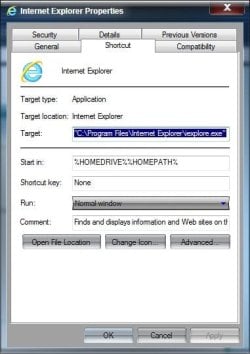
How are you launching IE? Right click whatever shortcut you are using and choose Properties. On the shortcut tab, what is the path listed under target?

Shortcut.jpg

Also try launching from the all programs list

Start> All programs> Internet Explorer, not Internet Explorer (64-bit)

Does that launch the 32 bit IE?

A Guy


A Guy
 

My Computer

Computer type
PC/Desktop
OS
Windows 10 Home x64
CPU
INTEL Core i5-750 Quad-Core 3.37GHz
Motherboard
ASUS P7P55D
Memory
HyperX Fury Black Series 8GB (2 x 4GB) 1866Mhz
Graphics Card(s)
EVGA GeForce GTX 750 Superclocked 1GB 128-Bit GDDR5
Monitor(s) Displays
LG 32MA68HY 32" IPS
Screen Resolution
1920 x 1080
Hard Drives
Samsung 840 Evo 120GB, SEAGATE 500GB Barracuda® 7200.12, SATA 3 Gb/s, 7200 RPM, 16MB cache
PSU
ANTEC TruePower New TP-550, 80 PLUS, 550W
Case
ANTEC Three Hundred Illusion
Cooling
COOLER MASTER Hyper 212 Plus, 4 x 120mm 1 x 140mm Noctua's
Internet Speed
85 + Mbps
Antivirus
Avast
Browser
Vivaldi
How are you launching IE? Right click whatever shortcut you are using and choose Properties. On the shortcut tab, what is the path listed under target?

View attachment 221599

"C:\Program Files\Internet Explorer\iexplore.exe"

Also try launching from the all programs list

Start> All programs> Internet Explorer, not Internet Explorer (64-bit)

Does that launch the 32 bit IE?

No.

Edit: I got it fixed by turning IE off and on again.
 

My Computer

OS
Windows 7 Ultimate x64
CPU
AMD Phenom II X4 965BE
Memory
4GB DDR3-1333 RAM
Graphics Card(s)
NVIDIA GeForce GTX 580
That should have been "C:\Program Files (x86)\Internet Explorer\iexplore.exe" for the 32 bit. Good you got it sorted :thumbsup:

A Guy
 

My Computer

Computer type
PC/Desktop
OS
Windows 10 Home x64
CPU
INTEL Core i5-750 Quad-Core 3.37GHz
Motherboard
ASUS P7P55D
Memory
HyperX Fury Black Series 8GB (2 x 4GB) 1866Mhz
Graphics Card(s)
EVGA GeForce GTX 750 Superclocked 1GB 128-Bit GDDR5
Monitor(s) Displays
LG 32MA68HY 32" IPS
Screen Resolution
1920 x 1080
Hard Drives
Samsung 840 Evo 120GB, SEAGATE 500GB Barracuda® 7200.12, SATA 3 Gb/s, 7200 RPM, 16MB cache
PSU
ANTEC TruePower New TP-550, 80 PLUS, 550W
Case
ANTEC Three Hundred Illusion
Cooling
COOLER MASTER Hyper 212 Plus, 4 x 120mm 1 x 140mm Noctua's
Internet Speed
85 + Mbps
Antivirus
Avast
Browser
Vivaldi
Back
Top