Internet Explorer slow on select major sites (Google, Facebook, Yahoo,

Does this reproduce without the google toolbar installed? I can see it doing... interesting .... things. It could just be the victim, but it sure looks complicit here in causing this. I also see traffic to "groupme.com" and auth.me.com, both of which are a part of some Skype component. Those are actually causing HTTPS tunnels as well, so again, it could be either, but both are doing "bad" things nonetheless.

I think it's safe to say that there are Google services installed and running on this machine, and they've taken over your browser (you can see them navigating the IE page in a frame, but the main browsing is being controlled externally). I wouldn't suspect this is a Comcast issue other than they're either blocking or providing slow access to whatever this application/service is requiring.

This isn't a browser problem, per se, it's an installed crapware problem :). We need to rid this machine of anything Google, Skype, and any other messenger/toolbar/crap that might be installed and retest. After that, you can try layering back on if things improve after that, but avoid toolbars and applications that install browser-based extensions long-term.
 

My Computer My Computer

At a glance

Windows 10 Pro x64Intel Core i7 4790K @ 4.5GHz32GB DDR3Nvidia GeForce GTX970
Computer type
PC/Desktop
Computer Manufacturer/Model Number
Custom
OS
Windows 10 Pro x64
CPU
Intel Core i7 4790K @ 4.5GHz
Motherboard
Asus Maximus Hero VII
Memory
32GB DDR3
Graphics Card(s)
Nvidia GeForce GTX970
Sound Card
Realtek HD Audio
Screen Resolution
1920x1200
Hard Drives
1x Samsung 250GB SSD
4x WD RE 2TB (RAIDZ)
PSU
Corsair AX760i
Case
Fractal Design Define R4
Cooling
Noctua NH-D15
I uninstalled the Google Toolbar, completely unistalled anything related to Skype, and disabled all add-ons in IE. Problem still persists, attached is the latest file.
 

Attachments

My Computer My Computer

At a glance

Win 7
OS
Win 7
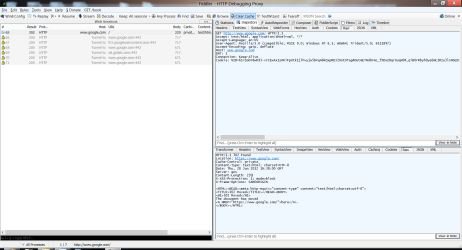
As you can see from the attached image, something is still directing you to https://www.google.com, and your user agent still contains odd numbers - I can see the GTB entry is gone, but there's still something extra on the end after Trident/5.0.

I think it might be time to scan the machine for malware, look at msconfig or autoruns to disable anything unnecessary from starting/running, etc. Something is still driving your browser...
 

Attachments

  • fiddler_log.png
    fiddler_log.png
    62.2 KB · Views: 15

My Computer My Computer

At a glance

Windows 10 Pro x64Intel Core i7 4790K @ 4.5GHz32GB DDR3Nvidia GeForce GTX970
Computer type
PC/Desktop
Computer Manufacturer/Model Number
Custom
OS
Windows 10 Pro x64
CPU
Intel Core i7 4790K @ 4.5GHz
Motherboard
Asus Maximus Hero VII
Memory
32GB DDR3
Graphics Card(s)
Nvidia GeForce GTX970
Sound Card
Realtek HD Audio
Screen Resolution
1920x1200
Hard Drives
1x Samsung 250GB SSD
4x WD RE 2TB (RAIDZ)
PSU
Corsair AX760i
Case
Fractal Design Define R4
Cooling
Noctua NH-D15
Thanks, will look at msconfig and autoruns, I have scanned with Forefront and Malwarebytes both came up empty, any other programs you can recommend? Really appreciate your time.
 

My Computer My Computer

At a glance

Win 7
OS
Win 7
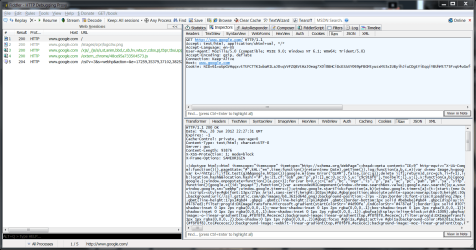
No, those should be sufficient in catching any malware. At this point, it's probably "legitimate" software, although it's behavior is a bit unwanted. For reference, attached is IE9 on Win7 (same as you) on my machine - notice the difference in response ;).
 

Attachments

  • fiddler_log2.png
    fiddler_log2.png
    86.6 KB · Views: 8

My Computer My Computer

At a glance

Windows 10 Pro x64Intel Core i7 4790K @ 4.5GHz32GB DDR3Nvidia GeForce GTX970
Computer type
PC/Desktop
Computer Manufacturer/Model Number
Custom
OS
Windows 10 Pro x64
CPU
Intel Core i7 4790K @ 4.5GHz
Motherboard
Asus Maximus Hero VII
Memory
32GB DDR3
Graphics Card(s)
Nvidia GeForce GTX970
Sound Card
Realtek HD Audio
Screen Resolution
1920x1200
Hard Drives
1x Samsung 250GB SSD
4x WD RE 2TB (RAIDZ)
PSU
Corsair AX760i
Case
Fractal Design Define R4
Cooling
Noctua NH-D15
I think I found the fix, someone just responded to the original thread I first attached in this thread; reattching it here: Internet Explorer slow on select major sites (Google, Facebook, - Microsoft Answers Look at the last post in the thread, text pasted below:

Experienced this issue when the users were using IE as their browser and the client machine has both IPv4 and IPv6 enabled. Troubleshooting took way longer than I wanted. The large “hobby sites” have IPv6 infrastructure, however somewhere between the client, switches, routers and ISP the IPv6 traffic is not being routed properly. Only big corporate sites so far seem to have IPv6 enabled. Since the traffic gets clogged from not routing properly from end-to-end it causes IE to timeout before retrying traffic over IPv4.
Fix in my situation was to disable IPv6 on certain clients.
How to disable IP version 6 (IPv6) or its specific components in Windows 7http://support.microsoft.com/kb/929852
For other clients I was able to resolve issue with Microsoft Fix it 50410 on same Microsoft KB article which sets the default to prefer IPv4 over IPv6
Hope this helps …. Good luck!
DJTECH

So far so good!
 

My Computer My Computer

At a glance

Win 7
OS
Win 7
Thanks rich27. I popped over to post my thread here today and see it is already here.

Experienced this issue when the users were using IE as their browser and the client machine has both IPv4 and IPv6 enabled. Troubleshooting took way longer than I wanted. The large “hobby sites” have IPv6 infrastructure, however somewhere between the client, switches, routers and ISP the IPv6 traffic is not being routed properly. Only big corporate sites so far seem to have IPv6 enabled. Since the traffic gets clogged from not routing properly from end-to-end it causes IE to timeout before retrying traffic over IPv4.

Fix in my situation was to disable IPv6 on certain clients.

How to disable IP version 6 (IPv6) or its specific components in Windows 7 http://support.microsoft.com/kb/929852
For other clients I was able to resolve issue with Microsoft Fix it 50410 on same Microsoft KB article which sets the default to prefer IPv4 over IPv6

Since original answer on the other answers.microsoft post yesterday we have rolled out this fix to dozens of internal client PCs with great success. In a case of a corporate environment our firewalls and cisco switches will currently not route the IPv6. I would guess even home users could experience issues if their ISP's hardware is not up-to-date from end to end. Certainly the world will need IPv6 for future internet expansion, however until everything connected is ready users will pay the price such as what is happening to IE users. I find the irony that Chrome and Firefox users are not affected. They are digging all the new users throwing out IE. Since IE is a corporate standard at my workplace we do not have that option.

I wrote another couple pages as far as an internal document for the rest of our WW IT team. But following the disable IPv6 option or make IPv4 the preferred has had huge success for our team in the last 24 hours.

-DJTECH
 

My Computer My Computer

At a glance

Windows 7 x64
OS
Windows 7 x64
Back
Top