
IP conflict

Bituser

Banned
Hello,

I am having trouble setting up ICS with my home network. I have uploaded a diagram I made to better explain what I am meaning.

What I have done on my laptop is bridge my wireless connection with my lan port so my computer next to the laptop can connect to the network and internet. It's working good as all devices are seeing each other and can connect to the internet.

My only problem is that the computer wired to my laptop can't be connected to when I turn it on sometimes because of a IP conflict. I have tried setting static IPs for the bridge and for the wired computer but I just can't get them to communicate once I have done that. It appears to be a simple solution, but I can't work it out :sarc:.

The computer connected to my laptop is running Windows XP professional, the laptop is running Home Premium x64 and the topmost computer is also running Home Premium x64.
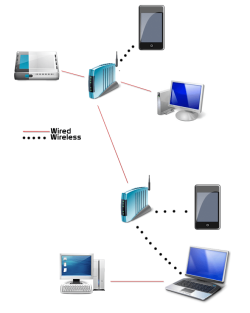
Bituser_Network_map.png


Thanks Guys,

Bituser - Sam
 

My Computer

Computer Manufacturer/Model Number
Toshiba
OS
Windows 7 Home Premium x64
CPU
Celeron
Other Info
I will Fill in my Specs soon
Hello,

I am having trouble setting up ICS with my home network. I have uploaded a diagram I made to better explain what I am meaning.

What I have done on my laptop is bridge my wireless connection with my lan port so my computer next to the laptop can connect to the network and internet. It's working good as all devices are seeing each other and can connect to the internet.

My only problem is that the computer wired to my laptop can't be connected to when I turn it on sometimes because of a IP conflict. I have tried setting static IPs for the bridge and for the wired computer but I just can't get them to communicate once I have done that. It appears to be a simple solution, but I can't work it out :sarc:.

The computer connected to my laptop is running Windows XP professional, the laptop is running Home Premium x64 and the topmost computer is also running Home Premium x64.
View attachment 150093


Thanks Guys,

Bituser - Sam


Great post. I do have one idea. Is the networking set up to use Homegroup (IPV6) or workgroup (IPV4). Homegroup is for win 7 networks, workgroup for mixed with older hardware.


Ken
 

My Computer

Computer Manufacturer/Model Number
HP Pavillion dv-7 1005 Tx
OS
Win 8 Release candidate 8400
CPU
[email protected]
Memory
4 gigs
Graphics Card(s)
Nvidia 9600M
Sound Card
HD built-in
Monitor(s) Displays
17" Wxga
Screen Resolution
1440x900
Cooling
none
Internet Speed
45Mb down 5Mb up
If you do not set static IP's to all devices, then you need to choose those IP's used as static from the end of your IP pool. If for instance you are using normal 192.168.x.x range, use IP's like 192.168.x.250 to 255.

When devices using dynamic IP's get their address from DHCP server, they usually get addresses starting from the low end of your IP pool. So, if you have several dynamic IP devices on and connected and you then boot a device whose static IP is from the low end of the address pool, the conflict is almost sure to happen.

Better of course would be to use only static addresses.

Kari
 

My Computer

Computer type
Laptop
Computer Manufacturer/Model Number
HP ENVY 17-1150eg
OS
Windows 10 Pro x64 EN-GB
CPU
1.6 GHz Intel Core i7-720QM Processor
Memory
6 GB
Graphics Card(s)
ATI Mobility Radeon HD 5850 Graphics
Sound Card
Beats sound system with integrated subwoofer
Monitor(s) Displays
17" laptop display, 22" LED and 32" Full HD TV through HDMI
Screen Resolution
1600*900 (1), 1920*1080 (2&3)
Hard Drives
Internal: 2 x 500 GB SATA Hard Disk Drive 7200 rpm
External: 2TB for backups, 3TB USB3 network drive for media
Cooling
As Envy runs a bit warm, I have it on a Cooler Master pad
Keyboard
Logitech diNovo Media Desktop Laser (bluetooth)
Mouse
Logitech Performance Mouse MX
Internet Speed
50/10 Mbps VDSL
Antivirus
Windows Defender 4.3.9431.0
Browser
Maxthon 3.5.2., IE11
Hello,

I am having trouble setting up ICS with my home network. I have uploaded a diagram I made to better explain what I am meaning.

What I have done on my laptop is bridge my wireless connection with my lan port so my computer next to the laptop can connect to the network and internet. It's working good as all devices are seeing each other and can connect to the internet.

My only problem is that the computer wired to my laptop can't be connected to when I turn it on sometimes because of a IP conflict. I have tried setting static IPs for the bridge and for the wired computer but I just can't get them to communicate once I have done that. It appears to be a simple solution, but I can't work it out :sarc:.

The computer connected to my laptop is running Windows XP professional, the laptop is running Home Premium x64 and the topmost computer is also running Home Premium x64.
View attachment 150093


Thanks Guys,

Bituser - Sam


Great post. I do have one idea. Is the networking set up to use Homegroup (IPV6) or workgroup (IPV4). Homegroup is for win 7 networks, workgroup for mixed with older hardware.


Ken
Thanks for the compliment and the Rep Ken :). I thought I would get more replies if I properly explained ;). I didn't know about that minor difference with Homegroup and Workgroup, you can have some rep too :D.


If you do not set static IP's to all devices, then you need to choose those IP's used as static from the end of your IP pool. If for instance you are using normal 192.168.x.x range, use IP's like 192.168.x.250 to 255.

When devices using dynamic IP's get their address from DHCP server, they usually get addresses starting from the low end of your IP pool. So, if you have several dynamic IP devices on and connected and you then boot a device whose static IP is from the low end of the address pool, the conflict is almost sure to happen.

Better of course would be to use only static addresses.

Kari
Thanks Kari. I switched all devices that supported static IPs to static and was still having the same issue. I found the solution though. I completely forgot about setting the DNS servers :shock::o +Rep

Thanks for everything guys, glad I have this sorted ;)

~Bituser - Sam
 

My Computer

Computer Manufacturer/Model Number
Toshiba
OS
Windows 7 Home Premium x64
CPU
Celeron
Other Info
I will Fill in my Specs soon
Good to hear you got it sorted.

Kari
 

My Computer

Computer type
Laptop
Computer Manufacturer/Model Number
HP ENVY 17-1150eg
OS
Windows 10 Pro x64 EN-GB
CPU
1.6 GHz Intel Core i7-720QM Processor
Memory
6 GB
Graphics Card(s)
ATI Mobility Radeon HD 5850 Graphics
Sound Card
Beats sound system with integrated subwoofer
Monitor(s) Displays
17" laptop display, 22" LED and 32" Full HD TV through HDMI
Screen Resolution
1600*900 (1), 1920*1080 (2&3)
Hard Drives
Internal: 2 x 500 GB SATA Hard Disk Drive 7200 rpm
External: 2TB for backups, 3TB USB3 network drive for media
Cooling
As Envy runs a bit warm, I have it on a Cooler Master pad
Keyboard
Logitech diNovo Media Desktop Laser (bluetooth)
Mouse
Logitech Performance Mouse MX
Internet Speed
50/10 Mbps VDSL
Antivirus
Windows Defender 4.3.9431.0
Browser
Maxthon 3.5.2., IE11
Back
Top