Is comcast compatible with windows 7?

chucknorrischop

New member
I appreciate any help. I am trying to install my comcast high speed internet (through ethernet using a cable modem) on a computer I just bought from someone who has windows 7 installed and the comcast message is telling me that the my operating system (windows nt 6.1) isn't meeting the minimum requirements to install and list every other prior operating system as those that meet the requirements. Is there a way I can install without having to wipe windows seven and install xp?
 

My Computer

OS
windows 7
I appreciate any help. I am trying to install my comcast high speed internet (through ethernet using a cable modem) on a computer I just bought from someone who has windows 7 installed and the comcast message is telling me that the my operating system (windows nt 6.1) isn't meeting the minimum requirements to install and list every other prior operating system as those that meet the requirements. Is there a way I can install without having to wipe windows seven and install xp?

is the installation online (meaning web based) or offline (using some sort of media)
if its offline then you can use the compatibility wizard to shim it to think that its using another OS
if it is online you might try (if you are using firefox) user agent switcher to shim the online install to think its on a vista machine...;)
is this the RC or the RTM by any chance?
if it is the rc then you could also choose to download Virtual XP so you can do the install from there...;)
 

My Computer

Computer Manufacturer/Model Number
Tx2500z Tablet Pc/Homemade Server
OS
Windows 7 Ult x64(x2), HomePrem x32(x4), Server 08 (+VM), 08 R2 (VM) , SuSe 11.2 (VM), XP 32 (VM)
CPU
Turion X2 ultra (oh well came with laptop)/P4 @3.2 (yes P4)
Motherboard
IDK HP Motherboard / Intel DG965SS
Memory
OCZ Dual Channel 4GB kit/ 1gb Dual Channel
Graphics Card(s)
HD 3200 graphics /GMA x3100 (yay for intergrated!!)
Sound Card
Realtek HD Audio(mic working, well sort of)/Siig IC-70012
Monitor(s) Displays
built-in Hp 12" laptop screen/ Acer 19"
Screen Resolution
1280x800 /1440x900
Cooling
All Air Cooled
Mouse
Logi MX Rev. /MS Wheel Optical 1.1A /Logitech Optical Mouse
Internet Speed
College baby but its still routed through vpn to 1536k...
Other Info
love my wacom pen and pressure sensitivity...
wished it worked in 7, SUSE for that matter though
Hi darkassain thank you for responding. I have the windows 7 RC and I have the offline install disc and I also attempted installing it online with the same result. How do I 'shim' it with the compatibility wizard if it is offline? or if that doesn't work how do I use the firefox method for the online way you suggested?
 

My Computer

OS
windows 7
Hi darkassain thank you for responding. I have the windows 7 RC and I have the offline install disc and I also attempted installing it online with the same result. How do I 'shim' it with the compatibility wizard if it is offline? or if that doesn't work how do I use the firefox method for the online way you suggested?

right here...
http://www.sevenforums.com/tutorials/316-compatibility-mode.html

post back your results...:)
if you dont have Virtual XP installed then we will go through the process of installing firefox and using a addon called user agent switcher...;)

if it does not work then you might have to download virtualxp (the tutorial is here: http://www.sevenforums.com/tutorials/8247-windows-xp-mode-install-setup.html)
 

My Computer

Computer Manufacturer/Model Number
Tx2500z Tablet Pc/Homemade Server
OS
Windows 7 Ult x64(x2), HomePrem x32(x4), Server 08 (+VM), 08 R2 (VM) , SuSe 11.2 (VM), XP 32 (VM)
CPU
Turion X2 ultra (oh well came with laptop)/P4 @3.2 (yes P4)
Motherboard
IDK HP Motherboard / Intel DG965SS
Memory
OCZ Dual Channel 4GB kit/ 1gb Dual Channel
Graphics Card(s)
HD 3200 graphics /GMA x3100 (yay for intergrated!!)
Sound Card
Realtek HD Audio(mic working, well sort of)/Siig IC-70012
Monitor(s) Displays
built-in Hp 12" laptop screen/ Acer 19"
Screen Resolution
1280x800 /1440x900
Cooling
All Air Cooled
Mouse
Logi MX Rev. /MS Wheel Optical 1.1A /Logitech Optical Mouse
Internet Speed
College baby but its still routed through vpn to 1536k...
Other Info
love my wacom pen and pressure sensitivity...
wished it worked in 7, SUSE for that matter though
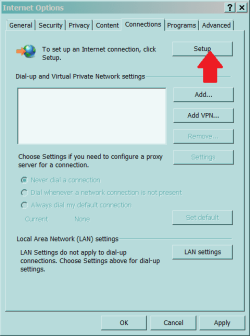
Forget installing the software - you do not need it. Just plug in the LAN cable. You might have to click Tools, Internet Options, Connections, Setup and run the wizard.
 

Attachments

  • Capture.PNG
    Capture.PNG
    32.7 KB · Views: 229
also need help

i have the same exact problem as the guy asking the question. I cant use antman's way because the wizard asks for username and password fom my ISP and since i cant install/register i c dont have one. and for dark assasin i have windows 7 home premium so the links listed don't work as they requre windows 7 professional or higher.
 

My Computer

Computer Manufacturer/Model Number
HP
OS
Windows 7 Home Premium
If you're installing Comcast high speed internet for the first time, there is a way to avoid having to install it via the web.

In the past, I only had a computer running OS X and it would never install correctly via Comcast's CD. All it really does is change the settings in your internet connections. To install it manually, you've got to call up the Comcast Customer Support guy and explain to him that you need him to help manually install your internet. If you're using a router, then you really don't have to do anything at all on your side. Even if you aren't, it shouldn't be too difficult.

If you need more help with your interenet, check DSLReports.com
 

My Computer

Computer Manufacturer/Model Number
Apple Macbook Pro (April 2009)
OS
W7 Ult. x64 | OS X
CPU
Intel Mobile Core 2 Duo 2.93Ghz [T9800 Penryn]
Motherboard
NVIDIA nForce 730i Rev. B1 [Mac-F2268EC8 (U2E1)]
Memory
4096MB Samsung DDR3 Dual Channel [PC3-8500F 1066Mhz]
Graphics Card(s)
NVIDIA GeForce 9600M GT 512MB [G96M Rev. C1]
Sound Card
SB X-Fi Surround 5.1 USB | Onboard Realtek (Disabled)
Monitor(s) Displays
Acer x223wbd 22" | Apple Anti-Glare 17" (Disabled)
Screen Resolution
{Current} 1440x900 {Acer} 1680x1050 {Apple} 1920x1200
Hard Drives
{Internal}
Seagate Momentus 320GB 2.5" 7200RPM [ST9320421AS]

{Externals}
LaCie 320GB USB 2.0 HDD [301284UR]
LaCie 750GB USB 2.0 FW400 eSATA HDD [301314U]
LaCie 1TB USB 2.0 HDD [301304UR]
PSU
Magsafe
Case
Aluminum/Unibody (MBP52)
Cooling
2 x 6000 RPM Fans
Keyboard
Logitech G-15v2 [PN 920-000379]
Mouse
Logitech G-9 [PN 910-000338]
Internet Speed
12Mbps/2.5Mbps w/ 24Mbps Speed Boost [Comcast]
Other Info
Logitech X-540 Speakers [PN 970223-0122]
Sennheiser PC-151 Headset
Back
Top