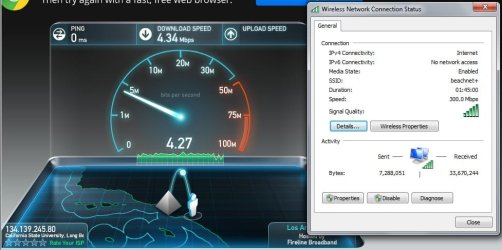
Is it possible to get 0 ms ping on speedtest.net via Wi-Fi

theveterans

Junior Member
Pro User
Local time
1:47 AM
Messages
562
Location
Within the radius of 25 miles from LA.
Has anyone achieved a 0 ms ping via Wi-Fi on speedtest.net's closest server? I just began my first day of the semester on my university and decided to do a speed test out of boredom. The server I'm doing the speed test is at LA while the university is at Long Beach (~30 mi distance). When I ping the university's access point (default gateway IP) I get 1 ms using command prompt. How could speedtest.net yield 0 ms ping while pinging the router takes 1 ms? Weird lol. Probably a mistake by speedtest.net

Untitled.jpg
 

My Computer My Computer

At a glance

Windows 7 Professional x64 SP1Intel® Pentium® 4 @ 2.26 GHz, Intel Core i7-2...512MB Dual channel DDR SDRAM @ 400MHz 2.5-3-3...Intel 82865G, Nvidia GeForce 520M Graphics
Computer type
Laptop
Computer Manufacturer/Model Number
Dell Optiplex SX270, Lenovo Z470
OS
Windows 7 Professional x64 SP1
CPU
Intel® Pentium® 4 @ 2.26 GHz, Intel Core i7-2670QM @ 2.20 GH
Motherboard
Dell, Lenovo
Memory
512MB Dual channel DDR SDRAM @ 400MHz 2.5-3-3-7, 8 GB DDR3
Graphics Card(s)
Intel 82865G, Nvidia GeForce 520M Graphics
Sound Card
SoundMax Integrated Audio, Integrated HD Audio
Monitor(s) Displays
LG W1952
Screen Resolution
1440x900, 1366 x 768
Hard Drives
40 GB 2.5" IDE 4200 RPM HDD, 500 GB 5400 RPM Sata 1.5 + 32 GB SSD
PSU
Dell 145 Watt, Lenovo 120 Watt Power Adapter
Case
Optiplex SX270 Small Form Factor, Laptop
Cooling
Dell Proprietary Air Cooling, Stock laptop cooling
Keyboard
Dell SK-8125 USB Keyboard
Mouse
Dell PS/2 2 button ball mouse with wheel scroll
Internet Speed
300 Mbit down / 20 Mbps up Time Warner Cable
Antivirus
MSE, Malwarebytes Scanner
Browser
Internet (Aizawa) Explorer 11
Other Info
Running Windows Server 2012 Datacenter on a virtual machine to run Metro Apps.
Could be a glitch or more likely your University hiding certain information to you. Does it happen to all connection tests? My guess is that the university may have redundant routers servicing clients so that if one fails there is a backup. By doing so the routers would create a phantom IP and MAC address that both would respond to meaning possible causing a false identity to appear for speedtest.

Just my guess but in real world terms no it shouldn't be possible. Remember that the speedtest is to the Uni's router and not to your machine ;)

Josh :)
 

My Computer My Computer

At a glance

Windows 7 Professional x64 SP1 ; Windows Serv...Intel Core i5 2400 @ 3.10GHz8.0GB DDR3 @ 665MHz (2GBx4)AMD Radeon HD 6870
Computer type
PC/Desktop
Computer Manufacturer/Model Number
Custom Built
OS
Windows 7 Professional x64 SP1 ; Windows Server 2012 R2 Standard
CPU
Intel Core i5 2400 @ 3.10GHz
Motherboard
Foxconn H67MP-S/-V/H67MP
Memory
8.0GB DDR3 @ 665MHz (2GBx4)
Graphics Card(s)
AMD Radeon HD 6870
Sound Card
Realtek High Definition Audio
Monitor(s) Displays
AOC 2243W & SMB1930NW
Screen Resolution
1440x900 & 1920x1080
Hard Drives
977GB Seagate ST31000524AS ATA Drive (SATA)
250GB WD iSCSI attached Drive
PSU
750W Gaming PSU
Case
Novatech Night
Cooling
Fan
Keyboard
Dell Standard PS/2 Keyboard
Mouse
R.A.T 07 Gaming Mouse
Internet Speed
Download: 10 Mbps Ping: 30ms Upload: 0.81 Mbps
Browser
Google Chrome
Other Info
Optiarc DVD RW AD-5260S ATA Device
No. 0 ms ping doesn't happen all the time. On my other speedtests I get 3 ms - 5 ms, but this is the first time I got 0 ms on Wi-Fi which is surprising considering it needs 1 ms from router to my laptop to send/receive information. I remember being able to achieve this too using Ethernet cable at home. Well, pinging the router at home using Ethernet is always 0 ms if there are no problems. It must be a random glitch with the server. I would consider this as a bug if the test always results to 0 ms ping.

 

My Computer My Computer

At a glance

Windows 7 Professional x64 SP1Intel® Pentium® 4 @ 2.26 GHz, Intel Core i7-2...512MB Dual channel DDR SDRAM @ 400MHz 2.5-3-3...Intel 82865G, Nvidia GeForce 520M Graphics
Computer type
Laptop
Computer Manufacturer/Model Number
Dell Optiplex SX270, Lenovo Z470
OS
Windows 7 Professional x64 SP1
CPU
Intel® Pentium® 4 @ 2.26 GHz, Intel Core i7-2670QM @ 2.20 GH
Motherboard
Dell, Lenovo
Memory
512MB Dual channel DDR SDRAM @ 400MHz 2.5-3-3-7, 8 GB DDR3
Graphics Card(s)
Intel 82865G, Nvidia GeForce 520M Graphics
Sound Card
SoundMax Integrated Audio, Integrated HD Audio
Monitor(s) Displays
LG W1952
Screen Resolution
1440x900, 1366 x 768
Hard Drives
40 GB 2.5" IDE 4200 RPM HDD, 500 GB 5400 RPM Sata 1.5 + 32 GB SSD
PSU
Dell 145 Watt, Lenovo 120 Watt Power Adapter
Case
Optiplex SX270 Small Form Factor, Laptop
Cooling
Dell Proprietary Air Cooling, Stock laptop cooling
Keyboard
Dell SK-8125 USB Keyboard
Mouse
Dell PS/2 2 button ball mouse with wheel scroll
Internet Speed
300 Mbit down / 20 Mbps up Time Warner Cable
Antivirus
MSE, Malwarebytes Scanner
Browser
Internet (Aizawa) Explorer 11
Other Info
Running Windows Server 2012 Datacenter on a virtual machine to run Metro Apps.
Back
Top