Is it possible to make a win7 computer a file server?

In your router, you need to make a "Port Forwarding" rule that states "Forward everything on port whatever_your_Webserver_listen_port_is to your computer", example: "Forward everything on port 80 to 10.0.0.1" (click the menu, you'll know what I mean). Once that done, you need to setup Windows Firewall (or whatever 3rd party firewall you use) to allow traffic to pass on port 80 (or whatever your Webserver is listening to). Once that done, you can access your computer using your dyndns name FROM ANOTHER network. You can't test it from your own computer.

zzz2496
 

My Computer My Computer

Computer Manufacturer/Model Number
Self Built
OS
Windows7 Ultimate 64bit
CPU
Intel Core 2 Quad Q6600
Motherboard
Abit IN9-32X-MMAX
Memory
DDR2 Adata 4GB
Graphics Card(s)
Nvidia GeForce GTX 285 1024 and Nvidia GeForce 8800GT 512
Sound Card
Asus Xonar HDAV 1.3
Monitor(s) Displays
Dell 2407WFP and BenQ 2400v and Philips 150v3
Screen Resolution
3840x1200 and 1024x768
Hard Drives
2 WDC 1TB
1 WDC 1.5TB
1 WDC 640GB
1 WDC 320GB
1 Seagate 200GB
PSU
Corsair TX 850W
Case
Cooler Master HAF932
Cooling
Arctic Cooling Freezer Extreme and plenty of fans...
Keyboard
MicrosoftNaturalKeyboard 4000/Apple Alu keyboard/Dinovo mini
Mouse
Logitech G5/MarbleMouseTrackball/PerformanceMX/SpacePilotPRO
Internet Speed
1.5Mbps down/384Kbps up
Other Info
APC SURT 1000XL
Logitech Z-560
Wiimote
Mikrotik Router
Linksys (now Cisco) SD2008 8 port Gigabit switch
Linksys WRT54G (acting as AP)
Apple wireless Aluminium keyboard
Apple Magic Mouse
Xbox360 wired controller
Ok...
Well, basically, I cannot access 10.0.0.227 from an intranet computer. I turned on "Respond to Ping on Internet Port". Not sure if it will work, though. And when I enter palz2015.ath.cx [my dyndns host] on a non-lan computer, it won't load.
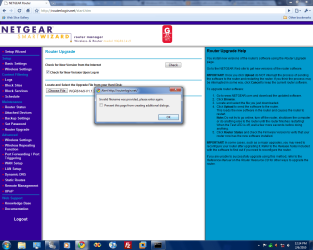
I have a suspicion that I have to update the firmware for my router, but this is what happens when I try [see attachment] (the file next to "Choose File" is the update):

Also, is there a difference between DynDNS and OpenDNS? I am using both, will this be a problem?
 

Attachments

  • Untitled.png
    Untitled.png
    69.5 KB · Views: 19

My Computer My Computer

Computer Manufacturer/Model Number
Acer Aspire X1700
OS
Windows 7 Ultimate x64 & Ubuntu 10.10 Maverick Meerkat Beta
CPU
Intel Pentium Dual CPU @ 2.40 GHz
Memory
4GB
Graphics Card(s)
nVidia GeForce Ge100
Sound Card
Realtek HD Audio
Monitor(s) Displays
Dell E193FP
Screen Resolution
1280 by 1024
Hard Drives
Western Digital
PSU
Acer
Case
Acer
Cooling
Acer
Keyboard
Acer PnP HID
Mouse
Acer PnP HID
Internet Speed
20Mbps
Thanks for all help on this thread. I have gotten DynDNS and XAMPP to work perfectly.
Check out my site: http://palz2015.ath.cx
 

My Computer My Computer

Computer Manufacturer/Model Number
Acer Aspire X1700
OS
Windows 7 Ultimate x64 & Ubuntu 10.10 Maverick Meerkat Beta
CPU
Intel Pentium Dual CPU @ 2.40 GHz
Memory
4GB
Graphics Card(s)
nVidia GeForce Ge100
Sound Card
Realtek HD Audio
Monitor(s) Displays
Dell E193FP
Screen Resolution
1280 by 1024
Hard Drives
Western Digital
PSU
Acer
Case
Acer
Cooling
Acer
Keyboard
Acer PnP HID
Mouse
Acer PnP HID
Internet Speed
20Mbps
First thing is first....
Make that computer have a STATIC Address
 

My Computer My Computer

Computer Manufacturer/Model Number
HP Pavilion Elite HPE-410f
OS
Windows 7 Ultimate x64
CPU
AMD Phenom x6 1045t
Motherboard
N/A
Memory
8 GB
Graphics Card(s)
ATI Radeon HD 5570
Sound Card
Realtek Highdefinition Audio / 5.1 Dolby Setup
Monitor(s) Displays
HP w2207h Widescreen
Screen Resolution
1680*1050
Hard Drives
1 TB (fixed), 320 Portable maxtor, Server Hard drives
PSU
350 Watt
Case
HP CASE
Cooling
Bass
Keyboard
Logitech MX 5500
Mouse
Logitech MX 5500
Internet Speed
ROAD RUNNER 16MB D/512 U
1) Make the computer you want to act as a server have a static IP address

2) You are going to have to do alot of port forwarding for your router...
2a) The easy way is to DMZ your server ip address but its not safe
2b) Port Fordward FTP, HTTP, ect... like gaming things like that you know.... just mess with the port forwarding page and you will get the hang of it.

3) If you would lke to use a DNS address instead of trying to remmber your dynamic ip address you get from the ISP, you can activate the dynamic dns located usually under your tools in your router... this way instead of remembering the numbers

you could type: umm kickbutt.homeip.net this homeip.net can by aquired from www.dynamicdns.com i tink its called the kickbutt would be the subdirectory which would lick it to your router and forward the dns name to your router insteadof remembering the numbers. Got to remember ... most residences only have dynamtic IP from their ISP most businesses have the static.. little bit different here.
 

My Computer My Computer

Computer Manufacturer/Model Number
HP Pavilion Elite HPE-410f
OS
Windows 7 Ultimate x64
CPU
AMD Phenom x6 1045t
Motherboard
N/A
Memory
8 GB
Graphics Card(s)
ATI Radeon HD 5570
Sound Card
Realtek Highdefinition Audio / 5.1 Dolby Setup
Monitor(s) Displays
HP w2207h Widescreen
Screen Resolution
1680*1050
Hard Drives
1 TB (fixed), 320 Portable maxtor, Server Hard drives
PSU
350 Watt
Case
HP CASE
Cooling
Bass
Keyboard
Logitech MX 5500
Mouse
Logitech MX 5500
Internet Speed
ROAD RUNNER 16MB D/512 U
Back
Top