Is it possible to make a win7 computer a file server?

palz

New member
What I mean is, without getting a server OS (ex. Windows Server 2008 or 2003), can I make my desktop a server so, if you enter the name in the "Map Network Drive", you can view the files on it (from the root)?
ALSO: Can I make it so a web page shows up when I enter my IP in the address bar instead of an error?
 

My Computer

Computer Manufacturer/Model Number
Acer Aspire X1700
OS
Windows 7 Ultimate x64 & Ubuntu 10.10 Maverick Meerkat Beta
CPU
Intel Pentium Dual CPU @ 2.40 GHz
Memory
4GB
Graphics Card(s)
nVidia GeForce Ge100
Sound Card
Realtek HD Audio
Monitor(s) Displays
Dell E193FP
Screen Resolution
1280 by 1024
Hard Drives
Western Digital
PSU
Acer
Case
Acer
Cooling
Acer
Keyboard
Acer PnP HID
Mouse
Acer PnP HID
Internet Speed
20Mbps
You really don't need to map a drive. Just set up a workgroup among all the PC's you want to provide access to and share the drive or folders.

If all the PC's are W7, then you can set up a homegroup which is more powerful and has more features than a simple workgroup. If you're in a mixed XP/W7 then you'll need to use a workgroup.

I don't understand your question about the web page though. Can you clarify?
 

My Computer

Computer Manufacturer/Model Number
Dell C521
OS
W7 Ultimate 64bit W7 Premium 64bit W7 Premium 32bit WXP Home 32bit
CPU
Athlon 64X2 5000+
Motherboard
Dell
Memory
4GB
Graphics Card(s)
ATI X1300
Sound Card
On Board
Monitor(s) Displays
Dell 19" Flat
Screen Resolution
1280x1024
Hard Drives
500GB Western Digital Caviar Green
Mouse
Microsoft Wireless Intellimouse Explorer 2.0
Internet Speed
SBC DSL - 6Mbps
Well, I mean when you enter my computer's IP from the address bar (of any computer on the internet), it shows a web page instead of "This page cannot by found". Does that help?
(The reason I am doing this is to help with my VPN)
 

My Computer

Computer Manufacturer/Model Number
Acer Aspire X1700
OS
Windows 7 Ultimate x64 & Ubuntu 10.10 Maverick Meerkat Beta
CPU
Intel Pentium Dual CPU @ 2.40 GHz
Memory
4GB
Graphics Card(s)
nVidia GeForce Ge100
Sound Card
Realtek HD Audio
Monitor(s) Displays
Dell E193FP
Screen Resolution
1280 by 1024
Hard Drives
Western Digital
PSU
Acer
Case
Acer
Cooling
Acer
Keyboard
Acer PnP HID
Mouse
Acer PnP HID
Internet Speed
20Mbps
What does this "web page" look like? Is it a web search results page by some chance? I noticed that IE will send you to it's default search provider if the address in the url times out rather than bringing up a "page not found". This happens if web Search Suggestions in enabled in IE's Search Settings.
 

My Computer

Computer Manufacturer/Model Number
Dell C521
OS
W7 Ultimate 64bit W7 Premium 64bit W7 Premium 32bit WXP Home 32bit
CPU
Athlon 64X2 5000+
Motherboard
Dell
Memory
4GB
Graphics Card(s)
ATI X1300
Sound Card
On Board
Monitor(s) Displays
Dell 19" Flat
Screen Resolution
1280x1024
Hard Drives
500GB Western Digital Caviar Green
Mouse
Microsoft Wireless Intellimouse Explorer 2.0
Internet Speed
SBC DSL - 6Mbps
Well, like an HTML website that I made. So if I enter my "server"'s IP, I get the webpage.
 

My Computer

Computer Manufacturer/Model Number
Acer Aspire X1700
OS
Windows 7 Ultimate x64 & Ubuntu 10.10 Maverick Meerkat Beta
CPU
Intel Pentium Dual CPU @ 2.40 GHz
Memory
4GB
Graphics Card(s)
nVidia GeForce Ge100
Sound Card
Realtek HD Audio
Monitor(s) Displays
Dell E193FP
Screen Resolution
1280 by 1024
Hard Drives
Western Digital
PSU
Acer
Case
Acer
Cooling
Acer
Keyboard
Acer PnP HID
Mouse
Acer PnP HID
Internet Speed
20Mbps
Do you mean like an "Intranet" page rather than an "Internet" page ... Soz i'm also a bit confused to what your trying to do.

If you had a website that you created/saved on your pc and you shared it on the network, then made the default startup website page on the client machines point to to index.html (or whatever you called your website default page name) then yes it would work
 

My Computer

Computer type
PC/Desktop
Computer Manufacturer/Model Number
Self Built
OS
Windows 7 Ultimate 64bit
CPU
AMD Phenom Quad core 9950 black edition
Motherboard
Gigabyte
Memory
16Gb
Graphics Card(s)
2x XFX Radeon 5850
Sound Card
PCI Express X-Fi Titanium / Logitech G35
Monitor(s) Displays
2x HP 2410i
Screen Resolution
1920x1080
Hard Drives
2x 500Gb Seagate
1x 300Gb Seagate
1x 1Tb Seagate
2x 1Tb Hitatchi
PSU
Jean Tech Storm 700W
Case
Cooler Master COSMOS S
Cooling
Akasa Evo Blue Pro
Keyboard
Logitech G15
Mouse
Mad Catz M.M.O. 7
Internet Speed
12mb
Well, like an HTML website that I made. So if I enter my "server"'s IP, I get the webpage.

If you're looking for IIS, it's only available on W7 Pro and Ultimate.

I take it you're looking to write your own custom web app, right?
 

My Computer

Computer Manufacturer/Model Number
Dell C521
OS
W7 Ultimate 64bit W7 Premium 64bit W7 Premium 32bit WXP Home 32bit
CPU
Athlon 64X2 5000+
Motherboard
Dell
Memory
4GB
Graphics Card(s)
ATI X1300
Sound Card
On Board
Monitor(s) Displays
Dell 19" Flat
Screen Resolution
1280x1024
Hard Drives
500GB Western Digital Caviar Green
Mouse
Microsoft Wireless Intellimouse Explorer 2.0
Internet Speed
SBC DSL - 6Mbps
What I mean is, without getting a server OS (ex. Windows Server 2008 or 2003), can I make my desktop a server so, if you enter the name in the "Map Network Drive", you can view the files on it (from the root)?
ALSO: Can I make it so a web page shows up when I enter my IP in the address bar instead of an error?


Guys, i have the gut feeling that the OP is talking about using IE as a means to access his "server", a visual representation, a desktop on IE. If so then this is what servers can provide through the use of, RSA connectivity (Remote Server Admin/Assistance). A connection to the "server" through RSA port. But lets assume he isn't talking about this cos it's a whole new level of complexity there.

@ Palz, a server especially a File server is nothing more than a machine that you can connect to it to retreive files. This can be a desktop, laptop or any other hardware loosly speaking. No special "server" software is required. The means can be RDP-ing, share mappings, FTP-ing etc.

All that said, i believe what you are after is something in between. IIS service (as my man RedBirdDad has mentioned). will give you a direct link to your folders, directories for transferring files. Access is with IE as you have denoted.
 

My Computer

Computer Manufacturer/Model Number
Lenovo ThinkPad T60
OS
Windows 7 Ultimate 64Bit
CPU
GenuineIntel Intel(R) Core(TM) DuoCore T2400 @ 1.83GHz
Motherboard
Intel(R) 82801G (ICH7 Family)
Memory
2.00 GB
Graphics Card(s)
Mobile Intel(R) 945 Express Chipset
Sound Card
SoundMAX Integrated Digital HD Audio
Monitor(s) Displays
ThinkPad Display
Screen Resolution
1400x1050
Hard Drives
100Gb SATA
Keyboard
Standard Keyboard
Mouse
HID-compliant Mouse
Internet Speed
Cable Broadband - 54Mbps
Other Info
Intel(R) PRO/1000 PL Network Connection
11a/b/g Wireless LAN Mini PCI Express Adapter
That could be.

What has me confused is he asked about the web page as a sort of "by the way can I...".

I can't tell if the two requests are related or not. :huh:

It is a puzzlement...
 

My Computer

Computer Manufacturer/Model Number
Dell C521
OS
W7 Ultimate 64bit W7 Premium 64bit W7 Premium 32bit WXP Home 32bit
CPU
Athlon 64X2 5000+
Motherboard
Dell
Memory
4GB
Graphics Card(s)
ATI X1300
Sound Card
On Board
Monitor(s) Displays
Dell 19" Flat
Screen Resolution
1280x1024
Hard Drives
500GB Western Digital Caviar Green
Mouse
Microsoft Wireless Intellimouse Explorer 2.0
Internet Speed
SBC DSL - 6Mbps
Welllll....

Like, my web page on the intranet, gives access to the files on my server. Because normally, Win7 or any other os gives a "this page cannot be displayed" because there is nothing set up to be displayed.

I am asking 3 things:
1) How can I get the web page to show up at my IP (on the computer itself)
2) How can I use entering my IP in any computer on the LAN to display the webpage?
 
Last edited:

My Computer

Computer Manufacturer/Model Number
Acer Aspire X1700
OS
Windows 7 Ultimate x64 & Ubuntu 10.10 Maverick Meerkat Beta
CPU
Intel Pentium Dual CPU @ 2.40 GHz
Memory
4GB
Graphics Card(s)
nVidia GeForce Ge100
Sound Card
Realtek HD Audio
Monitor(s) Displays
Dell E193FP
Screen Resolution
1280 by 1024
Hard Drives
Western Digital
PSU
Acer
Case
Acer
Cooling
Acer
Keyboard
Acer PnP HID
Mouse
Acer PnP HID
Internet Speed
20Mbps
Welllll....

Like, my web page on the intranet, gives access to the files on my server. Because normally, Win7 or any other os gives a "this page cannot be displayed" because there is nothing set up to be displayed.

I am asking 3 things:
1) How can I get the web page to show up at my IP
2) How can I use entering my IP in any computer on the LAN to display the webpage?

As we already have hinted.

1) Install IIS on your "server".
2) Put in the ip address in the IE bar.

Here is some reading (a snapshot).

How to Install IIS on Windows 7 or Vista - the How-To Geek
 

My Computer

Computer Manufacturer/Model Number
Lenovo ThinkPad T60
OS
Windows 7 Ultimate 64Bit
CPU
GenuineIntel Intel(R) Core(TM) DuoCore T2400 @ 1.83GHz
Motherboard
Intel(R) 82801G (ICH7 Family)
Memory
2.00 GB
Graphics Card(s)
Mobile Intel(R) 945 Express Chipset
Sound Card
SoundMAX Integrated Digital HD Audio
Monitor(s) Displays
ThinkPad Display
Screen Resolution
1400x1050
Hard Drives
100Gb SATA
Keyboard
Standard Keyboard
Mouse
HID-compliant Mouse
Internet Speed
Cable Broadband - 54Mbps
Other Info
Intel(R) PRO/1000 PL Network Connection
11a/b/g Wireless LAN Mini PCI Express Adapter
Unfortunately I don't think he's getting his message across due to language challenges.

palz: Is there a way we can see a sample of the web page you are referring to?
 

My Computer

Computer Manufacturer/Model Number
Dell C521
OS
W7 Ultimate 64bit W7 Premium 64bit W7 Premium 32bit WXP Home 32bit
CPU
Athlon 64X2 5000+
Motherboard
Dell
Memory
4GB
Graphics Card(s)
ATI X1300
Sound Card
On Board
Monitor(s) Displays
Dell 19" Flat
Screen Resolution
1280x1024
Hard Drives
500GB Western Digital Caviar Green
Mouse
Microsoft Wireless Intellimouse Explorer 2.0
Internet Speed
SBC DSL - 6Mbps
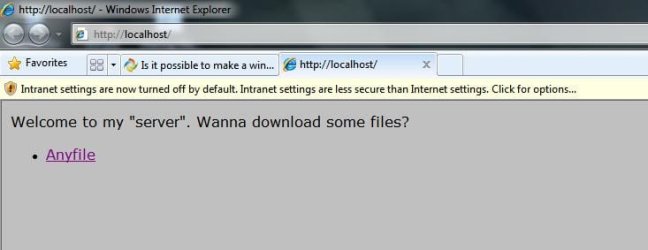
Sure:
Code:
<html>
<head>
</head>
<body>
Welcome to my "server". Wanna download some files?
<br>
<ul>
<li> <a href="/">Anyfile</a>
</ul>
</body>
</html>

ALSO, how do I modify that IIS page? [This was added later]
 
Last edited:

My Computer

Computer Manufacturer/Model Number
Acer Aspire X1700
OS
Windows 7 Ultimate x64 & Ubuntu 10.10 Maverick Meerkat Beta
CPU
Intel Pentium Dual CPU @ 2.40 GHz
Memory
4GB
Graphics Card(s)
nVidia GeForce Ge100
Sound Card
Realtek HD Audio
Monitor(s) Displays
Dell E193FP
Screen Resolution
1280 by 1024
Hard Drives
Western Digital
PSU
Acer
Case
Acer
Cooling
Acer
Keyboard
Acer PnP HID
Mouse
Acer PnP HID
Internet Speed
20Mbps
Hi Palz,

If you setup IIS as per my link before. All there is to do is to starting building your webpage.

The location of where you should put your html page is C:\inetpub\wwwroot

I have insert your sample html text into iisstart.htm (default page) and here it looks. Note: \\localhost is just local testing, \\machineIP etc would be remote access.

Noname.jpg

I would think to view this page from another PC. You might fiddle around with permissions, and that should do it.
 

My Computer

Computer Manufacturer/Model Number
Lenovo ThinkPad T60
OS
Windows 7 Ultimate 64Bit
CPU
GenuineIntel Intel(R) Core(TM) DuoCore T2400 @ 1.83GHz
Motherboard
Intel(R) 82801G (ICH7 Family)
Memory
2.00 GB
Graphics Card(s)
Mobile Intel(R) 945 Express Chipset
Sound Card
SoundMAX Integrated Digital HD Audio
Monitor(s) Displays
ThinkPad Display
Screen Resolution
1400x1050
Hard Drives
100Gb SATA
Keyboard
Standard Keyboard
Mouse
HID-compliant Mouse
Internet Speed
Cable Broadband - 54Mbps
Other Info
Intel(R) PRO/1000 PL Network Connection
11a/b/g Wireless LAN Mini PCI Express Adapter
Ok, I have this set up. One final question:
How can I get entering my IP on any computer connected to the internet to see the IIS page? I ask because my netgear router gives my computer the IP 10.0.0.2, and my IP at IP-finder sites is something different. This is confusing.
 

My Computer

Computer Manufacturer/Model Number
Acer Aspire X1700
OS
Windows 7 Ultimate x64 & Ubuntu 10.10 Maverick Meerkat Beta
CPU
Intel Pentium Dual CPU @ 2.40 GHz
Memory
4GB
Graphics Card(s)
nVidia GeForce Ge100
Sound Card
Realtek HD Audio
Monitor(s) Displays
Dell E193FP
Screen Resolution
1280 by 1024
Hard Drives
Western Digital
PSU
Acer
Case
Acer
Cooling
Acer
Keyboard
Acer PnP HID
Mouse
Acer PnP HID
Internet Speed
20Mbps
Ok, I have this set up. One final question:
How can I get entering my IP on any computer connected to the internet to see the IIS page? I ask because my netgear router gives my computer the IP 10.0.0.2, and my IP at IP-finder sites is something different. This is confusing.

Use ping to test connectivity. You first have to get the machines on the same vlan.

From the non-IIS machine just type in it's browser the ip address of the IIS machine as such.

http://ipaddress
 

My Computer

Computer Manufacturer/Model Number
Lenovo ThinkPad T60
OS
Windows 7 Ultimate 64Bit
CPU
GenuineIntel Intel(R) Core(TM) DuoCore T2400 @ 1.83GHz
Motherboard
Intel(R) 82801G (ICH7 Family)
Memory
2.00 GB
Graphics Card(s)
Mobile Intel(R) 945 Express Chipset
Sound Card
SoundMAX Integrated Digital HD Audio
Monitor(s) Displays
ThinkPad Display
Screen Resolution
1400x1050
Hard Drives
100Gb SATA
Keyboard
Standard Keyboard
Mouse
HID-compliant Mouse
Internet Speed
Cable Broadband - 54Mbps
Other Info
Intel(R) PRO/1000 PL Network Connection
11a/b/g Wireless LAN Mini PCI Express Adapter
Ok. Well, I thought if other people had the same idea and have the same router, something would go wrong. I mean, 10.0.0.2 is seemingly common [to the noob, me :)]. Correct me if I am wrong.

If this causes a problem, how can I change my subnet/IP?

added later: I made my "server"'s port 80. Tell me if you can access http://10.0.0.2:80
 

My Computer

Computer Manufacturer/Model Number
Acer Aspire X1700
OS
Windows 7 Ultimate x64 & Ubuntu 10.10 Maverick Meerkat Beta
CPU
Intel Pentium Dual CPU @ 2.40 GHz
Memory
4GB
Graphics Card(s)
nVidia GeForce Ge100
Sound Card
Realtek HD Audio
Monitor(s) Displays
Dell E193FP
Screen Resolution
1280 by 1024
Hard Drives
Western Digital
PSU
Acer
Case
Acer
Cooling
Acer
Keyboard
Acer PnP HID
Mouse
Acer PnP HID
Internet Speed
20Mbps
Firstly, can i ask have you setup your network so that all machines can communicate with one another. In this case, they need to be able to ping one another to start off with.

How have your machines been setup on your network?
 

My Computer

Computer Manufacturer/Model Number
Lenovo ThinkPad T60
OS
Windows 7 Ultimate 64Bit
CPU
GenuineIntel Intel(R) Core(TM) DuoCore T2400 @ 1.83GHz
Motherboard
Intel(R) 82801G (ICH7 Family)
Memory
2.00 GB
Graphics Card(s)
Mobile Intel(R) 945 Express Chipset
Sound Card
SoundMAX Integrated Digital HD Audio
Monitor(s) Displays
ThinkPad Display
Screen Resolution
1400x1050
Hard Drives
100Gb SATA
Keyboard
Standard Keyboard
Mouse
HID-compliant Mouse
Internet Speed
Cable Broadband - 54Mbps
Other Info
Intel(R) PRO/1000 PL Network Connection
11a/b/g Wireless LAN Mini PCI Express Adapter
Well, I have 2 windows laptops sharing files. They cannot even access the IP 10.0.0.2, even though it is on the LAN, let alone a remote computer.

EDIT: Do I have to configure these computers? What do I need to do so any device that can access the internet can access my page?
 

My Computer

Computer Manufacturer/Model Number
Acer Aspire X1700
OS
Windows 7 Ultimate x64 & Ubuntu 10.10 Maverick Meerkat Beta
CPU
Intel Pentium Dual CPU @ 2.40 GHz
Memory
4GB
Graphics Card(s)
nVidia GeForce Ge100
Sound Card
Realtek HD Audio
Monitor(s) Displays
Dell E193FP
Screen Resolution
1280 by 1024
Hard Drives
Western Digital
PSU
Acer
Case
Acer
Cooling
Acer
Keyboard
Acer PnP HID
Mouse
Acer PnP HID
Internet Speed
20Mbps
Why are you using 10.0.0.1, 10.0.0.2?

Are those IP provided through DHCP, through auto detect from your modem/router?

Regardless of what IP you are using, if the two machines are setup correctly and are actually ON the WLAN, you should be able to ping one to the other. If you can't ping, then the setup is not correct.
 

My Computer

Computer Manufacturer/Model Number
Lenovo ThinkPad T60
OS
Windows 7 Ultimate 64Bit
CPU
GenuineIntel Intel(R) Core(TM) DuoCore T2400 @ 1.83GHz
Motherboard
Intel(R) 82801G (ICH7 Family)
Memory
2.00 GB
Graphics Card(s)
Mobile Intel(R) 945 Express Chipset
Sound Card
SoundMAX Integrated Digital HD Audio
Monitor(s) Displays
ThinkPad Display
Screen Resolution
1400x1050
Hard Drives
100Gb SATA
Keyboard
Standard Keyboard
Mouse
HID-compliant Mouse
Internet Speed
Cable Broadband - 54Mbps
Other Info
Intel(R) PRO/1000 PL Network Connection
11a/b/g Wireless LAN Mini PCI Express Adapter
Back
Top