Solved Is it time for new CPU paste?

logo897

New member
Member
VIP
Local time
7:22 AM
Messages
422
Hi all,

I always have been working on my grandma's pc which is now 6 years old, but there's a concern I have. She bought it in 2011 and it's getting up there in age. I have already replaced the hard drive for her 1 time and re-installed windows 7.

I notice now that her CPU is getting a bit hot, as I've never pasted it before since it's been applied by the factory.

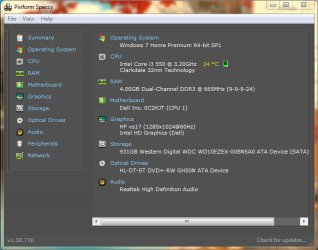
Her pc model is a dell inspiron 580 with a core i3 550 cpu. 4 gigs of ram and a 1tb hard drive. Windows 7 home premium.

The temps are ranging from 30-50c when in use, and at a full 70 degrees Celsius when at 100% usage with a stress test using cpu-z.

Is it time I apply new thermal paste for her PC? I just did on my PC with the help of another thread on here, and I notice a difference with my temps.

By the way, her CPU max for her PC is around 72 degrees Celsius. I believe the clarkdale CPU's like her cannot have as high of a temp as these newer cpu's.

Thanks
 

My Computer

Computer type
PC/Desktop
Computer Manufacturer/Model Number
Maingear Custom PC
OS
Windows 7 Pro
CPU
Intel Core i7 2600k @4.6Ghz
Motherboard
Gigabyte GA-Z68X-UD4-B3
Memory
16 GB DDR3 1600mhz
Graphics Card(s)
EVGA GTX 980Ti
Sound Card
Onboard
Monitor(s) Displays
Curved MSI 144hz 1ms
Screen Resolution
1920x1080
Hard Drives
250GB Samsung 860 Evo SSD
PSU
Seasonic 650 Watts Gold Rating
Case
Custom Maingear Case
Cooling
60mm Maingear Liquid Cooling CPU
Keyboard
Basic Wireless Keyboard
Mouse
Basic Wireless Mouse
Antivirus
Microsoft Security Essentials
Browser
Google Chrome (Latest Version)
A i7-680 do run a little hotter that others.

Because of the time it's been in use, some new thermal paste is a good idea in my opinion. It would also give you a chance to make sure the heat sink and fans are nice and clean and operating properly.

Jack
 

My Computer

Computer type
PC/Desktop
Computer Manufacturer/Model Number
Home made Desktop
OS
Windows 10 Pro. 64/ version 1709 Windows 7 Pro/64
CPU
Intel i7-6800K @ 4.3
Motherboard
ASUS X-99 Deluxe II
Memory
Corsair Platinum 16 gig @2400
Graphics Card(s)
EVGA GTX 1070 OC
Monitor(s) Displays
Asus 27" LED LCD/VE278Q
Screen Resolution
1920-1080 or 1280-720 HDMI
Hard Drives
INTEL SSD 730-240 Gb Sata 3.0/
PSU
EVGA Platium 1200W
Case
Phanteks Luxe Tempered Glass 8 fans/ one radiator
Cooling
XSPC/ Water Cooled CPU
Keyboard
Das 4 Professional
Mouse
Logitech M705/MX Anywhere 2-S
Internet Speed
100 mbits
Antivirus
Microsoft Security Essentials/ Malwarebytes Premium 3.0/ SAS
Browser
I.E. 11 default/Firefox/ ISP Time Warner Cable/Spectrum
Other Info
LG BluRay Burner/
Sound system-KLipsch-THX/
Icy Dock ssd Hot Swap bays.
A i7-680 do run a little hotter that others.

Because of the time it's been in use, some new thermal paste is a good idea in my opinion. It would also give you a chance to make sure the heat sink and fans are nice and clean and operating properly.

Jack

Thank you, Jack. That's a good idea considering I haven't opened it up since I replaced the hard drive in 2015.
 

My Computer

Computer type
PC/Desktop
Computer Manufacturer/Model Number
Maingear Custom PC
OS
Windows 7 Pro
CPU
Intel Core i7 2600k @4.6Ghz
Motherboard
Gigabyte GA-Z68X-UD4-B3
Memory
16 GB DDR3 1600mhz
Graphics Card(s)
EVGA GTX 980Ti
Sound Card
Onboard
Monitor(s) Displays
Curved MSI 144hz 1ms
Screen Resolution
1920x1080
Hard Drives
250GB Samsung 860 Evo SSD
PSU
Seasonic 650 Watts Gold Rating
Case
Custom Maingear Case
Cooling
60mm Maingear Liquid Cooling CPU
Keyboard
Basic Wireless Keyboard
Mouse
Basic Wireless Mouse
Antivirus
Microsoft Security Essentials
Browser
Google Chrome (Latest Version)
I agree with Jack. New thermal paste and a good internal cleaning are just what the doctor ordered. :)

And DON'T USE A VACUUM to clean the dust out of the computer. Use compressed air to blow it out.
 

My Computer

Computer type
PC/Desktop
Computer Manufacturer/Model Number
Mellon Labs (custom build)
OS
Win 7 Pro x64/Win 10 Pro x64 dual boot
CPU
AMD FX 8350 Vishera @ 4200
Motherboard
ASUS M5A97 R2.0
Memory
16 GB Mushkin Blackline DDR3-2400 @ 1866 (9-10-10-10-31)
Graphics Card(s)
XFX Radeon R9 280 Double D Black Edition
Sound Card
Realtek HD Audio on MB. Sounds great.
Monitor(s) Displays
Acer 24", Acer 22"
Screen Resolution
3840 x 1080
Hard Drives
1 x Mushkin Chronos 120 GB SSD (Win 10)
1 x Samsung 850 EVO 250 GB SSD (Win 7)
1 x WD 1TB SATA Blue
1 x WD 1TB SATA Green
PSU
Corsair TX-750
Case
CoolerMaster HAF 912+
Cooling
Coolermaster Seidon 240M Liquid AIO. 6 case fans
Keyboard
Logitech G710+
Mouse
Logitech G500s
Internet Speed
Much better since I got fiber, but still way overpriced.
Antivirus
MSE, Malware Bytes for scanning
Browser
Firefox
Other Info
Corsair VOID USB headphones.

A Mellon Labs X-1 - LCD Smartie driven system status display.

Brought to you by the letter E
I agree with Jack. New thermal paste and a good internal cleaning are just what the doctor ordered. :)

And DON'T USE A VACUUM to clean the dust out of the computer. Use compressed air to blow it out.

X2 on not using a vacuum.
 

My Computer

Computer type
PC/Desktop
Computer Manufacturer/Model Number
Custom Build
OS
Win 7 Ultimate 64 bit
CPU
Intel i7-3930K
Motherboard
ASUS P9X79 WS
Memory
Kingston HyperX Genesis 32GB Kit (8x4GB Modules) 1600MHz DDR
Graphics Card(s)
MSI R7850 Twin Frozr 2GD5/OC Radeon HD 7850 2GB 256-bit GDDR
Sound Card
Asus Xonar Essence STX
Monitor(s) Displays
3x Asus VG248QE 24", Vizio 32" TV
Screen Resolution
1920 x 1080, ?
Hard Drives
Samsung 128GB 840 Pro SSD (1),
Samsung 4TB 850 EVO SSDs (4)
Samsung 4TB 850 EVO SSDs (16) external backup drives used in 2.5" hot swap bays in the computer.
PSU
Corsair HX750w
Case
Antec Two Hundred v2 (modified)
Cooling
Cooler Master GeminII S524 120mm (fan replaced with a 140mm)
Keyboard
Logitech G510s
Mouse
Logitech M525 (two in use)
Internet Speed
=< 32Mbps down, 8Mbps up
Antivirus
AVAST!, MBAM, SAS, Spybot S&D (all but MBAM free) Glary Util
Browser
IE11
Other Info
LSI 9211-8i HBA card (8 SATA III ports), 2.5" & 3.5" Hot Swap Bays, HooToo HT-CR001 PCI-E to USB 3.0 Internal Hub + 6 Slot Card Reader, and LG Model CH12LS28 BD-ROM Optical Drive. Also, ScanSnap S1500 ADF duplexing scanner, Canon 9000F flat bed scanner, Corsair SP2500 2.1 speakers, Samsung CLP 415nw laser color printer, Cyberpower PP2200SW UPS
Gotcha, I happen to have 2 cans of compressed air ;)
 

My Computer

Computer type
PC/Desktop
Computer Manufacturer/Model Number
Maingear Custom PC
OS
Windows 7 Pro
CPU
Intel Core i7 2600k @4.6Ghz
Motherboard
Gigabyte GA-Z68X-UD4-B3
Memory
16 GB DDR3 1600mhz
Graphics Card(s)
EVGA GTX 980Ti
Sound Card
Onboard
Monitor(s) Displays
Curved MSI 144hz 1ms
Screen Resolution
1920x1080
Hard Drives
250GB Samsung 860 Evo SSD
PSU
Seasonic 650 Watts Gold Rating
Case
Custom Maingear Case
Cooling
60mm Maingear Liquid Cooling CPU
Keyboard
Basic Wireless Keyboard
Mouse
Basic Wireless Mouse
Antivirus
Microsoft Security Essentials
Browser
Google Chrome (Latest Version)
Hi,
I use a shop vac all the time it does not have any metal on it's hose or it's attachments and works well
It also sucks or blows but I do prefer suction it is less messy ;)
 

My Computer

Computer type
PC/Desktop
Computer Manufacturer/Model Number
Custom assembled by me :}
OS
Win-7-Pro64bit 7-H-Prem-64bit
CPU
i7-5930K 2nd i9-9940x both water blocked VRM's too
Motherboard
ASUS SABERTOOTH X99 2nd ASUS x299 Apex
Memory
Trident-z 3200C14 2nd Trident-z 3600C16
Graphics Card(s)
EVGA 1080ti ftw3 2nd Titan Xp both water blocked
Sound Card
Built-in Realtek
Monitor(s) Displays
1-AOC G2460PG 24"G-Sync 144Hz/ 2nd 1-ASUS VG248QE 24" 144Hz
Screen Resolution
1920 x 1080 144Hz
Hard Drives
2-Samsung M.2 Evo & Evo Plus
2-Samsung 850 EVO 500GB SSD's/ 3-2.5 W.D. Black 1tb-&3-1tb/3-3.5 WD Black 1tb hdd's
PSU
EVGA SuperNOVA 1000-P2 2nd 1200-P2
Case
2-Corsair Obsidian Series 450D Black ATX Mid Tower
Cooling
Custom water loops
Keyboard
Logitech G710+/ 2nd Logitech G910
Mouse
2-RedDragon M901 Perdition 16400 dpi Gaming mouse = wired
Internet Speed
Comcast Ping 19ms 89.31mbps download speed 6.12mbps upload
Antivirus
Malwarebytes Pro/ Superantispyware Pro
Browser
FireFox & Pale moon
Other Info
2nd ASUS X299 Apex/Intel i9-9940x with Custom water loop/7H-Prem-x64/Corsair 450D case/Ram Trident-z 3600C16 4x8gb / Samsung970Evo plus 500gb SSD/Dual ssd EZ swap evo/PSU EVGA SuperNova 1200w-P2 80+Platinum/GPU Titan Xp /8-ML-140 on push-pull on 2-280GTX rads
Hi,
I use a shop vac all the time it does not have any metal on it's hose or it's attachments and works well
It also sucks or blows but I do prefer suction it is less messy ;)

Read these:

Should I vacuum my PC? — Ask PC Gamer | PC Gamer

Ask How-To Geek: Why You Should Never Vacuum Your PC, Converting Books for the Kindle, and Controlling Multiple Computers with One Keyboard

There is a fair amount of controversy over this, mostly because one isn't guaranteed to cause ESD with a vacuum cleaner every time it's used so many people get away with it. I feel why take a chance? Btw, static electricity can build up on plastic.
 

My Computer

Computer type
PC/Desktop
Computer Manufacturer/Model Number
Custom Build
OS
Win 7 Ultimate 64 bit
CPU
Intel i7-3930K
Motherboard
ASUS P9X79 WS
Memory
Kingston HyperX Genesis 32GB Kit (8x4GB Modules) 1600MHz DDR
Graphics Card(s)
MSI R7850 Twin Frozr 2GD5/OC Radeon HD 7850 2GB 256-bit GDDR
Sound Card
Asus Xonar Essence STX
Monitor(s) Displays
3x Asus VG248QE 24", Vizio 32" TV
Screen Resolution
1920 x 1080, ?
Hard Drives
Samsung 128GB 840 Pro SSD (1),
Samsung 4TB 850 EVO SSDs (4)
Samsung 4TB 850 EVO SSDs (16) external backup drives used in 2.5" hot swap bays in the computer.
PSU
Corsair HX750w
Case
Antec Two Hundred v2 (modified)
Cooling
Cooler Master GeminII S524 120mm (fan replaced with a 140mm)
Keyboard
Logitech G510s
Mouse
Logitech M525 (two in use)
Internet Speed
=< 32Mbps down, 8Mbps up
Antivirus
AVAST!, MBAM, SAS, Spybot S&D (all but MBAM free) Glary Util
Browser
IE11
Other Info
LSI 9211-8i HBA card (8 SATA III ports), 2.5" & 3.5" Hot Swap Bays, HooToo HT-CR001 PCI-E to USB 3.0 Internal Hub + 6 Slot Card Reader, and LG Model CH12LS28 BD-ROM Optical Drive. Also, ScanSnap S1500 ADF duplexing scanner, Canon 9000F flat bed scanner, Corsair SP2500 2.1 speakers, Samsung CLP 415nw laser color printer, Cyberpower PP2200SW UPS
Hi,
Yep well to each his/ her own opinion but since adding real filters the inside is fairly spotless
Only have to vac the front filter and bottom filter and I'm done :)

I believe it's a no brainer not to get the tip too close to anything ;)
 

My Computer

Computer type
PC/Desktop
Computer Manufacturer/Model Number
Custom assembled by me :}
OS
Win-7-Pro64bit 7-H-Prem-64bit
CPU
i7-5930K 2nd i9-9940x both water blocked VRM's too
Motherboard
ASUS SABERTOOTH X99 2nd ASUS x299 Apex
Memory
Trident-z 3200C14 2nd Trident-z 3600C16
Graphics Card(s)
EVGA 1080ti ftw3 2nd Titan Xp both water blocked
Sound Card
Built-in Realtek
Monitor(s) Displays
1-AOC G2460PG 24"G-Sync 144Hz/ 2nd 1-ASUS VG248QE 24" 144Hz
Screen Resolution
1920 x 1080 144Hz
Hard Drives
2-Samsung M.2 Evo & Evo Plus
2-Samsung 850 EVO 500GB SSD's/ 3-2.5 W.D. Black 1tb-&3-1tb/3-3.5 WD Black 1tb hdd's
PSU
EVGA SuperNOVA 1000-P2 2nd 1200-P2
Case
2-Corsair Obsidian Series 450D Black ATX Mid Tower
Cooling
Custom water loops
Keyboard
Logitech G710+/ 2nd Logitech G910
Mouse
2-RedDragon M901 Perdition 16400 dpi Gaming mouse = wired
Internet Speed
Comcast Ping 19ms 89.31mbps download speed 6.12mbps upload
Antivirus
Malwarebytes Pro/ Superantispyware Pro
Browser
FireFox & Pale moon
Other Info
2nd ASUS X299 Apex/Intel i9-9940x with Custom water loop/7H-Prem-x64/Corsair 450D case/Ram Trident-z 3600C16 4x8gb / Samsung970Evo plus 500gb SSD/Dual ssd EZ swap evo/PSU EVGA SuperNova 1200w-P2 80+Platinum/GPU Titan Xp /8-ML-140 on push-pull on 2-280GTX rads
Hi,
Yep well to each his/ her own opinion but since adding real filters the inside is fairly spotless
Only have to vac the front filter and bottom filter and I'm done :)

I believe it's a no brainer not to get the tip too close to anything ;)

Nothing wrong with vacuuming the filters since that is from the outside; heck, I also do that between cleanings. It may be a no brainer for us to not to get too close with the tip, including when using a compressor or high powered blower, but most people do not realize that.

Where I'm at (I live in a desert), a lot of really fine dust gets through the filters but there is no question that filters stops the worst of the dust.
 

My Computer

Computer type
PC/Desktop
Computer Manufacturer/Model Number
Custom Build
OS
Win 7 Ultimate 64 bit
CPU
Intel i7-3930K
Motherboard
ASUS P9X79 WS
Memory
Kingston HyperX Genesis 32GB Kit (8x4GB Modules) 1600MHz DDR
Graphics Card(s)
MSI R7850 Twin Frozr 2GD5/OC Radeon HD 7850 2GB 256-bit GDDR
Sound Card
Asus Xonar Essence STX
Monitor(s) Displays
3x Asus VG248QE 24", Vizio 32" TV
Screen Resolution
1920 x 1080, ?
Hard Drives
Samsung 128GB 840 Pro SSD (1),
Samsung 4TB 850 EVO SSDs (4)
Samsung 4TB 850 EVO SSDs (16) external backup drives used in 2.5" hot swap bays in the computer.
PSU
Corsair HX750w
Case
Antec Two Hundred v2 (modified)
Cooling
Cooler Master GeminII S524 120mm (fan replaced with a 140mm)
Keyboard
Logitech G510s
Mouse
Logitech M525 (two in use)
Internet Speed
=< 32Mbps down, 8Mbps up
Antivirus
AVAST!, MBAM, SAS, Spybot S&D (all but MBAM free) Glary Util
Browser
IE11
Other Info
LSI 9211-8i HBA card (8 SATA III ports), 2.5" & 3.5" Hot Swap Bays, HooToo HT-CR001 PCI-E to USB 3.0 Internal Hub + 6 Slot Card Reader, and LG Model CH12LS28 BD-ROM Optical Drive. Also, ScanSnap S1500 ADF duplexing scanner, Canon 9000F flat bed scanner, Corsair SP2500 2.1 speakers, Samsung CLP 415nw laser color printer, Cyberpower PP2200SW UPS
Okay, I have just applied new thermal paste, cleaned the dust, and now the PC is booted back up.


Her PC is now ranging from 20-30 degrees celsius, and it goes up to around 60 degrees Celsius under 100% full load for several minutes. I don't have to worry about that, though, as she only browses on Facebook and her CPU usage is never full for several minutes straight. I'm blown away by the positive results. It's even colder compared to my PC! But still, I put more paste on hers compared to mine. I wonder if I should redo mine :/
 

My Computer

Computer type
PC/Desktop
Computer Manufacturer/Model Number
Maingear Custom PC
OS
Windows 7 Pro
CPU
Intel Core i7 2600k @4.6Ghz
Motherboard
Gigabyte GA-Z68X-UD4-B3
Memory
16 GB DDR3 1600mhz
Graphics Card(s)
EVGA GTX 980Ti
Sound Card
Onboard
Monitor(s) Displays
Curved MSI 144hz 1ms
Screen Resolution
1920x1080
Hard Drives
250GB Samsung 860 Evo SSD
PSU
Seasonic 650 Watts Gold Rating
Case
Custom Maingear Case
Cooling
60mm Maingear Liquid Cooling CPU
Keyboard
Basic Wireless Keyboard
Mouse
Basic Wireless Mouse
Antivirus
Microsoft Security Essentials
Browser
Google Chrome (Latest Version)
Thank you all very much!
 

My Computer

Computer type
PC/Desktop
Computer Manufacturer/Model Number
Maingear Custom PC
OS
Windows 7 Pro
CPU
Intel Core i7 2600k @4.6Ghz
Motherboard
Gigabyte GA-Z68X-UD4-B3
Memory
16 GB DDR3 1600mhz
Graphics Card(s)
EVGA GTX 980Ti
Sound Card
Onboard
Monitor(s) Displays
Curved MSI 144hz 1ms
Screen Resolution
1920x1080
Hard Drives
250GB Samsung 860 Evo SSD
PSU
Seasonic 650 Watts Gold Rating
Case
Custom Maingear Case
Cooling
60mm Maingear Liquid Cooling CPU
Keyboard
Basic Wireless Keyboard
Mouse
Basic Wireless Mouse
Antivirus
Microsoft Security Essentials
Browser
Google Chrome (Latest Version)
Heres a pic
 

Attachments

  • speccy.PNG
    speccy.PNG
    30.1 KB · Views: 18

My Computer

Computer type
PC/Desktop
Computer Manufacturer/Model Number
Maingear Custom PC
OS
Windows 7 Pro
CPU
Intel Core i7 2600k @4.6Ghz
Motherboard
Gigabyte GA-Z68X-UD4-B3
Memory
16 GB DDR3 1600mhz
Graphics Card(s)
EVGA GTX 980Ti
Sound Card
Onboard
Monitor(s) Displays
Curved MSI 144hz 1ms
Screen Resolution
1920x1080
Hard Drives
250GB Samsung 860 Evo SSD
PSU
Seasonic 650 Watts Gold Rating
Case
Custom Maingear Case
Cooling
60mm Maingear Liquid Cooling CPU
Keyboard
Basic Wireless Keyboard
Mouse
Basic Wireless Mouse
Antivirus
Microsoft Security Essentials
Browser
Google Chrome (Latest Version)
Be aware you can put too much paste between a CPU and a cooler and, not only will it not cool as well, it can cause damage to the CPU and the motherboard if the paste squeezes past the IFS (the top of the CPU). See: How-to apply thermal compound - YouTube
 

My Computer

Computer type
PC/Desktop
Computer Manufacturer/Model Number
Custom Build
OS
Win 7 Ultimate 64 bit
CPU
Intel i7-3930K
Motherboard
ASUS P9X79 WS
Memory
Kingston HyperX Genesis 32GB Kit (8x4GB Modules) 1600MHz DDR
Graphics Card(s)
MSI R7850 Twin Frozr 2GD5/OC Radeon HD 7850 2GB 256-bit GDDR
Sound Card
Asus Xonar Essence STX
Monitor(s) Displays
3x Asus VG248QE 24", Vizio 32" TV
Screen Resolution
1920 x 1080, ?
Hard Drives
Samsung 128GB 840 Pro SSD (1),
Samsung 4TB 850 EVO SSDs (4)
Samsung 4TB 850 EVO SSDs (16) external backup drives used in 2.5" hot swap bays in the computer.
PSU
Corsair HX750w
Case
Antec Two Hundred v2 (modified)
Cooling
Cooler Master GeminII S524 120mm (fan replaced with a 140mm)
Keyboard
Logitech G510s
Mouse
Logitech M525 (two in use)
Internet Speed
=< 32Mbps down, 8Mbps up
Antivirus
AVAST!, MBAM, SAS, Spybot S&D (all but MBAM free) Glary Util
Browser
IE11
Other Info
LSI 9211-8i HBA card (8 SATA III ports), 2.5" & 3.5" Hot Swap Bays, HooToo HT-CR001 PCI-E to USB 3.0 Internal Hub + 6 Slot Card Reader, and LG Model CH12LS28 BD-ROM Optical Drive. Also, ScanSnap S1500 ADF duplexing scanner, Canon 9000F flat bed scanner, Corsair SP2500 2.1 speakers, Samsung CLP 415nw laser color printer, Cyberpower PP2200SW UPS
Be aware you can put too much paste between a CPU and a cooler and, not only will it not cool as well, it can cause damage to the CPU and the motherboard if the paste squeezes past the IFS (the top of the CPU). See: How-to apply thermal compound - YouTube

Hi,

I understand. I made sure to smooth out the paste on the cpu and then I put very little on the heatsink, while on mine I didn't put any on the heatsink at all. I'm going to look over mine again with a bit caution and see if I can add more without adding too much, thank you for letting me know :)
 

My Computer

Computer type
PC/Desktop
Computer Manufacturer/Model Number
Maingear Custom PC
OS
Windows 7 Pro
CPU
Intel Core i7 2600k @4.6Ghz
Motherboard
Gigabyte GA-Z68X-UD4-B3
Memory
16 GB DDR3 1600mhz
Graphics Card(s)
EVGA GTX 980Ti
Sound Card
Onboard
Monitor(s) Displays
Curved MSI 144hz 1ms
Screen Resolution
1920x1080
Hard Drives
250GB Samsung 860 Evo SSD
PSU
Seasonic 650 Watts Gold Rating
Case
Custom Maingear Case
Cooling
60mm Maingear Liquid Cooling CPU
Keyboard
Basic Wireless Keyboard
Mouse
Basic Wireless Mouse
Antivirus
Microsoft Security Essentials
Browser
Google Chrome (Latest Version)
Hi,

I understand. I made sure to smooth out the paste on the cpu and then I put very little on the heatsink, while on mine I didn't put any on the heatsink at all. I'm going to look over mine again with a bit caution and see if I can add more without adding too much, thank you for letting me know :)

I would only put a dot onto the CPU and let the cooler spread it out when you cinch it down. Spreading it out first sets up the likelihood of trapping air bubbles that will interfere with heat transfer.

I would also put paste on the cooler only if it had heat pipes on it. I would spread it thin, then scrape off all but the paste that gets into the cracks between the base of the cooler and the heat pipes. Then put a dot on the CPU and cinch down the cooler.

Keep in mind the CPU chip is actually smaller than the IHS (cover) on the CPU so it isn't necessary for the paste to cover every bit of the cover. A round circle that comes close to the edges of the IHS when you cinch down the cooler is all you need.
 

My Computer

Computer type
PC/Desktop
Computer Manufacturer/Model Number
Custom Build
OS
Win 7 Ultimate 64 bit
CPU
Intel i7-3930K
Motherboard
ASUS P9X79 WS
Memory
Kingston HyperX Genesis 32GB Kit (8x4GB Modules) 1600MHz DDR
Graphics Card(s)
MSI R7850 Twin Frozr 2GD5/OC Radeon HD 7850 2GB 256-bit GDDR
Sound Card
Asus Xonar Essence STX
Monitor(s) Displays
3x Asus VG248QE 24", Vizio 32" TV
Screen Resolution
1920 x 1080, ?
Hard Drives
Samsung 128GB 840 Pro SSD (1),
Samsung 4TB 850 EVO SSDs (4)
Samsung 4TB 850 EVO SSDs (16) external backup drives used in 2.5" hot swap bays in the computer.
PSU
Corsair HX750w
Case
Antec Two Hundred v2 (modified)
Cooling
Cooler Master GeminII S524 120mm (fan replaced with a 140mm)
Keyboard
Logitech G510s
Mouse
Logitech M525 (two in use)
Internet Speed
=< 32Mbps down, 8Mbps up
Antivirus
AVAST!, MBAM, SAS, Spybot S&D (all but MBAM free) Glary Util
Browser
IE11
Other Info
LSI 9211-8i HBA card (8 SATA III ports), 2.5" & 3.5" Hot Swap Bays, HooToo HT-CR001 PCI-E to USB 3.0 Internal Hub + 6 Slot Card Reader, and LG Model CH12LS28 BD-ROM Optical Drive. Also, ScanSnap S1500 ADF duplexing scanner, Canon 9000F flat bed scanner, Corsair SP2500 2.1 speakers, Samsung CLP 415nw laser color printer, Cyberpower PP2200SW UPS
There's no paste going over onto the Mobo though
Also the dot method is one of the ways. I've seen ways done where you put a small line down through the middle of the CPU. That's how I did it.
 

My Computer

Computer type
PC/Desktop
Computer Manufacturer/Model Number
Maingear Custom PC
OS
Windows 7 Pro
CPU
Intel Core i7 2600k @4.6Ghz
Motherboard
Gigabyte GA-Z68X-UD4-B3
Memory
16 GB DDR3 1600mhz
Graphics Card(s)
EVGA GTX 980Ti
Sound Card
Onboard
Monitor(s) Displays
Curved MSI 144hz 1ms
Screen Resolution
1920x1080
Hard Drives
250GB Samsung 860 Evo SSD
PSU
Seasonic 650 Watts Gold Rating
Case
Custom Maingear Case
Cooling
60mm Maingear Liquid Cooling CPU
Keyboard
Basic Wireless Keyboard
Mouse
Basic Wireless Mouse
Antivirus
Microsoft Security Essentials
Browser
Google Chrome (Latest Version)
Back
Top