
You are using an out of date browser. It may not display this or other websites correctly.
You should upgrade or use an alternative browser.
You should upgrade or use an alternative browser.
Solved Is there any solution changing the basic taskbar color ?
- Thread starter veram
- Start date
Mike Connor
New member
You can try this ;
How To Change Your Taskbar’s Color In Windows 7 | door2windows
Edit: Sorry, it doesn't work without aero transparency being enabled.
Regards....Mike Connor
How To Change Your Taskbar’s Color In Windows 7 | door2windows
Edit: Sorry, it doesn't work without aero transparency being enabled.
Regards....Mike Connor
Last edited:
My Computer
- OS
- Several, including Windows 7 x64 Ultimate

Bongo
Jerry ☮ 1956-2019 R.I.P.
This is from Imperfect1 from another thead it's about the start menu but the same will work with other stuff by using the drop down menu.
Jerry
Jerry
Yes, you actually can change the Start Menu background color quite easily --- if you've chosen a Windows theme that allows it (like, for example, Windows Classic). All you have to do is right-click your Desktop to open Personalize. Select: Window Color and Appearance, and click on the Advanced button. In the Item drop-down menu, select: Menu. After you've changed the Start Menu color you can also experiment with the Advanced - Item drop-down list and change the color, size style of many items in Windows.
My Computer
- Computer type
- Laptop
- Computer Manufacturer/Model Number
- Sager NP9170
- OS
- Win 7 Pro x64 / Win 10 Pro
- CPU
- Intel(R) Core(TM) i7-3630QM CPU @ 2.40GHz
- Motherboard
- CLEVO P170EM
- Memory
- 12 GB
- Graphics Card(s)
- (1) Intel(R) HD Graphics 4000 (2) NVIDIA GeForce GTX 675M
- Sound Card
- (1) Realtek High Definition Audio (2) Intel(R) Display Aud
- Monitor(s) Displays
- 17.3
- Screen Resolution
- 1920x1080
- Hard Drives
- (1) Samsung 860 EVO 500GB(OS) (1) Samsung 860 EVO 500GB(Data)
- Keyboard
- Backlite
- Antivirus
- MSE, Malwarebytes Pro
- Browser
- Firefox
- Other Info
- DESKTOP: Custom-built.
OS: Win 10 Pro x64.
CASE: Rosewill R5.
CPU: Intel I5 4670K CPU @ 3.40GHz.
CPU COOLER: Cool Master Hyper 212 EVO.
MOTHERBOARD: Asus Z87-A.
MEMORY: Kingston HyperX 2x4 GB.
GPU: Nvidia Geforce 650 TI.
PSU: Corsair TX750.
DRIVES: (1) Samsung 840 120 GB SSD (2) Western Digital blue 500 GB 7200 RPM.
This is from Imperfect1 from another thead it's about the start menu but the same will work with other stuff by using the drop down menu.
Jerry
Yes, you actually can change the Start Menu background color quite easily --- if you've chosen a Windows theme that allows it (like, for example, Windows Classic). All you have to do is right-click your Desktop to open Personalize. Select: Window Color and Appearance, and click on the Advanced button. In the Item drop-down menu, select: Menu. After you've changed the Start Menu color you can also experiment with the Advanced - Item drop-down list and change the color, size style of many items in Windows.
In this picture ;
http://i51.tinypic.com/s448b4.jpg
When I select "basic" theme the taskbar color does not change ! How to change color only in this theme ?
My Computer
- OS
- windows 7 64bit
Bongo
Jerry ☮ 1956-2019 R.I.P.
OK I just did it by following this UNAWAVE - Windows 7 Basic Theme transparent
It said You will need to do 1 of these 2 guides for it to work.
http://www.sevenforums.com/tutorials/28377-theme-how-apply-custom-themes.html or (I use) http://www.sevenforums.com/tutorials/34579-enabling-custom-themes-windows-7-a.html
you need to use windows classic theme then logoff then logon take ownership of the aero.msstyle in C:\Windows\Resources\Themes\Aero change the name to aeroold
then put a aero theme with the taskbar changed in C:\Windows\Resources\Themes\Aero & name it aero now windows basic will change.
I tried it works (screenshot)
Jerry
PS I can change the aero.msstyle for you if you need me to get me a color.
It said You will need to do 1 of these 2 guides for it to work.
http://www.sevenforums.com/tutorials/28377-theme-how-apply-custom-themes.html or (I use) http://www.sevenforums.com/tutorials/34579-enabling-custom-themes-windows-7-a.html
you need to use windows classic theme then logoff then logon take ownership of the aero.msstyle in C:\Windows\Resources\Themes\Aero change the name to aeroold
then put a aero theme with the taskbar changed in C:\Windows\Resources\Themes\Aero & name it aero now windows basic will change.
I tried it works (screenshot)
Jerry
PS I can change the aero.msstyle for you if you need me to get me a color.
Attachments

My Computer
- Computer type
- Laptop
- Computer Manufacturer/Model Number
- Sager NP9170
- OS
- Win 7 Pro x64 / Win 10 Pro
- CPU
- Intel(R) Core(TM) i7-3630QM CPU @ 2.40GHz
- Motherboard
- CLEVO P170EM
- Memory
- 12 GB
- Graphics Card(s)
- (1) Intel(R) HD Graphics 4000 (2) NVIDIA GeForce GTX 675M
- Sound Card
- (1) Realtek High Definition Audio (2) Intel(R) Display Aud
- Monitor(s) Displays
- 17.3
- Screen Resolution
- 1920x1080
- Hard Drives
- (1) Samsung 860 EVO 500GB(OS) (1) Samsung 860 EVO 500GB(Data)
- Keyboard
- Backlite
- Antivirus
- MSE, Malwarebytes Pro
- Browser
- Firefox
- Other Info
- DESKTOP: Custom-built.
OS: Win 10 Pro x64.
CASE: Rosewill R5.
CPU: Intel I5 4670K CPU @ 3.40GHz.
CPU COOLER: Cool Master Hyper 212 EVO.
MOTHERBOARD: Asus Z87-A.
MEMORY: Kingston HyperX 2x4 GB.
GPU: Nvidia Geforce 650 TI.
PSU: Corsair TX750.
DRIVES: (1) Samsung 840 120 GB SSD (2) Western Digital blue 500 GB 7200 RPM.

logicearth
New member
Is there a reason why you do not want to use Aero?
My Computer
- Computer type
- PC/Desktop
- Computer Manufacturer/Model Number
- Alienware Aurora ALX R4
- OS
- Windows 10 Pro (x64)
- CPU
- Intel Core i7-3930K (3.2GHz - 4.5GHz)
- Motherboard
- Alienware Aurora-R4 x79
- Memory
- 4x Samsung 4GB PC3-12800 DDR3 (16GB 1600MHz)
- Graphics Card(s)
- Nvidia Geforce GTX 690
- Sound Card
- SteelSeries Siberia Elite
- Monitor(s) Displays
- Dell UltraSharp U3011
- Screen Resolution
- 2560x1600
- Hard Drives
- Samsung 850 Pro 256 GB, Seagate 1TB Desktop Hybrid HDD, 2x Western Digital 4TB Green HDD
- PSU
- 875W Some Dell PSU <.<
- Case
- Alienware Aurora ALX
- Cooling
- Custom Liquid Cooling (EK CPU & GPU blocks) dual EK 480RAD
- Keyboard
- Logitech G710+ Mechanical
- Mouse
- Logitech G700s
- Internet Speed
- Verizon Fios (50 mbps average)
- Other Info
- Server: Intel NUC D54250WYK: i5-4250U, 16GB, 256 GB mSATA, Windows Server 2012 R2
OK I just did it by following this UNAWAVE - Windows 7 Basic Theme transparent
It said You will need to do 1 of these 2 guides for it to work.
http://www.sevenforums.com/tutorials/28377-theme-how-apply-custom-themes.html or (I use) http://www.sevenforums.com/tutorials/34579-enabling-custom-themes-windows-7-a.html
you need to use windows classic theme then logoff then logon take ownership of the aero.msstyle in C:\Windows\Resources\Themes\Aero change the name to aeroold
then put a aero theme with the taskbar changed in C:\Windows\Resources\Themes\Aero & name it aero now windows basic will change.
I tried it works (screenshot)
Jerry
PS I can change the aero.msstyle for you if you need me to get me a color.
Thank you so much Bongo !!! I did it finally

My Computer
- OS
- windows 7 64bit
Bongo
Jerry ☮ 1956-2019 R.I.P.
OK I just did it by following this UNAWAVE - Windows 7 Basic Theme transparent
It said You will need to do 1 of these 2 guides for it to work.
http://www.sevenforums.com/tutorials/28377-theme-how-apply-custom-themes.html or (I use) http://www.sevenforums.com/tutorials/34579-enabling-custom-themes-windows-7-a.html
you need to use windows classic theme then logoff then logon take ownership of the aero.msstyle in C:\Windows\Resources\Themes\Aero change the name to aeroold
then put a aero theme with the taskbar changed in C:\Windows\Resources\Themes\Aero & name it aero now windows basic will change.
I tried it works (screenshot)
Jerry
PS I can change the aero.msstyle for you if you need me to get me a color.
Thank you so much Bongo !!! I did it finally
 Glad you got it.
Jerry
My Computer
- Computer type
- Laptop
- Computer Manufacturer/Model Number
- Sager NP9170
- OS
- Win 7 Pro x64 / Win 10 Pro
- CPU
- Intel(R) Core(TM) i7-3630QM CPU @ 2.40GHz
- Motherboard
- CLEVO P170EM
- Memory
- 12 GB
- Graphics Card(s)
- (1) Intel(R) HD Graphics 4000 (2) NVIDIA GeForce GTX 675M
- Sound Card
- (1) Realtek High Definition Audio (2) Intel(R) Display Aud
- Monitor(s) Displays
- 17.3
- Screen Resolution
- 1920x1080
- Hard Drives
- (1) Samsung 860 EVO 500GB(OS) (1) Samsung 860 EVO 500GB(Data)
- Keyboard
- Backlite
- Antivirus
- MSE, Malwarebytes Pro
- Browser
- Firefox
- Other Info
- DESKTOP: Custom-built.
OS: Win 10 Pro x64.
CASE: Rosewill R5.
CPU: Intel I5 4670K CPU @ 3.40GHz.
CPU COOLER: Cool Master Hyper 212 EVO.
MOTHERBOARD: Asus Z87-A.
MEMORY: Kingston HyperX 2x4 GB.
GPU: Nvidia Geforce 650 TI.
PSU: Corsair TX750.
DRIVES: (1) Samsung 840 120 GB SSD (2) Western Digital blue 500 GB 7200 RPM.

lgbalfa
New member
hello everyone -
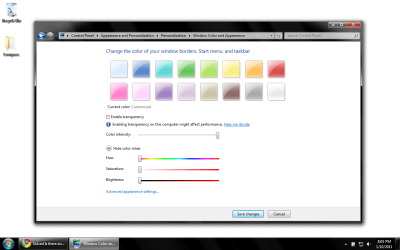
i just want to change the taskbar color to a solid color without the "waves".
i know it can be done as i had it before but when i messed around with the colors, i could not get it back.
just looking for solid black - no "waves" in it.
i just want to change the taskbar color to a solid color without the "waves".
i know it can be done as i had it before but when i messed around with the colors, i could not get it back.
just looking for solid black - no "waves" in it.
My Computer
- Computer Manufacturer/Model Number
- HP
- OS
- windows 7 x64
logicearth
New member
hello everyone -
i just want to change the taskbar color to a solid color without the "waves".
i know it can be done as i had it before but when i messed around with the colors, i could not get it back.
just looking for solid black - no "waves" in it.
Like the image attached?
Attachments
My Computer
- Computer type
- PC/Desktop
- Computer Manufacturer/Model Number
- Alienware Aurora ALX R4
- OS
- Windows 10 Pro (x64)
- CPU
- Intel Core i7-3930K (3.2GHz - 4.5GHz)
- Motherboard
- Alienware Aurora-R4 x79
- Memory
- 4x Samsung 4GB PC3-12800 DDR3 (16GB 1600MHz)
- Graphics Card(s)
- Nvidia Geforce GTX 690
- Sound Card
- SteelSeries Siberia Elite
- Monitor(s) Displays
- Dell UltraSharp U3011
- Screen Resolution
- 2560x1600
- Hard Drives
- Samsung 850 Pro 256 GB, Seagate 1TB Desktop Hybrid HDD, 2x Western Digital 4TB Green HDD
- PSU
- 875W Some Dell PSU <.<
- Case
- Alienware Aurora ALX
- Cooling
- Custom Liquid Cooling (EK CPU & GPU blocks) dual EK 480RAD
- Keyboard
- Logitech G710+ Mechanical
- Mouse
- Logitech G700s
- Internet Speed
- Verizon Fios (50 mbps average)
- Other Info
- Server: Intel NUC D54250WYK: i5-4250U, 16GB, 256 GB mSATA, Windows Server 2012 R2
lgbalfa
New member
hello everyone -
i just want to change the taskbar color to a solid color without the "waves".
i know it can be done as i had it before but when i messed around with the colors, i could not get it back.
just looking for solid black - no "waves" in it.
Like the image attached?
yes like that but it looks like yours is not solid black and there is still a "wave / shadow" ?
My Computer
- Computer Manufacturer/Model Number
- HP
- OS
- windows 7 x64
logicearth
New member
That is as solid as it gets.
My Computer
- Computer type
- PC/Desktop
- Computer Manufacturer/Model Number
- Alienware Aurora ALX R4
- OS
- Windows 10 Pro (x64)
- CPU
- Intel Core i7-3930K (3.2GHz - 4.5GHz)
- Motherboard
- Alienware Aurora-R4 x79
- Memory
- 4x Samsung 4GB PC3-12800 DDR3 (16GB 1600MHz)
- Graphics Card(s)
- Nvidia Geforce GTX 690
- Sound Card
- SteelSeries Siberia Elite
- Monitor(s) Displays
- Dell UltraSharp U3011
- Screen Resolution
- 2560x1600
- Hard Drives
- Samsung 850 Pro 256 GB, Seagate 1TB Desktop Hybrid HDD, 2x Western Digital 4TB Green HDD
- PSU
- 875W Some Dell PSU <.<
- Case
- Alienware Aurora ALX
- Cooling
- Custom Liquid Cooling (EK CPU & GPU blocks) dual EK 480RAD
- Keyboard
- Logitech G710+ Mechanical
- Mouse
- Logitech G700s
- Internet Speed
- Verizon Fios (50 mbps average)
- Other Info
- Server: Intel NUC D54250WYK: i5-4250U, 16GB, 256 GB mSATA, Windows Server 2012 R2