Issue deleting pictures

zezasu

New member
I am having trouble deleting pictures when I am in pictures library section (call it what you want) only. Pictures inside the documents or any other place delete after i select yes to delete this picture and it will be sent to recycle bin etc etc.

The main issue lies inside the picture library and in the fact that after i have said yes to delete a picture it simply doesn't do it until i leave the folder and enter it again and then its finally gone. I got quite a lot of pictures of cars and i need to get rid of the junk ones so but so far I haven't been able to do because of this problem.

I am not sure if i have done anything wrong, so if anyone has an idea help.:cry:

**It happens in folders with bigger chunks of photos, i tired it with 5-6 and it deletes after i say so. Probally after 100 pictures it seems to not delete after i select it. **
 

My Computer

Computer Manufacturer/Model Number
ZezasuBuilt
OS
Windows Seven x64
CPU
Intel Core 2 Quad Q6700 3.2Ghz
Motherboard
GA-UD3P Intel and Crossfire ready
Memory
6GB Samsung
Graphics Card(s)
5850 Sapphire Toxic Edition
Sound Card
On Board relTek
Monitor(s) Displays
23inch LG W2343T Dual Montiors
Screen Resolution
1920-1680 Dualmonitors
Hard Drives
Western Digital 7200. X 2 (500gb)
Sega 7.2 X 2 (500gb)
PSU
Corsair HX650W
Case
Lian Li Lan Cool PC-k7
Cooling
Artic Freezer 7 Artic Case fans
Keyboard
Logitech illuminated keyboard
Mouse
Logitech Trackball
Internet Speed
1MB down 500k UP (10mb D /1mb U )
Other Info
Windows 7, have yet to reinstall :)
I believe the pictures are in fact deleting when you click delete but you are just seeing a remnant of the file that won't disappear from your display until you refresh the screen (or exit the folder and return, which accomplishes the same thing as refreshing). I suspect, but don't really know, that the fact that W7 doesn't automatically refresh the screen to make those deleted folders or files disappear immediately when you delete was probably a feature implemented to improve performance by eliminating some arguably unnecessary processes.

If you look up at the top of the screen in Windows Explorer, to the right of the address bar (window that shows the breadcrumb trail of folders), you will see a little box with arrows pointing up and down. This is a refresh button and pressing it should make those deleted files (or photos) disappear from your screen.
 

My Computer

Computer Manufacturer/Model Number
HP DV8t quad
OS
Windows 7 Ultimate x64 (Retail)
CPU
i7-Q 720
Motherboard
Motherboard Chipset Intel Ibex Peak-M PM55, Intel Lynnfield
Memory
6 GB
Graphics Card(s)
nVidia GeForce GT 230M (1GB)
Sound Card
IDT High Definition Audio CODEC
Monitor(s) Displays
18.4 inch HP Infinity FHD (Samsung 184HT03-001)
Screen Resolution
1920 x 1080
Hard Drives
Hitachi 500GB 7200 rpm (x2)
Seagate FreeAgent 1.5 TB External USB (x2)
Thermaltake BlacX eSATA/USB 2.0 3.5/2.5 HD dock
Cooling
Zalman NC-2000 notebook cooling pad
Keyboard
laptop
Mouse
Logitech VX Revolution
Other Info
Backup Unit: Lenovo T61p
Oh dam i refreshed my page while i was typing.
To make it quick.
1. Got home and wasn't annoyed so i logged on to try and read your message and i went to try once again.
2. Pictures still failed to be deleted and be refreshed. So went to my Nvidia Control Panel to change the refresh rate from 59 to 60 instead.
3. Not sure if what i did had any effect since it went up only +1. Still to no avail nothing worked
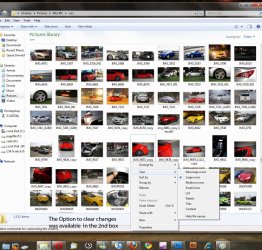
4. I right clicked on the properties for some reason thanks to Harpua and i looked at it and i noticed there was an additional option. It said [clear changes].
5. I click and tons of pictures delete (i forgot to say i use some image duplicate finder) and then tried deleting another picture and it worked.

I am not sure if it was the image duplicate finder program, the refresh rate or nvidia, but everything worked by dumb luck and thanks to harpua for giving me better description for myself and anyone else who might happen too.
 

My Computer

Computer Manufacturer/Model Number
ZezasuBuilt
OS
Windows Seven x64
CPU
Intel Core 2 Quad Q6700 3.2Ghz
Motherboard
GA-UD3P Intel and Crossfire ready
Memory
6GB Samsung
Graphics Card(s)
5850 Sapphire Toxic Edition
Sound Card
On Board relTek
Monitor(s) Displays
23inch LG W2343T Dual Montiors
Screen Resolution
1920-1680 Dualmonitors
Hard Drives
Western Digital 7200. X 2 (500gb)
Sega 7.2 X 2 (500gb)
PSU
Corsair HX650W
Case
Lian Li Lan Cool PC-k7
Cooling
Artic Freezer 7 Artic Case fans
Keyboard
Logitech illuminated keyboard
Mouse
Logitech Trackball
Internet Speed
1MB down 500k UP (10mb D /1mb U )
Other Info
Windows 7, have yet to reinstall :)
can you be more specific on what 'properties' you right clicked on? i too am having no luck deleting pictures frome the wmp12.....tia....
 

My Computer

Computer Manufacturer/Model Number
home built
OS
windows 7 ultimate
CPU
core 2 quad q6600
Motherboard
asus p5k3 deluxe
Memory
4GB OCZ DDR3
Graphics Card(s)
nvidia geforce 8800 gts
Sound Card
soundblaster x-fi xtreme
Monitor(s) Displays
viewsonic va2226
Case
soprano dx
Keyboard
logitech G-15
Mouse
logitech G5
Internet Speed
AT&T U-Verse 18MBS
Not sure I understand what is going on, but I'm glad you've managed to fix the problem.
 

My Computer

Computer Manufacturer/Model Number
HP DV8t quad
OS
Windows 7 Ultimate x64 (Retail)
CPU
i7-Q 720
Motherboard
Motherboard Chipset Intel Ibex Peak-M PM55, Intel Lynnfield
Memory
6 GB
Graphics Card(s)
nVidia GeForce GT 230M (1GB)
Sound Card
IDT High Definition Audio CODEC
Monitor(s) Displays
18.4 inch HP Infinity FHD (Samsung 184HT03-001)
Screen Resolution
1920 x 1080
Hard Drives
Hitachi 500GB 7200 rpm (x2)
Seagate FreeAgent 1.5 TB External USB (x2)
Thermaltake BlacX eSATA/USB 2.0 3.5/2.5 HD dock
Cooling
Zalman NC-2000 notebook cooling pad
Keyboard
laptop
Mouse
Logitech VX Revolution
Other Info
Backup Unit: Lenovo T61p
Well to be more precise, i just right clicked on a blank spot between images. and the option to clear changes was there. I am still trying to duplicate my issue. I don't think this has to do with wmp12 and its another reason i dont use that. Sorry i cant help with that

Down below is a picture, but without what i actually saw.
 

Attachments

  • I_tried_.jpg
    I_tried_.jpg
    207.4 KB · Views: 63

My Computer

Computer Manufacturer/Model Number
ZezasuBuilt
OS
Windows Seven x64
CPU
Intel Core 2 Quad Q6700 3.2Ghz
Motherboard
GA-UD3P Intel and Crossfire ready
Memory
6GB Samsung
Graphics Card(s)
5850 Sapphire Toxic Edition
Sound Card
On Board relTek
Monitor(s) Displays
23inch LG W2343T Dual Montiors
Screen Resolution
1920-1680 Dualmonitors
Hard Drives
Western Digital 7200. X 2 (500gb)
Sega 7.2 X 2 (500gb)
PSU
Corsair HX650W
Case
Lian Li Lan Cool PC-k7
Cooling
Artic Freezer 7 Artic Case fans
Keyboard
Logitech illuminated keyboard
Mouse
Logitech Trackball
Internet Speed
1MB down 500k UP (10mb D /1mb U )
Other Info
Windows 7, have yet to reinstall :)
i have no problem deleting them there, the problem i have is after deleting them there and in their original folder i see empty frames with the old titles still there in wmp12. i have shut it down and am now using nero 8. i guess i will have to not have wmp12 and media player on my 400.00 software:mad: that refuses to let you manipulate files unless you know the "secret".
 

My Computer

Computer Manufacturer/Model Number
home built
OS
windows 7 ultimate
CPU
core 2 quad q6600
Motherboard
asus p5k3 deluxe
Memory
4GB OCZ DDR3
Graphics Card(s)
nvidia geforce 8800 gts
Sound Card
soundblaster x-fi xtreme
Monitor(s) Displays
viewsonic va2226
Case
soprano dx
Keyboard
logitech G-15
Mouse
logitech G5
Internet Speed
AT&T U-Verse 18MBS
well i finally was able to delete the empty titled frames doing what is below. if you get err saying wmp is in use do a ctrl/alt/del and end the wmp process and do as shown below.....


clear the Windows Media Player database. To do this, follow these steps:
  1. Exit Windows Media Player.
  2. For Windows XP:

    Click Start, click Run, type %userprofile%\Local Settings\Application Data\Microsoft\Media Player, and then click OK.

    For Windows Vista:

    Click Start, click Run, type %LOCALAPPDATA%\Microsoft\Media Player, and then click OK.
  3. Select all the files in the folder, and then click Delete on the File menu.

    Note You do not have to delete the folders that are in this folder.
  4. Restart Windows Media Player.

    Note Windows Media Player automatically rebuilds the database.
 

My Computer

Computer Manufacturer/Model Number
home built
OS
windows 7 ultimate
CPU
core 2 quad q6600
Motherboard
asus p5k3 deluxe
Memory
4GB OCZ DDR3
Graphics Card(s)
nvidia geforce 8800 gts
Sound Card
soundblaster x-fi xtreme
Monitor(s) Displays
viewsonic va2226
Case
soprano dx
Keyboard
logitech G-15
Mouse
logitech G5
Internet Speed
AT&T U-Verse 18MBS
Back
Top