JavaScript is disabled. For a better experience, please enable JavaScript in your browser before proceeding.
You are using an out of date browser. It may not display this or other websites correctly.
You should upgrade or use an
alternative browser .
I have read several threads about java using like 100% cpu but none of them give a clear or effective method of fixing the problem
Windows 7 Intel Pentium 4 cpu 3.06 (2 CPUs), ~3.1 GHz 3 gigs Nvidia geforce 9800 Compaq Presario 061 Windows 7 Intel Pentium 4 cpu 3.06 (2 CPUs), ~3.1 GHz 3 gigs Nvidia geforce 9800 1440x900
Consumer Security
Guru
Gold Member
VIP
What problem are you having? The latest is Java Runtime Environment (JRE) 6u16
Windows 7 Ultimate 32bit SP1 Intel(R) Core(TM)2 Quad CPU @ 2.40GHz, 2400 MHz 4 GB ATI Radeon HD 2600 Pro PC/Desktop Bruce ... somewhere in his 40's Windows 7 Ultimate 32bit SP1 Intel(R) Core(TM)2 Quad CPU @ 2.40GHz, 2400 MHz INTEL/D975XBX2 4 GB ATI Radeon HD 2600 Pro Samsung SyncMaster 914v 1280 x 1024 2/500GB each ... ST3500630AS ATA Device. Rocketfish 700 W G.Skill Gigabyte Chassis Standard PS/2 Keyboard Microsoft PS/2 Mouse DSL Avira Internet Security IE 11 ATI HDMI Audio
New member
Thread Starter
well the problem is that it is using so much cpu over 100,000 infact
Windows 7 Intel Pentium 4 cpu 3.06 (2 CPUs), ~3.1 GHz 3 gigs Nvidia geforce 9800 Compaq Presario 061 Windows 7 Intel Pentium 4 cpu 3.06 (2 CPUs), ~3.1 GHz 3 gigs Nvidia geforce 9800 1440x900
New member
Guru
Gold Member
VIP
well the problem is that it is using so much cpu over 100,000 infact
Can you take a screenshot of your process list and post it?
Also what apps are you using that use Java?
Windows 7 Home Premium x64 - Mac OS X 10.6.4 x64 Intel Core 2 Duo T9300 2.5 GHz 4GB Kingston DDR2-800 NVIDIA Geforce 8600M GT (512MB Model) Compal JFT02 (Custom Build Laptop) Windows 7 Home Premium x64 - Mac OS X 10.6.4 x64 Intel Core 2 Duo T9300 2.5 GHz JFT02 4GB Kingston DDR2-800 NVIDIA Geforce 8600M GT (512MB Model) Realtek HD Audio WUXGA Standard Laptop Display 1680*1050 Toshiba 320GB 5400RPM Laptop HD Standard Laptop Power Supply Standard Laptop Case Standard Laptop Cooling Standard Laptop 105 Key-Keyboard Synaptics Touchpad Verizion Online DSL 3360/864 kbs (dl/up)
New member
Thread Starter
wait what buttons do you press to make a screen shot?
Windows 7 Intel Pentium 4 cpu 3.06 (2 CPUs), ~3.1 GHz 3 gigs Nvidia geforce 9800 Compaq Presario 061 Windows 7 Intel Pentium 4 cpu 3.06 (2 CPUs), ~3.1 GHz 3 gigs Nvidia geforce 9800 1440x900
New member
Guru
Gold Member
VIP
If you are running Windows 7 than you can use the snipping tool
Windows 7 Home Premium x64 - Mac OS X 10.6.4 x64 Intel Core 2 Duo T9300 2.5 GHz 4GB Kingston DDR2-800 NVIDIA Geforce 8600M GT (512MB Model) Compal JFT02 (Custom Build Laptop) Windows 7 Home Premium x64 - Mac OS X 10.6.4 x64 Intel Core 2 Duo T9300 2.5 GHz JFT02 4GB Kingston DDR2-800 NVIDIA Geforce 8600M GT (512MB Model) Realtek HD Audio WUXGA Standard Laptop Display 1680*1050 Toshiba 320GB 5400RPM Laptop HD Standard Laptop Power Supply Standard Laptop Case Standard Laptop Cooling Standard Laptop 105 Key-Keyboard Synaptics Touchpad Verizion Online DSL 3360/864 kbs (dl/up)
New member
Thread Starter
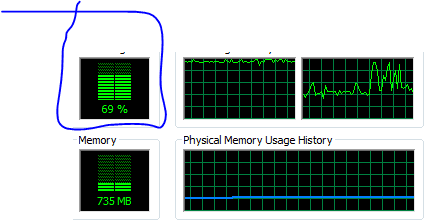
there you go and im trying to play Runescape (super nerdy I know
)
Capture.PNG
1.8 KB
· Views: 7
Capture1.PNG
3.1 KB
· Views: 9
Windows 7 Intel Pentium 4 cpu 3.06 (2 CPUs), ~3.1 GHz 3 gigs Nvidia geforce 9800 Compaq Presario 061 Windows 7 Intel Pentium 4 cpu 3.06 (2 CPUs), ~3.1 GHz 3 gigs Nvidia geforce 9800 1440x900
New member
Guru
Gold Member
VIP
I used to play runescape also (have a level 105...felt like I wasted to much time on it so I dropped it...for now
)
...anyhow did you install Java from a link through Jagex or from Sun Microsystems themselves? If you got it through Jagex than shutdown runescape, uninstall Java (all Java in your Program and Features), and install the latest update of Java from Sun's website
https://cds.sun.com/is-bin/INTERSHO...ProductRef=jre-6u16-oth-JPR@CDS-CDS_Developer
Windows 7 Home Premium x64 - Mac OS X 10.6.4 x64 Intel Core 2 Duo T9300 2.5 GHz 4GB Kingston DDR2-800 NVIDIA Geforce 8600M GT (512MB Model) Compal JFT02 (Custom Build Laptop) Windows 7 Home Premium x64 - Mac OS X 10.6.4 x64 Intel Core 2 Duo T9300 2.5 GHz JFT02 4GB Kingston DDR2-800 NVIDIA Geforce 8600M GT (512MB Model) Realtek HD Audio WUXGA Standard Laptop Display 1680*1050 Toshiba 320GB 5400RPM Laptop HD Standard Laptop Power Supply Standard Laptop Case Standard Laptop Cooling Standard Laptop 105 Key-Keyboard Synaptics Touchpad Verizion Online DSL 3360/864 kbs (dl/up)
New member
Thread Starter
reinstalling now will tell you if circumstances change in like 2 min
Windows 7 Intel Pentium 4 cpu 3.06 (2 CPUs), ~3.1 GHz 3 gigs Nvidia geforce 9800 Compaq Presario 061 Windows 7 Intel Pentium 4 cpu 3.06 (2 CPUs), ~3.1 GHz 3 gigs Nvidia geforce 9800 1440x900
New member
Thread Starter
problem persists
Windows 7 Intel Pentium 4 cpu 3.06 (2 CPUs), ~3.1 GHz 3 gigs Nvidia geforce 9800 Compaq Presario 061 Windows 7 Intel Pentium 4 cpu 3.06 (2 CPUs), ~3.1 GHz 3 gigs Nvidia geforce 9800 1440x900
New member
Thread Starter
Hello anyone going to help:sa:
Windows 7 Intel Pentium 4 cpu 3.06 (2 CPUs), ~3.1 GHz 3 gigs Nvidia geforce 9800 Compaq Presario 061 Windows 7 Intel Pentium 4 cpu 3.06 (2 CPUs), ~3.1 GHz 3 gigs Nvidia geforce 9800 1440x900
Consumer Security
Guru
Gold Member
VIP
Through your Control Panel, click on Programs and Features. Uninstall any older versions of Java.
Next, you can clear the Java cache...
In the Control Panel, open the "Java Plug-in Control Panel"
Select the Cache Tab
Click the Clear button inside the Cache Tab, which will clear your JRE cache directory
Windows 7 Ultimate 32bit SP1 Intel(R) Core(TM)2 Quad CPU @ 2.40GHz, 2400 MHz 4 GB ATI Radeon HD 2600 Pro PC/Desktop Bruce ... somewhere in his 40's Windows 7 Ultimate 32bit SP1 Intel(R) Core(TM)2 Quad CPU @ 2.40GHz, 2400 MHz INTEL/D975XBX2 4 GB ATI Radeon HD 2600 Pro Samsung SyncMaster 914v 1280 x 1024 2/500GB each ... ST3500630AS ATA Device. Rocketfish 700 W G.Skill Gigabyte Chassis Standard PS/2 Keyboard Microsoft PS/2 Mouse DSL Avira Internet Security IE 11 ATI HDMI Audio
New member
Thread Starter
unable to locate Java Plug-in Control Panel
Windows 7 Intel Pentium 4 cpu 3.06 (2 CPUs), ~3.1 GHz 3 gigs Nvidia geforce 9800 Compaq Presario 061 Windows 7 Intel Pentium 4 cpu 3.06 (2 CPUs), ~3.1 GHz 3 gigs Nvidia geforce 9800 1440x900
Consumer Security
Guru
Gold Member
VIP
Click on the Java Icon (coffee cup) in the Control Panel.
You can also clear with this little application ATF Cleaner
ATF-Cleaner.exe - www.atribune.org
It says it's for Win 2000 and XP, but it also works with Vista and Windows 7.
Click "Main" > check 'select all' (except Prefetch) this first time using it, then click "Empty Selected". Do the same for FireFox or Opera if you use either of those browsers.
Windows 7 Ultimate 32bit SP1 Intel(R) Core(TM)2 Quad CPU @ 2.40GHz, 2400 MHz 4 GB ATI Radeon HD 2600 Pro PC/Desktop Bruce ... somewhere in his 40's Windows 7 Ultimate 32bit SP1 Intel(R) Core(TM)2 Quad CPU @ 2.40GHz, 2400 MHz INTEL/D975XBX2 4 GB ATI Radeon HD 2600 Pro Samsung SyncMaster 914v 1280 x 1024 2/500GB each ... ST3500630AS ATA Device. Rocketfish 700 W G.Skill Gigabyte Chassis Standard PS/2 Keyboard Microsoft PS/2 Mouse DSL Avira Internet Security IE 11 ATI HDMI Audio
New member
Thread Starter
Windows 7 Intel Pentium 4 cpu 3.06 (2 CPUs), ~3.1 GHz 3 gigs Nvidia geforce 9800 Compaq Presario 061 Windows 7 Intel Pentium 4 cpu 3.06 (2 CPUs), ~3.1 GHz 3 gigs Nvidia geforce 9800 1440x900
New member
Thread Starter
Hello anyone there, I STill need help
Windows 7 Intel Pentium 4 cpu 3.06 (2 CPUs), ~3.1 GHz 3 gigs Nvidia geforce 9800 Compaq Presario 061 Windows 7 Intel Pentium 4 cpu 3.06 (2 CPUs), ~3.1 GHz 3 gigs Nvidia geforce 9800 1440x900



 )
)
 )
)

