Java Runtime Environment is defective for using Open Office on x64

XP VM User

New member
Member
VIP
Local time
3:52 PM
Messages
279
Hi Everyone:

New Problem:

Using Open Office suite of programs ver 3.3 I am now unable to open and use it due to the following error message in screenshot below:
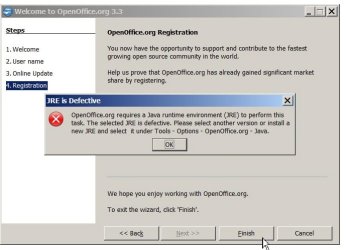
JRE for Open Office Java Error PS17839.jpg

Researching the reason---it is because Open Office uses Java for all of its data base/calc programs and some of the word programs, so you need to install a better Java.

Problem Java site is confusing/unclear no real help no phone only knowledge base (links posted below)

Screenshot of site: (see items in red underline)
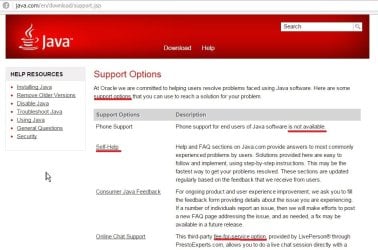
JRE Java has NO help options PS17833.jpg

OpenOffice.org Forum :: Database Tables give JRE Error (Comment: not helpful as I don't have the AOO version or latest OO version, and its refusing to start anything in Open Office suite---and I do have x64--- but wondering about using x32 bit Java for entire computer as won't that destroy its usefulness when the computer says "but I'm a x64 computer and I need Java x64 for other applications!) (confusing)

https://search.oracle.com/search/search group=Java.com&search_p_main_operator=any&search_p_atname=url&search_p_op=contains&search_p_val=en&q=JRE+java+runtime+environment&submit.x=8&submit.y=4

the Open Office site offers only this help , which is no help of course.
https://forum.openoffice.org/en/forum/viewtopic.php?f=6&t=53796
I see each explains how to do it... when I tried to follow the instructions and put in a new Java (done it 3-4 times over past few months, I'm just frustrated) ----Even though I know where to go to tell Open Office to "choose" another JRE Java Runtime Environment---it still says "sorry " its not the right one...

Questions are simple:

1. What am I doing wrong?

2. How to fix it without any help/assistance from Java or Open Office sites?

Thank you!

XP VM USER (got stuck with name on first visit here)
 

My Computer

Computer type
Laptop
Computer Manufacturer/Model Number
SONY VAIO VPCS111FM
OS
Windows7 Professional 64bit
CPU
Intel(R) Core (TM) i5 CPU M 430 @2.27 Ghz
Memory
8.0 GB
Hard Drives
Seagate 500GB Momentus
Cooling
Internal fan
Mouse
Logitech bluetooth trackball
Browser
Pale Moon Browser for x64
Close open office including the quick starter on the taskbar near the clock.

Download both the offline 32 bit & offline 64 bit java here Java Downloads for All Operating Systems

Uninstall all java in the Control Panel\Programs\Programs and Features

Install the 32 bit Java choose custom install. Uncheck the option to install additional software if any. Watch closely you can miss it.

Next,

Install the 64 bit Java choose custom install. Uncheck the option to install additional software if any. Watch closely you can miss it.

The additional software is sometimes included and sometimes it is not, Oracle goes back & forth. Another words do not install the additional software if offered.

After done, reboot.

Try your open office again and see if that works. If it doesn't try updating open office then reboot, then try again. Good luck.
 

My Computer

Computer type
PC/Desktop
Computer Manufacturer/Model Number
Dell All in one Inspiron 2020
OS
W10 32 bit, XUbuntu 18.xx 64 bit
CPU
Intel(R) Celeron(R) CPU G1620T @ 2.40GHz, 2400 Mhz
Motherboard
Dell
Memory
4GB
Graphics Card(s)
Intel HD graphics
Sound Card
High Definition Audio Device
Monitor(s) Displays
20 inch Screen
Screen Resolution
W7=1280 x 720 & Linux Mint Xfce=1360 x 768
Hard Drives
500 GB hard drive
Keyboard
Usb
Mouse
Usb
Internet Speed
High-Speed
Antivirus
MSE
Browser
Main Browser Firefox
Other Info
I have done a clean install of Windows 7 using Dell re-installation disk (Dell sent me one). I also use Free Macrium reflect backup and restore.
Using Open Office suite of programs ver 3.3 I am now unable to open and use it due to the following error message in screenshot below:

OpenOffice 3.3 can only detect Java 6 or earlier.
forum.openoffice.org/en/forum/viewtopic.php?f=15&t=68056
You should either upgrade to a newer version, or use Java 6 (unsafe and pointless):
oracle.com/technetwork/java/javase/archive-139210.html

A alternative is to use the program Libreoffice, which requires no Java for its most important features and is a bit more mature.
libreoffice.org

For the differences, check out this nice documentation:
OpenOffice vs. LibreOffice
 
Last edited:

My Computer

Computer type
PC/Desktop
Computer Manufacturer/Model Number
Custom build
OS
Primary OS: Archlinux with Kde-Plasma5 x86-64. Secondary OS: Windows 8.1 x64. UEFI Setup.
CPU
i5-4570 3.2GHz
Motherboard
Asus H87-PLUS
Memory
8GiB
Graphics Card(s)
Nvidia GeForce GTX 660 (Msi TwinFrozr III)
Screen Resolution
1920 * 1080
Hard Drives
Samsung SSD 840 PRO 128Gib (Linux) [Is technically not a HDD]
WD Red 1TB (Data+Windows)
PSU
Corsair Gaming GS600 (600W)
Case
Zalman Z9 Plus
Internet Speed
46Mbps (5,75MBps) Down. 5Mbps (0,625MBps) Up.
Antivirus
Avast, but never really needed any AV though...
Browser
Firefox only ^^.
Thanks!

A quick reply! to Midori

Will follow what you suggest!

Thanks!

(thanks for the advice groze, but I think I tried it that way---maybe I give up on Open Office?? will see what Libre does for me---steep learning curve though!)
 
Last edited:

My Computer

Computer type
Laptop
Computer Manufacturer/Model Number
SONY VAIO VPCS111FM
OS
Windows7 Professional 64bit
CPU
Intel(R) Core (TM) i5 CPU M 430 @2.27 Ghz
Memory
8.0 GB
Hard Drives
Seagate 500GB Momentus
Cooling
Internal fan
Mouse
Logitech bluetooth trackball
Browser
Pale Moon Browser for x64
A question before going to Libre Office

Hi Midori:

I have 1000+ documents in Open Office suite (all types combined )----what happens to them when I go to Libre?

Thanks for your link showing the dual history of Open Office/Apache Open Office and Libre (Linux) versions....

But I didn't see anywhere where it says about sharing documents...

I have had terrible experiences when another word processor died, before I could upgrade all the documents to a "odd"? I forgot now form that can be opened by many word processors....so since I've been unable to re-open or use Open Office for months now----how am I to re-save all the documents over again in the new format for use by Libre Office (that is if it has to be transformed to be read/resaved/ reaccessed again)

Sorry for rough wording, wanted to get this question posted to give everyone time to read/answer (I'll try to fix the wording using the great edit function here if I find out the right words to use)

Thanks all!!
 

My Computer

Computer type
Laptop
Computer Manufacturer/Model Number
SONY VAIO VPCS111FM
OS
Windows7 Professional 64bit
CPU
Intel(R) Core (TM) i5 CPU M 430 @2.27 Ghz
Memory
8.0 GB
Hard Drives
Seagate 500GB Momentus
Cooling
Internal fan
Mouse
Logitech bluetooth trackball
Browser
Pale Moon Browser for x64
A quick reply! to Midori

Will follow what you suggest!

Thanks!

(thanks for the advice groze, but I think I tried it that way---maybe I give up on Open Office?? will see what Libre does for me---steep learning curve though!)

XP VM User,
I went to there OpenOffice website Apache OpenOffice - Official Site - The Free and Open Productivity Suite they have a newer version available my version is OpenOffice 4.1.0, the newer version is 4.1.1 I have not tried it yet. Since, you are having issues instead of upgrading OpenOffice, remove OpenOffice 3.3 version. Then reinstall the new version, I would recommended customize install it and don't install the quickstarter. I always found that to be an issue with any computer I use but that is just my experience. Remember, to backup your open office documents to a different folder so it won't be deleted during the uninstall of Open Office.
 
Last edited:

My Computer

Computer type
PC/Desktop
Computer Manufacturer/Model Number
Dell All in one Inspiron 2020
OS
W10 32 bit, XUbuntu 18.xx 64 bit
CPU
Intel(R) Celeron(R) CPU G1620T @ 2.40GHz, 2400 Mhz
Motherboard
Dell
Memory
4GB
Graphics Card(s)
Intel HD graphics
Sound Card
High Definition Audio Device
Monitor(s) Displays
20 inch Screen
Screen Resolution
W7=1280 x 720 & Linux Mint Xfce=1360 x 768
Hard Drives
500 GB hard drive
Keyboard
Usb
Mouse
Usb
Internet Speed
High-Speed
Antivirus
MSE
Browser
Main Browser Firefox
Other Info
I have done a clean install of Windows 7 using Dell re-installation disk (Dell sent me one). I also use Free Macrium reflect backup and restore.
Thanks--I think!

Ok willing to do that... Question: won't 4.1.0 or 4.1.1 replace automatically my older 3.3 version (I never did the 3.4 I have auto update problems with every program here got to fix that too)

Remember, to backup your open office documents to a different folder so it won't be deleted during the uninstall of Open Office.

I can't believe everyone who uses 3.3 would lose everything they did by upgrading.. if this was true no one would upgrade---maybe that is why I never did it... NO ONE told me to keep everything made by OO in one folder I have it scattered EVERYWHERE including inside Email client drafts stored on computer (I never sent them(not ready yet)) So what do I do?

No easy one button save for all those documents/spreadsheets/presentations etc etc made over years....

Question: Will all these be deleted?? when I go to 4.1.0 and how (now I have just two backups but I did not get the AOMEI recovery disk done yet (its an open question here if you got an answer)

Lots of work still to do... but how can I do a spreadsheet I need by Friday, if its failing due to this crazy JRE issue???
Thanks!
 
Last edited:

My Computer

Computer type
Laptop
Computer Manufacturer/Model Number
SONY VAIO VPCS111FM
OS
Windows7 Professional 64bit
CPU
Intel(R) Core (TM) i5 CPU M 430 @2.27 Ghz
Memory
8.0 GB
Hard Drives
Seagate 500GB Momentus
Cooling
Internal fan
Mouse
Logitech bluetooth trackball
Browser
Pale Moon Browser for x64

My Computer

Computer type
Laptop
Computer Manufacturer/Model Number
SONY VAIO VPCS111FM
OS
Windows7 Professional 64bit
CPU
Intel(R) Core (TM) i5 CPU M 430 @2.27 Ghz
Memory
8.0 GB
Hard Drives
Seagate 500GB Momentus
Cooling
Internal fan
Mouse
Logitech bluetooth trackball
Browser
Pale Moon Browser for x64
I think as long as you have the documents stored elsewhere than C:\Program Files (x86)\OpenOffice... or C:\Program Files (x86)\OpenOffice.... and a couple of other locations it also installs to, Open Office shouldn't remove any of those documentation.
 

My Computer

Computer type
PC/Desktop
Computer Manufacturer/Model Number
Dell All in one Inspiron 2020
OS
W10 32 bit, XUbuntu 18.xx 64 bit
CPU
Intel(R) Celeron(R) CPU G1620T @ 2.40GHz, 2400 Mhz
Motherboard
Dell
Memory
4GB
Graphics Card(s)
Intel HD graphics
Sound Card
High Definition Audio Device
Monitor(s) Displays
20 inch Screen
Screen Resolution
W7=1280 x 720 & Linux Mint Xfce=1360 x 768
Hard Drives
500 GB hard drive
Keyboard
Usb
Mouse
Usb
Internet Speed
High-Speed
Antivirus
MSE
Browser
Main Browser Firefox
Other Info
I have done a clean install of Windows 7 using Dell re-installation disk (Dell sent me one). I also use Free Macrium reflect backup and restore.
Many are in "My Documents" "My Downloads" "Windows Live Mail" Client etc are these vulnerable too under your phrase "..and a couple of other locations it installs to" ???? (All are C Drive as other user is NON-Computer person who does not understand what partitioning the drive into C for programs D for all files means in terms of how to save items.

Sorry, best I can do in a short message... hope its understandable.... if not ask Questions!

Question Should have asked earlier.... can I install and use Libre Office while still keeping Open Office suite 3.3 installed until I settle the JRE problem or get an upgrade?
(I could see a potential problem if they both use similar extensions and the programs get confused about which documents were created or can be edited by each program. Had the same problem when I switched from IE to another browser and all the desktop icon sites revised to the new browser but because some were in IE only access---they became broken links! so I see its not a simple cut and dried answer I assume....
or is it????

Thanks!
 
Last edited:

My Computer

Computer type
Laptop
Computer Manufacturer/Model Number
SONY VAIO VPCS111FM
OS
Windows7 Professional 64bit
CPU
Intel(R) Core (TM) i5 CPU M 430 @2.27 Ghz
Memory
8.0 GB
Hard Drives
Seagate 500GB Momentus
Cooling
Internal fan
Mouse
Logitech bluetooth trackball
Browser
Pale Moon Browser for x64
Many are in "My Documents" "My Downloads" "Windows Live Mail" Client etc are these vulenerable too under your phrase "..and a couple of other locations it installs to" ???? (All are C Drive as other user is NON-Computer person who does not understand what partitioning the drive into C for programs D for all files means in terms of how to save items.

Sorry, best I can do in a short message... hope its understandable.... if not ask Questions!


Not sure I understand part of your response. Those Location you did mention should be ok. As I precaution I would make a temp folder in c:\ drive or on your desktop and copy the those files in "My Documents" "My Downloads" to do the temp folder I had you make. You don't have to worry about those attached to emails that were sent in the windows live email program.
 

My Computer

Computer type
PC/Desktop
Computer Manufacturer/Model Number
Dell All in one Inspiron 2020
OS
W10 32 bit, XUbuntu 18.xx 64 bit
CPU
Intel(R) Celeron(R) CPU G1620T @ 2.40GHz, 2400 Mhz
Motherboard
Dell
Memory
4GB
Graphics Card(s)
Intel HD graphics
Sound Card
High Definition Audio Device
Monitor(s) Displays
20 inch Screen
Screen Resolution
W7=1280 x 720 & Linux Mint Xfce=1360 x 768
Hard Drives
500 GB hard drive
Keyboard
Usb
Mouse
Usb
Internet Speed
High-Speed
Antivirus
MSE
Browser
Main Browser Firefox
Other Info
I have done a clean install of Windows 7 using Dell re-installation disk (Dell sent me one). I also use Free Macrium reflect backup and restore.
I can't believe everyone who uses 3.3 would lose everything they did by upgrading.. if this was true no one would upgrade---maybe that is why I never did it... NO ONE told me to keep everything made by OO in one folder I have it scattered EVERYWHERE including inside Email client drafts stored on computer (I never sent them(not ready yet)) So what do I do?

No easy one button save for all those documents/spreadsheets/presentations etc etc made over years....

Question: Will all these be deleted?? when I go to 4.1.0 and how (now I have just two backups but I did not get the AOMEI recovery disk done yet (its an open question here if you got an answer)
If you uninstall OpenOffice, you will not lose personal files, it does not touch anything than its program files:
https://forum.openoffice.org/en/forum/viewtopic.php?f=10&t=40918
Files may lose their icon though, cause the program they were associated too is gone.
Question Should have asked earlier.... can I install and use Libre Office while still keeping Open Office suite 3.3 installed until I settle the JRE problem or get an upgrade?
(I could see a potential problem if they both use similar extensions and the programs get confused about which documents were created or can be edited by each program.
Yes OpenOffice and Libreoffice will live togheter just fine, both install onto their own program directory and have their own settings:
https://forum.openoffice.org/en/forum/viewtopic.php?f=5&t=65361
The only conflict i keep reading about is when using 'OOo extensions manager', but i am not sure this conflict still exists and it breaks nothing, a simple uninstall of either programs fixes.
Had the same problem when I switched from IE to another browser and all the desktop icon sites revised to the new browser but because some were in IE only access---they became broken links! so I see its not a simple cut and dried answer I assume....
or is it????
You can have only one program associated to a extension at a time, if you want to run other programs, right-click on the file and choose 'Open With'.
But I didn't see anywhere where it says about sharing documents...

I have had terrible experiences when another word processor died, before I could upgrade all the documents to a "odd"? I forgot now form that can be opened by many word processors....so since I've been unable to re-open or use Open Office for months now----how am I to re-save all the documents over again in the new format for use by Libre Office (that is if it has to be transformed to be read/resaved/ reaccessed again)
As far as i know, the files generated by OpenOffice are very similiar to Libreoffice.

I recommend though choosing to save files as Word if you want to retain compatibility with new and old versions of Word.
Choose 'Libreoffice' > 'Tools' > 'Options' > 'Load/Save' > 'General'
Set in 'DocumentType' set the options as below:
  • 'Word' > 'Microsoft Word 97/2000/XP/2003'
  • 'Spreadsheet' > 'Microsoft Excel 97/2000/XP/2003'
  • 'Presentation' > 'Microsoft Powerpoint 97/2000/XP/2003'
Microsoft Word has rather bad compability with ODF files.
 

My Computer

Computer type
PC/Desktop
Computer Manufacturer/Model Number
Custom build
OS
Primary OS: Archlinux with Kde-Plasma5 x86-64. Secondary OS: Windows 8.1 x64. UEFI Setup.
CPU
i5-4570 3.2GHz
Motherboard
Asus H87-PLUS
Memory
8GiB
Graphics Card(s)
Nvidia GeForce GTX 660 (Msi TwinFrozr III)
Screen Resolution
1920 * 1080
Hard Drives
Samsung SSD 840 PRO 128Gib (Linux) [Is technically not a HDD]
WD Red 1TB (Data+Windows)
PSU
Corsair Gaming GS600 (600W)
Case
Zalman Z9 Plus
Internet Speed
46Mbps (5,75MBps) Down. 5Mbps (0,625MBps) Up.
Antivirus
Avast, but never really needed any AV though...
Browser
Firefox only ^^.
New Problems (same old thread) JRE is not working on Libre Office

Hi Everyone!

Status Report:

Downloaded Libre Office (Latest version 4.4.1.2 ) and installed it successfully.

I opened up the database to begin... let it choose whatever standard items it wanted to---registered with Libre Office (Ok, its just a test database, nothing personal yet in it) and...

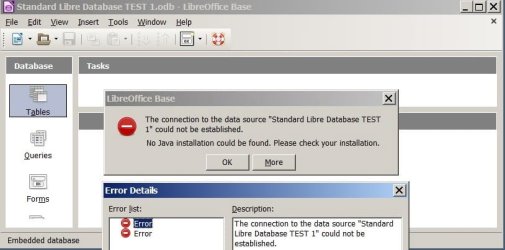
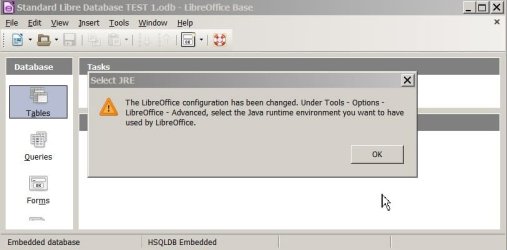
I received the following warnings and error messages.

JRE RUNTIME ERROR Libre Office too 1 PS17987.jpg

JRE Runtime Error Libre Office too 2 PS17985.jpg

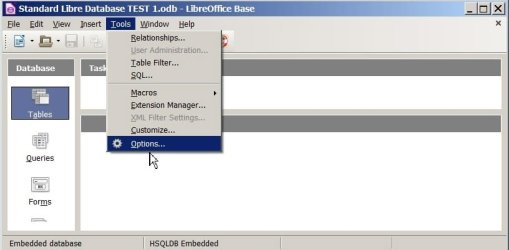
JRE Runtime Error in Libre Office too 3 PS17988.jpg

JRE Runtime Error in Libre Office 4 PS17989.jpg

JRE Runtime Error in Libre Office 5 PS17990.jpg


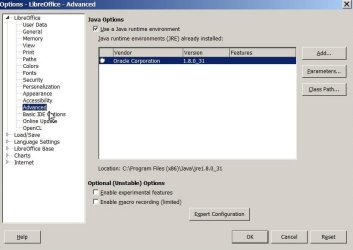
Of course I went to Tools Options Advanced, etc

Guess what? Only ONE Adobe JRE is listed....

Selecting it still does not fix the problem!

I have not been able to successfully fix the Open Office JRE Runtime Error problem!
I was told Libre Office will not have the JRE problem that Open Office had so I could use it!
I'm now without the database program...


Also Midori Wrote:::
I recommend though choosing to save files as Word if you want to retain compatibility with new and old versions of Word.
Choose 'Libreoffice' > 'Tools' > 'Options' > 'Load/Save' > 'General'
Set in 'DocumentType' set the options as below:
  • 'Word' > 'Microsoft Word 97/2000/XP/2003'
  • 'Spreadsheet' > 'Microsoft Excel 97/2000/XP/2003'
  • 'Presentation' > 'Microsoft Powerpoint 97/2000/XP/2003'
Microsoft Word has rather bad compability with ODF files.

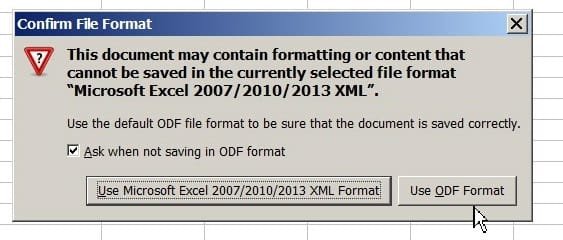
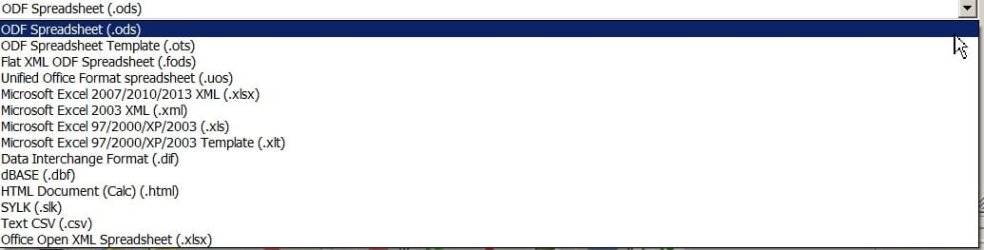
Why can't my Spreadsheet in Libre Office be saved in Microsoft Excel version??
Why not???
See Screenshots below when I tired to do this.
Where do I find the differences ????
What is actually lost if I attempt to save it??


JRE Runtime Error in Libre Office cant save in WORD office formatting PS18033.jpg

JRE Runtime Error in Libre Office cant save in WORD formats choices PS18035.jpg

Midori;3012231Microsoft Word has rather bad compability with ODF files.[/QUOTE said:
The information about Libre Office on the multiple windows or in their manual was not clear as to what is lost if I did it

And as I said before, when trying to share ODF Open Office 3.3 over the years with others who ONLY have and ONLY want to have Microsoft Office programs--- (I can't afford a new one)---they complain that the opened document is terrible! A mess! Can't read or see documents/spreadsheets etc using Microsoft Office versions they have....

It is NICER that Libre Office has settings to save in those Microsoft Office formats....

But after I worked to get everything just "right" to save it in that format is problem!!! as I can't see how it will look on Microsoft viewer not having a working one... (My student freebie edition expired, and you know Microsoft protects itself with those expiring product keys etc)

So where do I go now???

Don't mis read this!
I like Libre Office,
will have to learn it so I'm using it like I did Open Office (Never knew about he Apache Office story etc so never upgraded to it)...
Appreciate everyone's help as I begin to learn all the new problems with using Libre Office

Again.... last line of post..
If it is not good to combine this post with my old Open Office one (as it was here I learned of Libre Office)

I can set up a brand new Thread
With Libre Office in the title so others on the Internet/Googling can find it and find out what the answer is as this thread is only indexed to Open Office....

Thanks!!
 

My Computer

Computer type
Laptop
Computer Manufacturer/Model Number
SONY VAIO VPCS111FM
OS
Windows7 Professional 64bit
CPU
Intel(R) Core (TM) i5 CPU M 430 @2.27 Ghz
Memory
8.0 GB
Hard Drives
Seagate 500GB Momentus
Cooling
Internal fan
Mouse
Logitech bluetooth trackball
Browser
Pale Moon Browser for x64
Hello XP VM User,
I opened up the database to begin... let it choose whatever standard items it wanted to---registered with Libre Office (Ok, its just a test database, nothing personal yet in it) and...

I received the following warnings and error messages.

Of course I went to Tools Options Advanced, etc

Guess what? Only ONE Adobe JRE is listed....

Selecting it still does not fix the problem!
Java is owned by Oracle, not Adobe ;).

Anyhow, Libreoffice does not need Java for its main programs [Write-Calc-Pres-Draw,etc], but does for 'Base', a email send program and some small things almost nobody uses.
What features absolutely require Java ? - Ask LibreOffice
.
I have tested a clean install of Libreoffice and Java 8.40 32-bit and they function correctly here. Try removing and installing the newest java 32-bit.
Why can't my Spreadsheet in Libre Office be saved in Microsoft Excel version??
Why not???
See Screenshots below when I tired to do this.
Where do I find the differences ????
What is actually lost if I attempt to save it??
Doc and many other file formats of Microsoft are not fully documentated [Thus had to be most likely reverse engineered], Libre/Openoffice saves files to a format that closely representates the ODF format which is a superior open source fully documentated format [which Microsoft resists to support correctly].
https://forum.openoffice.org/en/forum/viewtopic.php?f=7&t=65383

If you save in Microsoft word format, you only lose special formatting which doc does not support (similiar to if you used docx).

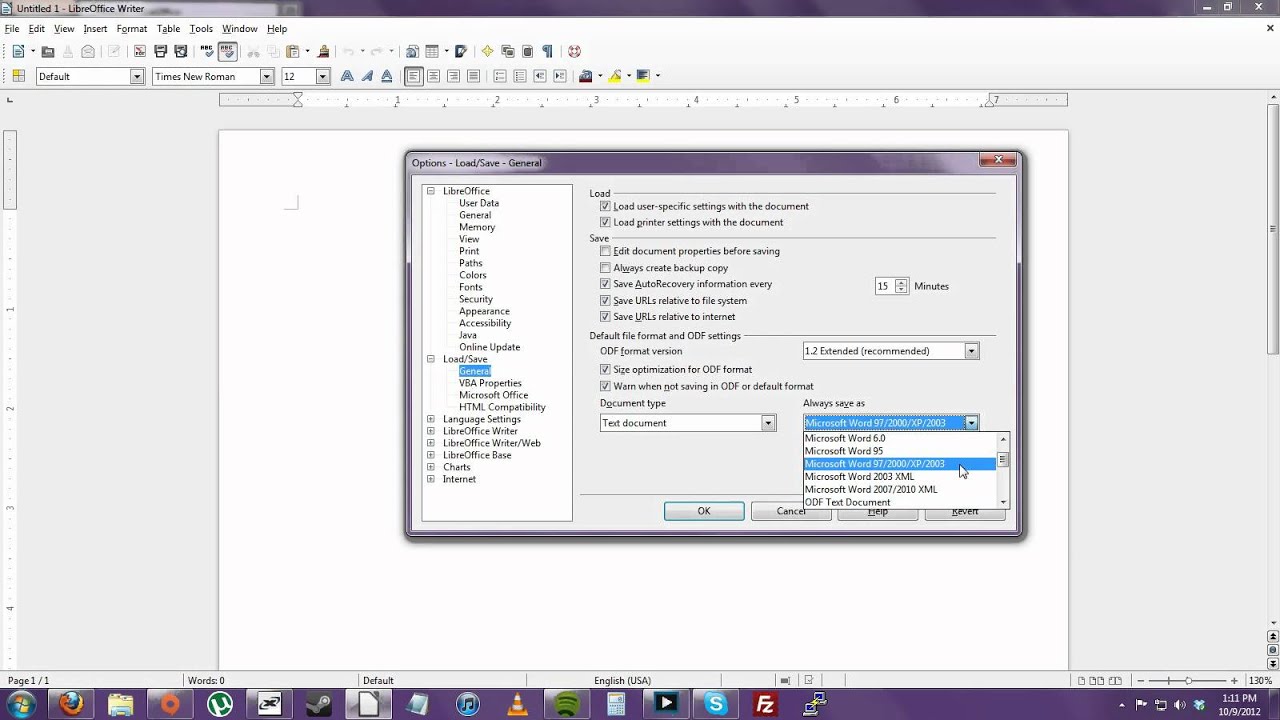
You can make Libreoffice save files by default as Microsoft Office supported files by changing as follows:

Open Libreoffice, go to the menu 'Tools', click on the option 'Options', then in the following window, navigate to 'Load/Save' and click on 'General'.
Set in 'DocumentType' and 'Always save as' the options as below:

  • 'Text Document' > 'Microsoft Word 97/2000/XP/2003'
  • 'Spreadsheet' > 'Microsoft Excel 97/2000/XP/2003'
  • 'Presentation' > 'Microsoft Powerpoint 97/2000/XP/2003'
maxresdefault.jpg


But after I worked to get everything just "right" to save it in that format is problem!!! as I can't see how it will look on Microsoft viewer not having a working one... (My student freebie edition expired, and you know Microsoft protects itself with those expiring product keys etc)
If you wish, you can use the free 'Word/Powerpoint/Excel Viewer' to see how they could look like:
Word Viewer
Excel Viewer
Powerpoint Viewer
 
Last edited:

My Computer

Computer type
PC/Desktop
Computer Manufacturer/Model Number
Custom build
OS
Primary OS: Archlinux with Kde-Plasma5 x86-64. Secondary OS: Windows 8.1 x64. UEFI Setup.
CPU
i5-4570 3.2GHz
Motherboard
Asus H87-PLUS
Memory
8GiB
Graphics Card(s)
Nvidia GeForce GTX 660 (Msi TwinFrozr III)
Screen Resolution
1920 * 1080
Hard Drives
Samsung SSD 840 PRO 128Gib (Linux) [Is technically not a HDD]
WD Red 1TB (Data+Windows)
PSU
Corsair Gaming GS600 (600W)
Case
Zalman Z9 Plus
Internet Speed
46Mbps (5,75MBps) Down. 5Mbps (0,625MBps) Up.
Antivirus
Avast, but never really needed any AV though...
Browser
Firefox only ^^.
How in the world can this thread be considered "[SOLVED]" when the problem was never actually fixed?????????? Telling someone with a problem to use a different program is not a "solution"!
 

My Computer

Computer type
PC/Desktop
Computer Manufacturer/Model Number
Self Built
OS
Windows 7 x64 bit Home Premium
CPU
AND FX8150
Motherboard
Asus Crosshair V Formula/Thunderbolt
Memory
16GB DDR3
Graphics Card(s)
GeForce GTX 1070
Monitor(s) Displays
Asus VK228 , LG34UM66, Asus VS228
Screen Resolution
6000 x 2560
Hard Drives
A great many. 3 are SSD, including the Win7 OS Drive, and one for FSX. All SATA
PSU
Cooler Master Silent Pro M 1000W
Case
Cooler Master Cosmos II Ultra Tower
Cooling
Corsair Hydro H100 Extreme Performance Liquid Cooling
Keyboard
Logitech G510s
Mouse
Logitech Trackball M571
Internet Speed
Spectrum Broadband
Antivirus
ME Security Essentials, Malwarebytes AntiMalware
Browser
Chrome
Other Info
Ableconn 10 port SATA PSI Card. Of these 10 and the 6 SATA Ports on the mobo, 14 of them are in use.
Back
Top