Solved Keyboard Shortcuts to Taskbar Button bars?

KenK

New member
Local time
9:17 PM
Messages
9
I'm a keyboard guy and had a couple of folders on my start bar in XP. I'd hit Ctrl+Esc to fly up the Start menu, then an S for the Stuff folder, then an F (for instance) to start my "F"ont program. I now, of course, can't do that same thing on the Windows 7 Start menu.

I've created a toolbar on my task bar but can't find a way to access it with a keystroke. Is there one?

Thanks!
Ken
 

My Computer

OS
Windows Professional, 64 bit
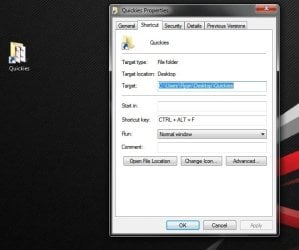
The easiest solution to your problem is to create a shortcut to whatever you want on the desktop and assign it a keyboard shortcut.
Quickies.jpg
 

My Computer

Computer type
PC/Desktop
Computer Manufacturer/Model Number
Self Build
OS
Windows 7 Ultimate x64
CPU
Intel Core2 Quad Q8300 2.5Ghz
Motherboard
Asus P5QD Turbo
Memory
Kingston HyperX 4x1GB DDR2 1066Mhz
Graphics Card(s)
Asus/Nvidia 9500GT 1GB
Sound Card
On-Board HD
Monitor(s) Displays
22" Widescreen TFT
Screen Resolution
1920x1080
Hard Drives
2x 320Gb Seagate SATAII RAID 0
2x 80Gb Seagate SATAII RAID 0
1x 1tb hybrid (8gb ssd)
PSU
650w
Case
ATX
Cooling
140mm front, 120mm Rear, 80mm Chipset + stock CPU and GPU
Keyboard
Plastic one
Mouse
Plastic one
Internet Speed
4Mbps
Other Info
Laptop: HP Elitebook 2560p
i5 @2.7Ghz 4GB DDR3
Yeah, I thought of that and the button bar is just a folder to which I can assign a keystroke. But then, of course, I have an Explorer Window open that I don't really need open once the APP I've launched from it is running.

That's why I was hoping to be able to access the menu with the keystroke.

I'll keep banging around and post if I find anything.

Thanks for answering!
Ken
 

My Computer

OS
Windows Professional, 64 bit
In case this helps anyone I found a "mostly-works-for-me" solution.

The keystrokes to access things on the start bar was what I missed most, namely I had multiple Windows Explorer shortcuts on there to access various folders / drives on our servers. I started the shortcuts with numbers and would hit Ctrl + Esc to fly up the Start menu then the number for the exporer I wanted.

By right clicking the "All Programs" on the Start bar and selecting "Open All Users" you can put a folder inside that folder and include any programs you want quick access to. I put in the folder shortcuts to Explorers pointing to the various places and named them 11Explore C, 22Explore F, 33Explore G and so on.

Now when I hit the Ctrl+Esc to get my Start menu I can hit 22 in the usual search box then enter. I had to use two numbers because a single number wasn't unique enough and I was getting other things at the top of the list.

Yeah, anal-retentive, I know. But any time I can just hit a few keystrokes without looking at my keyboard I'm WAY happier than using my mouse.
 

My Computer

OS
Windows Professional, 64 bit
Back
Top