Kodak Camera Not Recognised by Windows 7...

Simcut

New member
Hey all

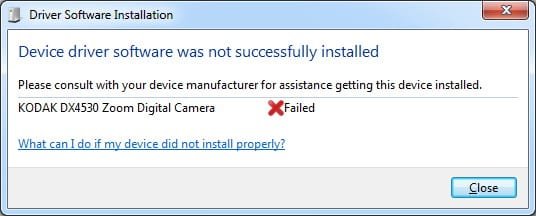
I can't get my Kodak Camera DX4530 to be recognised properly by Windows 7, when I connect it up windows attempted to install drivers but fails.....any suggestions please? I installed Kodak Easyshare Software but it made no difference :(

Thanks in advance
 

My Computer

OS
Windows 7 Ultimate 64-Bit
CPU
Intel i5 2500k
Motherboard
Gigabyte GA-Z68AP-D3
Memory
Corsair Vengeance 8gb DDR3 RAM
Graphics Card(s)
GeForce GTX 560
Sound Card
Creative X-Fi XtremeMusic
Monitor(s) Displays
Samsung SyncMaster P2450
Screen Resolution
1920x1080
Hard Drives
2 x 500gb Samsung Spinpoint
1 x 1TB Samsung Spinpoint
1 x 1.5TB Seagate Barracuda
PSU
Seasonic M12 700W
Case
Antec Twelve Hundred
Keyboard
Logitech K120
Mouse
Logitech G400
Internet Speed
50mbit Cable (Virgin Media)

My Computers

System One System Two

  • Computer type
    PC/Desktop
    Computer Manufacturer/Model Number
    ChillBlast - Custom to my design
    OS
    Windows 11 Pro x64 [Latest Release and Release Preview]
    CPU
    Ryzen 9 5950X, 3.8 - 5.2 MHz
    Motherboard
    Asus Prime X570-Pro
    Memory
    64GB [2 x 32GB] DDR4 3200MHz
    Graphics Card(s)
    4GB NVIDIA GEFORCE GTX 1650 Ti
    Sound Card
    On-board SPDIF to 5.1 System + HDMI [5.1 system]
    Monitor(s) Displays
    32" UHD 32 Bit HDR Monitor + 43" UHD 4K 32Bit HDR TV
    Screen Resolution
    2 x 3840 x 2160 @60Hz
    Hard Drives
    1TB M2 SSD OS, 500GB Fast Access SSD, 2 x 8TB Data + Various Externals from 1TB to 4TB, 10TB NAS
    PSU
    NZXT C750 80 PLUS Gold 750W Modular PSU
    Case
    Workstation Case [Matt Black]
    Cooling
    NZXT Kraken X63 280mm CPU Cooler +2x Quiet Case fans
    Keyboard
    Logitech Wireless MX Keys & K400 + others
    Mouse
    Logitech Wireless MX Master 3S
    Internet Speed
    920 MB Down 50 MB Up
    Antivirus
    BitDefender Total Security Pro
    Browser
    Chrome (always run latest Non-Beta)
    Other Info
    Also run ...
    Laptop - Quad 8GB - Windows 10 Pro x64
    Nexus 7 Android tablet x2
    Samsung 10.2" tablet
    Blackview TAB 8 4G Android Tablet c/w Keyboard
    Wacom Intuos Pro Medium Pen Pad
    Wacom Intuos Pro Small Pen Pad
    Wacom Expresskeys Remote
    Loopdeck+ Graphics Controller
    Shuttle Pro v2 Control
  • Computer type
    Laptop
    System Manufacturer/Model Number
    Dell XPS 17 10750H
    OS
    Windows 11 Pro x64 Latest RP
    CPU
    Intel I7 10750H 5.0GHz
    Motherboard
    Dell XPS
    Memory
    32GB [2x16GB] DDR4 2933 MHz
    Graphics Card(s)
    nVidia GTX1650Ti 4 GB GDDR6
    Sound Card
    Stock [Realtek] 4 Speaker
    Monitor(s) Displays
    17" IPS UHD+ Infinity Edge Touchscreen
    Screen Resolution
    3840 x 2400
    Hard Drives
    2TB M2 NVMe, 4TB External + various 500GB & 1TB External NVMe (also have access to spinner HDD from
    PSU
    Stock
    Case
    Stock XPS Aluminium & Carbon Fibre
    Cooling
    Stock - Active Fan Control
    Keyboard
    Backlit + Various Logitech
    Mouse
    Stock Track Pad + Logitech MX Trackball
    Internet Speed
    72 MB Down 18MB Up
    Browser
    Chrome
    Other Info
    Also run ...
    Laptop - Quad 8GB - Windows 10 Pro x64
    Nexus 7 Android tablet x2
    10.2" tablet
    Sony Z3 Android Smartphone
    Wacom Intuos Pro Medium Pen Pad
    Wacom Intuos Pro Small Pen Pad
    Wacom Expresskeys Remote
    Loopdeck+ Graphics Controller
    Shuttle Pro v2 Control Pad
    10TB NAS
I'll try and install the Easyshare Software in Vista compatibility and see how that goes....thx
 

My Computer

OS
Windows 7 Ultimate 64-Bit
CPU
Intel i5 2500k
Motherboard
Gigabyte GA-Z68AP-D3
Memory
Corsair Vengeance 8gb DDR3 RAM
Graphics Card(s)
GeForce GTX 560
Sound Card
Creative X-Fi XtremeMusic
Monitor(s) Displays
Samsung SyncMaster P2450
Screen Resolution
1920x1080
Hard Drives
2 x 500gb Samsung Spinpoint
1 x 1TB Samsung Spinpoint
1 x 1.5TB Seagate Barracuda
PSU
Seasonic M12 700W
Case
Antec Twelve Hundred
Keyboard
Logitech K120
Mouse
Logitech G400
Internet Speed
50mbit Cable (Virgin Media)
I installed the Kodak Easyshare Software in Vista Compatibility and Windows 7 still doesnt recognise the camera when I connect it, it won't install the driver.... :(

See attached
 

Attachments

  • kodakerror.jpg
    kodakerror.jpg
    36 KB · Views: 165

My Computer

OS
Windows 7 Ultimate 64-Bit
CPU
Intel i5 2500k
Motherboard
Gigabyte GA-Z68AP-D3
Memory
Corsair Vengeance 8gb DDR3 RAM
Graphics Card(s)
GeForce GTX 560
Sound Card
Creative X-Fi XtremeMusic
Monitor(s) Displays
Samsung SyncMaster P2450
Screen Resolution
1920x1080
Hard Drives
2 x 500gb Samsung Spinpoint
1 x 1TB Samsung Spinpoint
1 x 1.5TB Seagate Barracuda
PSU
Seasonic M12 700W
Case
Antec Twelve Hundred
Keyboard
Logitech K120
Mouse
Logitech G400
Internet Speed
50mbit Cable (Virgin Media)
For now you'll need to use an SD card reader to get your photos off.

Luckily for me, all of my cameras are seen as USB drives (attached storage) and require no drivers.

Bye. :cool:
 

My Computer

Computer Manufacturer/Model Number
Home Brew
OS
Windows 7 Ultimate x64
CPU
i7 970
Motherboard
ASUS Rampage III GENE
Memory
9 GB
Graphics Card(s)
9600GT
Monitor(s) Displays
dual 24" Samsung
Screen Resolution
1920x1200
Hard Drives
VelociRaptor and 4TB of Hitachi RAID 0
PSU
Thermaltake toughpower W0104RU 650W
Case
Thermaltake LANBOX Lite
Internet Speed
30 Mbps Download 1 Mbps Upload (Speedtest.com)
I guess my digi cam is a bit "too old" :(

Its probably not worth me buying an SD Card Reader, Kodak are supposed to release some beta drivers "soon" for Kodak cameras etc so I hear
 

My Computer

OS
Windows 7 Ultimate 64-Bit
CPU
Intel i5 2500k
Motherboard
Gigabyte GA-Z68AP-D3
Memory
Corsair Vengeance 8gb DDR3 RAM
Graphics Card(s)
GeForce GTX 560
Sound Card
Creative X-Fi XtremeMusic
Monitor(s) Displays
Samsung SyncMaster P2450
Screen Resolution
1920x1080
Hard Drives
2 x 500gb Samsung Spinpoint
1 x 1TB Samsung Spinpoint
1 x 1.5TB Seagate Barracuda
PSU
Seasonic M12 700W
Case
Antec Twelve Hundred
Keyboard
Logitech K120
Mouse
Logitech G400
Internet Speed
50mbit Cable (Virgin Media)

My Computers

System One System Two

  • Computer type
    PC/Desktop
    Computer Manufacturer/Model Number
    ChillBlast - Custom to my design
    OS
    Windows 11 Pro x64 [Latest Release and Release Preview]
    CPU
    Ryzen 9 5950X, 3.8 - 5.2 MHz
    Motherboard
    Asus Prime X570-Pro
    Memory
    64GB [2 x 32GB] DDR4 3200MHz
    Graphics Card(s)
    4GB NVIDIA GEFORCE GTX 1650 Ti
    Sound Card
    On-board SPDIF to 5.1 System + HDMI [5.1 system]
    Monitor(s) Displays
    32" UHD 32 Bit HDR Monitor + 43" UHD 4K 32Bit HDR TV
    Screen Resolution
    2 x 3840 x 2160 @60Hz
    Hard Drives
    1TB M2 SSD OS, 500GB Fast Access SSD, 2 x 8TB Data + Various Externals from 1TB to 4TB, 10TB NAS
    PSU
    NZXT C750 80 PLUS Gold 750W Modular PSU
    Case
    Workstation Case [Matt Black]
    Cooling
    NZXT Kraken X63 280mm CPU Cooler +2x Quiet Case fans
    Keyboard
    Logitech Wireless MX Keys & K400 + others
    Mouse
    Logitech Wireless MX Master 3S
    Internet Speed
    920 MB Down 50 MB Up
    Antivirus
    BitDefender Total Security Pro
    Browser
    Chrome (always run latest Non-Beta)
    Other Info
    Also run ...
    Laptop - Quad 8GB - Windows 10 Pro x64
    Nexus 7 Android tablet x2
    Samsung 10.2" tablet
    Blackview TAB 8 4G Android Tablet c/w Keyboard
    Wacom Intuos Pro Medium Pen Pad
    Wacom Intuos Pro Small Pen Pad
    Wacom Expresskeys Remote
    Loopdeck+ Graphics Controller
    Shuttle Pro v2 Control
  • Computer type
    Laptop
    System Manufacturer/Model Number
    Dell XPS 17 10750H
    OS
    Windows 11 Pro x64 Latest RP
    CPU
    Intel I7 10750H 5.0GHz
    Motherboard
    Dell XPS
    Memory
    32GB [2x16GB] DDR4 2933 MHz
    Graphics Card(s)
    nVidia GTX1650Ti 4 GB GDDR6
    Sound Card
    Stock [Realtek] 4 Speaker
    Monitor(s) Displays
    17" IPS UHD+ Infinity Edge Touchscreen
    Screen Resolution
    3840 x 2400
    Hard Drives
    2TB M2 NVMe, 4TB External + various 500GB & 1TB External NVMe (also have access to spinner HDD from
    PSU
    Stock
    Case
    Stock XPS Aluminium & Carbon Fibre
    Cooling
    Stock - Active Fan Control
    Keyboard
    Backlit + Various Logitech
    Mouse
    Stock Track Pad + Logitech MX Trackball
    Internet Speed
    72 MB Down 18MB Up
    Browser
    Chrome
    Other Info
    Also run ...
    Laptop - Quad 8GB - Windows 10 Pro x64
    Nexus 7 Android tablet x2
    10.2" tablet
    Sony Z3 Android Smartphone
    Wacom Intuos Pro Medium Pen Pad
    Wacom Intuos Pro Small Pen Pad
    Wacom Expresskeys Remote
    Loopdeck+ Graphics Controller
    Shuttle Pro v2 Control Pad
    10TB NAS
I have a Kodak EasyShare DX4330 ... it works just fine with Win7. Uninstall the EasyShare, then plug your camera into a USB port .... then turn on the camera.

I use Picasa 3 to send and share photos.
 

My Computer

Computer type
PC/Desktop
Computer Manufacturer/Model Number
Bruce ... somewhere in his 40's
OS
Windows 7 Ultimate 32bit SP1
CPU
Intel(R) Core(TM)2 Quad CPU @ 2.40GHz, 2400 MHz
Motherboard
INTEL/D975XBX2
Memory
4 GB
Graphics Card(s)
ATI Radeon HD 2600 Pro
Monitor(s) Displays
Samsung SyncMaster 914v
Screen Resolution
1280 x 1024
Hard Drives
2/500GB each ... ST3500630AS ATA Device.
One is not connected
PSU
Rocketfish 700 W
Case
G.Skill Gigabyte Chassis
Keyboard
Standard PS/2 Keyboard
Mouse
Microsoft PS/2 Mouse
Internet Speed
DSL
Antivirus
Avira Internet Security
Browser
IE 11
Other Info
ATI HDMI Audio
I did all that but that error still comes up for me, that error message u see above.
 

My Computer

OS
Windows 7 Ultimate 64-Bit
CPU
Intel i5 2500k
Motherboard
Gigabyte GA-Z68AP-D3
Memory
Corsair Vengeance 8gb DDR3 RAM
Graphics Card(s)
GeForce GTX 560
Sound Card
Creative X-Fi XtremeMusic
Monitor(s) Displays
Samsung SyncMaster P2450
Screen Resolution
1920x1080
Hard Drives
2 x 500gb Samsung Spinpoint
1 x 1TB Samsung Spinpoint
1 x 1.5TB Seagate Barracuda
PSU
Seasonic M12 700W
Case
Antec Twelve Hundred
Keyboard
Logitech K120
Mouse
Logitech G400
Internet Speed
50mbit Cable (Virgin Media)
I have an EasyShare Z710. I was able to get it to work in 2 steps...

#1 - when I plugged it in, it would detect as a Kodak Z710, but, the driver wouldn't install successfully. I had to go into device manager and change the driver to MTP USB Device. Once I did that, the system recognized it normally as a Kodak Z710 each and every time I hooked it up and turned it on.

#2 - the Kodak software didn't seem to like Windows 7 without compatibility mode, but, oddly enough, when I put it into compatibility mode, it came up with a message asking me if I wanted to turn it off? Anyhow, I set it to Vista compatibility and the issues are gone!

Best of luck!
 

My Computer

Computer type
Laptop
Computer Manufacturer/Model Number
HP DV7-7135US
OS
Windows 7 x64 Home Premium, Professional and Ultimate, Ubuntu x64
CPU
i7-3610QM @ 2.30ghz
Memory
16GB
Graphics Card(s)
Intel HD 4000
Screen Resolution
1600x900
I don't know if this helps, but my Windows 7 did not recognize the fact that I had my Kodak EasyShare M763 camera connected to the USB port, even though I had installed the driver software with it. My solution was this: unplug the camera, uninstall the software, and plug the camera back into the USB. Windows loaded its own driver, and now it's working fine:D
 

My Computer

OS
Windows XP, Windows 7 Beta RC
The same thing happened to me with my Kodak EasyShare C513 and the software it came with. I tried downloading the latest version software but it kept prompting that my OS is not supported. Until I uninstalled the Kodak software and simply plugged the camera and it was installed by Windows properly. This is also true for cellphones. I connected my Nokia 6300 and Windows downloaded and installed the proper drivers.
 

My Computer

Computer Manufacturer/Model Number
Acer Travelmate 290
OS
Windows 7 Professional x86 RTM
CPU
Intel Pentium M 1.4 GHz
Memory
1024MB DDR333, 256MB DDR333
Graphics Card(s)
Intel 82852/82855 GM/GME
Sound Card
Realtek AC'97
Monitor(s) Displays
14-inch LCD
Screen Resolution
1024 by 768
Hard Drives
Fujitsu MHV2040AT
I tried to post this earlier but I don't think it ever got posted. So doing it again....

I have an DX4530.

I had an XP computer and I had Kodak's Easyshare software installed on it. And, while I never liked the software, at least it did install and it "worked".

I now have the same camera but a new computer. Win7. No matter what I try, the software will not work.

I've read this forum. I've installed, uninstalled and re-installed the software. I tried, as others suggested, uninstalling the software, then plugging the camera in. I've tried repeatedly. Nothing has worked.

So, here are my findings and conclusions:

I never did like the Kodak software. I found it complex and confusing. So, it's no great loss that I can't get it to work now.

Take ALL pictures on an SD card (provided your computer is new enough to have a card reader) and then "open" the SD card with some other software.

As long as you have your camera preferences set to take pictures onto an SD card and your computer has an SD card reader then forget about the Kodak software. Kodak's "EasyShare" software is not, and never has been, so EASY!


BTW - why is it I copy/paste something using Win7/Microsoft Works 9 it always changes the font??
 
Last edited:

My Computer

Computer Manufacturer/Model Number
Dell Inc. Studio XPS 8100
OS
Windows 7 Home Premium
CPU
2.67 gigahertz Intel Core i5 750
Motherboard
Dell Inc. 0T568R A00
Memory
4056 Megabytes
Graphics Card(s)
NVIDIA GeForce 310
Sound Card
NVIDIA High Definition Audio (4x)
Monitor(s) Displays
ViewSonic VA903
Hard Drives
WDC WD5000AAKS-75V0A0
I have a kodak easyshare m1033. I tried just plugging in the device and letting the computer find the driver with no luck. Tried installing the latest kodak software no luck there either.

My fix:
uninstall the kodak easyshare software
uninstall the kodak camera
unplug the camera
install the Media Feature Pack for Windows 7 N with Service Pack 1 and Windows 7 KN with Service Pack 1 (KB968211)
restart the computer
plug in the camera, the computer installed a driver and was able to pull it up and see the pictures and transfer.

Hope this helps someone that is having the same issues.
 

My Computer

OS
windows 7n
I have a kodak easyshare m1033. I tried just plugging in the device and letting the computer find the driver with no luck. Tried installing the latest kodak software no luck there either.

My fix:
uninstall the kodak easyshare software
uninstall the kodak camera
unplug the camera
install the Media Feature Pack for Windows 7 N with Service Pack 1 and Windows 7 KN with Service Pack 1 (KB968211)
restart the computer
plug in the camera, the computer installed a driver and was able to pull it up and see the pictures and transfer.

Hope this helps someone that is having the same issues.
thanks penguin2283 and welcome to sevenforums
 

My Computer

Computer Manufacturer/Model Number
Hewlett packard/p6512uk
OS
Microsoft Windows 7 Home Premium 64-bit 7600
CPU
IIx4 amd athelon 635 processor
Motherboard
FOXCONN 2AA9
Memory
2x2gb
Graphics Card(s)
ati radeon HD 5450
Sound Card
(1) Realtek High Definition Audio (2) AMD High Definition
Monitor(s) Displays
samsung lcd tv 32"
Screen Resolution
1360x 768
Hard Drives
(1) WDC WD10 01FAES-60Z2A0 SATA Disk Device (2) Maxtor OneTouch USB Device (3) ST310003 33AS USB Device (4) WD My Book 1111 USB Device
PSU
?
Cooling
air!
Keyboard
wireless hp
Mouse
wireless Hp,optical
Internet Speed
1.10mb/s
Antivirus
MSE
Browser
Firefox
Back
Top