Laptop having connectivity issues - says invlaid IP address

Melly88

New member
Hi there,

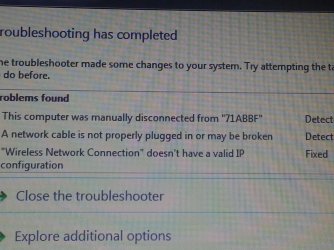
I need help as I am a not so tech savvy girl who is having IP address issues. I have had my Lenovo laptop for over a year now and about a week ago it started developing a connectivity problem. When my laptop is idle for awhile and I access it, it will not connect to my landlord's wireless internet. I have to troubleshoot the problem so that it resets the wireless connection because apparently I no longer have a valid IP address (as per the 'fixed' message).

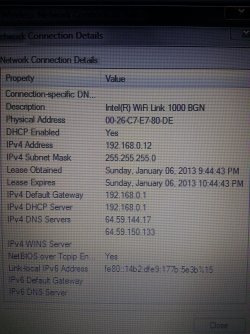
I would appreciate any assistance as it is a pain to have to resent the connection every time, and it is also inhibiting my ability to use my wireless printer. Below are images of both my troubleshooting message and my computer's IP info. Please try and put your responses in layman's terms as I really don't know that much computer lingo. Thanks :D
 

Attachments

  • 20130106_214515.jpg
    20130106_214515.jpg
    1 MB · Views: 2
  • 20130106_220129.jpg
    20130106_220129.jpg
    1.1 MB · Views: 3

My Computer

Computer Manufacturer/Model Number
Lenovo/Lenovo Win7 PC
OS
Windows 7 Home Premium
CPU
Intel Core i7-2630QM CPU @ 200 GHz
Memory
8.00 GB
It should come back from sleep but sometimes when they won't you need to turn off the power saving feature.

Open Device Manager> Control Panel> Device Manager

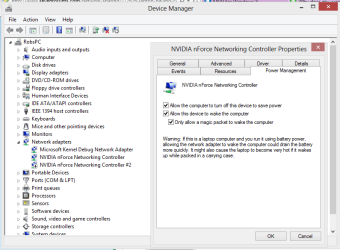
Expand Network Adapters, right-click the WLAN adapter, click Properties, click the Power Management tab, and then clear the Allow the computer to turn off this device to save power check box. "screen shot below"

If turning that power saving setting off there is another one under Power Settings, link below to adjust that one, adjust the one for network adaptor in the link.

Set the Wireless Adapter Power Settings in Windows 7 — MAXIMUMpcguides – Windows 7 tips, tricks, help, and how-to guides
 

Attachments

  • power settings.PNG
    power settings.PNG
    59.9 KB · Views: 3

My Computer

Computer type
PC/Desktop
Computer Manufacturer/Model Number
Home built
OS
Windows 7 Ult, Windows 8.1 Pro,
CPU
Q9650-4.275GHz, E8600 4.5GHz, E6750-3.8GHz
Motherboard
Evga 780i FTW
Memory
G.Skill PC2 9600 1200Mhz 5 5 5 15 2T
Graphics Card(s)
GTX480
Sound Card
Asus Xonar D2
Monitor(s) Displays
HannsG
Screen Resolution
1680X1050
Hard Drives
GSkill Phoenix Pro 120GB SSD
PSU
ThermalTake Toughpower 1000Watt modular
Case
ThermalTake XaserV
Cooling
Xigmatek S1283
Keyboard
Logitech G15
Mouse
Logitech G9
Internet Speed
T1
Already tried the first action with negative results

Hi there,

First off, thank you for taking the time to respond to my post.

I had already tried the first step this morning, and when I came home I was discouraged to say the least. Not only did my laptop not connect automatically, I couldn't even get it to connect with my trusted troubleshooting. I had to reboot my laptop entirely, and then it connected automatically.

I have just performed the second piece of the advice you gave me. I will have to see if that makes a difference, but I am not holding my breath. Any other thoughts?
 

My Computer

Computer Manufacturer/Model Number
Lenovo/Lenovo Win7 PC
OS
Windows 7 Home Premium
CPU
Intel Core i7-2630QM CPU @ 200 GHz
Memory
8.00 GB
I'd have to see a screen shot of the ipconfig/all from an elevated command prompt which shows more info.
 

My Computer

Computer type
PC/Desktop
Computer Manufacturer/Model Number
Home built
OS
Windows 7 Ult, Windows 8.1 Pro,
CPU
Q9650-4.275GHz, E8600 4.5GHz, E6750-3.8GHz
Motherboard
Evga 780i FTW
Memory
G.Skill PC2 9600 1200Mhz 5 5 5 15 2T
Graphics Card(s)
GTX480
Sound Card
Asus Xonar D2
Monitor(s) Displays
HannsG
Screen Resolution
1680X1050
Hard Drives
GSkill Phoenix Pro 120GB SSD
PSU
ThermalTake Toughpower 1000Watt modular
Case
ThermalTake XaserV
Cooling
Xigmatek S1283
Keyboard
Logitech G15
Mouse
Logitech G9
Internet Speed
T1
Back
Top