
Hi!
So, after recently fixing my issue with my laptop freezing and buzzing, I decided to move my laptop into my bedroom so i can game alone. It all worked great for the first couple of days, but...
After those 2 days I keep getting large ping spikes (from 60 to 300), which unfortunately, while they last for a just a few seconds, are continuous.
My router was about 11 meters away from my laptop so that obviously explained the lag, so today I moved my router closer. Now the router is only about 5 meters away. When the ping spikes, it will spike to about 170-200, but thats still really bad for gaming.
I've tried a lot of tweaks, all of them were partial fixes, they fixed my ping for 1 day then the next day it was back, and even after re-applying the fix my ping rarely gets fixed.
I've tried:
1) Disabling network performance throttling through the registry: Partial fix, next day the problem persisted
2) WLAN Optimizer (Downloads-WLAN Optimizer - Optimize wireless gaming, audio and video streaming...), partial fix once again.
3) TCP Optimizer: Probably the most effective out of all tweak I've done to my computer to encounter this issue, it really, really helps, but today it doesnt seem to be very helpful.
With TCP optimizer my ping gets stabilized to 60-70 which I love. It says there until I quit my game. For some reason, lets say I quit my game. If I come back after, say 30 minutes, the ping problems are back. And in order to fix them I have to reboot and even use the optimizer again with the same settings (even though it overwrites the same settings and values it seems to be helping sometimes).
I tried optimizing TCP optimzer through a video tutorial.
I'm not too sure about what I should say...
Spectating: the fabulous 1000 ping (cant even use voice chat)
Playing: semi-stable 70 ping, sometimes spiking to 150+.
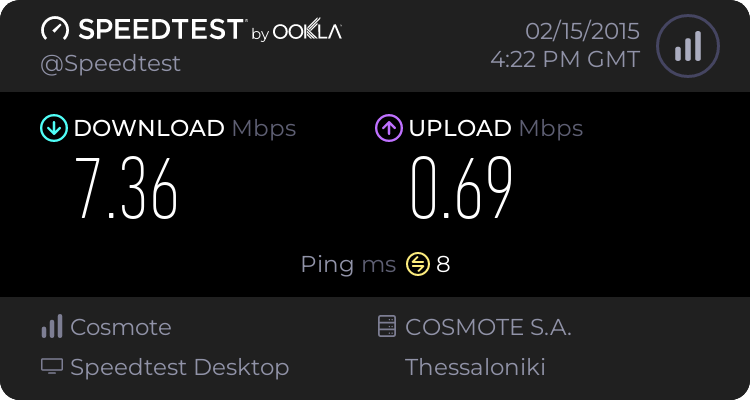
Speedtest result:
ISP:
OTE
EDIT:
Here's me pinging one of the servers I play on with cmd.exe, the ping is ridiculously stable
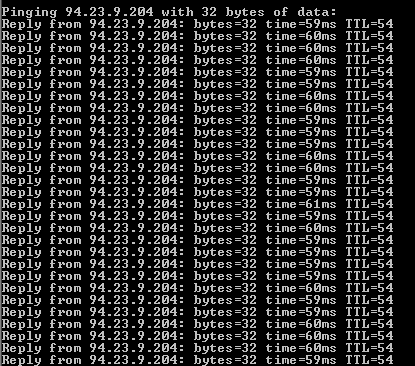
However it's nothing like this when I connect to it through the game. Through the game, when my ping spikes I see plenty of choke and a bit of loss (in net_graph)
So, after recently fixing my issue with my laptop freezing and buzzing, I decided to move my laptop into my bedroom so i can game alone. It all worked great for the first couple of days, but...
After those 2 days I keep getting large ping spikes (from 60 to 300), which unfortunately, while they last for a just a few seconds, are continuous.
My router was about 11 meters away from my laptop so that obviously explained the lag, so today I moved my router closer. Now the router is only about 5 meters away. When the ping spikes, it will spike to about 170-200, but thats still really bad for gaming.
I've tried a lot of tweaks, all of them were partial fixes, they fixed my ping for 1 day then the next day it was back, and even after re-applying the fix my ping rarely gets fixed.
I've tried:
1) Disabling network performance throttling through the registry: Partial fix, next day the problem persisted
2) WLAN Optimizer (Downloads-WLAN Optimizer - Optimize wireless gaming, audio and video streaming...), partial fix once again.
3) TCP Optimizer: Probably the most effective out of all tweak I've done to my computer to encounter this issue, it really, really helps, but today it doesnt seem to be very helpful.
With TCP optimizer my ping gets stabilized to 60-70 which I love. It says there until I quit my game. For some reason, lets say I quit my game. If I come back after, say 30 minutes, the ping problems are back. And in order to fix them I have to reboot and even use the optimizer again with the same settings (even though it overwrites the same settings and values it seems to be helping sometimes).
I tried optimizing TCP optimzer through a video tutorial.
I'm not too sure about what I should say...
Spectating: the fabulous 1000 ping (cant even use voice chat)
Playing: semi-stable 70 ping, sometimes spiking to 150+.
Speedtest result:
ISP:
OTE
EDIT:
Here's me pinging one of the servers I play on with cmd.exe, the ping is ridiculously stable
However it's nothing like this when I connect to it through the game. Through the game, when my ping spikes I see plenty of choke and a bit of loss (in net_graph)
My Computer
At a glance
Windows 7 Home Premium 32bit.AMD V120 Processor, ~2.2Ghz3,00 GB (2,74 usable)ATI Mobility Radeon HD 4200 Series
- Computer type
- Laptop
- Computer Manufacturer/Model Number
- Toshiba
- OS
- Windows 7 Home Premium 32bit.
- CPU
- AMD V120 Processor, ~2.2Ghz
- Memory
- 3,00 GB (2,74 usable)
- Graphics Card(s)
- ATI Mobility Radeon HD 4200 Series
- Hard Drives
- Kingston SSD (60GB)
- Antivirus
- AVG Free Edition
- Browser
- Google Chrome
