Last Access Timestamp - Enable or Disable in Windows

How to Enable or Disable File and Folder "Last Access Time" in Windows

   Information
The Last Access Time attribute is the date and time a file or folder was last accessed in Windows.

Last Access Time updating is enabled by default in XP. In order to save system resources, it is disabled by default in Vista, Windows 7, and Windows 8.

This tutorial will show you how to enable or disable the last access time attribute in Windows to show the date and time of when each file and folder was last accessed.

You must be logged in as an administrator to be able to do the steps in this tutorial.

   Warning
On older or slower systems, enabling Last Access Time could cause a performance decrease due to the increased overhead of Disk I/O.

   Tip
If you like while using "Details" folder view in Windows Explorer, you could add the "Date Accessed" column to make viewing the last access time of files and folders easier, and to be able to sort by "Date Accessed" if you like. This can also be helpful while doing searches.

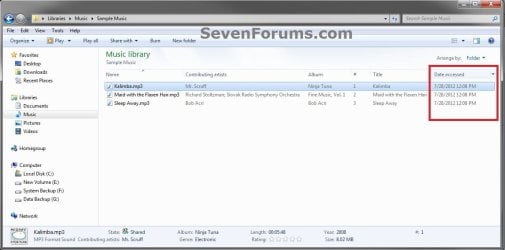
Add_Column-1.jpgAdd_Column-2.jpg


EXAMPLE: Last Accessed Time
NOTE: This is an example when you right click on a file or folder, click on Properties, and look at the Accessed details in the General tab.
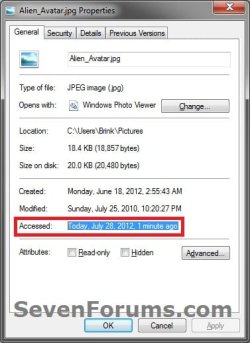
Example.jpg


OPTION ONE

To Enable or Disable "Last Access Time" using a REG File Download


1. Do step 2 or 3 below for what you would like to do.

2. To Enable "Last Access Time"
A) Click/tap on the Download button below to download the file below.
Enable_Last_Access_Time.reg


Download


B) Go to step 4 below.
3. To Disable "Last Access Time"
NOTE: This is the default setting.
A) Click/tap on the Download button below to download the file below.
Disable_Last_Access_Time.reg


Download


B) Go to step 4 below.
4. Save the .reg file to the desktop.

5. Double click/tap on the downloaded .reg file to Merge it.

6. If prompted, click/tap on Run, Yes (UAC), Yes, and OK.

7. Restart the computer to apply.

8. When finished, you can delete the downloaded .reg file if you like.


OPTION TWO

To Enable or Disable "Last Access Time" in a Command Prompt


1. Open an elevated command prompt.
NOTE: For Windows 8, see also: Elevated Command Prompt - Open in Windows 8

2. Do either step 3 or 4 below for what you would like to do.

3. To Enable "Last Access Time"
A) Copy and paste the command below in the the command prompt, press Enter, and go to step 5 below.
fsutil behavior set disablelastaccess 0
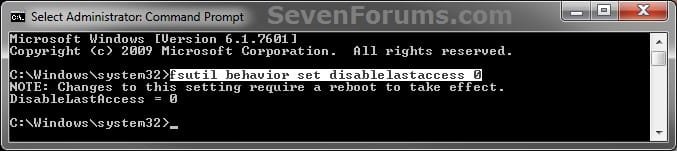
Enable.jpg
4. To Disable "Last Access Time"
NOTE: This is the default setting.
A) Copy and paste the command below in the the command prompt, press Enter, and go to step 5 below.
fsutil behavior set disablelastaccess 1
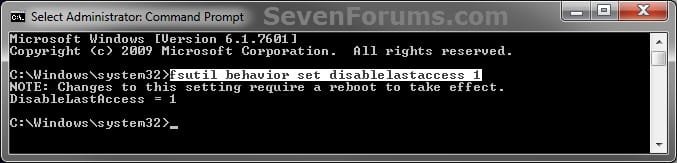
Disable.jpg
5. Close the elevated command prompt.

6. Restart the computer to apply.
That's it,
Shawn
 

Attachments

Last edited:
Turn on Last Access timestamp only on certian hard drives?

is there a way to enable last access timestamp for only certain hard drives. Since my OS is on an SSD, I really don't want any more activity than needed on my C: drive, and I really don't care about any files access date on that entire drive, but I would find it very useful on my Data drive. Any ideas on how to have last access timestamp on only one hard drive but not C: ?
 

My Computer My Computer

At a glance

Windows 7 Professional x64AMD FX-959032GBNVidia GTX 750
Computer type
PC/Desktop
Computer Manufacturer/Model Number
Custom Build
OS
Windows 7 Professional x64
CPU
AMD FX-9590
Motherboard
ASUS Sabertooth R2.0
Memory
32GB
Graphics Card(s)
NVidia GTX 750
Hard Drives
Samsung 250GB SSD, Samsung 120GB SSD, Western Digital 1.5TB, Seagate 4TB
Antivirus
Webroot Secure Anywhere
Browser
Firefox
Hello Zapphod, and welcome to Seven Forums.

I'm afraid that this is a global setting for all or none. :(
 

My Computer My Computer

At a glance

64-bit Windows 11 Pro for WorkstationsIntel i7-8700K OC'd to 5 GHz64 GB (4x16GB) G.SKILL TridentZ RGB DDR4 3600...ASUS ROG-STRIX-GTX1080TI-O11G-GAMING
Computer type
PC/Desktop
Computer Manufacturer/Model Number
Self built custom
OS
64-bit Windows 11 Pro for Workstations
CPU
Intel i7-8700K OC'd to 5 GHz
Motherboard
ASUS ROG Maximus XI Formula Z390
Memory
64 GB (4x16GB) G.SKILL TridentZ RGB DDR4 3600 MHz
Graphics Card(s)
ASUS ROG-STRIX-GTX1080TI-O11G-GAMING
Sound Card
Integrated
Monitor(s) Displays
2 x Samsung Odyssey G7 27"
Screen Resolution
2560x1440
Hard Drives
1TB Samsung 990 PRO M.2,
4TB Samsung 990 PRO PRO M.2,
TerraMaster F8 SSD Plus NAS
PSU
Seasonic Prime Titanium 850W
Case
Thermaltake Core P3
Cooling
Corsair Hydro H115i
Keyboard
Logitech wireless K800
Mouse
Logitech MX Master 4
Internet Speed
2 Gb/s Download and 100 Mb/s Upload
Antivirus
Malwarebyte Anti-Malware Premium
Browser
Google Chrome
Other Info
Logitech Z625 speaker system,
Logitech BRIO 4K Pro webcam,
HP Color LaserJet Pro MFP M477fdn,
APC SMART-UPS RT 1000 XL - SURT1000XLI,
Galaxy S23 Plus phone
ah, thats' too bad... but thank you for the fast response!

Perhaps I can make some batch files to enable the timestamp feature before the applications which use the files I wish to track and then disable it again after, since the vast majority of os files will already be open, they wont' be touched, and since my temp folders are not on my C drive that would at least minimize activity on my c drive.
 

My Computer My Computer

At a glance

Windows 7 Professional x64AMD FX-959032GBNVidia GTX 750
Computer type
PC/Desktop
Computer Manufacturer/Model Number
Custom Build
OS
Windows 7 Professional x64
CPU
AMD FX-9590
Motherboard
ASUS Sabertooth R2.0
Memory
32GB
Graphics Card(s)
NVidia GTX 750
Hard Drives
Samsung 250GB SSD, Samsung 120GB SSD, Western Digital 1.5TB, Seagate 4TB
Antivirus
Webroot Secure Anywhere
Browser
Firefox
I wouldn't be concerned with reducing writes to the SSD. Testing has shown that SSDs rarely fail due to disk writes. Most SSDs are replaced because they are to small or too slow before they fail.
 

My Computer My Computer

At a glance

Windows 7 Pro 64 bitXeon W35208 GBNvidia Geforce 210
Computer type
PC/Desktop
Computer Manufacturer/Model Number
HP
OS
Windows 7 Pro 64 bit
CPU
Xeon W3520
Memory
8 GB
Graphics Card(s)
Nvidia Geforce 210
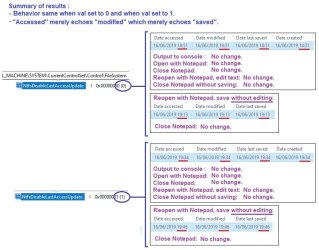
I'm on Windows 10 and even though the reg entry NtfsDisableLastAccessUpdate is set to 1 I get a Last Access Date for my files.
 

My Computer My Computer

At a glance

Windows 7 x64 RTM RetailIntel i7-920 Quad @ 4.0Ghz. Stepping D0.9GB DDR3 @ 1600 Mhz. 9-8-8-24-CR1XFX ATI HD5870 @ 900/1300
Computer Manufacturer/Model Number
Asus CG5290
OS
Windows 7 x64 RTM Retail
CPU
Intel i7-920 Quad @ 4.0Ghz. Stepping D0.
Motherboard
Asus Rampage II GENE
Memory
9GB DDR3 @ 1600 Mhz. 9-8-8-24-CR1
Graphics Card(s)
XFX ATI HD5870 @ 900/1300
Sound Card
SupremeFX X/Fi HD Audio onboard
Monitor(s) Displays
Samsung 24" WS
Screen Resolution
1920x1200
Hard Drives
OCZ AGILITY-EX (64 GB, SATA-II, SSD SLC NAND Flash)
Hitachi HDT721010SLA360 (1 TB, 7200 RPM, SATA-II)
Cavalry (500 GB, 7200 RPM, eSATA-II)
PSU
Antec TruePower 650 Watts
Case
Ugly but functional.
Cooling
Oversized heat sink, lots and lots of fans.
Keyboard
MS
Mouse
MS wireless explorer
Internet Speed
101/15 - Optimum Online Ultra
Hello streetwolf,

The "Acessed" option will always show in properties, but will just not be updated as you access the file unless enabled. :)
 

My Computer My Computer

At a glance

64-bit Windows 11 Pro for WorkstationsIntel i7-8700K OC'd to 5 GHz64 GB (4x16GB) G.SKILL TridentZ RGB DDR4 3600...ASUS ROG-STRIX-GTX1080TI-O11G-GAMING
Computer type
PC/Desktop
Computer Manufacturer/Model Number
Self built custom
OS
64-bit Windows 11 Pro for Workstations
CPU
Intel i7-8700K OC'd to 5 GHz
Motherboard
ASUS ROG Maximus XI Formula Z390
Memory
64 GB (4x16GB) G.SKILL TridentZ RGB DDR4 3600 MHz
Graphics Card(s)
ASUS ROG-STRIX-GTX1080TI-O11G-GAMING
Sound Card
Integrated
Monitor(s) Displays
2 x Samsung Odyssey G7 27"
Screen Resolution
2560x1440
Hard Drives
1TB Samsung 990 PRO M.2,
4TB Samsung 990 PRO PRO M.2,
TerraMaster F8 SSD Plus NAS
PSU
Seasonic Prime Titanium 850W
Case
Thermaltake Core P3
Cooling
Corsair Hydro H115i
Keyboard
Logitech wireless K800
Mouse
Logitech MX Master 4
Internet Speed
2 Gb/s Download and 100 Mb/s Upload
Antivirus
Malwarebyte Anti-Malware Premium
Browser
Google Chrome
Other Info
Logitech Z625 speaker system,
Logitech BRIO 4K Pro webcam,
HP Color LaserJet Pro MFP M477fdn,
APC SMART-UPS RT 1000 XL - SURT1000XLI,
Galaxy S23 Plus phone
Didn't know that, thanks for the new info.
 

My Computer My Computer

At a glance

Windows 7 x64 RTM RetailIntel i7-920 Quad @ 4.0Ghz. Stepping D0.9GB DDR3 @ 1600 Mhz. 9-8-8-24-CR1XFX ATI HD5870 @ 900/1300
Computer Manufacturer/Model Number
Asus CG5290
OS
Windows 7 x64 RTM Retail
CPU
Intel i7-920 Quad @ 4.0Ghz. Stepping D0.
Motherboard
Asus Rampage II GENE
Memory
9GB DDR3 @ 1600 Mhz. 9-8-8-24-CR1
Graphics Card(s)
XFX ATI HD5870 @ 900/1300
Sound Card
SupremeFX X/Fi HD Audio onboard
Monitor(s) Displays
Samsung 24" WS
Screen Resolution
1920x1200
Hard Drives
OCZ AGILITY-EX (64 GB, SATA-II, SSD SLC NAND Flash)
Hitachi HDT721010SLA360 (1 TB, 7200 RPM, SATA-II)
Cavalry (500 GB, 7200 RPM, eSATA-II)
PSU
Antec TruePower 650 Watts
Case
Ugly but functional.
Cooling
Oversized heat sink, lots and lots of fans.
Keyboard
MS
Mouse
MS wireless explorer
Internet Speed
101/15 - Optimum Online Ultra
:thumbsup:
 

My Computer My Computer

At a glance

64-bit Windows 11 Pro for WorkstationsIntel i7-8700K OC'd to 5 GHz64 GB (4x16GB) G.SKILL TridentZ RGB DDR4 3600...ASUS ROG-STRIX-GTX1080TI-O11G-GAMING
Computer type
PC/Desktop
Computer Manufacturer/Model Number
Self built custom
OS
64-bit Windows 11 Pro for Workstations
CPU
Intel i7-8700K OC'd to 5 GHz
Motherboard
ASUS ROG Maximus XI Formula Z390
Memory
64 GB (4x16GB) G.SKILL TridentZ RGB DDR4 3600 MHz
Graphics Card(s)
ASUS ROG-STRIX-GTX1080TI-O11G-GAMING
Sound Card
Integrated
Monitor(s) Displays
2 x Samsung Odyssey G7 27"
Screen Resolution
2560x1440
Hard Drives
1TB Samsung 990 PRO M.2,
4TB Samsung 990 PRO PRO M.2,
TerraMaster F8 SSD Plus NAS
PSU
Seasonic Prime Titanium 850W
Case
Thermaltake Core P3
Cooling
Corsair Hydro H115i
Keyboard
Logitech wireless K800
Mouse
Logitech MX Master 4
Internet Speed
2 Gb/s Download and 100 Mb/s Upload
Antivirus
Malwarebyte Anti-Malware Premium
Browser
Google Chrome
Other Info
Logitech Z625 speaker system,
Logitech BRIO 4K Pro webcam,
HP Color LaserJet Pro MFP M477fdn,
APC SMART-UPS RT 1000 XL - SURT1000XLI,
Galaxy S23 Plus phone
...
 

Attachments

  • Explorer(fileaccess).jpg
    Explorer(fileaccess).jpg
    67 KB · Views: 35

My Computer My Computer

At a glance

win
Computer type
PC/Desktop
OS
win
Back
Top