lenovo b570 windows 7 ssd drive samsung 128gig 2.5mm freezing

baxter724

New member
Local time
12:26 PM
Messages
1
hey gang pc freezing from time to time when connect to wifi either on youtube.com or when connecting external monitor . Using ssd drive 2.5 Samsung 128gig. I noticed that when disconnecting from wifi and wait few minutes it come back alive

thanks
 

My Computer My Computer

At a glance

Windows 7 32 bit home premium ssd drive10 gigintel hd graphics
Computer type
PC/Desktop
Computer Manufacturer/Model Number
lenovo b570
OS
Windows 7 32 bit home premium ssd drive
Memory
10 gig
Graphics Card(s)
intel hd graphics
Hard Drives
Samsung ssd sm841 2.5 7mm 128gb ata device
Antivirus
norton antivirus
Browser
ie and firefox latest version
Hello and welcome Baxter mate some more in depth specs please as that model Googles up as a laptop.:confused:
If you use this and find out what the motherboard is it would help a bit more

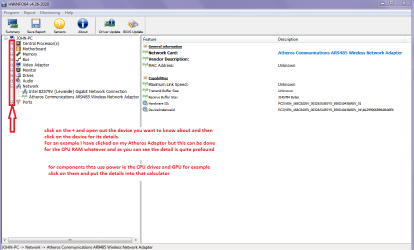
Using HW Info general components

DownloadHW Info and pick the right bit version - HWiNFO, HWiNFO32/64 - Download - (copy andpaste this site into the search bar) If you do not need the running informationin the smaller right hand panel close it. In the left hand window click on the+ for the individual device groupings and they will open out to the variouscomponents.

Go onopening out further until you get to the device itself. click on it and it willhighlight. In the right hand window there will be a very detailed descriptionof that device as in brand, speeds model number etc etc These are very detailedand are just what is needed for searching for drivers etc.

See my picfor an example - in this I have opened out one my components and then highlighted one of the one you need andyou can see the detail.
But I want you to open Motherboard

PS I did mean to add please see this for posting back pics of the screen
http://www.vistax64.com/tutorials/148532-how-use-snipping-tool-vista.html
 

Attachments

  • HW INFO DEVICES.PNG
    HW INFO DEVICES.PNG
    32.3 KB · Views: 0

My Computer My Computer

At a glance

Desk1 7 Home Prem / Desk2 10 Pro / Main lap A...Desk1 i5 3750K / Laptop i7 GTX 860M / Desk2 i...Desk1 8GB (1866) / Desk2 16GB (1333) / Laptop...Desk 1& 2NVidia GTX 650 & Laptops on board Intel
Computer type
PC/Desktop
Computer Manufacturer/Model Number
Own build (new) Desk1 / Asus ROG Win 7 / Desk2 1st build
OS
Desk1 7 Home Prem / Desk2 10 Pro / Main lap Asus ROG 10 Pro 2 laptop Toshiba 7 Pro Asus P2520 7 & 10
CPU
Desk1 i5 3750K / Laptop i7 GTX 860M / Desk2 i5 2500
Motherboard
Desk1 Asus P877-V / Desk2 Gigabyte H67 UD3H / Laptop ?
Memory
Desk1 8GB (1866) / Desk2 16GB (1333) / Laptop 8Gb DDR3
Graphics Card(s)
Desk 1& 2NVidia GTX 650 & Laptops on board Intel
Sound Card
Desk 1 & 2 -XONAR DG Realtek High Def audio Laptop
Monitor(s) Displays
Desk 1 Benq HD 2450 / Desk2 Philips 24" / Laptop 17.5"
Screen Resolution
1920x1080 D1 & D2 & Laptop 1
Hard Drives
Desk1 Samsung 120GB 830 SSD
Asus ROG 256GB 850 Pro SSD
Desk2 Samsung 840 256 SSD
Toshiba 120GB EVO
PSU
Desk 1 Corsair HX 1050/ Laptop ? / Desk 2 Corsair HX 650
Case
Desk 1 Cooler HAF XM ? Toshiba laptop / Desk2 Coolermaster
Cooling
Fans on all Desk1 -2 Desk2 - all Coolermasters 5 Laptop ?
Keyboard
Desk 1 MS Sidewinder X6 Desk 2 MS Sidewinder X 4
Mouse
Desk 1&2 - Gigabyte MS 900 gamer - laptop - Logitec wireless
Internet Speed
ADSL2+
Other Info
One other Desktop (tester) and spare Toshba laptop both with SSD's
Running Kaspersky 2016 ISS on all machines config'd identically
Logitec audio stereo systems on each machine (x3)
Canon MG5250MFC
Router/modem TP-Link running WPA2SK
Enable Automatically deliver drivers via Windows Update (Step 3) then Check for Updates, install all Important and Optional Updates except Bing. After restart check again.

Try Upgrading the Wireless Adapter driver in Device Manager. If none is provided by Windows Update, try the latest from the Lenovo Support Downloads webpage.

Establish a Clean Boot, utilitize the System Resources to check for Solutions, check the logs for repeat errors to resolve, check for infection and System File Integrity - all from http://www.sevenforums.com/tutorials/220165-troubleshooting-steps-windows-7-a.html.

Rightclick on connection icon in System Tray to Troubleshoot Wireless Adapter.
 
Back
Top