
Windows7Nippon
New member
- Local time
- 3:30 AM
- Messages
- 2
Hi there
I downloaded the SoundMax driver version 6.xxx which was recommended HERE but I have a slight problem.
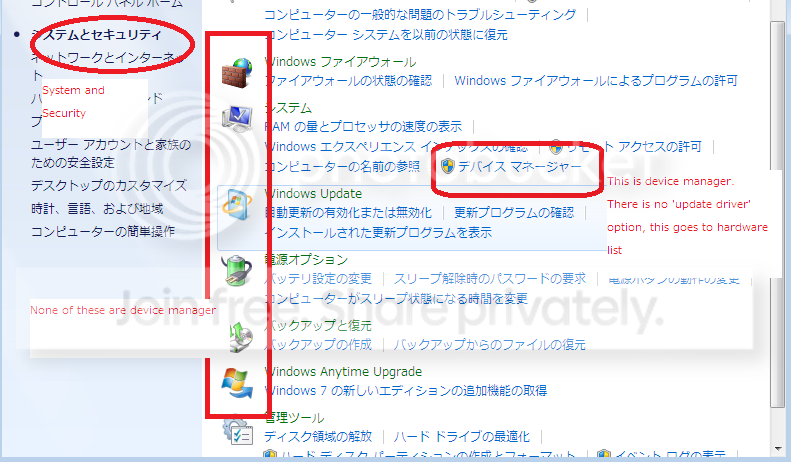
I am running Home Premium OEM for the Japanese market. Now while I can read Japanese fine the issue I've encountered is that the Device Manager set up is actually different from the US version. I eventually found screen shots of the US walk through for using Device Manager and confirmed that things are actually located in different spots on the menus and whatnot.
So I am not confident that what I'm trying to do exactly mirrors the process outlined in the above-quoted post, although it should be the same...
That being said, I managed to find a way to 'update driver', however, in the recommended file I downloaded HERE I could not find the file named ADIHdAud.inf so I was not able to specify it when updating the driver. All in all I just couldn't get the work around noted above to work for me.
Simply using setup.exe also failed, as it did not find my speakers or SoundMax equipment.
Can anyone here possible supply me with the necessary driver ADIHdAud.inf and/or point out where it is in the zip file I downloaded, and could someone possibly give me an alternative or slightly more detailed walk through for installing it?
Thanks very much
Edit: Here's a photo of what I'm talking about
If its too small to see here's the link:
http://i656.photobucket.com/albums/uu289/gyozajoe/b048419a.png
I downloaded the SoundMax driver version 6.xxx which was recommended HERE but I have a slight problem.
I am running Home Premium OEM for the Japanese market. Now while I can read Japanese fine the issue I've encountered is that the Device Manager set up is actually different from the US version. I eventually found screen shots of the US walk through for using Device Manager and confirmed that things are actually located in different spots on the menus and whatnot.
So I am not confident that what I'm trying to do exactly mirrors the process outlined in the above-quoted post, although it should be the same...
That being said, I managed to find a way to 'update driver', however, in the recommended file I downloaded HERE I could not find the file named ADIHdAud.inf so I was not able to specify it when updating the driver. All in all I just couldn't get the work around noted above to work for me.
Simply using setup.exe also failed, as it did not find my speakers or SoundMax equipment.
Can anyone here possible supply me with the necessary driver ADIHdAud.inf and/or point out where it is in the zip file I downloaded, and could someone possibly give me an alternative or slightly more detailed walk through for installing it?
Thanks very much
Edit: Here's a photo of what I'm talking about
If its too small to see here's the link:
http://i656.photobucket.com/albums/uu289/gyozajoe/b048419a.png
Last edited:
My Computer
At a glance
Windows 71.86gHz1gigATI onboard
- Computer Manufacturer/Model Number
- Lenovo Z60m
- OS
- Windows 7
- CPU
- 1.86gHz
- Memory
- 1gig
- Graphics Card(s)
- ATI onboard
- Sound Card
- SoundMax onboard
- Monitor(s) Displays
- 15"
- Screen Resolution
- 1024x728
- Hard Drives
- 52GB