
Solved Libre will not completely unistall to install older version

jim davis

New member
Member
VIP
Local time
11:14 AM
Messages
191
Location
Walking, Taking In The Sweet Air
Hi


For Me, the latest libre office program is just a over funded monster, rebuilt till the Document page

is so congested its a true distraction from creative thought.
So I tried to go back to 4 point some thing which is about 30 rebuilds back and very simple and easy to Write mom with ;)


so using "jet clean" to remove/uninstall the latest and messiest libre, but when I went to put the old program in, libre said the old (newer) libre had to be removed still, it is gone, but yet old program wont install

I went into the c drive to search out trinkets of the uninstalled one but found none.


in the past
I have removed new libre and installed old libre before twice on friends machines and once on my old XP using jet clean, the weakest cleaner in the world


why does it not work this time.


Thanks
 

My Computer My Computer

At a glance

7 Home Prem. 32 bit, c drive 74.4 space CPU 3...?64 ?
Computer type
PC/Desktop
Computer Manufacturer/Model Number
dell optiplex 745
OS
7 Home Prem. 32 bit, c drive 74.4 space CPU 3.00 GHZ
CPU
?
Motherboard
?
Memory
64 ?
Hard Drives
1 TARA BITE WESTERN
Cooling
FAN IN FRONT AND a fan in back
Internet Speed
100 mbps
Antivirus
Avast and many others
Browser
firefox
Other Info
Patience Please, I know nothing, Zip, Zero about computers

My Computer My Computer

At a glance

Win 10 x64, Linux Lite, Win 7 x64, BlackArch,...
Computer type
PC/Desktop
Computer Manufacturer/Model Number
HP Desktop & Compaq Laptop
OS
Win 10 x64, Linux Lite, Win 7 x64, BlackArch, & Kali
Hard Drives
Samsung 850 Pro 256Gb,
Hitachi HDD 1Tb,
Crucial MX SSD 250Gb
Segate 3Tb USB 3.0 Ext. Backup HDD
Internet Speed
150Mbps dn, 20Mbps up
Antivirus
Avast Free, Malwarebytes Anti-Exploit & Anti-Ransomware
Browser
Firefox, Chrome, Opera, & VPN
Hi Snick, I seem to keep running into you here, so hi again.
I will surly try your solution, and yes Patience & Tenacity are virtues, and even more so when dealing with folks, which is hardest of all.
I will let you know how this worked out with revo, if you don't hear from me know my whole bed room exploded :cry:
 

My Computer My Computer

At a glance

7 Home Prem. 32 bit, c drive 74.4 space CPU 3...?64 ?
Computer type
PC/Desktop
Computer Manufacturer/Model Number
dell optiplex 745
OS
7 Home Prem. 32 bit, c drive 74.4 space CPU 3.00 GHZ
CPU
?
Motherboard
?
Memory
64 ?
Hard Drives
1 TARA BITE WESTERN
Cooling
FAN IN FRONT AND a fan in back
Internet Speed
100 mbps
Antivirus
Avast and many others
Browser
firefox
Other Info
Patience Please, I know nothing, Zip, Zero about computers
jim davis
Hopefully, our contact is positive for you!
Folks, try dealing we my Control Freak Father!!! LOL
If Revo doesn't recognize the program you are trying to uninstall, you may be able to reinstall that version, then use Revo. I've had to do that on a couple occasions that I can recall.
If you install through Revo, install program, it will log every event in the install process. Then when you uninstall, you can use that profile to make sure it removes every 1 & 0 related to that program.
 

My Computer My Computer

At a glance

Win 10 x64, Linux Lite, Win 7 x64, BlackArch,...
Computer type
PC/Desktop
Computer Manufacturer/Model Number
HP Desktop & Compaq Laptop
OS
Win 10 x64, Linux Lite, Win 7 x64, BlackArch, & Kali
Hard Drives
Samsung 850 Pro 256Gb,
Hitachi HDD 1Tb,
Crucial MX SSD 250Gb
Segate 3Tb USB 3.0 Ext. Backup HDD
Internet Speed
150Mbps dn, 20Mbps up
Antivirus
Avast Free, Malwarebytes Anti-Exploit & Anti-Ransomware
Browser
Firefox, Chrome, Opera, & VPN
I wanna tell the 55 folks who visited this thread and did not know the answer either it's ok, we'll get there.


So when i went to install revo, it would not and said it needed a "higher elevation" at first i thought of Mt. Everest and that wild a-- book "Into thin air" which was a mind boggling trek about men trying to climb the mountain on a windy day, some of whom were never found, one of them came walking in a coma to base camp with his hand frozen like a TV dinner, he now lectures about men with a suicide wish, with a hand of fingers that is 4 fingers surgically fused together to make only 2 big fat fingers like a lobster.
another guy lost else where who knew he was dying, called his wife by cell phone to below in base camp to die on the phone as she listened. I really almost cried, man it screws my mind up when women get hurt, even mean ones.
Any case, I tried a " admin install" of revo and and it said my computer was not compatible, I thought s---, it was made not compatible, why tell me now.
Any any case I will await further instruction from base camp on this issue and warm my self knowing, we'll get this thing done. and hello to 56th viewer, hope its warm were you are and know what to do here to install revo, so I can uninstall a new libre program for a better simple old one.
 

My Computer My Computer

At a glance

7 Home Prem. 32 bit, c drive 74.4 space CPU 3...?64 ?
Computer type
PC/Desktop
Computer Manufacturer/Model Number
dell optiplex 745
OS
7 Home Prem. 32 bit, c drive 74.4 space CPU 3.00 GHZ
CPU
?
Motherboard
?
Memory
64 ?
Hard Drives
1 TARA BITE WESTERN
Cooling
FAN IN FRONT AND a fan in back
Internet Speed
100 mbps
Antivirus
Avast and many others
Browser
firefox
Other Info
Patience Please, I know nothing, Zip, Zero about computers
jim davis

The term "elevation" simply means that you need a "higher" level of access to the system than you currently have. The privileges associated with your current login need to be temporarily raised or "elevated" to a more privileged or powerful level. i.e. Administrative level privilege.

Right click the installer and choose run as administrator.
Are you running from standard or guest account? If so, that is why! Or you have UAC User Account Control set to high!

Requires Higher Elevation - What does that mean and what do I do?


My Computer My Computer

At a glance

Win 10 x64, Linux Lite, Win 7 x64, BlackArch,...
Computer type
PC/Desktop
Computer Manufacturer/Model Number
HP Desktop & Compaq Laptop
OS
Win 10 x64, Linux Lite, Win 7 x64, BlackArch, & Kali
Hard Drives
Samsung 850 Pro 256Gb,
Hitachi HDD 1Tb,
Crucial MX SSD 250Gb
Segate 3Tb USB 3.0 Ext. Backup HDD
Internet Speed
150Mbps dn, 20Mbps up
Antivirus
Avast Free, Malwarebytes Anti-Exploit & Anti-Ransomware
Browser
Firefox, Chrome, Opera, & VPN
thank you
it went in fine, nice lay out too.
right clicking on libre----do I use forced MSI uninstall or just uninstall
and please what is the difference


all my right clicks to open or delete on a object offer a admin uninstall
where do i set machine for all actions to be admin, instruction on other page where for vista


as well, I choose "Hunter mode to seek out fragments and revo shut down/off did i blow it!
oops now i see a cross hairs from revo, which i exited what was that for does the cross hairs do?
 
Last edited:

My Computer My Computer

At a glance

7 Home Prem. 32 bit, c drive 74.4 space CPU 3...?64 ?
Computer type
PC/Desktop
Computer Manufacturer/Model Number
dell optiplex 745
OS
7 Home Prem. 32 bit, c drive 74.4 space CPU 3.00 GHZ
CPU
?
Motherboard
?
Memory
64 ?
Hard Drives
1 TARA BITE WESTERN
Cooling
FAN IN FRONT AND a fan in back
Internet Speed
100 mbps
Antivirus
Avast and many others
Browser
firefox
Other Info
Patience Please, I know nothing, Zip, Zero about computers
This is not going well at all.
First, do warn people REVO opens up a world of micro surgery, picking all that stuff for an hour and deleted.
its no easy task, start in the morning.


Its no surprise to me stuff is still in there, half of it has nothing that says libre on it
so I am unsure what i deleted, warn people this device is not simple
Despite revo delete, and i am sure i missed tons of stuff to click, libre says there's still old junk in there stopping the older and better program from being installed.
so now that I used revo, how do i remove the rest of this waste libre program.
 
Last edited:

My Computer My Computer

At a glance

7 Home Prem. 32 bit, c drive 74.4 space CPU 3...?64 ?
Computer type
PC/Desktop
Computer Manufacturer/Model Number
dell optiplex 745
OS
7 Home Prem. 32 bit, c drive 74.4 space CPU 3.00 GHZ
CPU
?
Motherboard
?
Memory
64 ?
Hard Drives
1 TARA BITE WESTERN
Cooling
FAN IN FRONT AND a fan in back
Internet Speed
100 mbps
Antivirus
Avast and many others
Browser
firefox
Other Info
Patience Please, I know nothing, Zip, Zero about computers
I did a restore that put libre back as a short cut but nothing opens now.
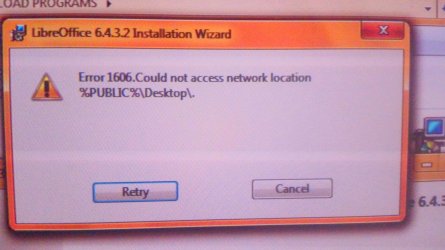
so I downloaded a new file to reinstall No Go cause I get this picture.
so i am lost, I must look for a job, Now I have No word Program at all
I need a heavy weight in on this to get my libre anything going or i will be in the street
but this box is stopping moving forward and hitting retry is a loop to no where
 

Attachments

  • KIMG1943.JPG
    KIMG1943.JPG
    327 KB · Views: 0

My Computer My Computer

At a glance

7 Home Prem. 32 bit, c drive 74.4 space CPU 3...?64 ?
Computer type
PC/Desktop
Computer Manufacturer/Model Number
dell optiplex 745
OS
7 Home Prem. 32 bit, c drive 74.4 space CPU 3.00 GHZ
CPU
?
Motherboard
?
Memory
64 ?
Hard Drives
1 TARA BITE WESTERN
Cooling
FAN IN FRONT AND a fan in back
Internet Speed
100 mbps
Antivirus
Avast and many others
Browser
firefox
Other Info
Patience Please, I know nothing, Zip, Zero about computers
This is not going well at all.
First, do warn people REVO opens up a world of micro surgery, picking all that stuff for an hour and deleted.
its no easy task, start in the morning.

What micro surgery? You click and choose! I've used it for YEARS without a problem. Doesn't take more than a minute or two to complete!
Video below,

How To: Use Revo Uninstaller - Free Version! - YouTube

I always use advanced removal being that REVO creates a restore point by default.


My Computer My Computer

At a glance

Win 10 x64, Linux Lite, Win 7 x64, BlackArch,...
Computer type
PC/Desktop
Computer Manufacturer/Model Number
HP Desktop & Compaq Laptop
OS
Win 10 x64, Linux Lite, Win 7 x64, BlackArch, & Kali
Hard Drives
Samsung 850 Pro 256Gb,
Hitachi HDD 1Tb,
Crucial MX SSD 250Gb
Segate 3Tb USB 3.0 Ext. Backup HDD
Internet Speed
150Mbps dn, 20Mbps up
Antivirus
Avast Free, Malwarebytes Anti-Exploit & Anti-Ransomware
Browser
Firefox, Chrome, Opera, & VPN
This is not going well at all.
First, do warn people REVO opens up a world of micro surgery, picking all that stuff for an hour and deleted.
its no easy task, start in the morning.


Its no surprise to me stuff is still in there, half of it has nothing that says libre on it
so I am unsure what i deleted, warn people this device is not simple
Despite revo delete, and i am sure i missed tons of stuff to click, libre says there's still old junk in there stopping the older and better program from being installed.
so now that I used revo, how do i remove the rest of this waste libre program.


What micro surgery? You click and choose! I've used it for YEARS without a problem. Doesn't take more than a minute or two to complete!

Video below,

How To: Use Revo Uninstaller - Free Version! - YouTube

I always use advanced removal being that REVO creates a restore point by default.
 

My Computer My Computer

At a glance

Win 10 x64, Linux Lite, Win 7 x64, BlackArch,...
Computer type
PC/Desktop
Computer Manufacturer/Model Number
HP Desktop & Compaq Laptop
OS
Win 10 x64, Linux Lite, Win 7 x64, BlackArch, & Kali
Hard Drives
Samsung 850 Pro 256Gb,
Hitachi HDD 1Tb,
Crucial MX SSD 250Gb
Segate 3Tb USB 3.0 Ext. Backup HDD
Internet Speed
150Mbps dn, 20Mbps up
Antivirus
Avast Free, Malwarebytes Anti-Exploit & Anti-Ransomware
Browser
Firefox, Chrome, Opera, & VPN
I did a restore that put libre back as a short cut but nothing opens now.
so I downloaded a new file to reinstall No Go cause I get this picture.
so i am lost, I must look for a job, Now I have No word Program at all
I need a heavy weight in on this to get my libre anything going or i will be in the street
but this box is stopping moving forward and hitting retry is a loop to no where

Why are you on %public%? Are you at home/apt or working from a public place, i.e. wifi at coffee shop, libary, ect.

Public:
Windows 7 puts up your PC’s shields. Windows Firewall plugs almost all its openings and protects its internal programs for being connected to potentially hostile network.

Are you working on this from Guest/User account or Administrator?

It's hard/next to impossible, to help you when suggestions/recommendations are made and you perform other operations on your own.

Will this help for now, until we can get your issue fixed.

Free Microsoft Office for the web, Word, Excel, PowerPoint

How to Use Microsoft Office for Free on the Web | PCMag

You could also try installing Apache OpenOffice for now.

Direct link OpenOffice

 
Last edited:

My Computer My Computer

At a glance

Win 10 x64, Linux Lite, Win 7 x64, BlackArch,...
Computer type
PC/Desktop
Computer Manufacturer/Model Number
HP Desktop & Compaq Laptop
OS
Win 10 x64, Linux Lite, Win 7 x64, BlackArch, & Kali
Hard Drives
Samsung 850 Pro 256Gb,
Hitachi HDD 1Tb,
Crucial MX SSD 250Gb
Segate 3Tb USB 3.0 Ext. Backup HDD
Internet Speed
150Mbps dn, 20Mbps up
Antivirus
Avast Free, Malwarebytes Anti-Exploit & Anti-Ransomware
Browser
Firefox, Chrome, Opera, & VPN
What micro surgery? You click and choose! I've used it for YEARS without a problem. Doesn't take more than a minute or two to complete!
Video below,

How To: Use Revo Uninstaller - Free Version! - YouTube

I always use advanced removal being that REVO creates a restore point by default.


Hey Snick, I think i know you well enough now to sense that dreaded pirate Roberts has got us here bound. and tied.
we are both right,
on revo I went to a screen that broke down the whole program into about not less then 80 trinkets
I almost went blind looking/ticking them all and looking for all, as I get it, there's another way, but my karma being bad I took the wrong fork in the road, and truly there must of been 80 clicks called Libre.
Hell with that, and off point, so moving on, so revo failed anyway and should have not hired me as a capt to man their machine in the first place,


So, I did a restore point-restore, which only left libre into a short cut, cause i chopped the rest out with revo I guess, I down loaded the libre program all over again, But cause i never wanted to see the "revo page from hell hard way again" so instead on what must have been the silent advice of angels, I went to add remove programs and removed libre 3rd time there, hoping the new install and flush would remove old bits as well that which got stuck from the first removal.


Crawling repentant on the floor in prayer at this point, cause i got resumes to send, and sure enough, god is alive and her magic is afoot, I took a back up f drive of old libre, cause i store all programs in a down load file in downloads in stead of C drive, stored on that flash, looked it up, hit admin install of the old and not over built libre.

There was a blinding flash of light, even a house plant I forget to water sprang to life, and old saner and purer of heart libre said, installed,,,, please smooch finish button
and i got old program back and working , with no options for Egyptology or Venusian like the new one.
but it has not made a search page of old docs to view and call up and it will not open PDF's but doc's will open if i click on one by going in document but will not recognize a PdF ext.
You can't have it all snick, but I got most of it back, now? wheres that darn

"Snick fixed Something Button"
 

My Computer My Computer

At a glance

7 Home Prem. 32 bit, c drive 74.4 space CPU 3...?64 ?
Computer type
PC/Desktop
Computer Manufacturer/Model Number
dell optiplex 745
OS
7 Home Prem. 32 bit, c drive 74.4 space CPU 3.00 GHZ
CPU
?
Motherboard
?
Memory
64 ?
Hard Drives
1 TARA BITE WESTERN
Cooling
FAN IN FRONT AND a fan in back
Internet Speed
100 mbps
Antivirus
Avast and many others
Browser
firefox
Other Info
Patience Please, I know nothing, Zip, Zero about computers
jim davis

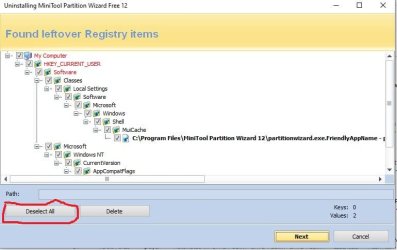
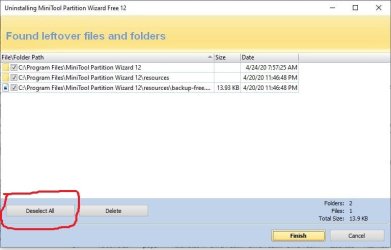
When I use revo I change the view to icons rather than using the list view as in the video I linked. I double left click on that program, not right-click, the default installer will popup which you run. When the default installer completes, I choose advanced, on REVO and then scan. When that completes, there are numerous leftovers. In the lower-left corner of the windows it says either deselect all or select all, of course you want to select all, or it is already selected by default. Click next. popup yes, another screen may or may not appears, it usually does with remnants, again the lower-left corner, select all button if not all checked, click finish. Viola all remnants are gone.

Being that you are still experiencing issues with Libre-Office, I would run REVO again, advanced, shutdown and restart computer and reinstall it.
Here's two screenshots. I'm uninstalling Mini-Tool Partition Wizard in the screenshots.

Capture.JPG

Capture1.JPG
 

My Computer My Computer

At a glance

Win 10 x64, Linux Lite, Win 7 x64, BlackArch,...
Computer type
PC/Desktop
Computer Manufacturer/Model Number
HP Desktop & Compaq Laptop
OS
Win 10 x64, Linux Lite, Win 7 x64, BlackArch, & Kali
Hard Drives
Samsung 850 Pro 256Gb,
Hitachi HDD 1Tb,
Crucial MX SSD 250Gb
Segate 3Tb USB 3.0 Ext. Backup HDD
Internet Speed
150Mbps dn, 20Mbps up
Antivirus
Avast Free, Malwarebytes Anti-Exploit & Anti-Ransomware
Browser
Firefox, Chrome, Opera, & VPN
jim davis

You can provide reputations to individuals that have helped you. Click on that person's username, mine is Snick, upper left, click notifications, new repuration and type what you wish.

On your thread, you can also mark the thread as resolved in the blue bar, it will say mark as resolved with a green check-mark
 

My Computer My Computer

At a glance

Win 10 x64, Linux Lite, Win 7 x64, BlackArch,...
Computer type
PC/Desktop
Computer Manufacturer/Model Number
HP Desktop & Compaq Laptop
OS
Win 10 x64, Linux Lite, Win 7 x64, BlackArch, & Kali
Hard Drives
Samsung 850 Pro 256Gb,
Hitachi HDD 1Tb,
Crucial MX SSD 250Gb
Segate 3Tb USB 3.0 Ext. Backup HDD
Internet Speed
150Mbps dn, 20Mbps up
Antivirus
Avast Free, Malwarebytes Anti-Exploit & Anti-Ransomware
Browser
Firefox, Chrome, Opera, & VPN
Back
Top